
Operator workflow diary · Social selling
Inside Our Lemlist Outreach Workflow: Why Every Reply Stopped Automation
AI may assist research organization and drafting. A human editor reviews every published page, checks material claims against the cited sources and owns the final decision. No company paid for placement in this article.
AI use policyAgent-ready brief
AI takeaways
Keep the key points here, or take a source-aware text brief into Claude, ChatGPT or another AI workspace.- 01Qualification, tiers and channel order must be approved before records enter Lemlist.
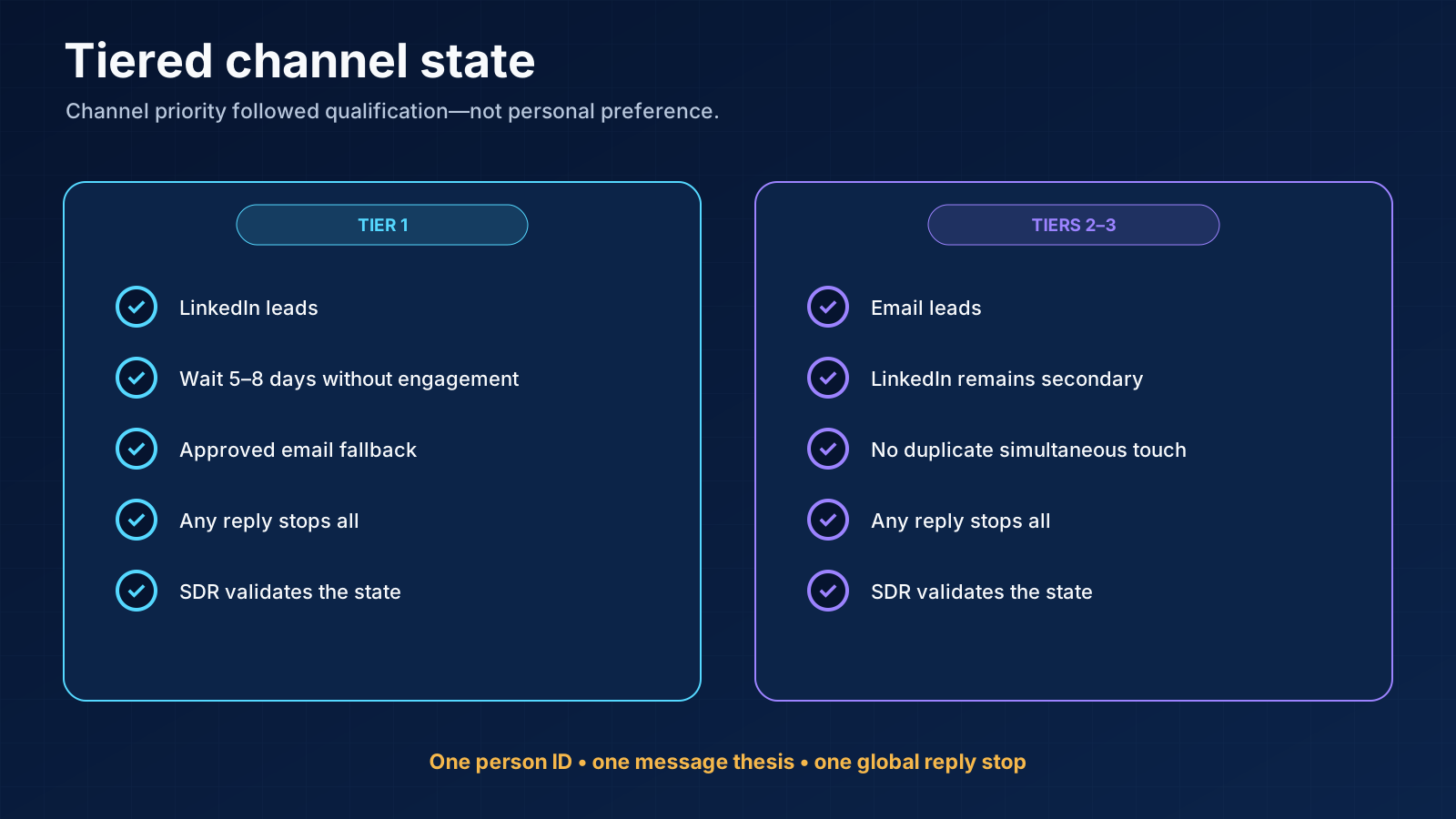
- 02LinkedIn led for tier one; email led for tiers two and three and could follow tier-one silence after five to eight days.
- 03Any reply in either channel stopped every remaining automated touch.
- 04An SDR validated replies and only positive or neutral commercial states entered CRM.
- 05Read contact-level and message-level metrics separately and correct the rule that caused each qualification miss.
Lemlist executes the state machine; the team still owns qualification, proof, stop rules, replies and CRM truth.
01 / workflow in one
The workflow in one line
source universe → AI-assisted qualification → human-approved tier → email/LinkedIn path → any reply stops all → SDR disposition → selective CRM admission| Layer | Owner | What had to be true before automation |
|---|---|---|
| ICP and offer | Head/team | Segment, buyer, problem and partner offer were explicit |
| Source universe | Ops | Company and person records had an origin and duplicate key |
| Qualification | Claude Code plus human review | Company, customer base, current role, current business and competitor state were checked |
| Tiering | Human-approved rules | Tier determined channel priority, not personal preference |
| Sequence | Team/head | Message thesis, variants, timing, proof and stop states were approved |
| Sender health | Ops | Mailbox/domain state and cold-send limit were acceptable |
| Execution | Lemlist | Only approved records entered the active campaign |
| Reply | SDR | Any reply stopped automation and received a human disposition |
| CRM | Seller/SDR | Only validated positive or neutral records entered |
02 / Lemlist owns and
What Lemlist owns and what it does not
- campaign membership;
- email and LinkedIn step order;
- waits and conditions;
- sender assignment;
- message variants;
- queued and completed activity;
- reply inbox and platform classifications;
- campaign-level reporting;
- integrations and webhooks.
- why the segment matters;
- whether the company and person fit;
- whether a signal has commercial context;
- which claims are current and defensible;
- whether the sender account should be used;
- which accounts must remain manual;
- what a reply actually means;
- whether a record belongs in CRM;
- when the campaign pauses or dies.
03 / start with a
Step 1: start with a qualification contract
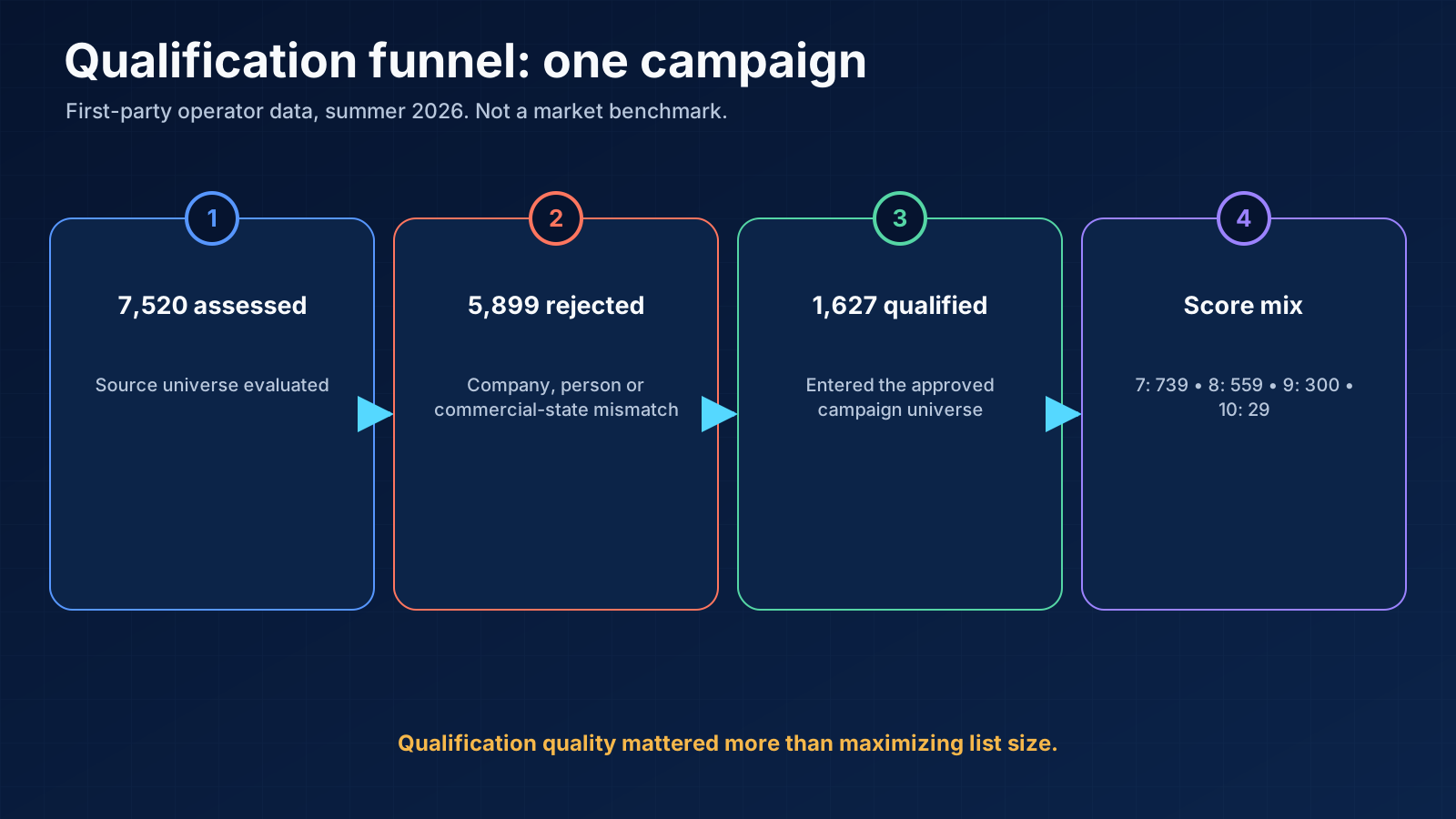
- score 7: 739 records;
- score 8: 559;
- score 9: 300;
- score 10: 29.
Company checks
- Is the organization actually a marketing agency or relevant partner type?
- Which clients or industries does it serve?
- Is the company in the approved geography and size range?
- Does the business model support reselling or implementing the offer?
- Is the company itself a direct competitor or AI automation provider?
- Is the site current and extractable?
Person checks
- Does the person currently work at the company?
- Is the role relevant to partnership, sales, growth, or delivery?
- Does the person's current headline reveal another primary business?
- Is the person a multi-founder whose active identity differs from the matched company?
- Is the person already a customer, partner, opportunity, employee, or competitor?
Evidence checks
- Which URL supports the company fit?
- Which source supports the current role?
- What is observation versus inference?
- Which fact changes the offer or message?
- How old is the evidence?
04 / qualification miss that
The qualification miss that changed the rule
old rule: company fit + formal roleimproved rule: company fit + current role + current primary business + competitor state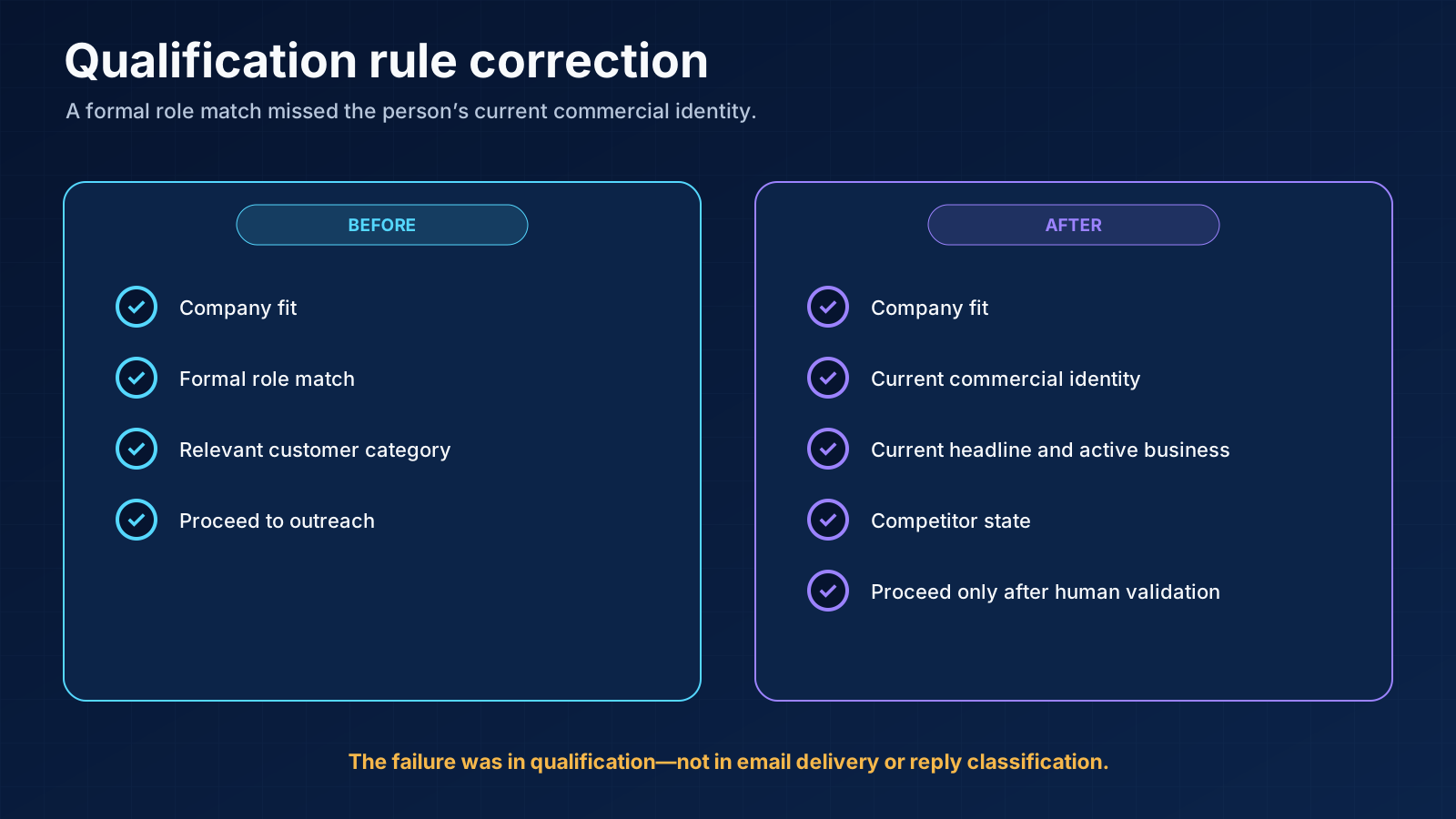
05 / tier the list
Step 2: tier the list before choosing channels
Tier one: strongest partner fit
Tier two: solid fit, less need for social context
Tier three: lower-confidence but still approved
06 / write a sequence
Step 3: write a sequence contract before building steps
- Eligibility: which fit score and exclusions allow enrollment.
- Channel lead: LinkedIn or email by tier.
- Message thesis: the partner problem, offer, and credible reason to contact.
- Evidence: current company and person context permitted in copy.
- Touch purpose: what new value each step adds.
- Stop: any reply, unsubscribe, negative state, sender warning, or discovered false fit.
- Owner: the SDR who takes over and the CRM admission rule.
07 / build the LinkedIn
Step 4: build the LinkedIn and email branches
Tier-one LinkedIn path
Email-led path
08 / A B test
Step 5: A/B test one meaningful variable
- comparable tier and fit distribution;
- similar account age and sender conditions;
- same geography and time window;
- one deliberate copy difference;
- enough eligible records;
- acceptance and replies separated;
- no simultaneous offer or channel change.
09 / preview every branch
Step 6: preview every branch and claim
- missing first name, company, or custom demo field;
- singular/plural and grammar variants;
- every A/B version;
- every branch condition;
- existing connections and missing email addresses;
- suppressed and duplicate contacts;
- link destination and current offer;
- sender identity and signature;
- strategic or named accounts;
- claims, prices, dates, and customer proof.
10 / launch small and
Step 7: launch small and watch the right states
- approved contacts;
- messages sent;
- messages delivered;
- LinkedIn requests sent;
- connections accepted;
- replies by channel;
- positive, neutral, negative, wrong-person, OOO, and unsubscribe states;
- booked and held calls;
- accepted opportunities;
- sender warnings and review time.
11 / the campaign data
What the campaign data showed
| Event | Count | Platform-reported context |
|---|---|---|
| Companies assessed | 7,520 | Qualification universe |
| Rejected | 5,899 | Failed fit or evidence rules |
| Qualified/reached | 1,627 | Approved campaign contacts |
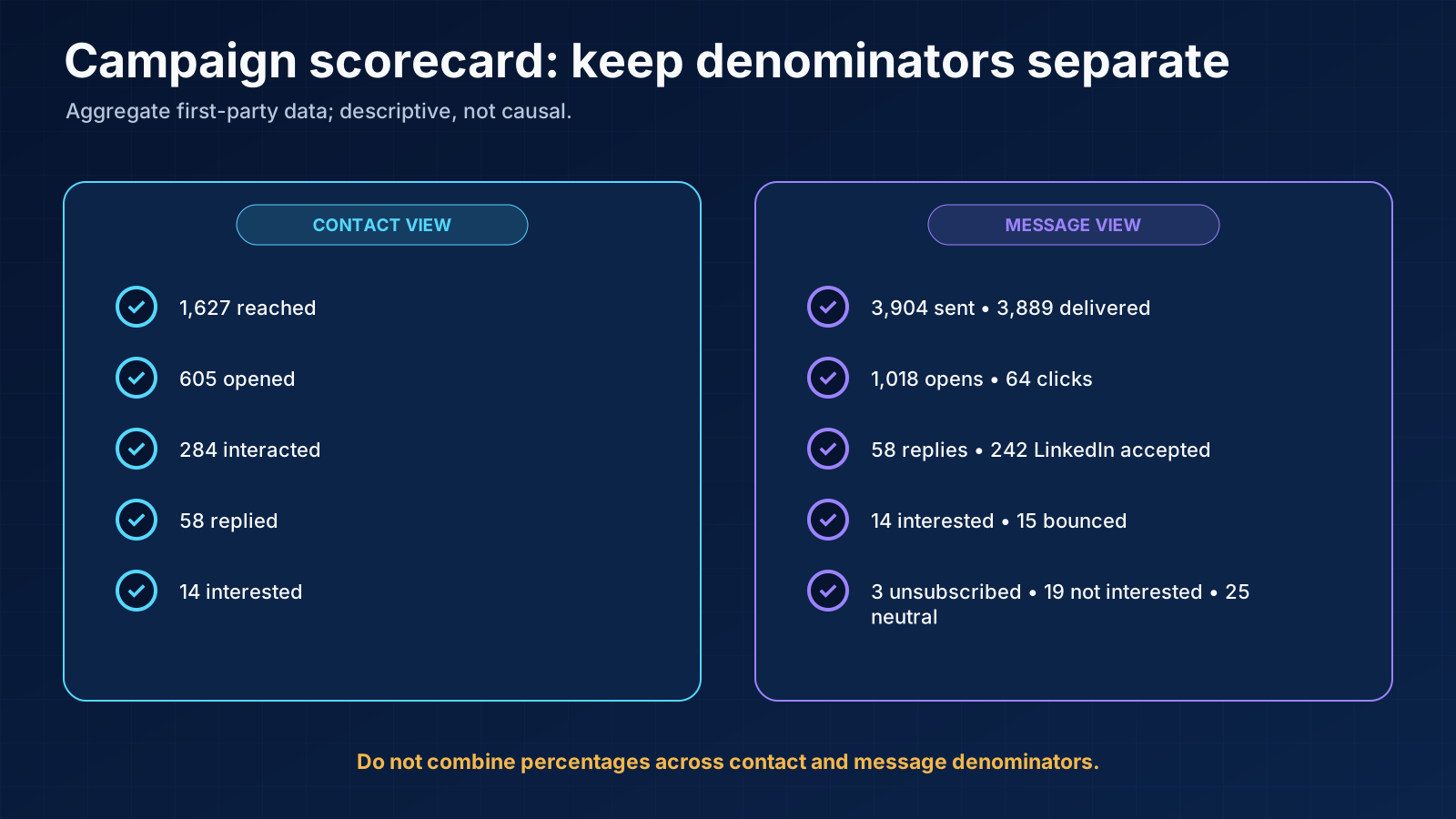
| Opened | 605 | 37.2% in this contact-level view |
| Interaction | 284 | 17.5% in this view |
| Replied | 58 | 3.6% of reached contacts in this view |
| Interested | 14 | 0.9% of reached contacts in this view |
| Event | Count | Platform-reported rate where shown |
|---|---|---|
| Messages sent | 3,904 | — |
| Delivered | 3,889 | 99.6% |
| Opens | 1,018 | 26.1% |
| Clicks | 64 | 1.6% |
| Replies | 58 | 1.5% |
| LinkedIn accepted | 242 | 15.0% |
| Interested | 14 | 0.2% |
| Bounced | 15 | 0.4% |
| Unsubscribed | 3 | — |
| Not interested | 19 | 0.3% |
| Interrupted/neutral | 25 | 1.5% |
- most of the source universe was rejected before outreach;
- the campaign coordinated email and LinkedIn;
- 58 people replied and 14 were marked interested;
- delivery and bounce events can be observed separately;
- the workflow still needed a human after the reply.
12 / make any reply
Step 8: make any reply a global stop
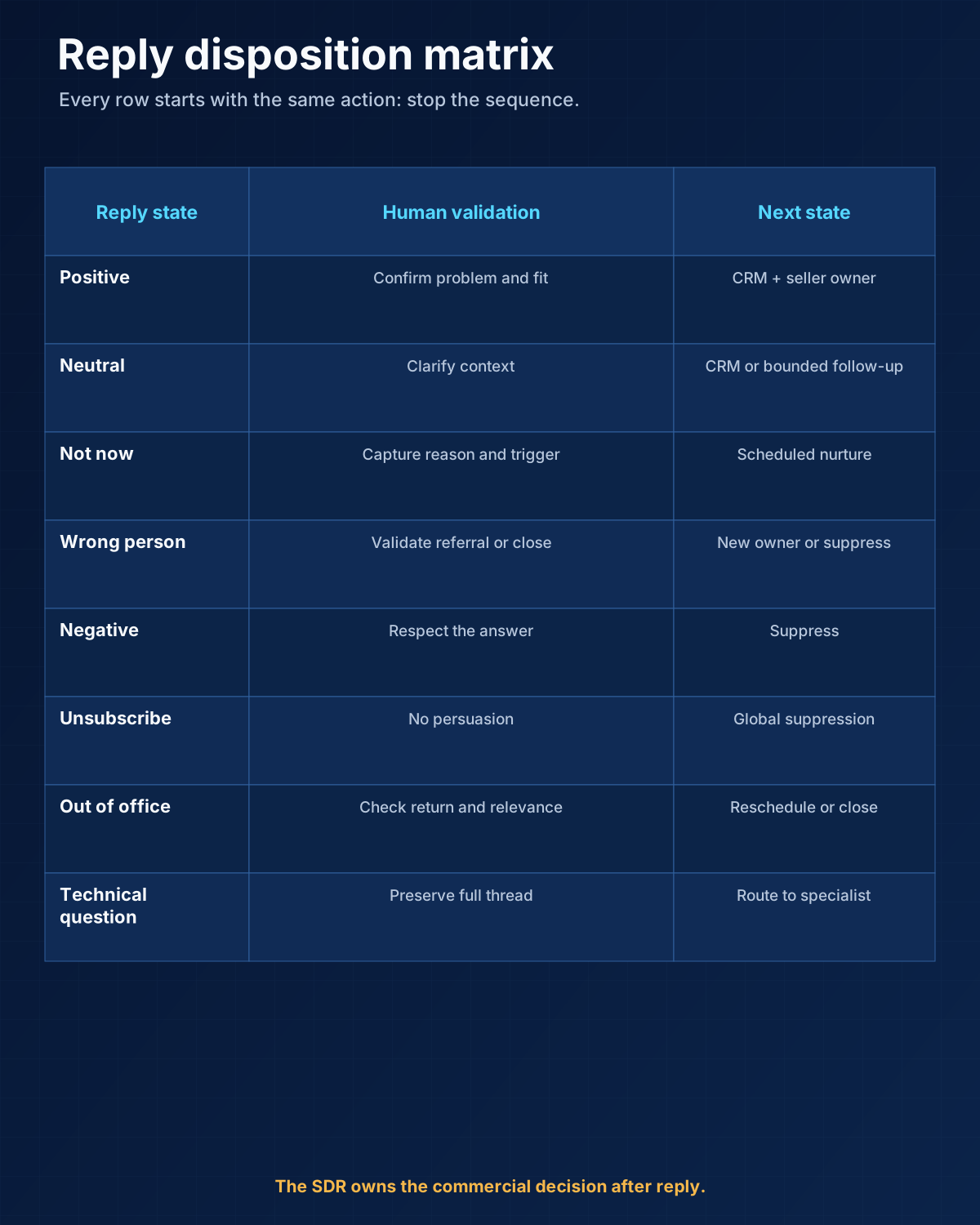
any reply → stop email → stop LinkedIn → assign SDR → validate → choose next state| Disposition | SDR action | Future automation | CRM |
|---|---|---|---|
| Positive | Qualify, answer, propose next step | No generic sequence | Admit after validation |
| Neutral/question | Answer or get technical context | No generic sequence | Admit if commercially relevant |
| Later/not now | Record reason and agreed date | Controlled reactivation only | Optional nurture state |
| Wrong person/referral | Verify referral and account owner | Do not auto-contact referral blindly | Add only validated referral |
| Negative | Close respectfully | Suppress current motion | No opportunity |
| Unsubscribe | Confirm global suppression | Never continue | Minimal suppression record |
| OOO | Review return date and owner | Optional controlled reschedule | Usually no admission yet |
13 / keep cold noise
Step 9: keep cold noise out of CRM
positive or neutral reply → human validates commercial relevance → assign owner → create/update CRM record- person and company identity;
- source campaign and channel;
- human-validated disposition;
- original evidence and message version;
- reply summary or thread link;
- owner;
- next action and date;
- lifecycle stage appropriate to the real state;
- correction reason if qualification changed.
14 / use monitoring as
Step 10: use monitoring as a decision system
Expand
Revise
Stop
15 / launch diary what
A launch diary: what we checked as the campaign matured
Before the first batch
After the first replies
After the first interested records
When the list expanded
When copy aged
When the workflow looked stable
16 / Build the workflow
Build the workflow in Lemlist
Before opening the sequence editor
- Approve ICP, exclusion, offer, and tier rules.
- Verify sender identity and email infrastructure.
- Create one person/account key across sources.
- Define approved evidence and prohibited personal/sensitive data.
- Assign the SDR and reply-response expectation.
- Write CRM admission and global suppression rules.
In the sequence editor
- Add the leading channel by tier.
- Add waits with a reason, not random spacing.
- Add only one meaningful A/B variable.
- Add fallback email for tier-one LinkedIn silence where valid.
- Keep named accounts out.
- Configure reply stops and test them end to end.
- Use clear close-the-loop copy.
Before launch
- Preview every record and branch.
- Test missing fields and broken links.
- Verify all claims, prices, and proof against current sources.
- Test unsubscribe, OOO, negative, and positive replies.
- Confirm queued steps stop across both channels.
- Review the first production batch manually.
After launch
- Read every reply.
- Inspect mailbox and account warnings.
- Track platform denominators.
- Review wrong-person and competitor patterns.
- Update the qualification contract before adding volume.
- Keep CRM free of unvalidated cold records.
17 / minimum event log
The minimum event log
18 / Frequently asked questions
Frequently asked questions
Can Lemlist run email and LinkedIn in one campaign?
Should email or LinkedIn go first in Lemlist?
How many follow-ups should a Lemlist campaign have?
Should Lemlist automatically answer replies?
Should every Lemlist contact sync to CRM?
Is this a recommended universal campaign?
19 / Final recommendation
Final recommendation
Research note
Methodology
- 01Anastasiia built, launched and monitored the anonymized first-party campaign from early summer 2026 through the evidence review.
- 02Names, companies, sender identities and raw screenshots are excluded; all workflow visuals are redrawn and anonymized.
- 03Contact-level and message-level denominators remain separate, and the campaign is not presented as an independent product benchmark.
Source ledger
Sources & editorial notes
- 01Create a Lemlist campaign
Lemlist Help · Official product, platform, provider or standards source used for the bounded claim cited in this guide.
- 02Lemlist help center
Lemlist Help · Official product, platform, provider or standards source used for the bounded claim cited in this guide.
- 03LinkedIn prohibited software and extensions
LinkedIn Help · Official product, platform, provider or standards source used for the bounded claim cited in this guide.
- 04Current NextLevel AI case evidence
NextLevel AI · Official product, platform, provider or standards source used for the bounded claim cited in this guide.
- 05Current NextLevel AI public offer
NextLevel AI · Official product, platform, provider or standards source used for the bounded claim cited in this guide.