
Operational guide · Prospecting & Outreach
AI Sales Outreach: How to Build a Human-Gated B2B Workflow
AI may assist research organization and drafting. A human editor reviews every published page, checks material claims against the cited sources and owns the final decision. No company paid for placement in this article.
AI use policyAgent-ready brief
AI takeaways
Keep the key points here, or take a source-aware text brief into Claude, ChatGPT or another AI workspace.- 01The head owns the ICP, offer, commercial logic and strategy; routine execution can automate only after those decisions are explicit.
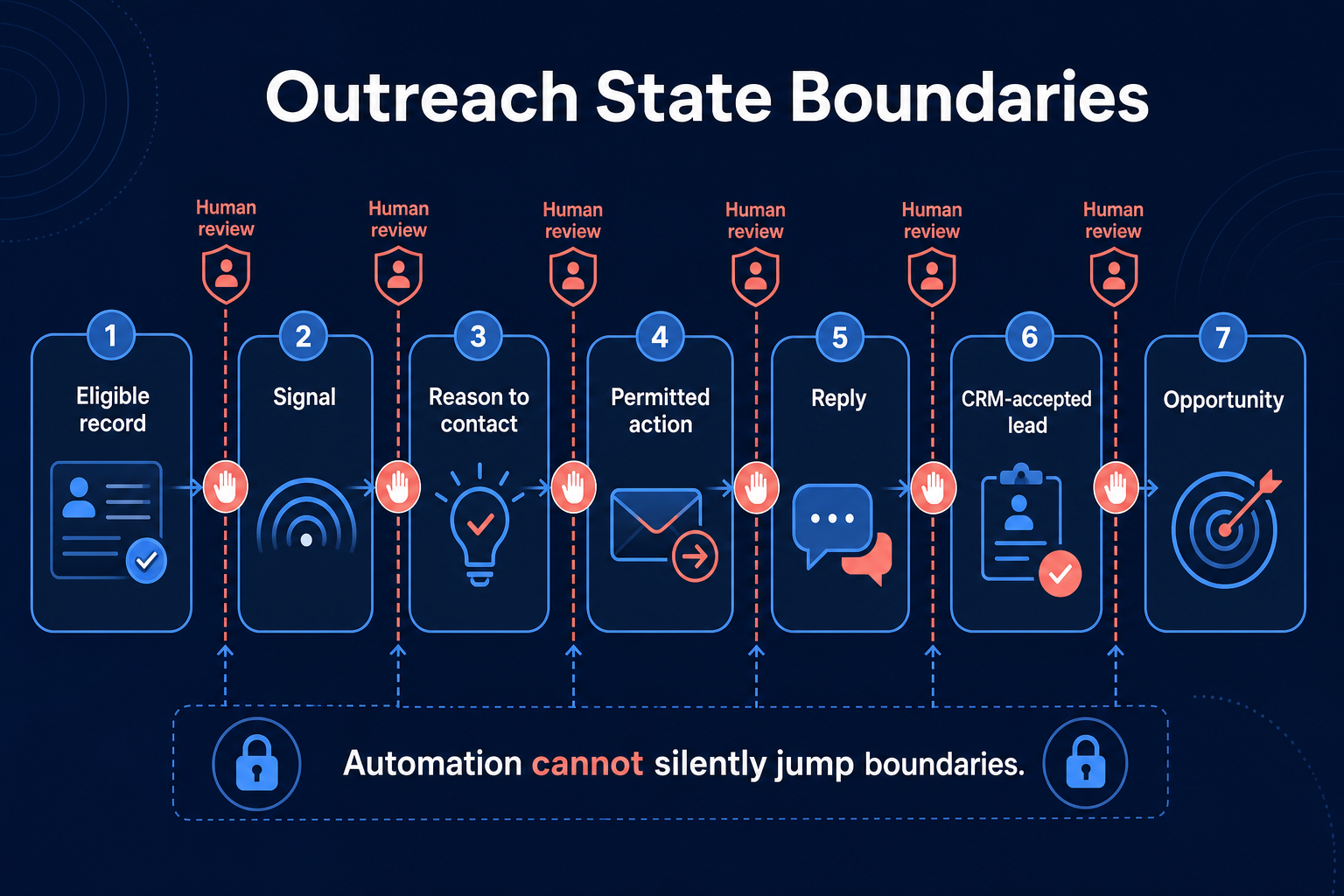
- 02Keep eligible record, signal, permitted action, reply, CRM lead and opportunity as separate states.
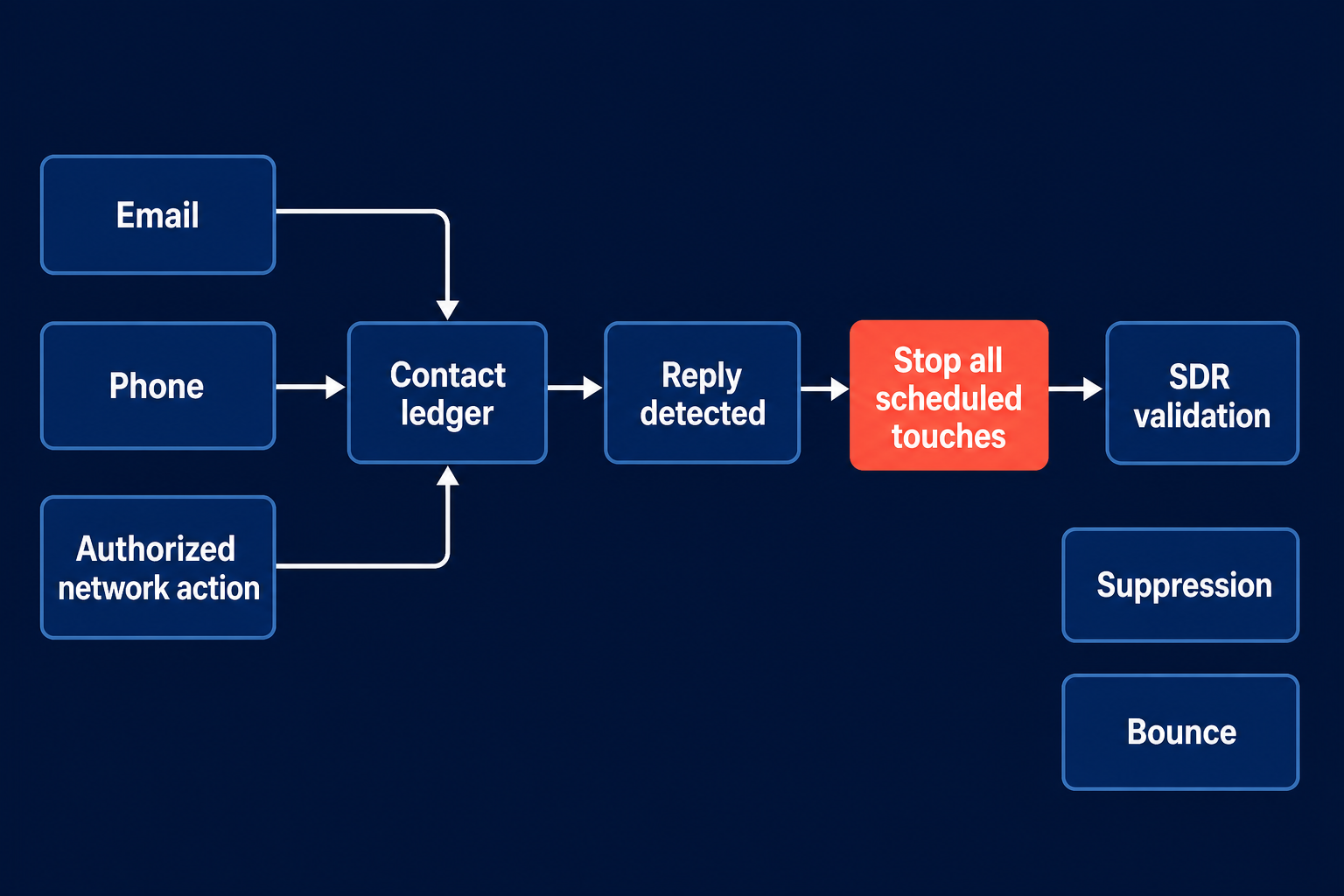
- 03Any reply stops every automated contact path and transfers the relationship to an SDR for validation.
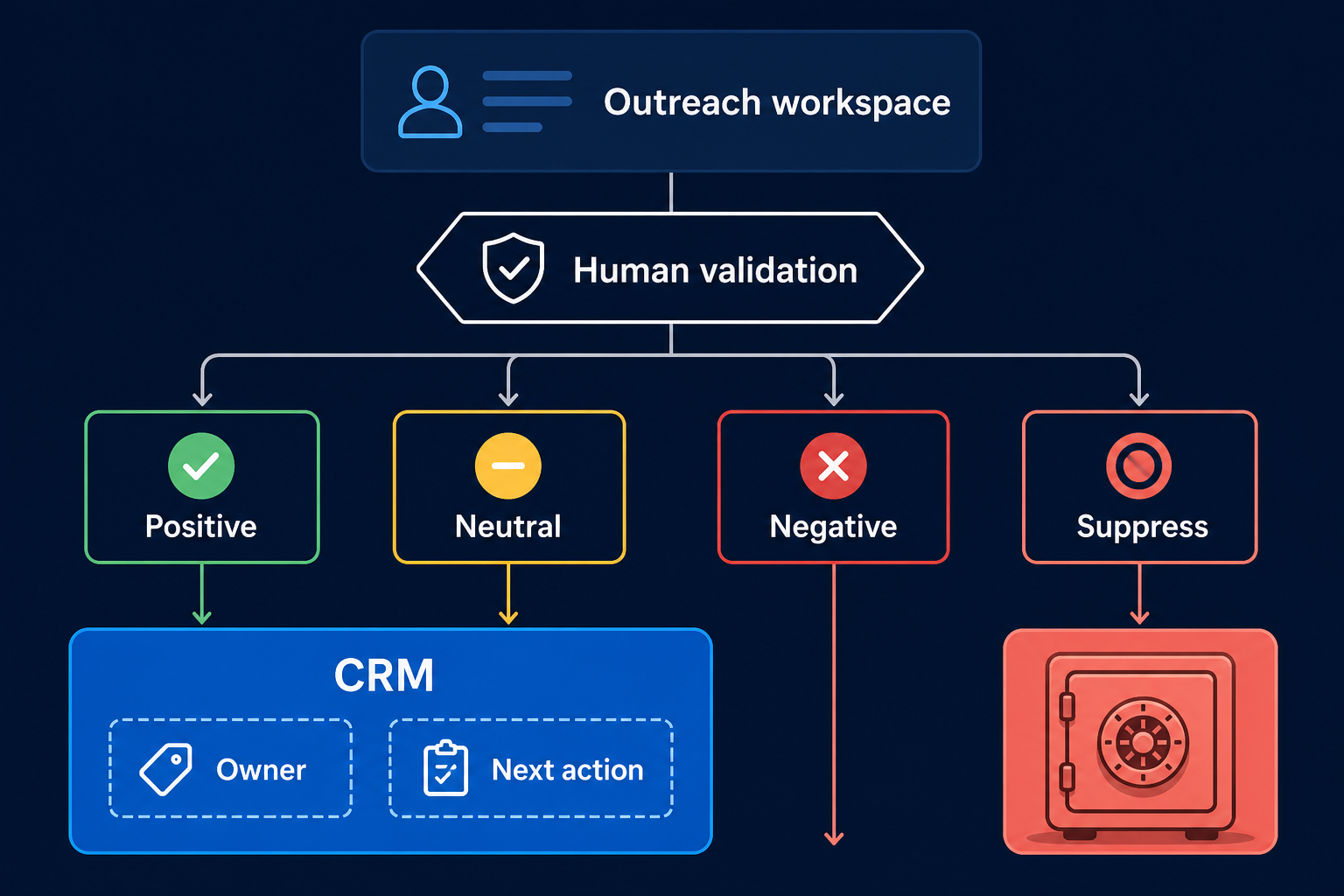
- 04Admit only validated positive or neutral responses to CRM with an owner and next action.
- 05Pilot on a fixed sample and measure accepted outcomes, review time and total cost.
Define the sales motion, evidence, authority, reply stop and CRM admission rule before automating execution.
01 / Definitions
Fit, signal, permission, reply and opportunity are different states
| State | Question answered | What it does not prove |
|---|---|---|
| Eligible record | Does this person and account meet the approved outreach rules? | Current need or permission |
| Signal | Did a relevant professional event occur? | Buyer intent |
| Reason to contact | Can the team connect the signal to a plausible commercial problem? | That the claim is true without a source |
| Permitted action | May this channel and message type be used under team, platform and legal rules? | That the buyer will welcome it |
| Reply | Did the recipient create new relationship context? | Qualification or opportunity |
| CRM-accepted lead | Did a person validate enough context to create a sales-owned record? | A sales opportunity |
| Opportunity | Did the record meet the team's explicit opportunity rule? | Revenue |
02 / Start with the
Start with the sales motion, not the outreach tool
- the ICP and explicit exclusions;
- the offer and the problem it addresses;
- the segment or buying situation being tested;
- the approved reasons to contact;
- the channels the team may use;
- the relationship-risk tiers;
- the owner of campaign policy;
- the owner after a reply;
- the definition of a positive, neutral and negative outcome;
- the rollback condition.
Match automation to the maturity of the sales motion
03 / Authority
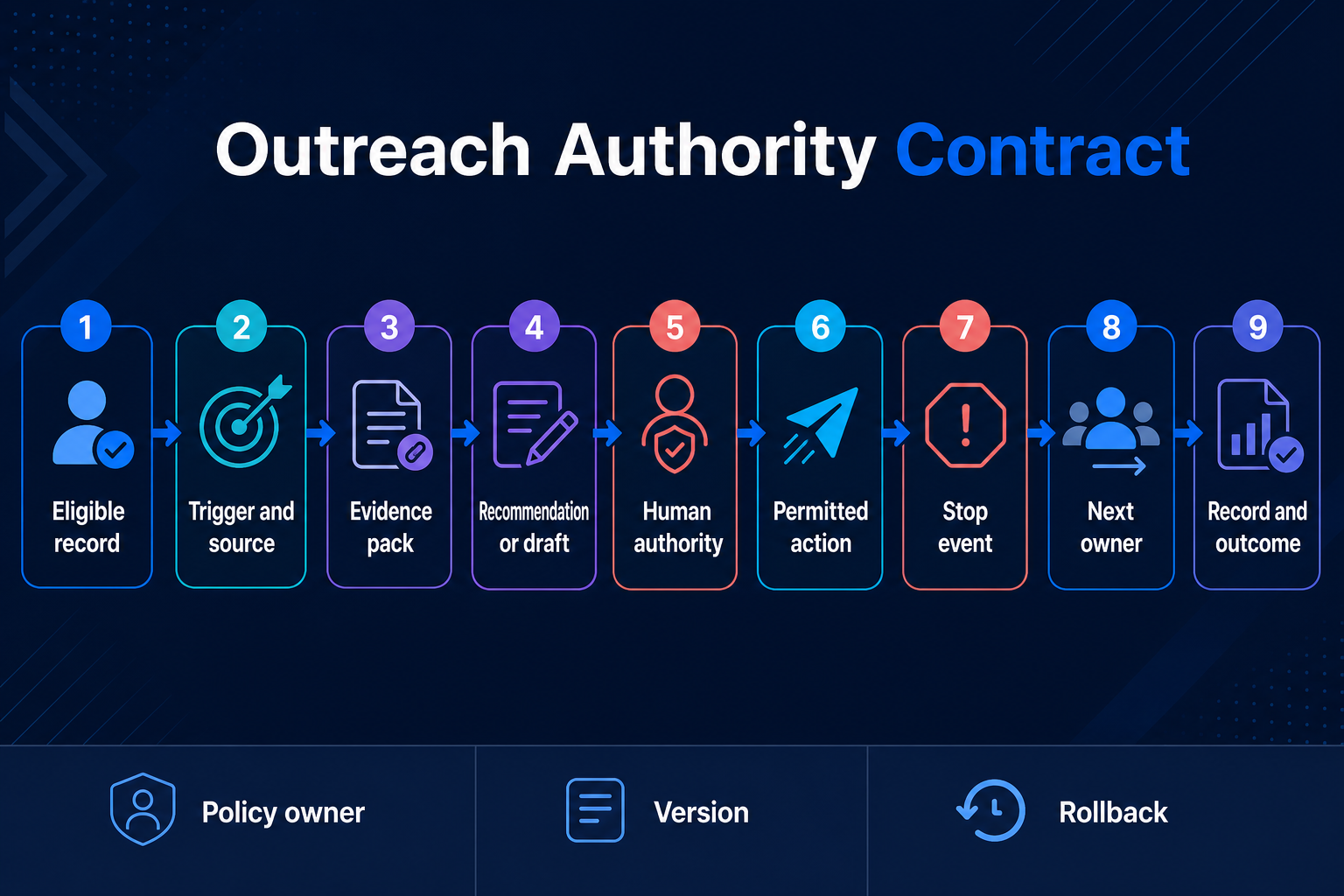
Write an Outreach Authority Contract
| Contract field | Required decision | Example |
|---|---|---|
| Eligible record | Which people and accounts may enter? | Current role, approved segment, no active owner conflict |
| Trigger and source | What event started the workflow? | New role posted on company careers page, captured with date |
| Evidence pack | Which facts may the system use? | Current role, company source, approved CRM history |
| Recommendation or draft | What may AI produce? | One reason to contact and one message draft |
| Human authority | Which actions need review? | Named accounts always; normal cohort after calibration |
| Permitted action | What may the system execute? | Email send, authorized network action or call task |
| Stop event | What freezes the workflow? | Any reply, unsubscribe, hard bounce, owner conflict |
| Next owner | Who resolves the state? | SDR, sales owner, technical specialist or suppression owner |
| Record and outcome | Where are evidence and results stored? | Outreach system before reply; CRM after validated acceptance |
Eligible records are current contacts in the approved segment with no active customer, opportunity, partner or named-account conflict. AI may summarize current professional evidence and draft a message using the approved offer. Routine cohort messages may send after the campaign-level review; named accounts require record-level review. Any reply or suppression event stops all scheduled touches. An SDR validates the reply. Pre-reply records remain in the outreach workspace; positive or neutral validated replies enter CRM with owner and next step. The sales head owns policy versioning and rollback.
Assign owners before assigning software
04 / Workflow
Build the AI sales outreach workflow in eight stages
1. Resolve identity and existing ownership
2. Build a source-linked evidence brief
- observed fact: the company lists three open customer-support roles;
- source: official careers page, captured on a named date;
- allowed claim: the company is recruiting for support roles;
- inference: the team may be managing increased support demand;
- prohibited claim: the company has a support crisis.
3. Select one commercial reason to contact
- Is the source current?
- Is the fact about the person's professional role or company?
- Does the recipient plausibly own or influence the problem?
- Can the message state the relevance without pretending to know intent?
- Would the sentence still make sense if the flattering detail were removed?
4. Draft one message and one next action
5. Apply the authority rule
| Action | Default authority in Anastasiia's operating model | Escalation |
|---|---|---|
| Routine first message | May automate after manual setup and calibration | Review if evidence is uncertain or risk increases |
| Routine follow-up | May automate | Stop if state changes |
| Strategic or named account | Human review | Sales owner decides |
| Email send | May automate inside approved sender and suppression rules | Pause on infrastructure or policy failure |
| LinkedIn action | Use only a LinkedIn-authorized method or execute manually | Unauthorized third-party automation is not recommended |
| Mass call task | May automate when the team deliberately chooses that motion | Conversation and disposition remain accountable |
| Reply classification | SDR validates in the documented workflow | Technical or sales specialist joins when needed |
| CRM owner or lifecycle change | Sales or SDR control | Do not let unattended outreach overwrite ownership |
| Unsubscribe or suppression | Automatic stop | No sales override to continue the sequence |
6. Execute through a shared contact state
- current suppression state;
- current reply state;
- current owner;
- active customer or opportunity conflict;
- last completed touch;
- channel permission and current platform policy;
- sender or account health;
- whether the evidence is still current.
7. Stop every sequence when a reply creates context
| Reply or event | Automated action | Human next step |
|---|---|---|
| Positive interest | Stop all touches | SDR validates need, context and next action |
| Objection | Stop | SDR decides whether to answer, close or revisit |
| Referral | Stop | Validate the referred person and ownership before contact |
| Wrong person | Stop | Correct identity; do not silently enroll another contact |
| Not now | Stop | Record a reason and a human-approved revisit condition |
| Unsubscribe or do not contact | Suppress | No further sales touch |
| Out-of-office | Pause | SDR checks return date, delegation and whether resumption is appropriate |
| Ambiguous response | Stop | SDR reads the thread before classification |
| Hard bounce | Stop channel | Fix or remove the address; do not continue the same email path |
8. Admit validated replies to CRM
- campaign and policy version;
- record and evidence source;
- message variant and completed touches;
- reply or stop event;
- SDR disposition;
- correction reason;
- suppression status.
- source or campaign;
- validated person and account;
- reply summary or relevant thread link;
- owner;
- next action and date;
- lifecycle or lead status;
- correction or referral context.
Preserve an outreach event and correction ledger
05 / Coordinate email, LinkedIn
Coordinate email, LinkedIn and phone without hiding collisions
| Shared field | Why it matters |
|---|---|
| Contact and account identity | Prevents duplicate or wrong-company outreach |
| Existing owner | Protects active relationships |
| Last completed action | Prevents simultaneous touches |
| Next scheduled action | Makes the plan inspectable |
| Reply state | Stops every channel, not only the one that received the reply |
| Suppression state | Prevents a new campaign from restarting contact |
| Channel authorization | Keeps platform and team rules current |
| Human owner | Ensures the buyer knows who is responsible |
06 / Adapt the control
Adapt the control model to the sales motion
Founder-led service business
Small SaaS team with a proven segment
Larger team with territories and named accounts
07 / Workflow
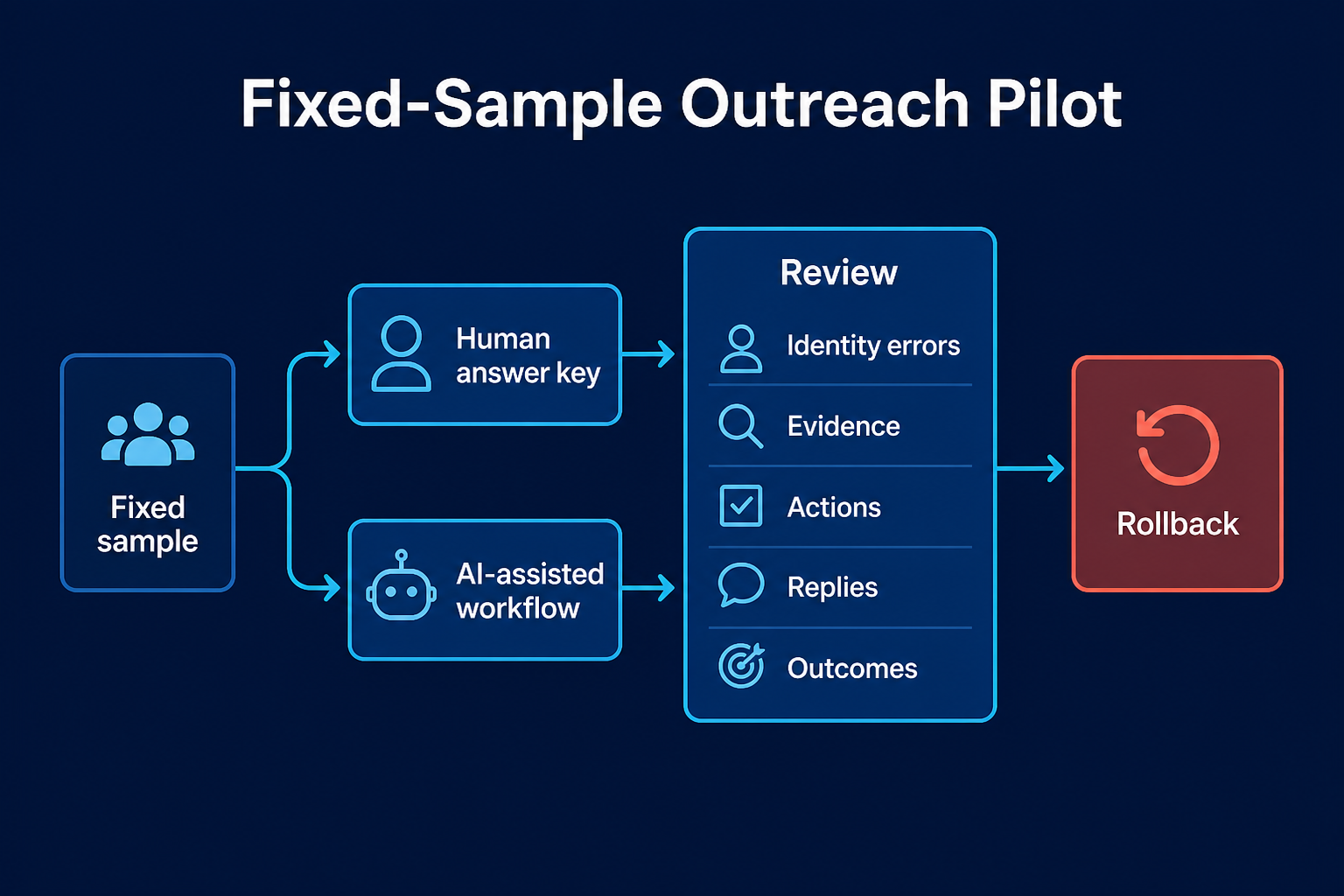
Pilot the workflow on a fixed sample
- Freeze the ICP, offer, evidence policy and exclusion rules.
- Create a human answer key for identity, eligibility, allowed claim, risk tier and permitted action.
- Run the AI-assisted workflow on the same records.
- Compare disagreements before live action.
- Launch only the approved risk tier.
- Review every reply and exception during the pilot.
- Roll back to the prior approved rules if stop or ownership failures appear.
| Measure | Definition |
|---|---|
| Identity correction rate | Records with corrected person or company ÷ records reviewed |
| Evidence acceptance rate | Evidence packs accepted by reviewer ÷ evidence packs reviewed |
| Action approval rate | Proposed actions approved ÷ proposed actions reviewed |
| Stop failure rate | Records touched after a stop event ÷ records with a stop event |
| Meaningful reply rate | Human-validated meaningful replies ÷ delivered messages or reached contacts, with the chosen denominator named |
| Held-meeting rate | Held meetings ÷ human-validated positive or neutral replies |
| Accepted-opportunity rate | Opportunities accepted under the CRM rule ÷ held meetings or validated replies |
| Review time | Human review minutes ÷ reviewed records |
| Total operating cost | Tools, data, infrastructure and human time for the measured period |
Decide when to expand, pause or rebuild
08 / Failure modes
Failure modes AI magnifies
The motion is not proven
The evidence is stale
Personalization has no commercial meaning
Channels have separate stop states
The sequence handles replies as another automation branch
CRM activity looks like pipeline
The team changes too much after one exception
09 / Reply control
Use the minimum tool roles required by the handoffs
- 40% on contact and account data;
- 40% on reasoning or agentic work, such as controlled research and drafting;
- 20% on sending.
- source-linked evidence;
- approved message logic;
- channel execution;
- one reply and suppression state;
- human handoff;
- a usable record of outcomes.
10 / Checklist
AI sales outreach checklist
Before configuration
- Define ICP, exclusions, offer and accountable owner.
- Separate signal, reason to contact and permitted action.
- Write the Outreach Authority Contract.
- Define named-account and existing-owner precedence.
- Confirm current channel, platform and market rules.
- Define reply, suppression and bounce stops.
Before launch
- Build a human answer key on a fixed sample.
- Verify identity and source freshness.
- Review each message purpose, not only grammar.
- Test cross-channel stops.
- Confirm the reply owner can see the full thread.
- Confirm CRM admission and rollback rules.
During the pilot
- Review every reply and exception.
- Measure corrections with denominators.
- Watch for repeated failure patterns.
- Keep changes versioned.
- Do not widen autonomy because send volume is high.
Before scale
- Confirm no stop or owner-state leakage.
- Confirm evidence and action approval remain stable.
- Review held meetings, customers and accepted opportunities.
- Include human time and infrastructure in cost.
- Keep named accounts and relationship decisions under the approved human rule.
11 / FAQ
Frequently asked questions
What is AI sales outreach?
How is AI sales outreach different from lead generation and prospecting?
Can AI send sales messages without human review?
What should happen when a prospect replies?
Should every cold contact enter CRM?
How should a team measure AI outreach?
When is a team not ready to automate outreach?
12 / Decision rules
Final operating rule
13 / Method
Sources and methodology
- NIST AI RMF Core — general guidance for defining application scope, roles and human oversight; not a sales-outreach standard.
- LinkedIn User Agreement — current platform terms for unauthorized bots and automated methods.
- LinkedIn: Automated activity — current product-policy explanation of prohibited third-party automation.
- FTC CAN-SPAM compliance guide — US commercial-email overview, including B2B; not legal advice.
- Owner-supplied sources K02 and K03 — first-hand Lemlist workflow, approval, reply-stop, sender and CRM policy evidence reviewed on 18 August 2026. Raw screenshots and PII are not included.
Research note
Methodology
- 01Operating rules come from Anastasiia Krynytska's documented Lemlist multichannel workflow.
- 02The NextLevel AI campaign is disclosed first-party context, not an independent product review.
- 03Official platform and policy sources support current product scope and channel rules.
Source ledger
Sources & editorial notes
- 01NIST AI RMF Core
airc.nist.gov · Official product, platform, policy or regulatory source cited in this guide.
- 02LinkedIn User Agreement
LinkedIn Help · Official product, platform, policy or regulatory source cited in this guide.
- 03LinkedIn: Automated activity
LinkedIn Help · Official product, platform, policy or regulatory source cited in this guide.
- 04FTC CAN-SPAM compliance guide
US Federal Trade Commission · Official product, platform, policy or regulatory source cited in this guide.