Weekly industry intelligence · No noiseSubscribe to the Luck My Sales newsletterFree briefing

Independent intelligence on AI in sales

Menu

Operational email guide · Cold email AI

AI Email Sales Outreach: Research, Personalization, Sending and Follow-Up

Build AI email sales outreach with a source-linked brief, distinct-purpose follow-ups, sender controls, deterministic stop states and human reply ownership.
Editorial disclosure

AI may assist research organization and drafting. A human editor reviews every published page, checks material claims against the cited sources and owns the final decision. No company paid for placement in this article.

AI use policy

Agent-ready brief

AI takeaways

Keep the key points here, or take a source-aware text brief into Claude, ChatGPT or another AI workspace.
  1. 01Start from an eligible contact, approved offer and source-linked reason to write.
  2. 02Give every follow-up a distinct commercial job instead of paraphrasing the first email.
  3. 03Separate official sender requirements from operator practices and delivery guarantees.
  4. 04Every reply, unsubscribe or hard bounce must stop the sequence.
  5. 05Keep untouched cold records outside CRM until a response is validated.
Includes summary, takeaways, sources and a use note.
AI email sales outreach should be an event-driven workflow, not a prompt that writes five emails and a timer that sends them. Start with an eligible contact and a sourced reason to write. Define what the first email must accomplish. Give every follow-up a different job. Check sender identity and suppression before each attempt. Stop on every reply, unsubscribe or address failure. Then transfer the complete thread to a human owner.
AI can research, summarize, draft, schedule and classify. It should not silently invent the commercial reason, continue after a buyer creates context or turn an untouched cold record into pipeline. Anastasiia Krynytska's operating policy allows routine first touches and follow-ups to run automatically after the human motion is built and calibrated. Named accounts stay human-reviewed. Any reply stops the sequence for SDR validation.
This article turns that policy into an Email Sequence Contract, a researched distinct-purpose cadence, a pre-send gate, sender controls, an event-state map and a CRM admission rule.
Method and disclosure: Anastasiia supplied a real Lemlist multichannel workflow, a five-pillar email model and first-hand sender practices. NextLevel AI was the first-party product context of the source campaign; this is not an independent review of NextLevel AI or Lemlist. She did not supply a complete first-hand email-only touch order and timing. The cadence below is therefore editorial synthesis from the current Phase 02 competitor review, not a sequence she claims to have run exactly. Sender counts are her practice, not deliverability guarantees. Google, Microsoft and FTC links support only the provider and US requirements they state. This is operational information, not legal advice.

Treat the sequence as a controlled relationship workflow, not a prompt plus a timer.

01 / Definitions

Define the email workflow boundary before automating it

This guide begins after a person or account is eligible for outreach. It does not use AI-generated copy to decide whether an account belongs in the market.
Before a record enters the sequence, the team needs six answers:
  1. Eligible contact: Is this the current person in an approved role and account?
  2. Approved offer: What problem and outcome may the message discuss?
  3. Reason to contact: Which current professional fact connects the offer to this recipient?
  4. Sender identity: Which authenticated domain, mailbox and person or business is sending?
  5. Suppression state: Is the person or account blocked, unsubscribed, bounced, owned or already in an active conversation?
  6. Accountable owner: Who takes control after a reply or exception?
If any answer is unknown, the workflow should pause before drafting. A language model cannot repair a missing offer by producing more polished language.
Use the AI prospecting workflow with human gates for the earlier evidence and eligibility decision. Use data enrichment providers when identity and contact data are still unresolved.

02 / Authority

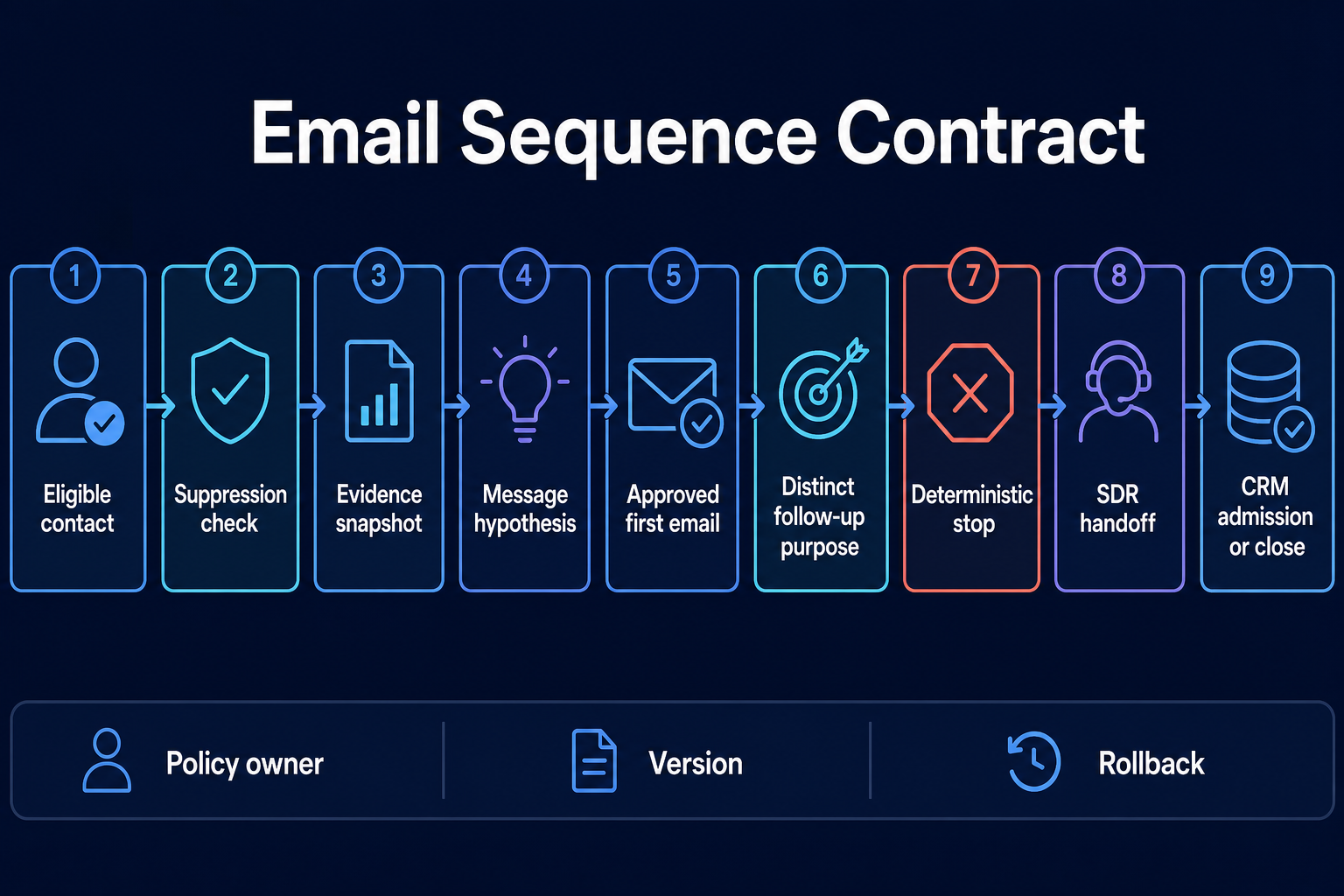
Write an AI email sales outreach sequence contract

The Email Sequence Contract defines the sequence as a relationship workflow. It connects evidence to a message purpose, a permitted action, a stop and a next owner.
Contract fieldDecision to recordWhy it matters
Eligible contactRole, company, segment and exclusion checksPrevents copy quality from hiding wrong targeting
Suppression checkContact, account, customer, opportunity and prior-reply statePrevents duplicate or prohibited outreach
Evidence snapshotSource, capture date, observation and allowed claimMakes personalization inspectable
Message hypothesisProblem, offer, value angle and CTAKeeps strategy outside the model's improvisation
First-email purposeThe one job of the opening touchPrevents feature dumping
Follow-up purposeA distinct reason for every later touchPrevents repeated paraphrases
Human authorityCampaign-level, record-level or exception reviewMakes approval proportional to risk
Deterministic stopReply, unsubscribe, hard bounce, owner conflict or manual pauseStops timers from overruling state
Handoff and recordSDR disposition, CRM admission, nurture, close or correctionGives the buyer and data a next owner
Add a policy owner, technical owner, version and rollback condition. The platform sequence is an implementation of this contract. It is not the contract itself.
A compact policy could read:

Current contacts in the approved segment may enter after identity, suppression and owner checks. AI may summarize approved sources and draft from one message hypothesis. Routine cohort emails may send after campaign-level review; named accounts require record-level review. Every follow-up must add a new commercial reason. Any reply, unsubscribe or hard bounce stops the email path. An SDR validates replies. Pre-reply records stay in the outreach workspace; positive or neutral validated replies enter CRM with an owner and next action.
That text answers more operational questions than “use AI for personalization at scale.”
Nine-stage email sequence contract from eligible contact to CRM admission or close.
Approve the sequence logic, evidence, follow-up purposes, stop and handoff before sending.

03 / Evidence

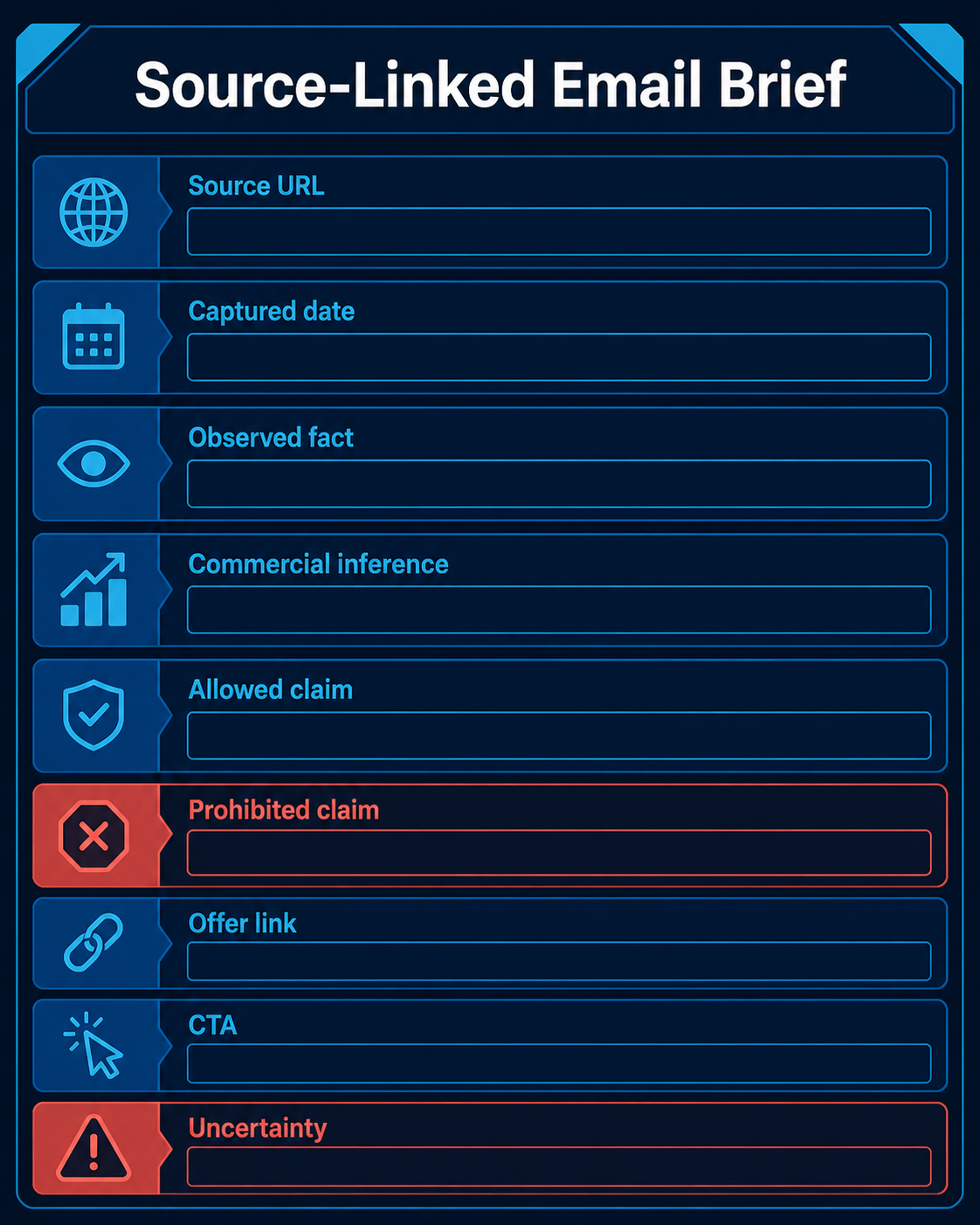
Build a source-linked email brief

The brief should separate evidence from sales inference. Otherwise the model may convert a plausible clue into a confident claim.
Use these fields:
FieldExample
Source URLOfficial company careers page
Captured dateNamed current date
Observed factCompany lists three open support roles
Commercial inferenceThe team may be preparing for more support demand
Allowed claim“I saw the open support roles”
Prohibited claim“Your support team is overloaded”
Recipient relevanceOperations leader responsible for service delivery
Offer connectionReduce after-hours response gaps
CTAAsk whether the issue is worth comparing
UncertaintyHiring may be replacement, not growth
A social post, new role, job listing, product launch or recent interview can justify research. It does not prove buying intent. Anastasiia allows current professional signals tied to the person's role and a plausible commercial problem. She excludes personal-life details, sensitive data, stale or unverified facts and random facts with no commercial context.
The best brief is short enough to review. More enrichment can create false confidence because the model has more sentences to combine. Keep only the facts needed to support the message hypothesis.
Blank source-linked email brief with fields for observed facts, allowed claims and uncertainty.
Separate source facts from commercial inference and explicitly constrain the claim.

04 / Draft the first

Draft the first email from the brief

The first email needs one job: establish a relevant reason to contact and invite a small response.
A useful structure is:
  1. Reason: the current, sourced reason this person is receiving the email.
  2. Problem: the commercial problem that may follow, stated as a possibility rather than hidden knowledge.
  3. Offer: the specific help or artifact being proposed.
  4. CTA: one low-friction question that lets the recipient decide whether to continue.
Do not ask AI to “make it highly personalized” without constraints. Give it the observed fact, allowed inference, offer, prohibited claims, tone and CTA. Ask the model to return the source line beside the draft so the reviewer can verify it.
Reject a draft when it:
  • claims the recipient has a problem that the evidence does not establish;
  • sounds as if the sender knows the person personally;
  • opens with praise that has no commercial purpose;
  • combines several unrelated facts;
  • hides the offer behind generic AI language;
  • asks for multiple actions;
  • uses a feature list instead of a reason to respond.
There is no universal winning word count. The message should be as short as the commercial reasoning allows, but not so compressed that the reason becomes vague.

05 / Sequence

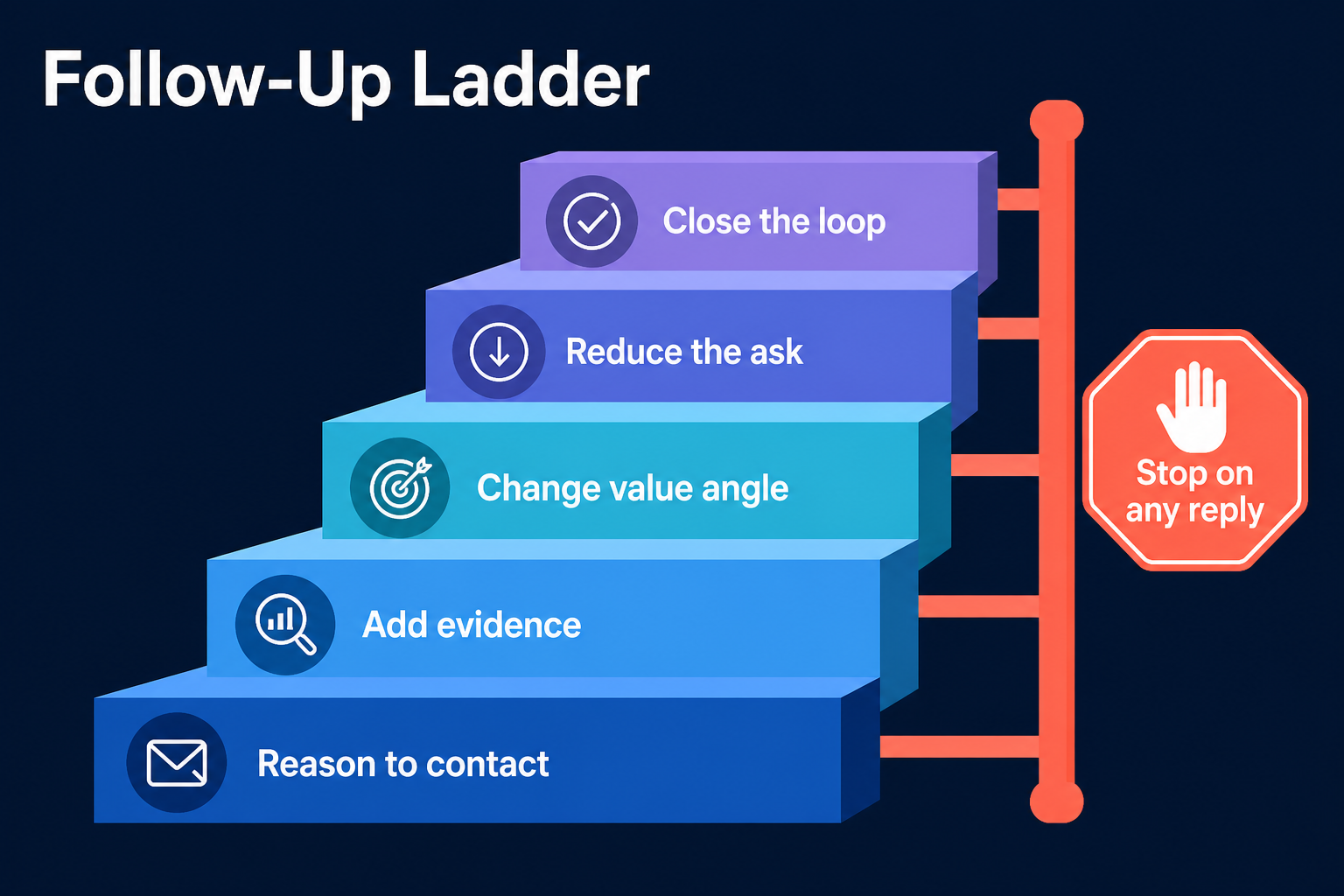
Use a researched distinct-purpose sequence

No complete first-hand email-only cadence was supplied for this guide. The following sequence is a research-led design based on the current SERP review and Anastasiia's rule that each touch needs a real job. It deliberately does not prescribe universal delays. Set timing by market, buying cycle, sender capacity and current provider feedback.
TouchCommercial jobNew informationStop condition
1. Reason to contactConnect one current source to one plausible problemSource and offerAny reply, unsubscribe, bounce or owner conflict
2. Add evidenceGive the recipient a concrete artifact, example or comparisonNew evidence, not “checking in”Same
3. Change the value angleAddress another approved consequence of the same problemNew role-relevant angleSame
4. Reduce the askOffer a smaller next step or direct answerLower-friction CTASame
5. Close the loopEnd the active sequence and leave a clear re-entry pathExplicit closeSame
A follow-up does not earn its place because the first email was ignored. It earns its place by adding information.

Touch 1: state the reason

Use the evidence brief. Do not lead with a generic product description.

Touch 2: add proof or an artifact

This can be an audit excerpt, tailored example, short comparison or answer to a likely question. Any performance claim needs its own source and scope.

Touch 3: change the value angle

The recipient may not own the first consequence. Change the approved angle, not the underlying facts. Do not invent a new pain to keep the sequence alive.

Touch 4: reduce the ask

Offer a short answer, a smaller sample or a yes/no decision. Reducing the ask is not permission to create urgency.

Touch 5: close the loop

Say the active sequence is ending. Do not use guilt or imply that silence proves the problem is unimportant.
Every step reads the same contact state immediately before sending. If a reply arrived in another inbox or channel, the email timer is no longer authoritative.
Five-step follow-up ladder with a stop-on-any-reply control.
Each follow-up should add a distinct reason, evidence or value angle.

06 / Run a pre-send

Run a pre-send human gate

Human review should test the decision, not only grammar.

Eligibility and ownership

  • Is the person still in the current role and company?
  • Does an existing customer, opportunity, partner or named-account owner take precedence?
  • Has the person or account replied, unsubscribed or been suppressed elsewhere?

Evidence and relevance

  • Can the reviewer open the source?
  • Is the capture date current enough for this signal?
  • Does the message distinguish observation from inference?
  • Does the recipient plausibly own the problem?
  • Is the claim allowed by the campaign policy?

Message and offer

  • Does the email have one job?
  • Is the offer specific?
  • Does the CTA ask one question?
  • Does the follow-up add something new?
  • Are all customer, performance, price and product claims verified?

Sender and compliance

  • Are sender identity and routing information accurate?
  • Are the sending domain and mailbox authenticated under the provider's requirements?
  • Is the physical address and opt-out mechanism present where required?
  • Can suppression update across every list and tool?
  • Is the person accountable for the send identifiable?

Authority

  • Is this a routine approved cohort or a named account?
  • Who can pause the campaign?
  • Who owns the thread after reply?
  • Which ruleset and message version created this action?
After the workflow is stable, routine cohort emails may move from record-level approval to campaign-level and exception review. Named accounts, uncertain evidence and live replies retain their human gate.

07 / Sender controls

Separate official sender requirements from operator practice

Email infrastructure has at least four different jobs: establish sender identity, authenticate it, control operational volume and preserve the reputation of normal business mail. One mailbox count cannot answer all four.

Current official requirements

Google's current sender guidelines say all senders to personal Gmail accounts must use SPF or DKIM. Senders above Google's bulk threshold must use SPF, DKIM and DMARC, meet alignment and other requirements, and support one-click unsubscribe for covered marketing or promotional traffic. Google's FAQ defines the bulk threshold near 5,000 messages to personal Gmail accounts in 24 hours from the same primary domain.
That last phrase matters. Google says mail from subdomains counts toward the same primary-domain threshold. Several subdomains are therefore not a loophole around bulk-sender classification.
Google also recommends increasing volume gradually, sending at a consistent rate and monitoring delivery, spam feedback and domain reputation. It does not turn any fixed ramp into a guarantee.
Microsoft's current outbound-spam guidance says bulk email through Microsoft 365 is supported only on a best-effort basis. Microsoft recommends avoiding the primary email domain for bulk traffic, using a custom subdomain and configuring SPF, DKIM and DMARC for custom subdomains.
For US commercial email, the FTC's CAN-SPAM business guide says the rules apply to B2B messages as well as consumer messages. It requires accurate header and subject information, a valid postal address, a clear opt-out method and timely honoring of opt-outs. Other markets can impose different or stricter rules.

Anastasiia's documented operating practice

In the supplied workflow, the team used:
  • four subdomains, never the main domain;
  • four to five mailboxes per domain;
  • at least 14 days of warm-up;
  • an initial five emails per day, increasing to 15 over three weeks;
  • a stated ceiling of 30 emails per healthy mailbox or domain setup;
  • ZeroBounce for mass verification, with Clay also used as a data source;
  • Lemlist duplicate suppression;
  • two or three reserve subdomains or mailboxes warming.
These numbers describe one operator's risk preference. They are not Gmail, Microsoft or Lemlist limits, and they do not guarantee inbox placement. The apparent 15-versus-30 distinction is best read as a conservative ramp versus a later ceiling for a setup judged healthy by the operator.
The owner also advised against sending mass cold email from the main domain, bad DNS, stale copy, too many mailboxes, excessive mailbox volume, non-consensual newsletters, skipped warm-up, rented infrastructure and unsuitable warm-up tools. The broader principles are useful. Product-specific claims, such as whether one CRM should be used for cold sending, need separate current verification and are not presented here as universal rules.

Sender preflight

Before each campaign, verify:
  1. SPF, DKIM and DMARC status for the actual sending domain.
  2. Alignment of the visible From identity under the provider's rules.
  3. Valid forward and reverse DNS where applicable.
  4. TLS and provider-specific sender requirements.
  5. Accurate sender identity, subject and postal information.
  6. Working opt-out and global suppression.
  7. Current verified address and duplicate state.
  8. Gradual, monitored volume rather than a burst.
  9. Separate monitoring for normal business mail.
  10. A pause rule for provider errors, spam complaints and reputation change.
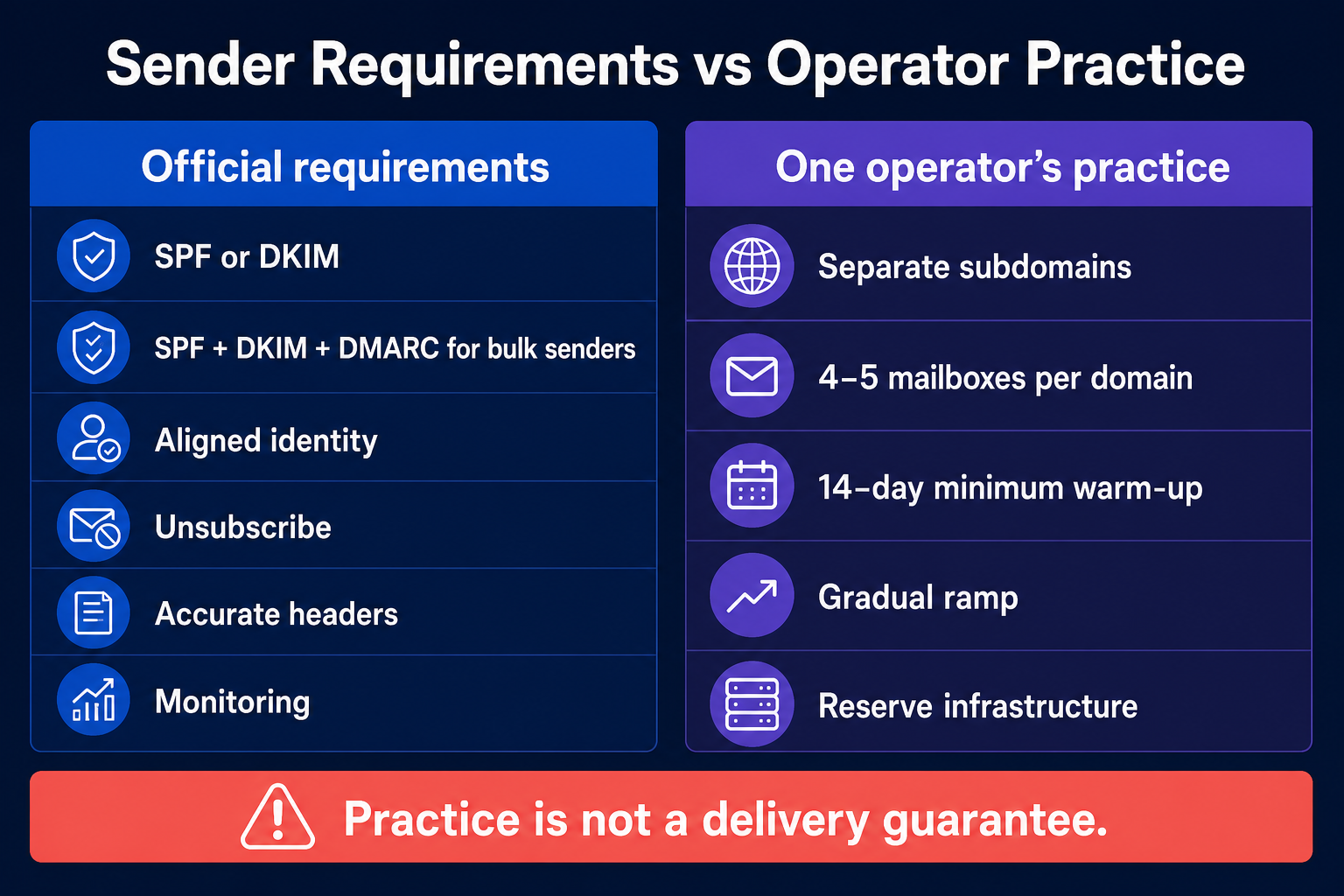
Warm-up does not replace authentication, relevance or consent. A dashboard showing “healthy” does not override provider responses or recipient feedback.
Official sender requirements compared with one operator's outreach infrastructure practice.
Operator practice can reduce avoidable risk, but it is not a delivery guarantee.

08 / Workflow

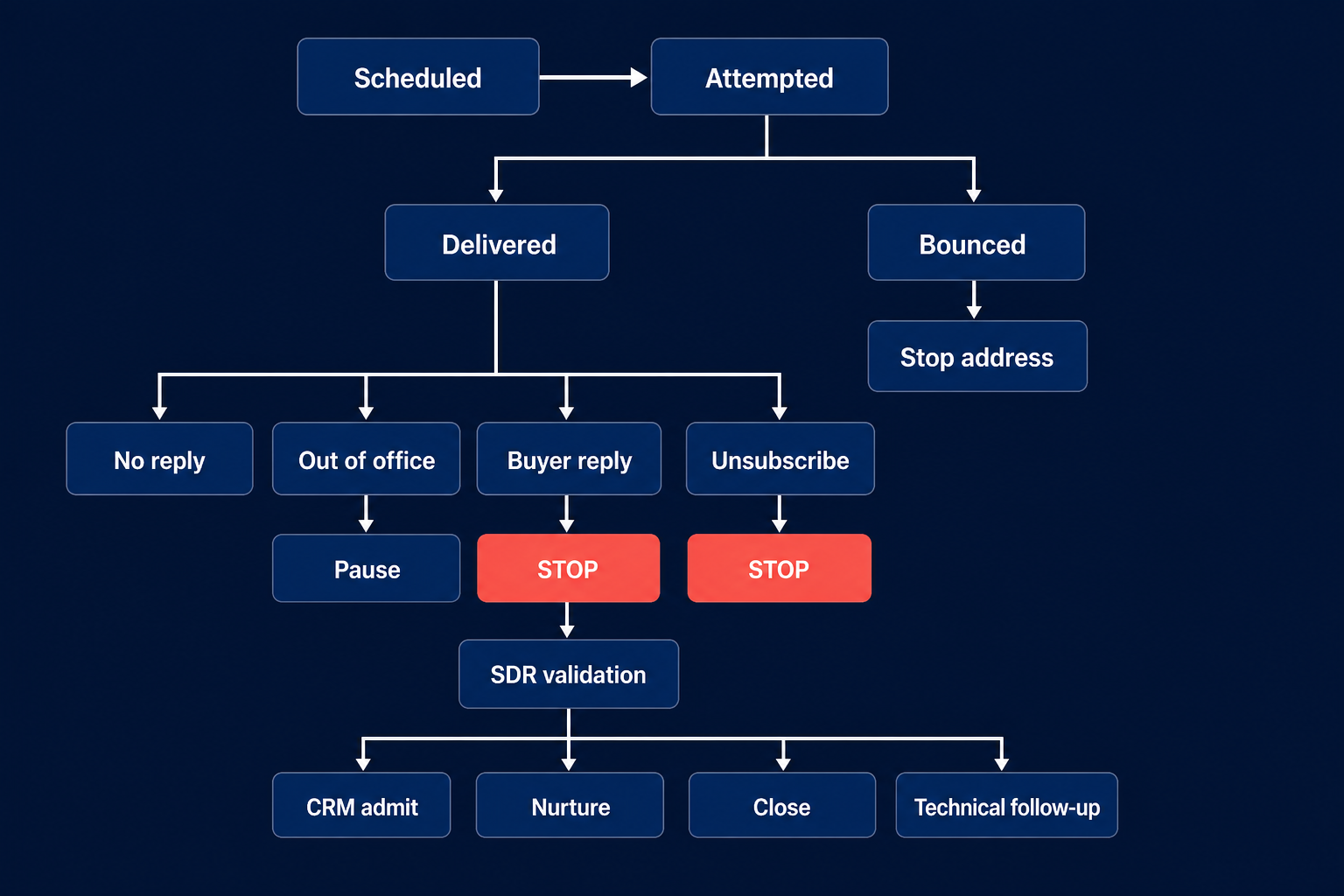
Model sequence state instead of relying on timers

The sequence should store events with clear meanings.
StateMeaningRequired action
ScheduledA future attempt is permitted under the current contractRecheck state before send
AttemptedThe platform tried to sendAwait provider result
DeliveredProvider accepted the message for deliveryDo not call it read or successful
BouncedAddress or provider rejected the messageStop the address and investigate
Out of officeAutomated reply created new timing or delegation contextPause and review
Buyer repliedRecipient supplied relationship contextStop all touches and hand off
UnsubscribedRecipient opted out or requested no contactSuppress across tools
Manually pausedHuman owner stopped the sequenceRecord reason and owner
CompletedSequence ended without another permitted touchDo not silently restart
“Sent,” “delivered,” “opened,” “replied” and “meaningful reply” are not interchangeable. Privacy features and image loading make opens especially weak as a business outcome. Use provider events for diagnostics, then measure human-validated replies and downstream conversations.
Email event state machine separating delivery, bounce, reply, unsubscribe, pause and SDR validation.
Model events explicitly so replies and unsubscribe requests cannot fall through the sequence.

09 / Reply control

Transfer every reply to an SDR

In Anastasiia's live policy, any reply stops the sequence. The SDR reads the whole thread and chooses the next state.
ReplySDR decision
Positive interestValidate need, account, owner and next action
Neutral questionAnswer, route for detail or qualify the context
ObjectionRespond, close or set a justified revisit condition
ReferralValidate the referred person before new outreach
Wrong personCorrect identity; do not automatically enroll another contact
Not nowRecord reason and human-approved re-entry condition
UnsubscribeSuppress; do not continue
Out of officeCheck return date, delegate and whether resumption is appropriate
AmbiguousKeep paused until a person resolves meaning
Technical questionBring the technical team into the thread with context
An AI classifier can suggest a disposition. It should not convert uncertainty into permission to continue. The handoff package should include:
  • evidence source and capture date;
  • all sent messages and timestamps;
  • the complete reply;
  • suggested disposition and confidence;
  • account and owner conflicts;
  • suppression state;
  • next-action options.

10 / CRM state

Keep untouched cold records out of qualified pipeline

Anastasiia's workflow keeps pre-reply activity in Lemlist or Instantly plus a spreadsheet. It does not push every cold record into CRM.
A record enters CRM only after:
  1. a positive or neutral reply;
  2. human validation of identity and context;
  3. assignment of an owner;
  4. a usable next action.
The CRM record then needs the campaign source, validated contact and account, reply context, owner, lifecycle or lead status, next action and any correction or referral.
This is not the only possible architecture. A company may need a warehouse or CRM object for all attempts. The important rule is semantic: an imported cold contact is not qualified pipeline because it exists in a database.

11 / Workflow

Pilot the AI email sales outreach workflow on a fixed sample

Test the workflow before raising volume or reducing review.
  1. Freeze the segment, offer, evidence rules and message hypothesis.
  2. Select one fixed sample.
  3. Create a human answer key for eligibility, evidence, permitted claim and suppression.
  4. Review every first email and follow-up purpose.
  5. Test reply, unsubscribe, bounce and out-of-office stops.
  6. Launch only the approved cohort.
  7. Review every reply and exception.
  8. Change one variable at a time.
  9. Keep the previous approved ruleset available for rollback.
Use explicit denominators:
MetricDefinition
Eligible-record rateRecords passing identity, segment and suppression checks ÷ records reviewed
Evidence acceptanceEvidence briefs accepted ÷ briefs reviewed
Message approvalDrafts approved ÷ drafts reviewed
Delivery rateDelivered messages ÷ attempted messages
Bounce rateBounced messages ÷ attempted messages
Meaningful reply rateHuman-validated meaningful replies ÷ delivered messages
Held-meeting rateHeld meetings ÷ validated positive or neutral replies
Accepted-opportunity rateOpportunities accepted under the CRM rule ÷ held meetings or validated replies
Review timeHuman minutes ÷ reviewed records
Total costData, infrastructure, software and human time for the measured period
Do not widen autonomy because opens, sends or raw replies increased. Calls, customers and accepted opportunities are closer to the commercial outcome. Also record stop failures: a message sent after a reply or unsubscribe is a control failure even if the campaign produced meetings.

12 / Failure modes

Diagnose the failure before changing the copy

Low delivery or rising bounces

Check authentication, DNS, address verification, provider responses, volume change and sender reputation. Copy changes cannot repair a rejected sender identity.

Delivery is stable but replies are weak

Check ICP, commercial reason, evidence, offer and CTA. Do not add random facts and call the result personalization.

Replies arrive but meetings do not

Read the replies. The sequence may attract polite questions, wrong-person corrections or low-intent interest. Check response speed, qualification and whether the offer earns a conversation.

Follow-ups produce complaints

Confirm each follow-up adds value, the close-loop message actually ends the sequence and suppression updates everywhere.

CRM fills while pipeline stays flat

Review the admission rule. Untouched records and automated activity may be inflating lead volume without buyer context.

One wrong-person reply appears

Correct the record, but do not rewrite the campaign from one exception. Look for a repeated role, source or freshness pattern.

A reply is followed by another automated touch

Treat this as a state-system failure, not a copy problem. Centralize the reply event and test cross-tool latency.

13 / Checklist

AI email sales outreach checklist

Before drafting

  • Confirm eligible contact, account and owner.
  • Capture current evidence and date.
  • Separate observation from inference.
  • Define one message hypothesis.
  • Check suppression across tools.

Before sending

  • Verify SPF, DKIM and DMARC for the actual sending domain.
  • Confirm current Google, Microsoft and other provider requirements.
  • Confirm sender identity, postal information and opt-out behavior.
  • Review message claim, offer and CTA.
  • Confirm follow-up purposes and stop states.
  • Keep named accounts under record-level review.

After sending

  • Store attempted, delivered, bounced, OOO, reply and unsubscribe as separate events.
  • Stop on every reply.
  • Hand the full thread to an SDR.
  • Admit only validated positive or neutral replies to CRM under this operating policy.
  • Measure meaningful replies, held meetings and accepted opportunities with denominators.
  • Roll back when stop, suppression or ownership controls fail.

14 / FAQ

Frequently asked questions

What is AI email sales outreach?

AI email sales outreach is a controlled process that uses AI to research an eligible contact, create a source-linked brief, draft messages and support execution. The workflow also defines sender controls, distinct follow-up purposes, deterministic stops, human reply ownership and CRM admission.

Can AI write and send the first email automatically?

Yes, for a routine cohort after the human team has proved the ICP, offer, evidence rules, sender setup and message hypothesis. Named accounts and uncertain evidence remain under human review. Automation should recheck suppression and owner state immediately before send.

How many follow-ups should an AI email sequence contain?

There is no universal number in this guide. Use only the touches that have distinct commercial jobs. The researched example uses five purposes—reason, evidence, alternate value angle, reduced ask and close—but does not claim universal timing or performance.

What should stop an automated email sequence?

Any buyer reply, unsubscribe, hard bounce, owner conflict or manual pause. Out-of-office replies pause the sequence for review. The stop should propagate across every tool and channel.

Does a separate subdomain guarantee deliverability?

No. A separate subdomain can help separate mail streams and protect normal business use, but authentication, recipient feedback, provider policy, content, address quality and volume still matter. Google also counts subdomains toward the same primary-domain bulk threshold.

Should all cold contacts be added to CRM?

Not in Anastasiia's operating model. Pre-reply records stay in the outreach workspace and spreadsheet. Positive or neutral replies enter CRM only after a person validates them. Other architectures may retain all activity elsewhere, but an untouched cold record should not be labeled qualified pipeline.

Is CAN-SPAM enough for global outreach?

No. The FTC guide is a US federal overview. Teams must check the rules that apply to the sender, recipient, data source, market and channel. Provider policies also apply independently of legal compliance.

15 / Decision rules

Final operating rule

AI email sales outreach works only when message generation remains inside an observable sender, state and ownership policy.
Build the human email motion first. Give AI only sourced evidence and an approved message job. Treat the sequence as a state machine, not a timer. Authenticate the real sender, preserve suppression, stop on every reply and hand the buyer's context to a person.

16 / Method

Sources and methodology

  • Gmail email sender guidelines — current Google authentication, alignment, monitoring and volume guidance for messages to personal Gmail accounts.
  • Gmail sender guidelines FAQ — current Google bulk-sender definition, primary-domain counting and covered unsubscribe requirements.
  • Microsoft outbound spam protection — current Microsoft 365 bulk-mail, primary-domain and custom-subdomain guidance.
  • FTC CAN-SPAM compliance guide for business — US federal commercial-email overview, including B2B; not legal advice.
  • Owner-supplied sources K02 and K03 — five-pillar email model, real Lemlist context, sender practice, reply-stop and CRM-admission rules reviewed on 18 August 2026.

Research note

Methodology

  1. 01The guide uses Anastasiia Krynytska's real Lemlist workflow and documented sender practices.
  2. 02The exact email-only touch order is editorial synthesis, not a sequence the author claims to have run unchanged.
  3. 03Provider and FTC sources support only the official requirements they state.
Read the full methodology

Source ledger

Sources & editorial notes

  1. 01
    Gmail email sender guidelines

    support.google.com · Official product, platform, policy or regulatory source cited in this guide.

  2. 02
    Gmail sender guidelines FAQ

    support.google.com · Official product, platform, policy or regulatory source cited in this guide.

  3. 03
    Microsoft outbound spam protection

    learn.microsoft.com · Official product, platform, policy or regulatory source cited in this guide.

  4. 04
    FTC CAN-SPAM compliance guide for business

    US Federal Trade Commission · Official product, platform, policy or regulatory source cited in this guide.

Corrections or primary material: contact the corrections desk.

About the author

Anastasiia Krynytska

Anastasiia Krynytska is a LeadGen Team Lead at Softermii and the lead editor of Luck My Sales. She covers AI-assisted outbound, account research, qualification, messaging, CRM handoffs and revenue workflows from a practitioner’s perspective.View author profile LinkedIn

Continue reading

01 · News analysis

AI sales is moving from assistant to operating layer

The category is expanding from drafting support into research, pipeline decisions, recommended actions and controlled execution.

Read news
02 · Field analysis

In AI sales, the handoff may be the product

Models are becoming accessible; durable value sits in the controlled transition from signal to seller action.

Read analysis
03 · Research framework

Sales AI Workflow Signals 2026

A launch framework for mapping the products, controls and buying questions shaping AI-enabled revenue work.

Read reports

Luck My Sales briefing

Useful context, once a week.

News, explanations and original research from this desk. No noise.
The newsletter is still being built. We will contact you when the first edition is ready.