Weekly industry intelligence · No noiseSubscribe to the Luck My Sales newsletterFree briefing

Independent intelligence on AI in sales

Menu

Data-provider comparison & workflow guide · Lead enrichment

10 B2B Data Enrichment Providers and Tools Compared by the Record You Need

Compare 10 B2B data enrichment providers by the record problem they solve, then use a seller-accepted workflow to filter stale, inactive and commercially irrelevant data before CRM activation.
Editorial disclosure

AI may assist research organization and drafting. A human editor reviews every published page, checks material claims against the cited sources and owns the final decision. No company paid for placement in this article.

AI use policy

Agent-ready brief

AI takeaways

Keep the key points here, or take a source-aware text brief into Claude, ChatGPT or another AI workspace.
  1. 01Choose a provider for the missing evidence or workflow role, not the advertised database size.
  2. 02Treat current company, function, tenure, company situation, activity and a usable channel as separate evidence.
  3. 03Keep candidate values in a staging table until a seller approves canonical CRM changes.
  4. 04Use social activity to route research and channels; never treat it as consent or proof of buying intent.
  5. 05Compare providers on one dated sample and calculate cost per seller-accepted record.
Includes summary, takeaways, sources and a use note.
Your sales list is probably smaller than the spreadsheet says. A row may contain a company, job title, email, phone number and LinkedIn URL without proving that the person still holds the role, the channel works or the offer is timely. Traditional enrichment fills columns. Good enrichment reduces uncertainty before a seller spends attention.
In the 2026 B2B workflows I reviewed, six fields mattered more than a long firmographic record: current company, function, time in role, online activity, company situation and a usable channel. Together, they help answer one commercial question: Is this a real, reachable person for this offer now?
In my experience, roughly 30–60% of some LinkedIn and email lists may be inactive for the campaign before it begins. I also observed an estimated 30–50% lift in replies and engagement when sourcing began with people active in relevant public conversations. These are directional operating observations, not controlled benchmarks or performance promises.
This guide compares ten data sources, enrichment providers and evidence layers by the record problem they solve. It also gives you a 100-record test, a staging-table workflow and a cost-per-seller-accepted-record metric. We did not run a fixed-sample accuracy benchmark across all ten products and do not name a universal winner.
Method and disclosure: Apollo, Clay, Lemlist, LinkedIn Sales Navigator and Claude Code appeared in the documented workflow. Other products are owner-recommended, documentation-reviewed, or both. Luck My Sales has no commercial, affiliate, or client relationship with the providers discussed. Product documentation was reviewed on August 13, 2026.

Do not enrich a bad market thesis. AI can prepare the evidence; a seller decides whether the record is usable.

01 / Short answer

The short answer: choose the missing evidence, not the biggest database

The best data enrichment provider depends on what is missing from the decision.
If the missing evidence is...Start with...Operational roleDo not assume...
A workable account and contact baseApolloDatabase and enrichment foundationEvery returned role or channel is current
Current function, tenure, job changes, and visible LinkedIn activityLinkedIn Sales NavigatorProfessional-identity and social-evidence layerActivity proves purchase intent or permission
Conditional research across several sourcesClayEnrichment and waterfall orchestrationClay is the original source of every returned field
Email, phone, or LinkedIn data close to campaign activationLemlistChannel finder, verifier, and execution-adjacent enrichmentA deliverable address makes the lead qualified
Email and mobile coverage across a provider waterfallFullEnrichContact-channel waterfallVendor coverage rates will repeat on your ICP
Person and company matching through an APIPeople Data LabsDeveloper-oriented identity and profile enrichmentAn API match is automatically seller-accepted
Contact and company refresh with controlled CRM field rulesCognismCRM and contact-data enrichment“Overwrite” is safe for every field
Enterprise deduplication, normalization, routing, and multi-vendor enrichmentZoomInfo OperationsData orchestration and governanceMore automation requires less field ownership
Enrichment that already lives inside HubSpotHubSpot data enrichmentCRM-native company and contact enrichmentCRM-native data needs no source or overwrite review
Company events, funding, growth, and market contextCrunchbaseCompany enrichment and change evidenceA company event proves buying intent
For a lean team, my first design would be one of these:
  • Apollo + an agentic review layer + a CRM, when you need an economical starting database; or
  • Sales Navigator + Claude Code or Codex + a CRM, when current role, function, tenure, and public activity matter more than bulk contact volume.
Add Clay only when the team can name the missing fields and measure the gap left by the first source. The extra seller-accepted records should justify the cost. Add a channel finder or waterfall when contact details—not ICP evidence—are the remaining constraint.

02 / Evidence

What an AI lead enrichment tool should actually enrich

An AI lead enrichment tool should do more than turn one input into more columns. It should keep four evidence classes separate: observation, provider data, model inference, and seller judgment.

1. Identity

Confirm the person, current employer, current function, and relationship between the contact and account. A name and historical employer can still produce a plausible wrong match.

2. Role relevance

Job titles vary. Function and decision responsibility are often more useful than title text alone. Time in the role and position in the buying committee also matter.

3. Company situation

Industry and headcount are static filters. Product maturity, customer type, and market saturation add context. Recent change and the business process affected by your offer can decide whether the company is a good target now.

4. Channel viability

A verified email, mobile number, active professional profile, or another approved route establishes a possible channel. It does not establish qualification, consent, or expected responsiveness.

5. Digital activity

Recent posts, comments, community activity, job changes, or interaction with your company can guide channel and timing. A nearly unused LinkedIn profile may be a weak LinkedIn route. The person can still be a valid buyer. Route the contact elsewhere or lower channel confidence; do not declare the human unqualified.

6. Evidence state

Each important field should carry a source, observed date, confidence, conflict status, and reviewer decision. Without this context, an AI inference can look like a verified fact.
FieldExample valueEvidence classWhat still needs review
Current functionRevenue operationsProfile or provider observationIs the function current and relevant to the buying decision?
Time in role14 monthsProfile-derived observationIs the start date reliable and commercially meaningful?
Company situationExpanding into MENACompany source or dated newsDoes the change affect this offer?
Public activityCommented on three relevant posts in 30 daysPlatform observationIs the activity genuine and useful for timing?
Email statusDeliverableVerifier resultDoes policy and law allow this use, and is email the right channel?
ICP rationaleLikely fit because...Model inferenceDoes the evidence support the conclusion?
The useful output is not an “enriched lead.” It is a record a seller can inspect and accept.

03 / Acceptance

Define a seller-accepted enriched record before buying credits

For this guide, a seller-accepted enriched record has:
  1. a current person–role–company match;
  2. a verified company identity and domain;
  3. at least one usable, approved channel;
  4. evidence that supports the ICP and offer;
  5. visible source and freshness information; and
  6. explicit human approval for the next action.
Public activity may raise or lower confidence in a channel. It is not a mandatory field for every sales motion. A CFO who never posts may still buy through a referral, email, conference, or phone call.
This definition prevents a common buying error. Provider A may return 85 populated rows and Provider B may return 70. Yet sellers may accept only 38 from Provider A and 52 from Provider B. Raw coverage would point toward the wrong choice.
Use this operating metric:

Cost per seller-accepted record = provider and usage cost for the pilot ÷ unique records approved for the defined action
Track review time beside it. A cheap row may take six minutes to correct. It can cost more than a higher-priced record with a clear source and no conflict.
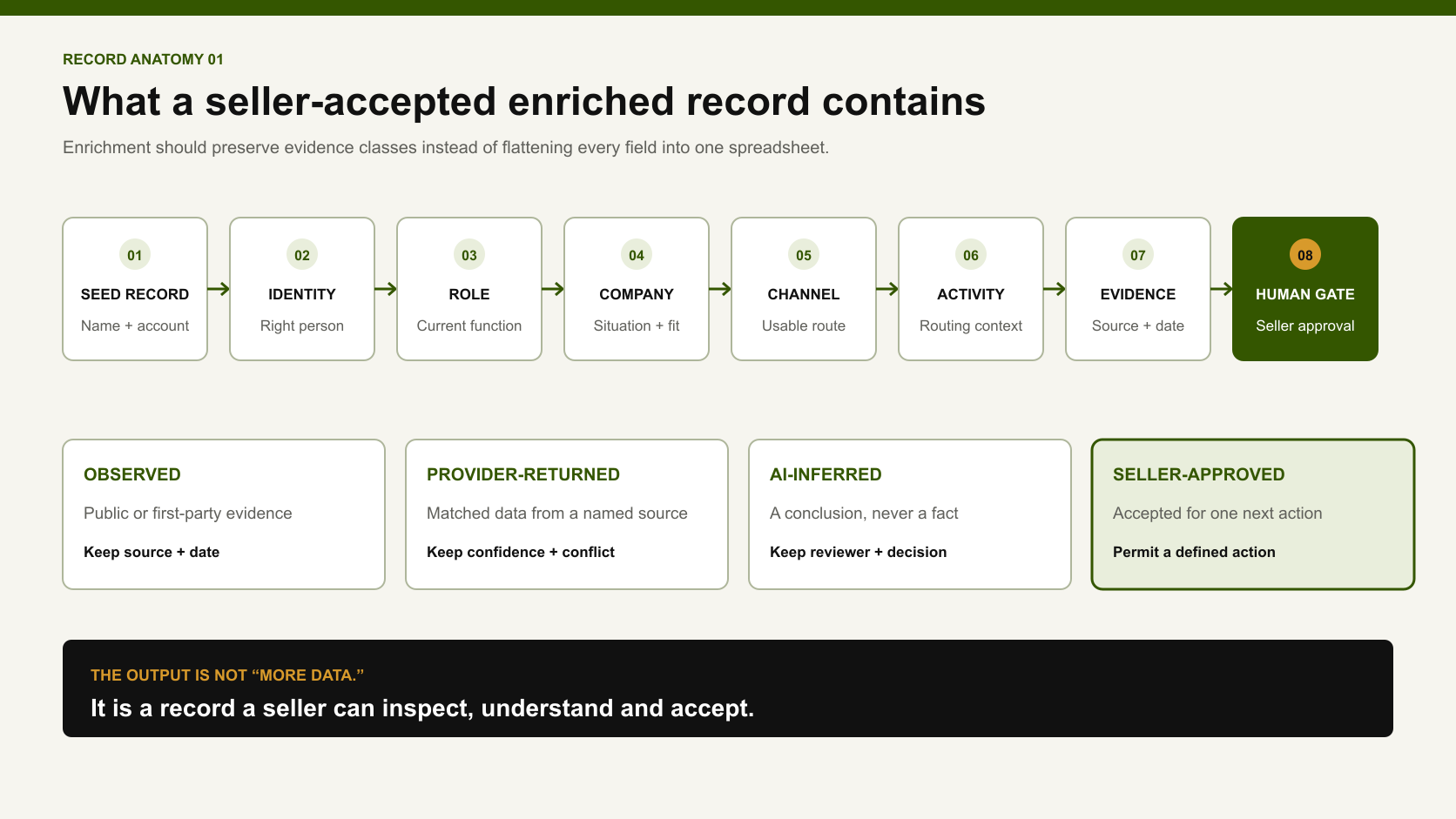
Eight-step anatomy of a seller-accepted enriched record from seed record and identity checks to evidence and human approval.
The useful output is a record a seller can inspect and approve—not merely more populated fields.

04 / Comparison

How we compared these ten solutions

This is a role-based comparison, not a controlled product ranking. Each entry has an evidence label:
  • Workflow-used: present in the documented 2026 process.
  • Owner-recommended: recommended by Anastasiia for a defined role, without a comparative accuracy test.
  • Documentation-reviewed: current capabilities checked against official product documentation; no hands-on endorsement.
We compared the solutions by:
  • record type: company, person, contact channel, social evidence, or CRM field;
  • delivery model: database, platform, API, CRM-native tool, or waterfall;
  • match and conflict controls;
  • source visibility and freshness;
  • write-back behavior;
  • billing unit where official documentation makes it clear; and
  • fit with a human review gate.
Vendor database sizes, “best accuracy” claims, testimonials, and conversion promises are excluded as proof. The independent OpenBenchmarks company-enrichment test discloses its method. That makes it useful. But its 282-company sample and company-only scope cannot identify the best provider for every contact workflow.

05 / Providers

Ten data enrichment providers and evidence layers compared by role

SolutionBest operational roleMain evidence or outputEvidence level in this guideImportant limitation
ApolloBuild and refresh a practical starting baseCompany/contact records, CRM or CSV enrichment, waterfall optionsWorkflow-used; documentation-reviewedCurrent role, identity, and channel still need acceptance checks
LinkedIn Sales NavigatorVerify professional context and observe activityFunction, seniority, years at company, job changes, posts, account activityWorkflow-used; documentation-reviewedNot a conventional email/phone provider; unauthorized scraping or automation violates LinkedIn rules
ClayRoute field requests across providers and research stepsConditional enrichments, source outputs, waterfall results, AI researchWorkflow-used; documentation-reviewedCost and conflicts increase when the workflow lacks run conditions and accepted-value rules
LemlistFind and verify channels near activationEmail finder/verifier, phone finder, LinkedIn enrichmentWorkflow-used; documentation-reviewedChannel availability is not ICP evidence; credits vary by enrichment type
FullEnrichRun an email/mobile waterfallWork/personal email and phone results from multiple providersDocumentation-reviewed onlyCoverage and validation claims are vendor-published; test on your own cohort
People Data LabsMatch person and company records through an APIOne-to-one person match, company enrichment, likelihood scoreDocumentation-reviewed onlyA returned match and likelihood score still require business-rule acceptance
CognismRefresh contact/company fields in a connected CRMEmail, mobile, title, company fields, match score, scheduled or instant jobsDocumentation-reviewed onlyField mapping can overwrite or fill blanks; instant enrichment is event-triggered, not continuous source sync
ZoomInfo OperationsManage enterprise data quality and orchestrationMatching, dedupe, normalization, real-time/bulk and multi-vendor enrichmentDocumentation-reviewed onlyBroad capability and custom setup create governance work; no hands-on comparison here
HubSpot data enrichmentEnrich records within the CRMContact/company properties, automatic and monthly continuous enrichmentDocumentation-reviewed onlyHubSpot uses a commercial dataset; overwrite choices and account data use require review
CrunchbaseAdd company and market contextFunding, growth, news, leadership, firmographic and financial fieldsOwner-recommended; documentation-reviewedCompany change is a research trigger, not a current-person match or buying decision
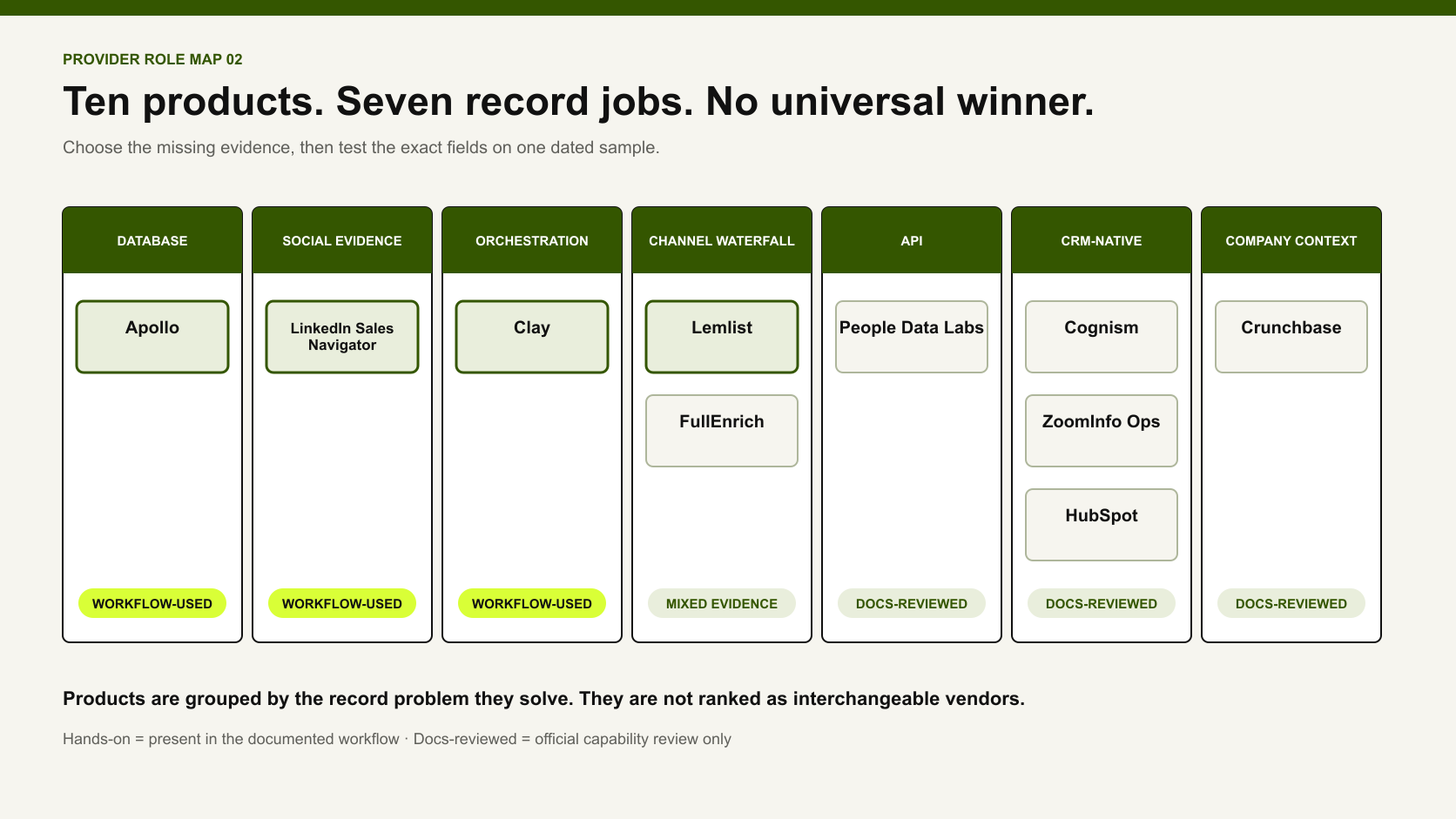
Ten data enrichment products grouped into database, social evidence, orchestration, channel waterfall, API, CRM-native and company-context roles.
The products solve different record problems and should not be ranked as interchangeable vendors.

1. Apollo: the practical starting database

Use Apollo when the first problem is building or refreshing a workable B2B account and contact base. Its current enrichment overview covers CSV, CRM, saved-record, job-change, missing-email, waterfall, and API workflows. Availability depends on the plan.
In our workflow, Apollo was the foundation or a complement to Clay. It worked best as the first evidence source, not the final decision. We still checked the current employer, function, profile, company situation, and route before activation.
Apollo's CRM documentation also shows why governance matters. Its CRM enrichment guide says enrichment can overwrite existing mapped values. Do not enable that behavior across the CRM without controls. Each field needs an owner, source priority, and rollback path.
Choose Apollo when: a lean team needs one practical source before adding orchestration.
Human gate: approve conflicts, stale roles, identity, duplicates, and the commercial reason to contact.

2. LinkedIn Sales Navigator: current professional and activity evidence

Sales Navigator is not a traditional data enrichment provider. It fills gaps that databases often leave unseen. LinkedIn's current product page lists filters such as function, seniority, years at company, experience, and job changes. It also lists alerts for role changes and selected content engagement. Availability varies by plan.
That makes it useful for answering: Does this person still appear to hold the role? How long have they been there? Are they publicly active? Is LinkedIn a plausible route? A saved lead page can surface role changes, posts, and news.
Do not convert activity into intent. Somebody may comment to learn, disagree, support a colleague, or build their own audience. Social evidence starts research. It does not establish permission or an active project.
LinkedIn also prohibits unauthorized third-party software that scrapes data or automates activity. A social-intent process must respect those access rules. Calling extraction “AI” does not make a prohibited method acceptable.
Choose Sales Navigator when: function, tenure, job change, relationships, and LinkedIn activity matter more than another bulk export.
Human gate: verify relevance and choose the channel; do not punish a valid buyer merely for low social activity.

3. Clay: optional orchestration for expensive or unusual gaps

Clay becomes valuable when one source cannot answer a defined question. Its official waterfall documentation explains how a table calls providers in a chosen order. The table can preserve each provider result. Conditional runs can limit which rows or fields consume credits.
That is useful for records requiring several evidence types: a current role, a company classification, a verified channel, and custom research about the company's clients. It can also support AI-generated fields when the prompt, sources, and accepted output are clear.
Clay is not mandatory. A lean workflow can use Sales Navigator plus Claude Code. Another option is Apollo plus an agentic review layer. Add Clay only after a pilot shows that missing records justify more providers, logic, and review.
Choose Clay when: you need multi-source routing, custom web research, and per-field conditions.
Human gate: approve the provider order, run conditions, spend cap, evidence classes, and conflict policy.

4. Lemlist: enrichment next to activation

Lemlist is useful when the record is approved but still lacks a route. Its current enrichment help describes email finding and verification. It also covers phone-number finding and LinkedIn enrichment. Credit use varies by tool, and results may be deliverable, risky, or undeliverable.
This proximity to the campaign is convenient and risky. The same interface can find a channel and activate a sequence. That makes it easy to skip the key question: should this person receive the message?
In the documented workflow, Lemlist sat after selection and customization. AI prepared or checked routine fields. People approved the first leads, messages, sends, replies, and CRM changes.
Choose Lemlist when: an approved lead needs channel discovery or verification close to execution.
Human gate: separate channel status from ICP, permission, suppression, and message approval.

5. FullEnrich: a specialized email and phone waterfall

FullEnrich is narrower than a full GTM database. Its trust documentation says the waterfall gets email addresses and mobile numbers from underlying providers. It does not maintain its own database for that service. Customers can request provider exclusions. They remain responsible for checking their selected providers.
That distinction is useful. The product routes and verifies contact-channel data. It is not the original source of every returned fact. Current materials describe CSV, API, CRM, and manual inputs.
FullEnrich publishes coverage, verification, and find-rate claims. Those are vendor claims, not editorial evidence. Run the same difficult sample against your current source and count seller-accepted, policy-usable results.
Choose FullEnrich when: missing work emails or mobiles remain the measurable bottleneck after qualification.
Human gate: review the source/subprocessor set, channel rules, geography, and same-sample results.

6. People Data Labs: API-based identity and company matching

People Data Labs is designed for teams that want enrichment inside their own system. Its official Person Enrichment API performs a one-to-one match. Inputs can include a profile, email, phone, name, company, or location. A result includes a likelihood score. A separate Company Enrichment API can use a company website as input.
This suits a product, data platform, or custom sales workflow that needs structured API responses. It removes the need for a seller-facing database and makes matching assumptions visible. More identifying inputs may improve the chance of finding the intended person.
A match score is still a provider confidence estimate. Your acceptance rule may require a current-company match, current function, domain evidence, and a usable approved channel.
Choose People Data Labs when: developers need person/company enrichment APIs and can build their own acceptance and write-back layer.
Human gate: sample low and high likelihood matches, test difficult identities, and preserve provider confidence separately from seller acceptance.

7. Cognism: controlled CRM enrichment and contact data

Cognism's April 2026 enrichment-job documentation describes one-off, scheduled, and instant contact enrichment. Teams can select mobile numbers, email addresses, titles, and company data. Field mapping can overwrite a value or fill it only when blank.
The same documentation notes an important limit. Instant enrich runs when a record is created or new data is added. It is not a continuous sync each time Cognism's source data changes.
Cognism's API documentation also exposes a match score and field-availability preview before the full record is redeemed. That can support a review-first implementation.
Choose Cognism when: contact data, mobile coverage, and controlled CRM refresh are the specific purchasing problem.
Human gate: set field-level overwrite rules, inspect previous values, and define what happens when the provider returns no confident match.

8. ZoomInfo Operations: enterprise data orchestration

ZoomInfo Operations covers a broader RevOps problem. Its official product page describes custom matching, deduplication, and normalization. It also covers bulk and real-time enrichment plus multi-vendor waterfalls through API sources.
This is useful when several systems create duplicate or inconsistent records. The team can manage field rules in one place. It is excessive when a small company only needs to refresh a few hundred prospects. More orchestration also raises the cost of bad rules.
We did not test ZoomInfo against the owner workflow. Treat this as an official-docs comparison, not a recommendation based on direct use.
Choose ZoomInfo Operations when: enterprise data quality, deduplication, routing, and multi-source governance are one combined program.
Human gate: own the canonical field map, dedupe policy, source precedence, and exceptions before enabling real-time actions.

9. HubSpot data enrichment: CRM-native convenience

HubSpot's April 2026 data-enrichment documentation describes automatic enrichment for new records. It also describes monthly enrichment for existing records. Contact enrichment uses submitted business emails, while company enrichment uses submitted domains. HubSpot says its commercial dataset combines public sources, third-party vendors, and internet data. AI extracts and normalizes data, while people verify models.
CRM-native enrichment removes a handoff. It does not remove source limits or overwrite choices. The team must still decide whether the result matters to the offer. Plan, seat, and credit requirements vary by feature.
The strongest use case is operational simplicity for a team already treating HubSpot as its system of record.
Choose HubSpot enrichment when: the team wants contact/company refresh inside the CRM and can govern property-level behavior.
Human gate: review automatic and continuous settings, overwrite controls, collected inputs, and incorrect-value correction paths.

10. Crunchbase: company enrichment for market timing

Crunchbase is most valuable when the company situation matters. Its official Salesforce documentation describes firmographic and financial fields. It also covers funding, growth, news signals, leadership changes, company refreshes, and contacts in eligible products.
This helps test the market thesis before spending on more person data. A company entering a region, launching a product, raising capital, or changing leadership may deserve research. The event does not prove the company needs your offer.
Crunchbase also recommends protecting trusted CRM values with custom fields, blank-only flows, and field-history tracking in Salesforce. That advice applies beyond Crunchbase.
Choose Crunchbase when: company maturity, private-market events, funding, or strategic change influences the account hypothesis.
Human gate: verify the event date and source, then explain why it changes the buying situation.

06 / Workflow

The workflow: enrich the market thesis before the contact channel

The strongest enrichment workflow starts before the first provider call.

Step 1: define where the offer is scarce

Write the problem, market, company situation, function, and disqualifiers. Geography can change adoption maturity and offer selection. In my experience, many US buyers have already evaluated more AI categories. Parts of MENA are still moving through adoption. Test this hypothesis by segment; do not turn it into a permanent regional label.

Step 2: build the seed list

Use Apollo for an economical database-led start. Use Sales Navigator when current professional context is central. Social-intent sourcing can start from people active in relevant public conversations. Follow platform rules and data-use requirements.

Step 3: enrich decision fields first

Prioritize:
  • current company and verified domain;
  • current function and role relevance;
  • time in role;
  • company/customer situation;
  • public activity or relationship evidence when the channel depends on it; and
  • one viable contact route.
Do not spend across every field because the provider offers it.

Step 4: run AI checks in a staging table

In the documented process, AI checked fields in an intermediate Excel table before CRM write-back. A review row should include:
FieldCandidate valueSourceObserved atAI checkConflictHuman decision
Current companypass / review / reject
Functionpass / review / reject
Time in rolepass / review / reject
Company situationpass / review / reject
Social/channel activityroute / alternate / unknown
Email or phoneverified / risky / missing
ICP rationalesupported / weak / contradicted
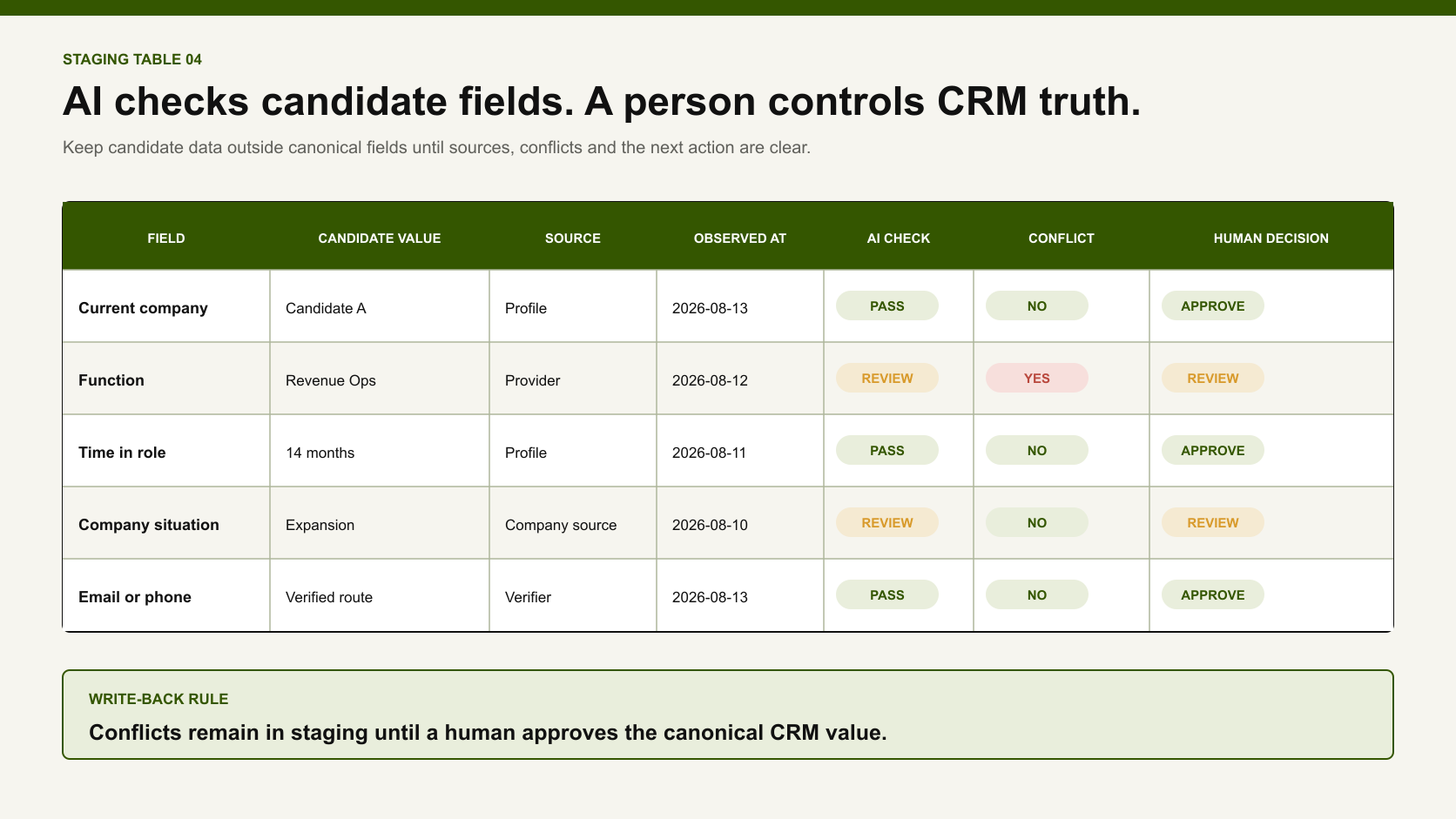
Example enrichment staging table with candidate values, sources, observed dates, AI checks, conflicts and human decisions.
AI can prepare and check candidate fields; a person controls canonical CRM values.
Claude Code or Codex can apply rules and collect approved public evidence. It can flag contradictions and prepare the queue. It should not invent missing facts or approve itself.

Step 5: approve the record and channel

A seller decides whether the account, person, offer, timing, and route make sense. Low LinkedIn activity can route a good buyer to email, phone, a referral, an event, or nurture. It should not create a universal rejection.

Step 6: write only approved values to the CRM

Preserve the original value and candidate value. Also keep the source, timestamp, reviewer, and applied decision. Use staging or provider-specific fields when a source should not replace a canonical value.

Step 7: return outcomes to the rules

Track each outcome separately: delivered, connected, replied, interested, meeting held, opportunity, and contract. Do not credit a provider just because its record existed somewhere before a closed deal.

07 / Social intent

Social intent exposes the invisible funnel

Traditional list enrichment asks, “Can I find this person?” Social-intent enrichment asks another question: “Is this person active in the digital market where I plan to contact them?”
Useful observations may include:
  • recent posts or comments about the problem;
  • activity in a relevant professional community;
  • engagement with your company or public campaign;
  • a job or role change;
  • a new connection path; or
  • repeated silence across the chosen channel.
These signals can improve timing and routing. They can also mislead.
ObservationSafe interpretationUnsafe interpretation
Commented on a competitor postRelevant topic is visible; research the contextReady to replace the competitor
Posts weekly on LinkedInLinkedIn may be a viable channelWill respond to your pitch
Almost no LinkedIn activityLower LinkedIn-channel confidenceNot a buyer or not commercially active
Recently changed rolesRecheck function, priorities, and companyHas budget and an active project
Follows your companyFamiliarity may existConsent or purchase intent exists
Decision tree routing active and quiet professional profiles to research or alternate channels before human approval.
Activity guides routing; it does not prove buying intent.
The 30–50% response and engagement lift from our social-intent work is a directional observation. We lack a matched campaign denominator. We also lack identical messaging and a controlled holdout. Use the result to justify a test, not a forecast.

08 / Pilot

How to run a 100-record provider bake-off
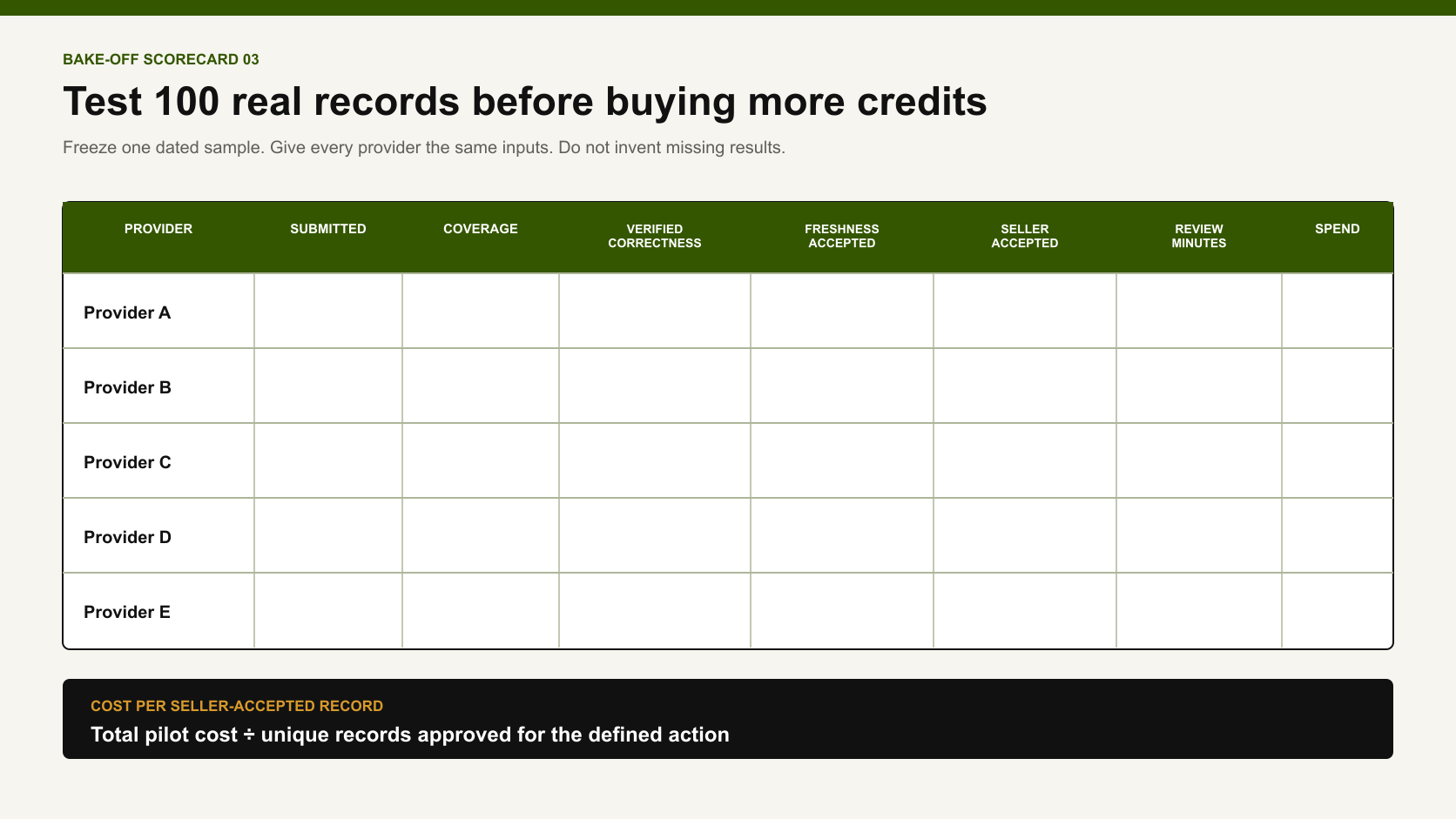
Do this before signing a long contract or activating a large waterfall.
Blank 100-record data enrichment provider scorecard with coverage, correctness, freshness, seller acceptance, review time and spend fields.
Use one dated sample and compare cost per seller-accepted record instead of advertised database size.

1. Freeze the sample

Choose 100 records from the actual segment. Mix easy, difficult, stale, regional, and incomplete cases. Save the sample date.

2. Define ground truth

For each required field, name the accepted source and freshness window. Define four result states: correct, conflicting, unverifiable, and missing.

3. Give every provider the same inputs

Do not give one vendor a LinkedIn URL and another only a name. Matching quality depends on inputs.

4. Score the result at field level

MetricFormulaWhy it matters
Coveragepopulated required fields ÷ required field opportunitiesShows how much was returned
Verified correctnessverified correct values ÷ returned values reviewedSeparates filled from right
Freshness acceptancecurrent values ÷ verified correct valuesExposes stale roles and companies
Seller acceptancerecords approved ÷ records submittedMeasures commercial usability
Review burdenreviewer minutes ÷ records submittedExposes hidden operating cost
Cost per accepted recordtotal pilot cost ÷ seller-accepted recordsMakes different billing models comparable

5. Record rejection reasons

Use a fixed taxonomy: wrong identity, stale role, wrong company, missing required field, channel unavailable, low channel confidence, ICP contradiction, duplicate, policy restriction, or unverifiable evidence.

6. Test the workflow, not only the lookup

Can the team see the source? Can it stop on a valid result? Can it preserve an existing CRM value? Can it rerun stale fields without paying for every field? Can a reviewer understand why the record passed?
We have no exact fixed-batch provider benchmark from the owner workflow. This framework is the test we would run now; it is not a disguised claim about results we did not measure.

09 / Failures

Five enrichment failures that destroy campaigns

1. Enriching the wrong ICP

Perfect contact data cannot rescue an offer aimed at a saturated market or a function that does not own the problem. Validate the market and offer before finding more people.

2. Treating every real profile as a live digital buyer

A current profile may be inactive on the chosen channel. Filter or reroute before the sequence. Do not let the spreadsheet create an illusion of reachable pipeline.

3. Matching the correct person to an outdated work identity

Founders and operators may remain attached to several companies. Their profile can be real, but the selected company may be a legacy role. Their current business may even make them a competitor or poor fit.

4. Letting provider output overwrite CRM truth

An automatic update can replace a seller-verified value with a new but weaker match. Stage conflicts, protect canonical fields, and preserve history.

5. Confusing contactability with qualification

A verified phone or deliverable email says the route may work technically. It does not establish function, need, timing, permission, or a qualified opportunity.

10 / Budget

Which enrichment stack fits your budget?

Lean: one source, one agentic layer, one review table

Use Apollo or Sales Navigator as the base. Use Claude Code or Codex to apply documented checks in a staging table. Add Lemlist only for approved records that lack a viable route. Keep HubSpot or another CRM as the system of record.

Growth: add waterfalls only for measured gaps

Add Clay when the ICP requires custom evidence or multiple providers. Add FullEnrich when missing email/mobile data is the bottleneck. Set row conditions and spend limits so expensive checks run only after fit survives.

CRM-centered: reduce handoffs without surrendering field ownership

HubSpot enrichment can simplify a HubSpot-first workflow. Cognism can support configurable contact refresh. Crunchbase can add company change evidence. Define overwrite rules, source fields, refresh cadence, and exception queues.

Enterprise: govern identity across systems

People Data Labs can support API-native products and internal data platforms. ZoomInfo Operations can support matching, deduplication, normalization, routing, and multi-source enrichment. A larger blast radius needs a more formal source hierarchy and rollback design.
For a small or midsize team, my starting budget remains 40% data, 40% LLM or agentic work, and 20% activation. This is an operating recommendation, not an industry benchmark. Change the split when your cost per accepted record, review burden, and channel outcomes support it.

11 / Checklist

Data enrichment implementation checklist

  • [ ] Define the offer, market maturity, company situation, and buyer function.
  • [ ] Name the required evidence fields before comparing providers.
  • [ ] Separate source data, provider match, AI inference, and seller decision.
  • [ ] Freeze one dated pilot sample and use identical provider inputs.
  • [ ] Check current person–role–company identity.
  • [ ] Treat role tenure and public activity as context, not universal qualification rules.
  • [ ] Verify a company domain before using it as an identity key.
  • [ ] Find contact channels only after the record survives the fit gate.
  • [ ] Put new or conflicting values into a review table or staging field.
  • [ ] Preserve source, observed date, confidence, reviewer, and prior value.
  • [ ] Define overwrite, fill-blank, reject, and rollback behavior per CRM field.
  • [ ] Measure cost and reviewer time per seller-accepted record.
  • [ ] Keep social activity separate from consent and purchase intent.
  • [ ] Respect platform access rules and applicable privacy/outreach requirements.
  • [ ] Return replies, meetings, opportunities, and contracts to the evaluation ledger.

12 / FAQ

Frequently asked questions

What is the best B2B data enrichment provider?

There is no defensible universal winner. Apollo is a practical starting database for a lean team. Clay helps orchestrate custom multi-source workflows. FullEnrich focuses on email and mobile waterfalls. People Data Labs is API-oriented. Cognism, ZoomInfo, HubSpot, and Crunchbase solve different CRM or company-data problems. Test the required fields on the same dated sample.

Is Clay a data enrichment provider?

Clay is better described as an enrichment and orchestration platform. It can call many sources, run conditional logic, and create research fields. Preserve the original provider and evidence behind each output instead of treating every value as “Clay data.”

Can I use Apollo without Clay?

Yes. For many lean teams, Apollo plus an agentic review layer and human approval is enough to begin. Add Clay only when a measured gap, custom evidence need, or multi-provider workflow justifies the added cost and complexity.

Can Sales Navigator replace a contact database?

It can replace part of the workflow when professional identity, function, tenure, relationships, and LinkedIn activity matter most. It does not provide every verified email or phone number by itself. Plan features vary. LinkedIn prohibits unauthorized scraping and automation.

Does social activity mean a lead has buying intent?

No. Social activity can indicate that the person is active on the channel and familiar with the topic. It does not prove budget, authority, timing, consent, or an active project.

What should an AI lead enrichment tool write to the CRM?

Write candidate values to staging fields first. Include their sources, timestamps, confidence, and conflict status. A human should approve identity, ICP fit, major overwrites, channel selection, and activation. Preserve the prior value and reviewer decision.

How often should B2B records be refreshed?

Refresh based on field volatility and sales use. Job title and current employer may require more frequent review than a company founding year. Recheck consequential identity and channel fields immediately before outreach rather than relying only on a global refresh schedule.

Does enriched public data automatically permit outreach?

No. Public availability and provider access do not prove a lawful basis, consent, or compliance with channel rules. The EU GDPR requires personal data to be adequate, relevant, and limited to what is necessary. It must also be accurate and kept up to date. Obtain legal advice for each market and process.

13 / Methodology

Methodology, evidence, and limitations

The workflow observations come from Anastasiia Krynytska's anonymized 2026 operating experience. This includes the 30–60% inactive-list estimate and 30–50% social-intent lift. They did not come from a controlled provider experiment. The article does not identify clients, prospects, or private campaign records.
No exact fill-rate, phone-validity, stale-role, false-match, credit-cost, or reviewer-time benchmark was available. Therefore, the provider profiles describe official current capabilities and operational fit. They do not rank accuracy.
Products not used in the documented workflow are labelled documentation-reviewed only. Vendor scale, coverage, accuracy, and outcome claims are excluded unless needed to explain a billing or workflow model, and they are not treated as independent evidence.
Anastasiia now recommends an improved workflow. It includes an intermediate review table, seller-accepted record, field evidence ledger, 100-record bake-off, and cost-per-accepted-record metric. This does not mean every field and calculation existed in the original campaign.
Privacy and outreach rules vary by market and channel. This article provides operating safeguards, not legal advice.

14 / Source list

Sources

Research note

Methodology

  1. 01Treat this as a role-based provider comparison rather than a controlled accuracy ranking.
  2. 02Use official documentation for current capabilities, overwrite behavior, matching controls and billing models.
  3. 03Attribute the 30–60% inactive-list estimate and 30–50% social-intent lift to Anastasiia Krynytska’s anonymized 2026 operating observations.
  4. 04Keep workflow-used, owner-recommended and documentation-reviewed labels separate.
  5. 05Exclude unsupported database-size, accuracy, conversion and superlative claims.
  6. 06Evaluate coverage, correctness, freshness, traceability, seller acceptance, review time and cost per seller-accepted record on the same dated sample.
Read the full methodology

Source ledger

Sources & editorial notes

  1. 01
    Apollo Enrichment Overview

    Apollo · Official enrichment modes and workflow documentation; updated March 5, 2026.

  2. 02
    LinkedIn Sales Navigator

    LinkedIn · Official professional-context, search, alert and activity capabilities.

  3. 03
    Building a Data Waterfall

    Clay · Official multi-provider waterfall and orchestration documentation.

  4. 04
    Enrich leads with Finder, Verifier and Phone

    Lemlist · Official execution-adjacent email, phone and LinkedIn enrichment documentation.

  5. 05
    Trust and waterfall documentation

    FullEnrich · Official provider-waterfall and contact-channel documentation; vendor coverage claims were not treated as independent evidence.

  6. 06
    Person Enrichment API

    People Data Labs · Official developer documentation for person matching and enrichment.

  7. 07
    Create and Manage Enrichment Jobs

    Cognism · Official CRM enrichment, matching and field-control documentation; dated April 9, 2026.

  8. 08
    ZoomInfo Operations

    ZoomInfo · Official enterprise matching, deduplication, normalization and data-orchestration capabilities.

  9. 09
    Get Started with Data Enrichment

    HubSpot · Official CRM-native data enrichment behavior and overwrite controls; updated April 30, 2026.

  10. 10
    Salesforce Enrichment Deep Dive

    Crunchbase · Official company-enrichment and CRM-field-governance documentation.

  11. 11
    Company Enrichment APIs

    OpenBenchmarks · Independent disclosed methodology for a company-only enrichment test; not a universal contact-provider ranking.

  12. 12
    General Data Protection Regulation, Article 5

    European Union · Primary legal text for data accuracy, minimization and related processing principles.

  13. 13
    AI for Lead Generation

    Luck My Sales · Parent human-gated B2B lead-generation workflow and campaign context.

  14. 14
    B2B Lead Intelligence Tools

    Luck My Sales · Role-based sales-intelligence stack and seller-accepted record framework.

Corrections or primary material: contact the corrections desk.

About the author

Anastasiia Krynytska

Anastasiia Krynytska is a LeadGen Team Lead at Softermii and the lead editor of Luck My Sales. She covers AI-assisted outbound, account research, qualification, messaging, CRM handoffs and revenue workflows from a practitioner’s perspective.View author profile LinkedIn

Continue reading

01 · News analysis

AI sales is moving from assistant to operating layer

The category is expanding from drafting support into research, pipeline decisions, recommended actions and controlled execution.

Read news
02 · Field analysis

In AI sales, the handoff may be the product

Models are becoming accessible; durable value sits in the controlled transition from signal to seller action.

Read analysis
03 · Research framework

Sales AI Workflow Signals 2026

A launch framework for mapping the products, controls and buying questions shaping AI-enabled revenue work.

Read reports

Luck My Sales briefing

Useful context, once a week.

News, explanations and original research from this desk. No noise.
The newsletter is still being built. We will contact you when the first edition is ready.