
LinkedIn tool comparison · Social selling
Best LinkedIn Outreach Tools for B2B Sales: Compare Workflow Fit and Account Risk
AI may assist research organization and drafting. A human editor reviews every published page, checks material claims against the cited sources and owns the final decision. No company paid for placement in this article.
AI use policyAgent-ready brief
AI takeaways
Keep the key points here, or take a source-aware text brief into Claude, ChatGPT or another AI workspace.- 01Sales Navigator is the baseline when current professional context and manual control matter.
- 02LinkedIn prohibits third-party tools that scrape or automate activity, so no vendor can remove account exposure.
- 03A visible social fact becomes useful only when it supports a current commercial reason to contact someone.
- 04Strategic accounts, replies and suppression remain human-owned even when routine steps are automated.
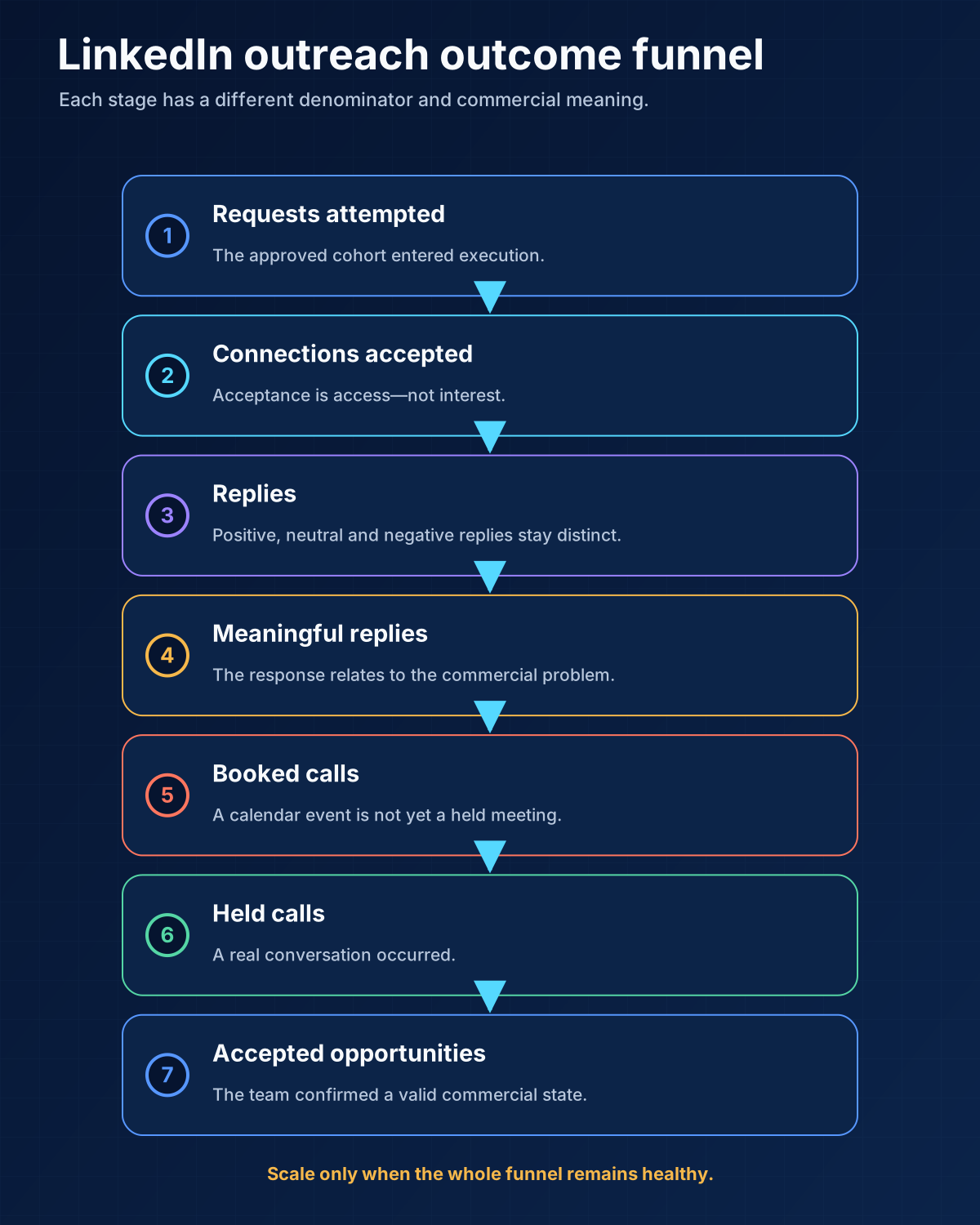
- 05Judge the whole funnel from accepted connection to meaningful reply, held call and opportunity.
Compare the workflow job first; automate only after authority, reply ownership and account exposure are explicit.
01 / LinkedIn outreach tools
LinkedIn outreach tools at a glance
| Tool | Main job | Evidence here | Human gate that still matters | Best fit |
|---|---|---|---|---|
| LinkedIn Sales Navigator | Search, account context, saved leads, signals | Official LinkedIn documentation | Confirm current role, account fit, and reason to contact | Manual or named-account research |
| Linked Helper | Desktop execution and campaign steps | Direct use | Account limits, list approval, copy, and every reply | Cost-sensitive operators who accept policy exposure |
| Lemlist | Email plus LinkedIn sequence orchestration | Direct use in a broader workflow | Channel order, sender health, reply stop, CRM admission | SMB multichannel execution |
| HeyReach | Multi-sender LinkedIn execution and shared inbox | Documentation reviewed | Account permissions, rotation logic, reply owner | Agencies and multi-seat teams |
| Expandi | LinkedIn and email sequence execution | Documentation reviewed | Campaign logic, duplicate protection, reply ownership | Teams wanting one multichannel interface |
| Dripify | LinkedIn sequences, team controls, analytics | Documentation reviewed | Enrollment, limits, message review, stop states | Small teams wanting a guided interface |
| Waalaxy | LinkedIn and email prospecting sequences | Documentation reviewed | Data origin, sequence selection, reply handling | Solo and small-team prospecting |
| Skylead | LinkedIn plus email smart sequences | Documentation reviewed | Source quality, branch logic, sender and suppression | Operators coordinating two channels |
| La Growth Machine | Conditional LinkedIn, email, and other-channel workflows | Documentation reviewed | Conditions, identity matching, shared inbox ownership | More complex multichannel paths |
| Overloop | AI-assisted prospecting and outbound workflows | Documentation reviewed | Research evidence, copy approval, CRM state | Teams that want prospecting plus execution |
02 / counts as a
What counts as a LinkedIn outreach tool
- Account and lead search. Find people by company, title, seniority, geography, relationship, or activity.
- Signal collection. Surface professional changes or engagement that may justify research.
- Message preparation. Draft or personalize a connection request, DM, InMail, or follow-up.
- Action execution. Visit profiles, send requests, withdraw requests, send messages, or create manual tasks.
- Conversation handling. Put replies in one inbox, tag them, assign an owner, and stop automation.
- System coordination. Sync CRM state, connect email, prevent duplicate touches, and report the funnel.
ICP → approved list → verified professional context → message thesis → permitted LinkedIn action → reply stop → human owner → CRM rule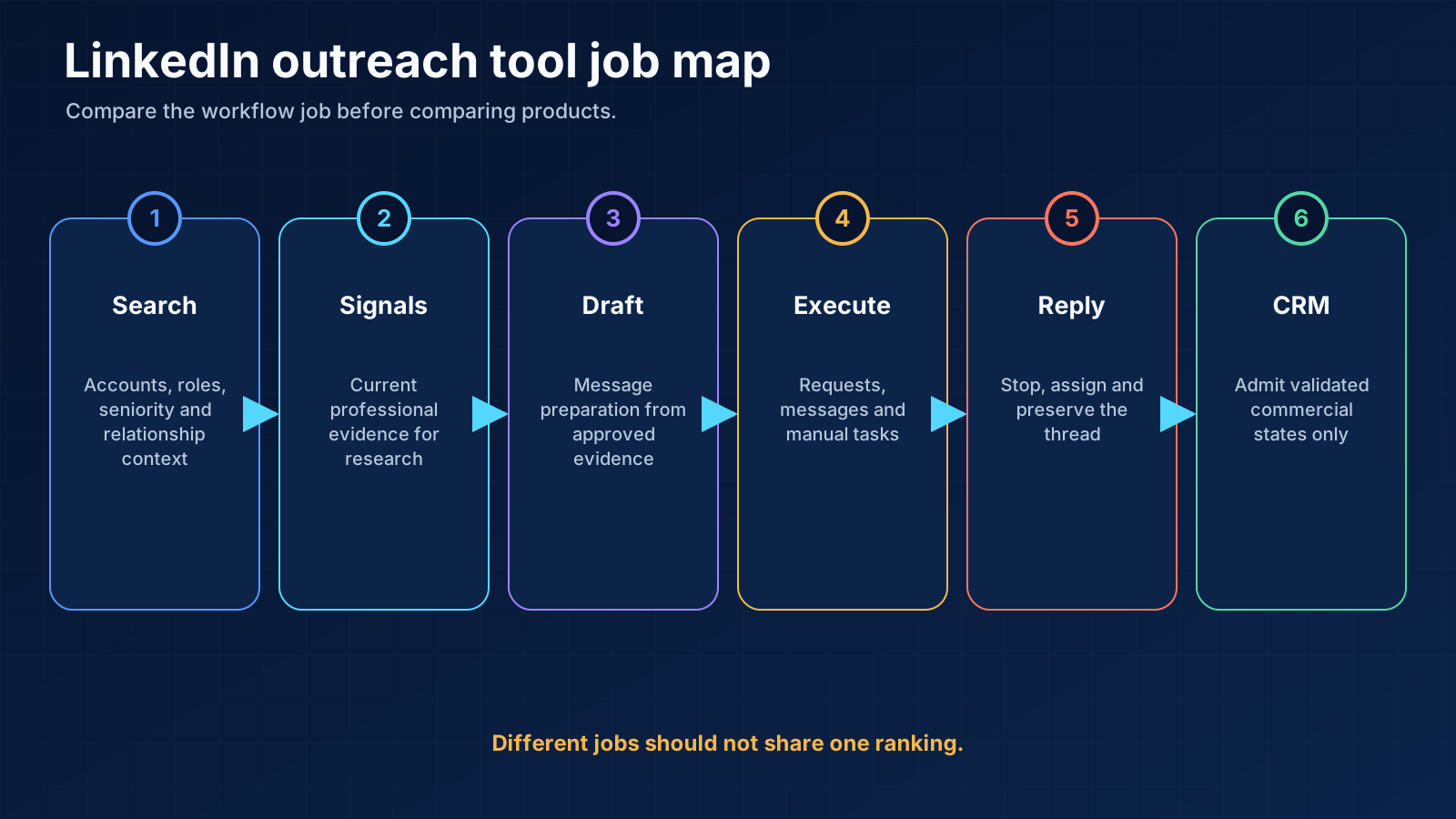
03 / we evaluated the
How we evaluated the shortlist
- What object does the product control: search result, profile, request, message, reply, or CRM record?
- Does it show the source and date behind a “signal”?
- Can a human approve the list and message before execution?
- Can named accounts be removed from automation?
- Does one reply stop every related step across channels?
- Can an SDR claim the conversation without another sender continuing?
- Can the team export its list, message version, reply state, and outcome?
04 / platform-risk contract most
The platform-risk contract most comparisons skip
| Decision | Required answer |
|---|---|
| Account at risk | Which person's professional account is exposed, and what happens if access is restricted? |
| Permitted actions | Which actions may run, which are manual, and which are prohibited internally? |
| Named-account rule | Which customers, opportunities, partners, and strategic accounts never enter automation? |
| Kill switch | Which warning, reply, list defect, or brand failure pauses the campaign? |
| Recovery owner | Who reviews a restriction, preserves evidence, changes the workflow, and communicates internally? |
05 / Best LinkedIn outreach
Best LinkedIn outreach tools by workflow job
LinkedIn Sales Navigator: best for manual research and current professional context
Linked Helper: best for low-cost execution, with explicit account exposure
Lemlist: best for a visible email-plus-LinkedIn state machine
HeyReach: best documented fit for multi-sender teams and agencies
Expandi: best for teams that want one LinkedIn-and-email execution interface
Dripify: best for a guided LinkedIn sequence and manager view
Waalaxy: best for an accessible solo or small-team prospecting flow
Skylead: best for smart-sequence branching across LinkedIn and email
La Growth Machine: best for more complex conditional multichannel paths
Overloop: best for teams that want AI-assisted prospecting plus execution
06 / professional signals are
Which professional signals are worth using
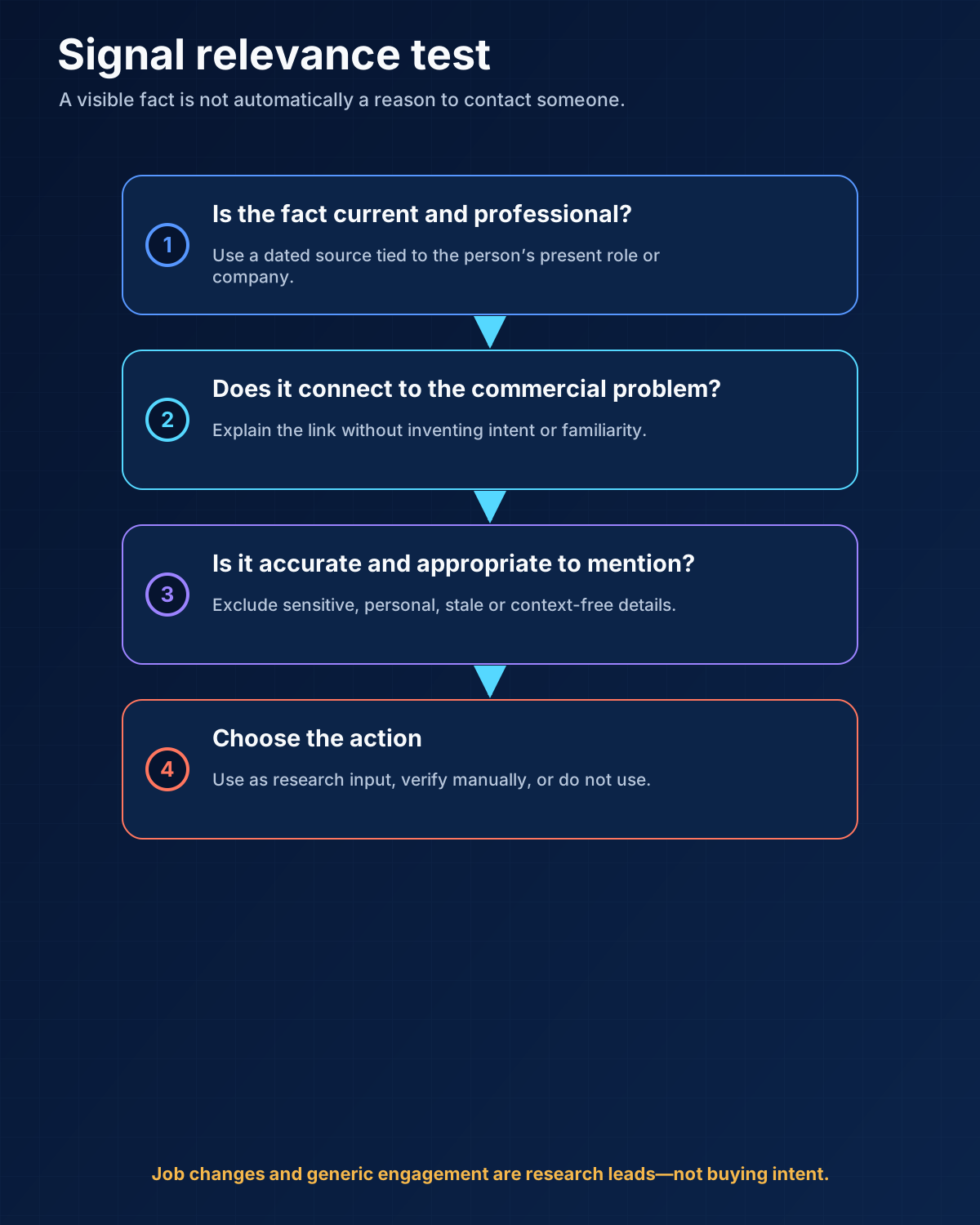
Stronger signals to investigate
- engagement around a competitor, adjacent solution, or problem category;
- a current company initiative visible in an official source;
- an active role or responsibility directly connected to the offer;
- a relevant product launch, market move, hiring pattern, or operational change;
- a mutual customer, partner, or credible relationship path;
- a buyer action connected to your company, where the platform and consent basis allow it.
Weak signals unless more context exists
- job change by itself;
- promotion by itself;
- a generic congratulatory post;
- old content with no current commercial link;
- a random personal interest;
- a company fact that could be inserted into any template.
07 / human-approval matrix
The human-approval matrix
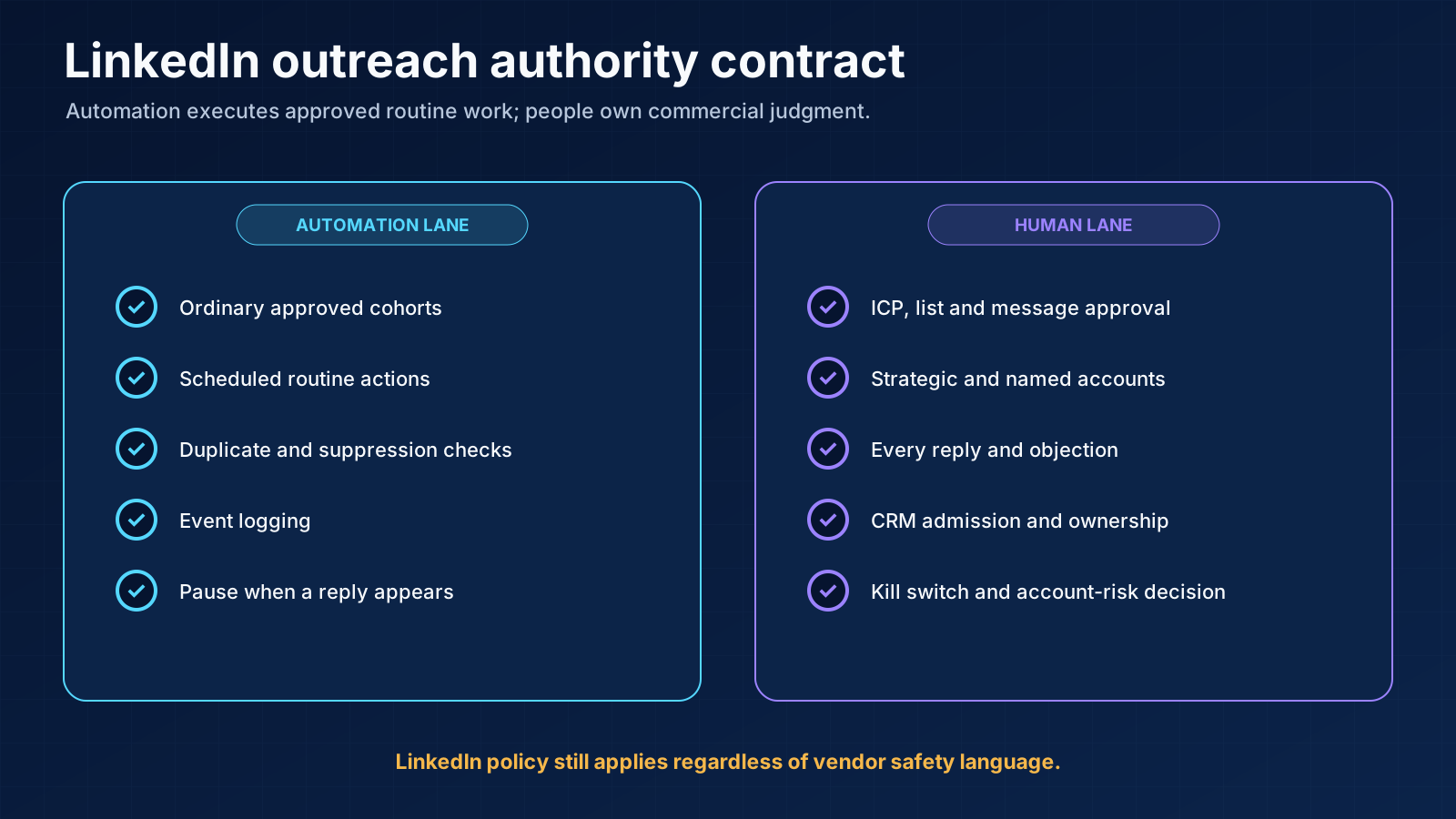
| Action | Default authority | Why |
|---|---|---|
| Define ICP, exclusion, and offer | Human | The system cannot repair a market decision it was never given |
| Approve list and signals | Human, with sampling later | False fit scales into wasted touches and brand damage |
| Draft ordinary first messages | AI/tool may draft | Evidence and claim still need review during setup |
| Send ordinary approved requests/follow-ups | May automate after proof | Saves repetitive execution time |
| Strategic or named accounts | Human | Context, ownership, and downside are higher |
| Comments, likes, voice notes | Risk-dependent and usually manual | They represent the person publicly and can look synthetic |
| Classify replies | Tool may suggest | SDR validates meaning and next action |
| Unsubscribe or explicit negative | Immediate stop/suppression | Continuing creates brand and compliance risk |
| CRM admission | Human-validated rule | Cold list volume is not pipeline |
08 / 30-day pilot for
A 30-day pilot for a small B2B team
Week 1: prove the list and message manually
Week 2: configure the smallest useful executor
Week 3: run a controlled batch
Week 4: decide by funnel and operating cost
09 / Selection rules by
Selection rules by team type
Founder or solo seller
Small in-house SDR team
Agency or multi-sender team
Technical multichannel operation
Team consolidating prospecting and execution
10 / final shortlist worksheet
A final shortlist worksheet
- Job: “We need the tool to execute approved follow-ups.”
- Non-job: “It must not choose our ICP or named accounts.”
- Input: “It receives a human-approved list with current evidence.”
- Action: “It may send ordinary requests and follow-ups.”
- Stop: “Any reply or account warning pauses the person.”
- Owner: “The assigned SDR reads and answers the reply.”
- CRM: “Only a validated conversation enters CRM.”
- Proof: “We will compare review time, replies, calls, and warnings.”
- Exit: “We will remove the tool if control or account exposure is unacceptable.”
11 / Frequently asked questions
Frequently asked questions
Are LinkedIn outreach automation tools safe?
What is the best LinkedIn outreach tool for a small business?
Should connection requests be personalized?
Which metric matters most?
When should LinkedIn lead instead of cold email?
12 / Final recommendation
Final recommendation
Research note
Methodology
- 01Anastasiia's direct-use evidence covers Linked Helper, Lemlist, Instantly, Outreach.io and Snov.io over more than seven years.
- 02Other products are compared from official documentation and are not presented as controlled hands-on tests.
- 03The shortlist is ordered by workflow job rather than paid placement, affiliate relationship or a universal score.
Source ledger
Sources & editorial notes
- 01LinkedIn prohibited software and extensions
LinkedIn Help · Official product, platform, provider or standards source used for the bounded claim cited in this guide.
- 02Sales Navigator lead and account filters
LinkedIn Help · Official product, platform, provider or standards source used for the bounded claim cited in this guide.
- 03Linked Helper product documentation
Linked Helper · Official product, platform, provider or standards source used for the bounded claim cited in this guide.
- 04Lemlist product documentation
Lemlist · Official product, platform, provider or standards source used for the bounded claim cited in this guide.
- 05HeyReach product documentation
HeyReach · Official product, platform, provider or standards source used for the bounded claim cited in this guide.
- 06Expandi product documentation
Expandi · Official product, platform, provider or standards source used for the bounded claim cited in this guide.
- 07Dripify product documentation
Dripify · Official product, platform, provider or standards source used for the bounded claim cited in this guide.
- 08Waalaxy product documentation
Waalaxy · Official product, platform, provider or standards source used for the bounded claim cited in this guide.
- 09Skylead product documentation
Skylead · Official product, platform, provider or standards source used for the bounded claim cited in this guide.
- 10La Growth Machine product documentation
La Growth Machine · Official product, platform, provider or standards source used for the bounded claim cited in this guide.
- 11Overloop product documentation
Overloop · Official product, platform, provider or standards source used for the bounded claim cited in this guide.