
Software comparison & buyer's guide · AI SDR tools
Best AI-Powered Tools for Sales Outreach Personalization at Scale
AI may assist research organization and drafting. A human editor reviews every published page, checks material claims against the cited sources and owns the final decision. No company paid for placement in this article.
AI use policyAgent-ready brief
AI takeaways
Keep the key points here, or take a source-aware text brief into Claude, ChatGPT or another AI workspace.- 01Choose by the bottleneck: research, signal interpretation, writing, coaching or execution.
- 02Connect a dated professional source to a restrained commercial hypothesis.
- 03Do not use personal life, sensitive data, stale facts or random details.
- 04Test tools on the same prospects with a human answer key.
- 05Measure source errors, overrides, edit time and accepted outcomes.
Personalization at scale means more seller-approved relevance with controlled review time, not more variables or message volume.
01 / Buying decision
The short answer: choose by the personalization bottleneck
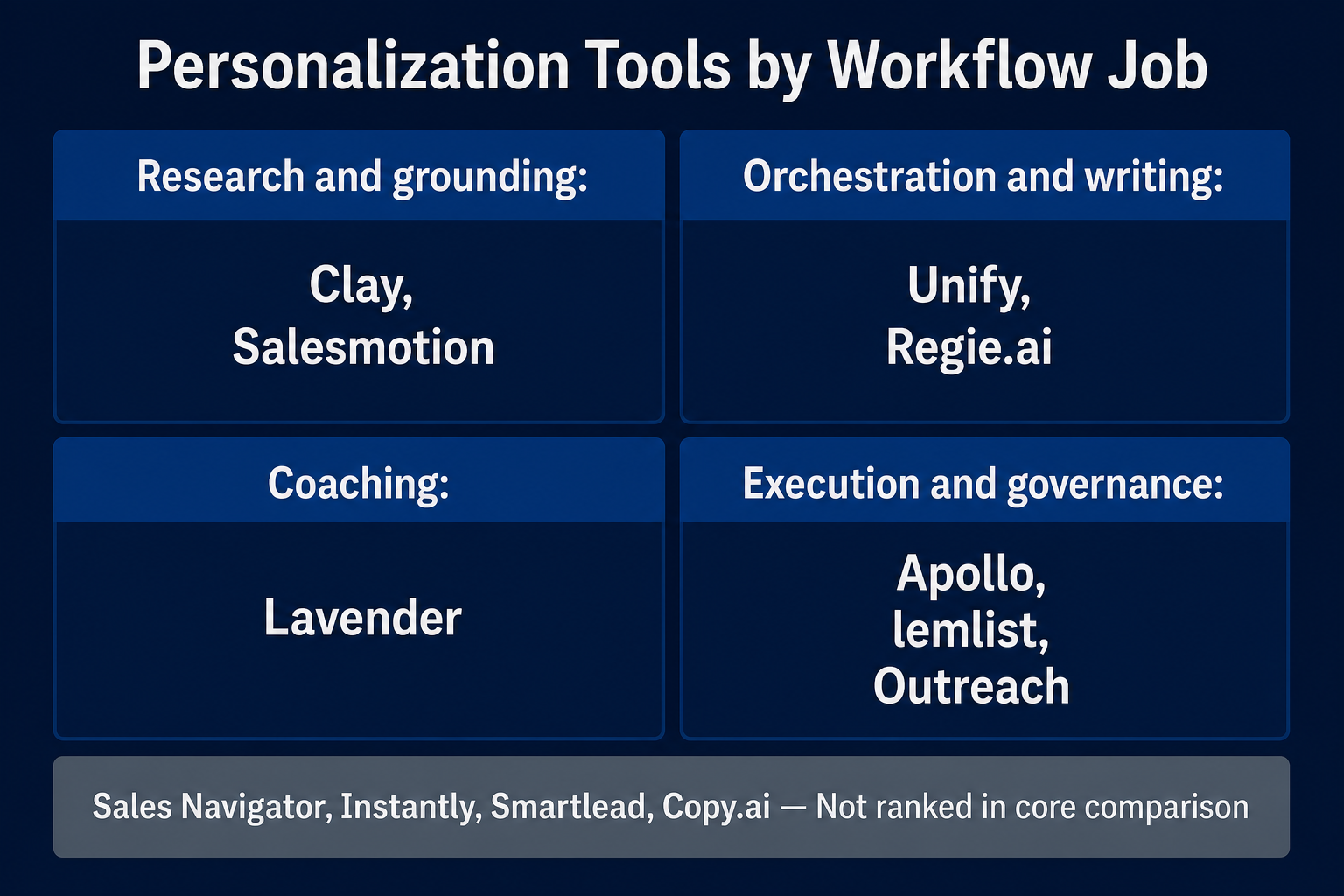
| Your current bottleneck | Best-fit shortlist | Why it belongs on the shortlist | Human control that remains |
|---|---|---|---|
| Custom research and source-backed fields | Clay | Combines selected data, web research, prompts and conditional workflow logic | Approve sources, allowed claims, run conditions and cost |
| Dated account signals with visible sources | Salesmotion | Organizes account events and source context before suggesting outreach | Decide whether the event creates a real reason to contact |
| Signal-to-sequence orchestration | Unify | Connects research agents, qualification, personalization and sequence actions | Approve the play, source policy and high-risk records |
| Seller writing and email coaching | Lavender | Brings recipient context and draft feedback into the seller's writing surface | Verify research and decide whether the suggestion improves the message |
| Adaptive, multichannel prospecting | Regie.ai | Connects research, signals, personalized content, sequence actions and CRM logging | Set authority, stop rules, named-account handling and reply ownership |
| Database-to-sequence workflow | Apollo | Uses research fields, dynamic variables, AI drafting and sequences in one operating surface | Validate identity, current role, required fields and campaign logic |
| Hands-on multichannel campaign execution | lemlist | Places AI variables, prompt testing and reply controls near the live sequence | Review the sample and stop every reply for SDR validation |
| Enterprise research and content governance | Outreach | Adds permission-controlled research, seller content and personalization agents | Govern sources, knowledge, permissions, rollout and account tier |
personalization.02 / What personalization at
What personalization at scale actually means
- What current professional evidence justifies contact?
- Where did that evidence come from, and when was it observed?
- Why could it matter to this role and this offer?
- Which part is fact, which part is a commercial hypothesis and who approved the message?
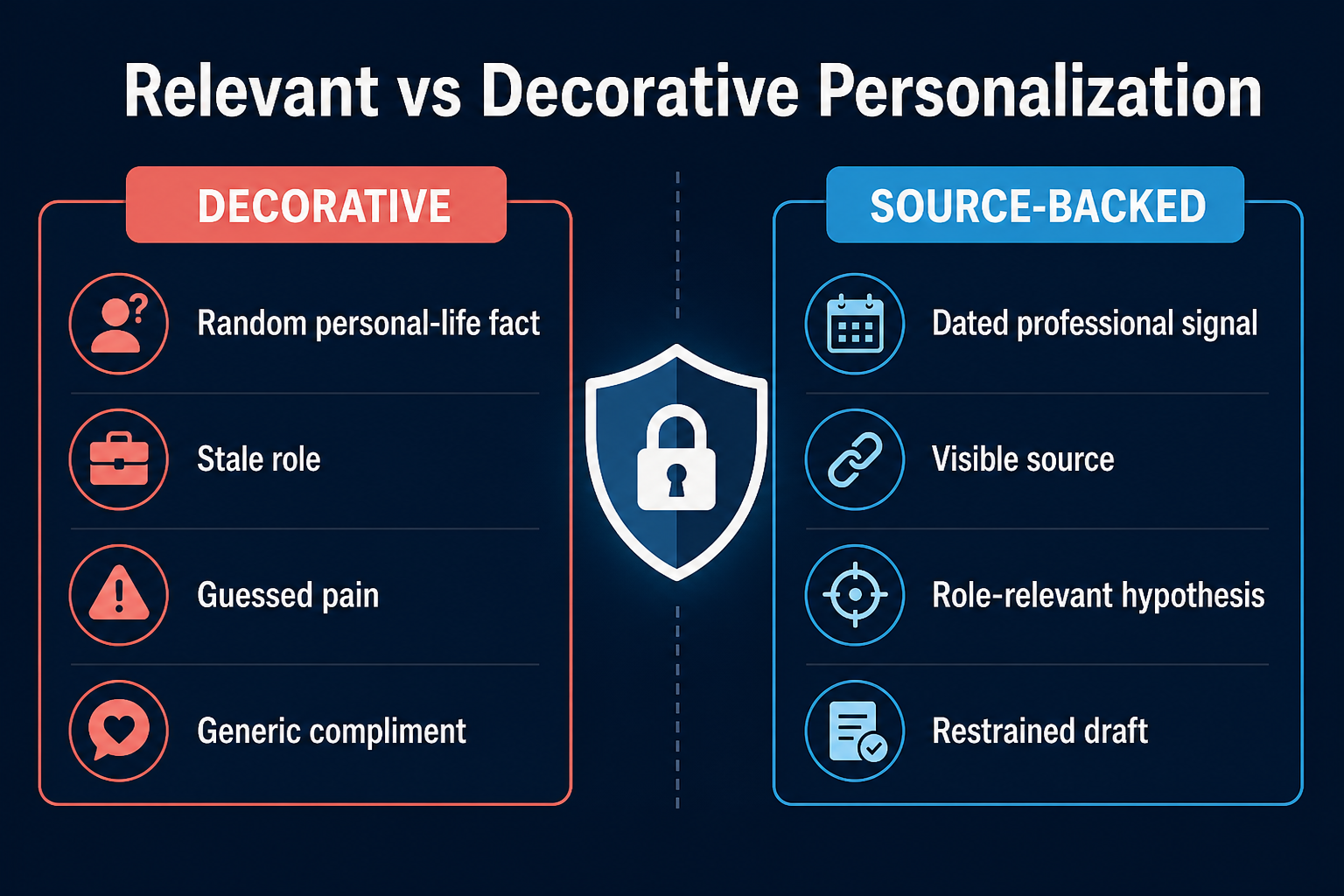
Relevant personalization connects evidence to a commercial hypothesis
The company is hiring may be a sourced fact. The team must be struggling with onboarding is a hypothesis. The seller may decide that the relationship is plausible enough to ask a restrained question. The message should not state the hypothesis as known pain.I saw your company is hiring. Congratulations on the growth.
I noticed three new implementation roles opened this month. Teams adding that function often have to standardize handoffs before volume increases. Is that part of the current plan, or is the hiring for another priority?
Some facts should never become personalization inputs
- Use current professional or commercial context connected to the person's role.
- Prefer first-party company pages, public filings, current professional profiles, product activity the company is permitted to use and clearly sourced business events.
- Do not use personal-life details, sensitive data, stale or unverified facts, or random mentions with no commercial context.
- Treat social activity as a research cue, not proof of purchase intent, qualification or permission.
- Follow the rules of the channel and the laws that apply to the sender and recipient.
03 / How Luck My
How Luck My Sales evaluated these tools
- Workflow-used; native personalization documentation-reviewed: The product appeared in documented sales work, but this article did not compare its AI-personalization feature against the others.
- Documentation-reviewed only: Current capabilities were checked against official material. No hands-on, accuracy or outcome claim is made.
- First-party operating context: The owner supplied a real workflow involving a product connected to her own business. It is useful process evidence, not independent proof.
04 / Evidence
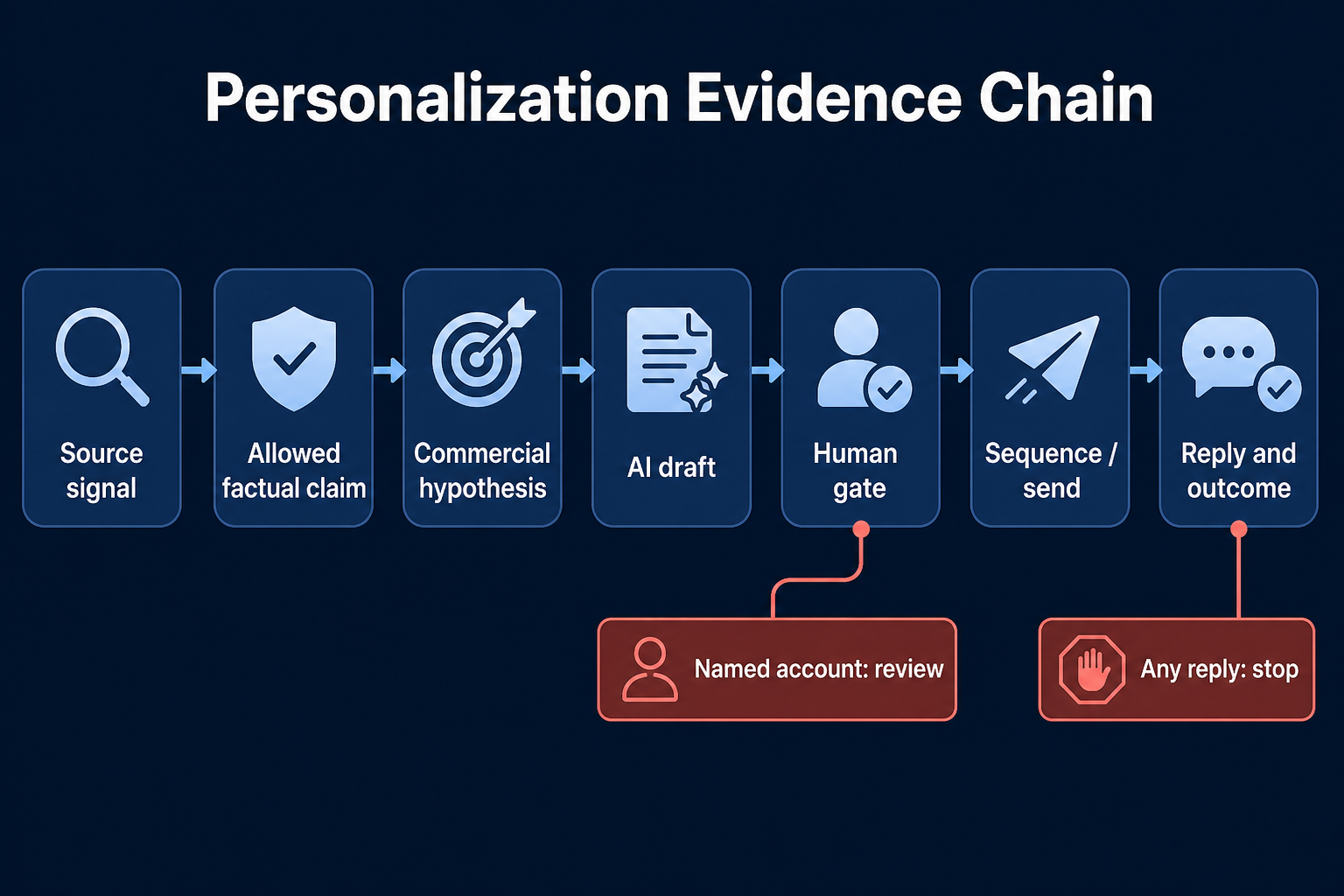
The personalization evidence chain
Professional source -> allowed factual claim -> commercial hypothesis -> AI draft -> human gate -> send/sequence -> reply and outcome1. Professional source
Recent post is not enough. The record should show which post, who published it and why the person-company match is reliable.2. Allowed factual claim
3. Commercial hypothesis
4. AI draft
5. Human gate
6. Send and sequence
7. Reply and outcome
05 / Comparison
Eight AI outreach personalization tools at a glance
| Product | Primary job in this guide | Inspectable context described in official sources | Generation or execution control | Evidence level here | Main buying risk |
|---|---|---|---|---|---|
| Clay | Custom research and personalized fields | Selected table columns, web research and enrichment outputs | Prompts, models, examples, structured outputs and run conditions | Workflow-used broadly; native personalization docs-reviewed | Flexible workflows can amplify weak sources and cost |
| Salesmotion | Account-signal grounding | Signal date, type, headline and source | Account summaries and outreach suggestions | Documentation-reviewed only | Vendor intent categories can be mistaken for buyer need |
| Unify | Signal-to-action orchestration | First-party, third-party and agent-researched context | Agents, Plays, smart snippets, qualification and sequences | Documentation-reviewed only | Broad automation before the motion is proven |
| Lavender | In-workflow writing coaching | Recipient research surfaced in the writing interface | Draft suggestions, coaching and email edits | Documentation-reviewed only | A high tool score can be mistaken for buyer relevance |
| Regie.ai | Adaptive multichannel prospecting | Signals, research, engagement and CRM context described by the vendor | Agentic email, social, call content, prioritization and logging | Documentation-reviewed only | High authority requires rigorous stops, permissions and audit |
| Apollo | Data, research fields and sequences | Apollo/contact fields, custom fields and AI research fields | AI assistant, dynamic variables, sequence review and rules | Workflow-used broadly; native personalization docs-reviewed | Database convenience can hide stale or weak evidence |
| lemlist | Campaign-level personalization and execution | Imported variables, AI columns and optional context tools | Prompt test, AI variables, preview, sequence insertion and reply behavior | Real workflow; native AI variables docs-reviewed | Campaign fluency can obscure targeting or source errors |
| Outreach | Enterprise research and personalization governance | Internal/external research, citations, account/prospect fields and seller content | Permissioned agents, knowledge, variables and sequence content | Documentation-reviewed only | Package, rollout and admin complexity |
Clay: best fit for custom, source-controlled personalization fields
Salesmotion: best fit for dated account signals with source visibility
buying intent labels and product claims are not treated as independent evidence.Unify: best fit for signal-to-sequence orchestration
Lavender: best fit for seller coaching inside the email workflow
Regie.ai: best fit for adaptive, multichannel prospecting
Apollo: best fit for an integrated database-to-sequence starting point
lemlist: best fit for hands-on multichannel execution with a strict reply stop
Outreach: best fit for enterprise research and content governance
06 / Method
Upstream sources and sending tools are not personalization quality
| Adjacent layer | Examples | Useful contribution | What it does not prove |
|---|---|---|---|
| Professional identity and relationship context | LinkedIn Sales Navigator | Current role, account and visible professional activity for human research | Need, permission or message quality |
| Agentic reasoning and QA | Claude Code or Codex | Apply local rules, transform records and prepare review queues | Contact accuracy or authority to send |
| Email-first sending | Instantly, Smartlead | Execute an approved email motion and manage capacity | Relevance, factual grounding or commercial fit |
| General workflow generation | Copy.ai or a custom LLM workflow | Draft or transform content under supplied instructions | Independent research quality or safe execution |
07 / Stack design
Three stack patterns by sales motion
Founder-led or solo sales
Sales Navigator or Apollo -> manual/agentic research -> seller-reviewed message -> lemlist or an email sequencerSMB SDR team
- Connected path: Apollo or Sales Navigator -> optional Clay -> Lavender or a controlled drafting layer -> lemlist.
- Unified path: Unify, Apollo or lemlist, depending on whether the main job is signal orchestration, database-to-sequence work or campaign execution.
Enterprise or account-based sales
08 / Workflow
What the real lemlist workflow proves—and does not prove
What the workflow did
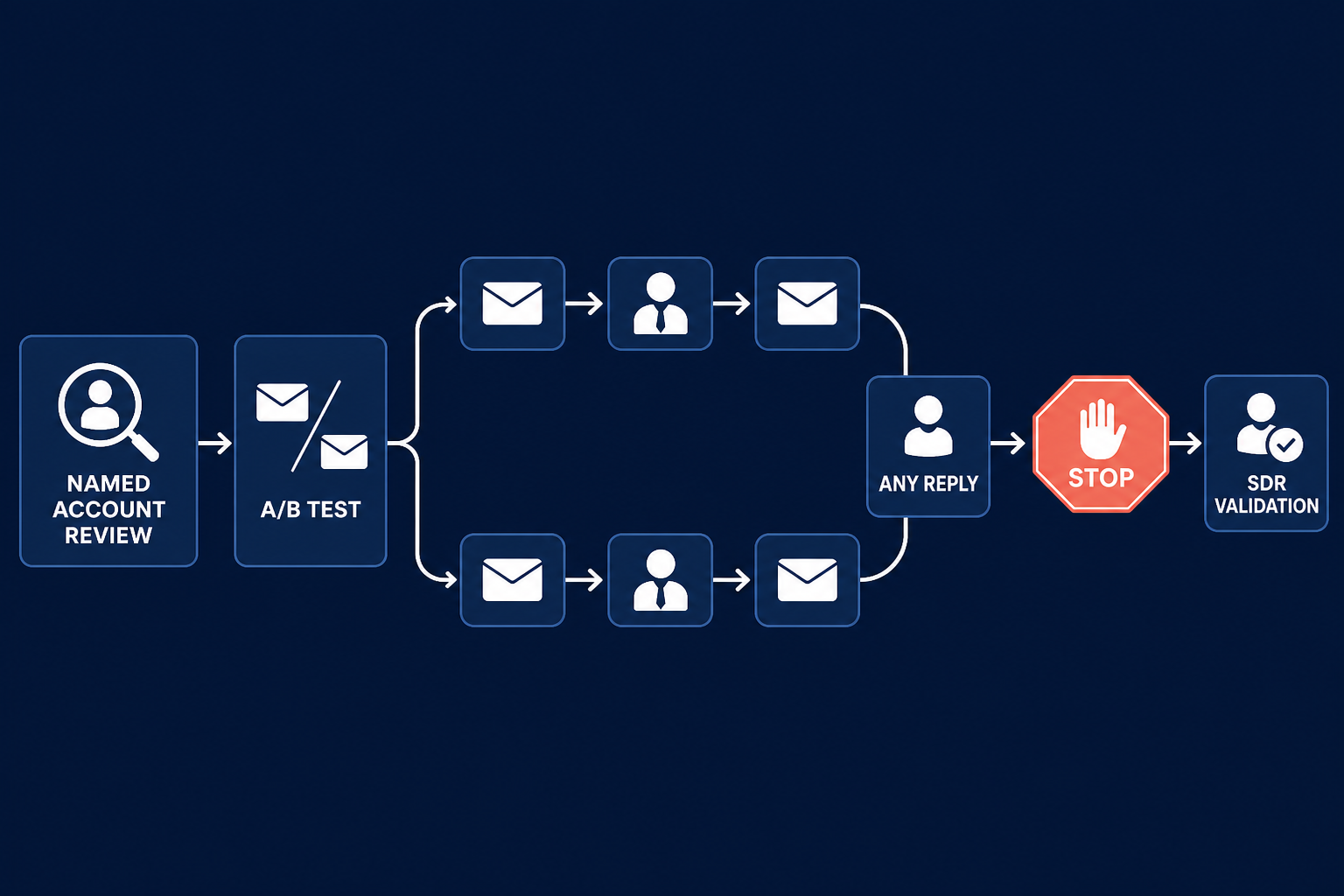
- The campaign used A/B connection-request variants and several LinkedIn follow-ups.
- The head supplied the ICP, offer, commercial logic and strategy before automation.
- Normal first messages and follow-ups could run automatically after setup.
- Strategic or named accounts required human review.
- Any reply stopped the active sequence.
- An SDR validated the reply and chose a next state: contact later, remove, reactivate later or ask the technical team for more detail.
- Positive or neutral, human-validated contacts could enter CRM. The untouched cold list stayed outside the system of record.
What the workflow shows
What the workflow cannot show
09 / Pilot
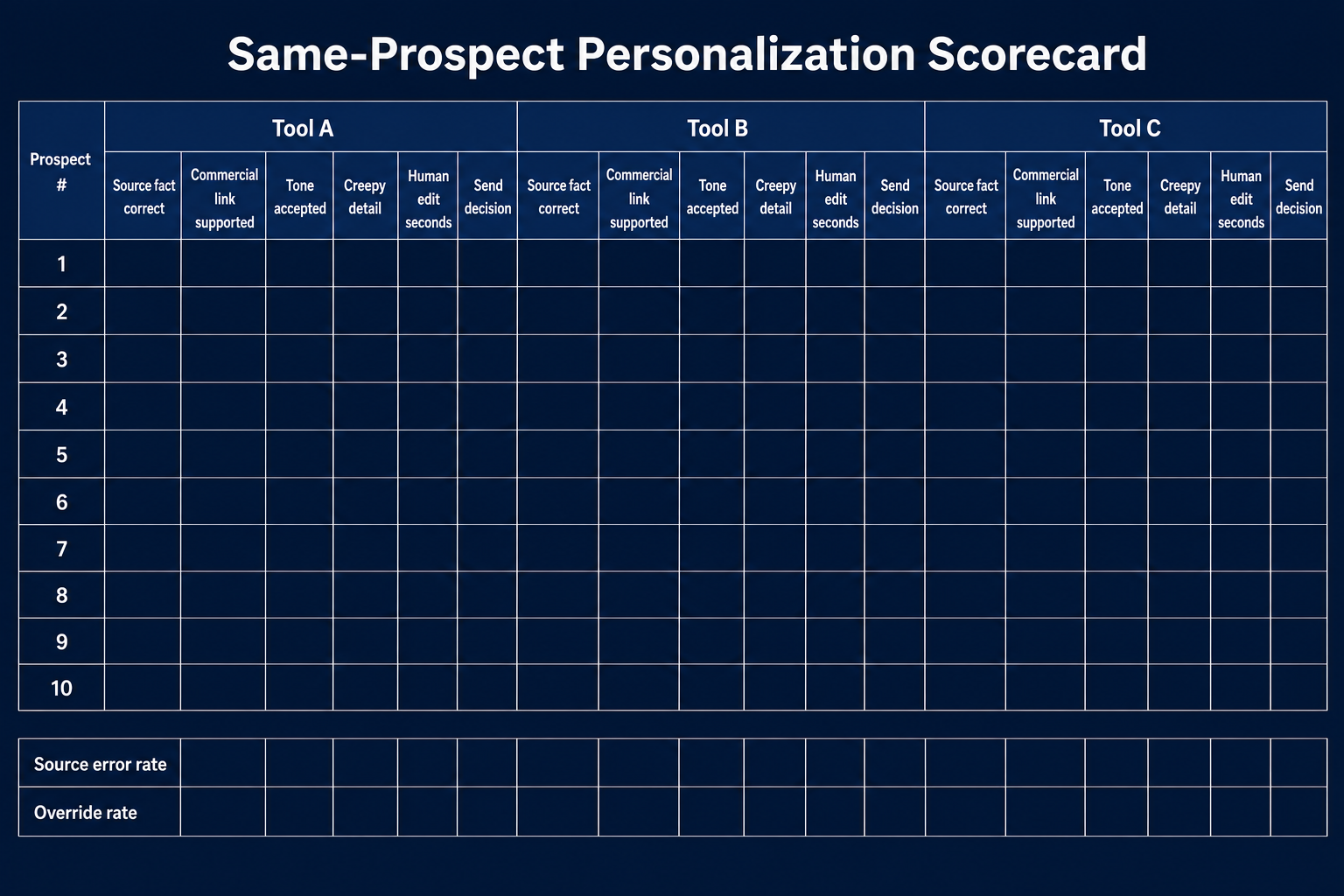
Test personalization tools on the same prospects before buying
Step 1: Define the job and sample
Step 2: Build the answer key before generating copy
- verified person, role and company;
- approved professional sources and timestamps;
- facts the message may use;
- facts it must not use;
- plausible commercial hypotheses;
- named-account or sensitive-data flags;
- correct fallback when evidence is insufficient.
Step 3: Give every tool the same brief
Step 4: Review the outputs blind
- factual accuracy;
- source traceability;
- commercial relevance;
- tone and specificity;
- creepy or prohibited detail;
- human review time.
Step 5: Test failure and stop behavior
- a required field is empty;
- two sources disagree;
- the professional signal expires;
- the seller rejects a draft;
- one person at the account replies;
- the prospect unsubscribes;
- CRM already has an active owner or opportunity.
Step 6: Compare controlled outcomes
- Source error rate = drafts with at least one wrong sourced claim / drafts reviewed.
- Unsupported inference rate = drafts stating an unproved hypothesis as fact / drafts reviewed.
- Override rate = drafts changed or rejected / drafts reviewed.
- Median review time = total review seconds / reviewed drafts, reported with the sample size.
- Seller approval rate = drafts approved for send / drafts reviewed.
10 / Measurement
Measure controlled relevance, not raw volume
messages generated. It is messages a seller would permit the team to send.| Measurement layer | Metric | What it answers |
|---|---|---|
| Evidence quality | Source error and unsupported inference rates | Can the draft be trusted enough to review? |
| Operating burden | Review time, override rate and exception count | Does the system reduce work without hiding risk? |
| Buyer response | Meaningful replies and qualified conversations per unique contacted person | Does the message create a relevant conversation? |
| Revenue progression | Held meetings and accepted opportunities under a defined CRM rule | Does the workflow produce a commercial outcome? |
11 / Failure modes
Nine failure modes and their safeguards
| Failure mode | Why it happens | Safe detection and fallback |
|---|---|---|
| Random-fact opener | The system selects any available fact rather than a commercially relevant one | Require an approved connection between source class, role and offer; otherwise use a neutral fallback |
| Stale role or employer | Contact data and social context were not refreshed | Store timestamp and person-company match; route uncertain identity to review |
| Invented causal link | AI turns an event into known pain or budget | Separate factual claim from hypothesis in fields and prompt rules |
| Creepy or sensitive detail | The source policy rewards novelty instead of professional relevance | Block personal-life and sensitive categories before generation |
| Missing-variable leak | A template sends blank, broken or literal variables | Require fields, preview samples and use no-send behavior for critical values |
| Same-sounding copy | One prompt produces cosmetic variations at scale | Review semantic variety, not synonym count; keep the offer and buyer situation specific |
| Named-account automation | High-value records enter a mass rule | Add an account-tier gate before enrollment and require named seller approval |
| Duplicate or reply leakage | Channel systems do not share the changed state | Use account/contact suppression and stop every channel on any reply |
| CRM pollution | Every imported cold contact becomes a lead or pipeline record | Keep pre-reply work in a staging system; create CRM records only after human validation under a clear rule |
12 / FAQ
Frequently asked questions
What is AI-powered sales outreach personalization?
Which AI tool is best for personalized outreach at scale?
How does AI support personalized sales outreach without sounding generic?
How do AI sales agents personalize outreach?
Should a human review every AI-personalized message?
Are Instantly and Smartlead personalization tools?
What prospect data is appropriate for personalization?
What should a personalization tool write to CRM?
13 / Method
Method, disclosure and update triggers
- Apollo, Clay, Sales Navigator and lemlist appeared in broader documented workflows.
- The lemlist sequence and reply handoff are owner-confirmed first-hand process evidence.
- Salesmotion, Unify, Lavender, Regie.ai and Outreach are documentation-reviewed only.
- No eight-product same-prospect test was performed.
- NextLevel AI appears only as disclosed first-party context inside the real sequence.
Choose the tool that turns permitted professional evidence into a reviewable commercial message with the least controlled effort. Reject any system that hides the source, invents the reason to contact or keeps automating after the buyer replies.
14 / Method
Sources
- Clay: AI in Clay and Use AI.
- Salesmotion: Understanding Account Signals and How Salesmotion Collects Data.
- Unify: Agents and Plays.
- Lavender: Coach overview.
- Regie.ai: Prospecting Agents and Signals.
- Apollo: AI Assistant and Custom Dynamic Variables.
- lemlist: AI Variables and Reply Controls.
- Outreach: Research Agent and Personalization Agents.
- LinkedIn: Sales Navigator and Prohibited Software.
- US Federal Trade Commission: CAN-SPAM compliance guide.
- Anastasiia Krynytska's owner-confirmed lemlist workflow and operating notes, reviewed 18 August 2026.
- Luck My Sales methodology.
Research note
Methodology
- 01The comparison combines owner-confirmed workflow evidence with official documentation.
- 02Native features were not tested head-to-head; best-fit labels describe workflow jobs.
- 03The real Lemlist workflow is disclosed first-party context and shows only control boundaries.
Source ledger
Sources & editorial notes
- 01prohibited-software guidance
LinkedIn Help · Official product, platform, policy or regulatory source cited in this guide.
- 02AI overview
Clay University · Official product, platform, policy or regulatory source cited in this guide.
- 03Use AI documentation
Clay University · Official product, platform, policy or regulatory source cited in this guide.
- 04account-signal documentation
Salesmotion · Official product, platform, policy or regulatory source cited in this guide.
- 05data-collection explanation
Salesmotion · Official product, platform, policy or regulatory source cited in this guide.
- 06Agents documentation
Unify · Official product, platform, policy or regulatory source cited in this guide.
- 07Plays product page
Unify · Official product, platform, policy or regulatory source cited in this guide.
- 08Coach overview
Lavender · Official product, platform, policy or regulatory source cited in this guide.
- 09Prospecting Agents page
Regie.ai · Official product, platform, policy or regulatory source cited in this guide.
- 10Signals page
Regie.ai · Official product, platform, policy or regulatory source cited in this guide.
- 11AI Assistant documentation
Apollo Knowledge Base · Official product, platform, policy or regulatory source cited in this guide.
- 12custom dynamic-variable documentation
Apollo Knowledge Base · Official product, platform, policy or regulatory source cited in this guide.
- 13AI Variables documentation
lemlist Help Center · Official product, platform, policy or regulatory source cited in this guide.
- 14reply controls
lemlist Help Center · Official product, platform, policy or regulatory source cited in this guide.
- 15Research Agent overview
Outreach Support · Official product, platform, policy or regulatory source cited in this guide.
- 16Personalization Agent documentation
Outreach Support · Official product, platform, policy or regulatory source cited in this guide.
- 17CAN-SPAM compliance guide
US Federal Trade Commission · Official product, platform, policy or regulatory source cited in this guide.
- 18LinkedIn: Sales Navigator
LinkedIn · Official product, platform, policy or regulatory source cited in this guide.