Weekly industry intelligence · No noiseSubscribe to the Luck My Sales newsletterFree briefing

Independent intelligence on AI in sales

Menu

Software comparison & buyer's guide · AI SDR tools

10 Lead Qualification Tools Compared by the Decision They Control

Compare ten B2B lead qualification tools by the evidence they see, the decision they support and the human control required before activation.
Editorial disclosure

AI may assist research organization and drafting. A human editor reviews every published page, checks material claims against the cited sources and owns the final decision. No company paid for placement in this article.

AI use policy

Agent-ready brief

AI takeaways

Keep the key points here, or take a source-aware text brief into Claude, ChatGPT or another AI workspace.
  1. 01Choose the qualification surface and controlled decision before choosing a vendor.
  2. 02Keep valid lead, warm lead, seller-accepted or SQL and sold as separate commercial states.
  3. 03Disqualify any consequential workflow that lacks a usable human override and meaningful-reply stop rule.
  4. 04Use the CRM to preserve evidence, relationship state, ownership, overrides and the approved next action.
  5. 05Compare viable architectures on the same current sample with one human-reviewed answer key.
Includes summary, takeaways, sources and a use note.
The best lead qualification tools do not all perform the same job. A database helps you find a plausible contact. Enrichment adds evidence. A form or chat asks questions. A routing tool assigns the record. A CRM stores the relationship. None of those steps alone proves that a buyer is ready for sales.
Choose the tool only after you define the decision it may control. Then test its evidence, stop rules, CRM behavior and human override on your own sales motion.
I have used HubSpot, Apollo, Clay, Claude Code or Codex, Lemlist, Warmly, Qualified and NextLevel AI inside sales workflows. Typeform, Chili Piper and Default are included from current official documentation. This is not a controlled accuracy ranking.
My operating rule: Build the buying motion first, the sequence second and the tool stack third. Scale only after the connection works.
Disclosure: Luck My Sales has no affiliate, paid-placement or commercial relationship with the listed vendors. NextLevel AI is a first-party workflow example supplied by the owner. It was not eligible for an independent ‘best overall’ position. Product documents were reviewed on August 14, 2026.

Build the buying motion first, the sequence second and the tool stack third. Scale only after the connection works.

01 / Buying decision

The short answer: match the tool to the qualification job

Use HubSpot when the CRM should collect evidence and own the state. Use Qualified or Warmly when anonymous website activity must become a real-time conversation. Use Typeform when the buyer can answer a structured set of questions. Use Chili Piper or Default when the main problem is routing and scheduling after capture.
For outbound, use Apollo or Clay to prepare evidence before contact. Use Lemlist to execute a controlled sequence and stop it after a reply. Add a custom reasoning layer such as Codex or Claude Code only when your rules require evidence from several sources. Use voice qualification only when phone conversation is natural for the market and a human can take over.
Your actual bottleneckTool categoryStrong shortlistSafe output
CRM records lack a clear qualification stateCRM-native qualificationHubSpotReviewable state and owner queue
Website visitors leave before sales respondsConversational website qualificationQualified, WarmlyTranscript, recommendation and route
Buyers can answer fixed eligibility questionsForms and surveysTypeformStructured answers and branch
Good form fills reach the wrong sellerRouting and schedulingChili Piper, DefaultAssignment and meeting path
Outbound records lack fit evidenceDatabase and enrichmentApollo, ClayResearch recommendation
A sequence must react safely to repliesOutreach executionLemlistPause, stop or human task
Phone is the natural buying surfaceVoice qualificationNextLevel AI or another reviewed voice layerTranscript, transfer and next action
Local rules span several toolsCustom reasoning and stagingCodex or Claude Code plus a staging tableEvidence-linked recommendation for approval
The product that covers the most rows is not automatically the best choice. Each added layer creates more data, handoffs and failure points.

02 / Qualification states

Define “qualified” before comparing software

Many teams use one word for four different commercial states. That makes any tool look more capable than it is.
Our practical state chain is:
valid lead → warm lead → open to sales / SQL → sold

Valid lead

The person, role and company match. The record has a usable channel and enough evidence for the next action. This is a data and fit decision. It does not show interest.

Warm lead

The person has shown relevant activity or engaged with the company. A visit, reply, content interaction or prior conversation may create warmth. It still does not prove sales intent.

Open to sales or SQL

The buyer has accepted a sales conversation under your team's rule. In outbound, that may be a positive reply after a direct offer is clear. In inbound, it may be a high-intent request from a commercial page, followed by confirmation that the person fits.

Sold

The commercial process has reached a signed agreement or another explicit closed-won event. A qualification tool should not manufacture this state from activity.
This article compares tools that help move evidence between these states. For the full operating model, read How AI Assists Lead Qualification. For numeric prioritization, use the separate lead scoring software guide.

03 / Decision matrix

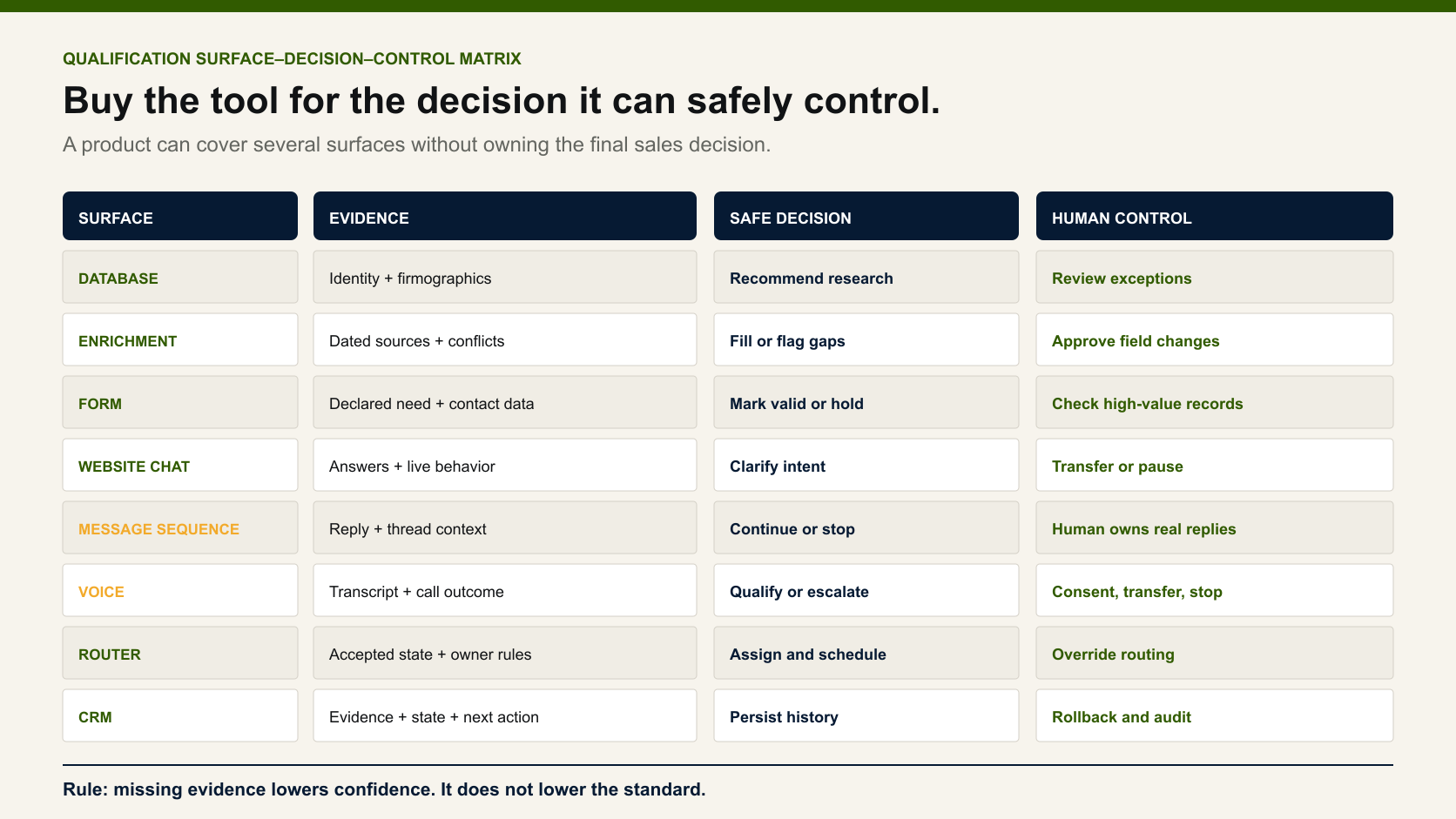
The Qualification Surface–Decision–Control Matrix

A useful comparison starts with three questions:
  1. Surface: Where does the tool observe or speak with the lead?
  2. Decision: What conclusion can it support from that evidence?
  3. Control: What may it change, and who can stop or reverse the action?
SurfaceEvidence availableDefensible decisionSafe automated actionHuman control that remains
Database or professional networkCompany, role, function, tenure, channel and activityRecord is worth researchAdd to a staging queueApprove fit and message
Enrichment workflowSource-linked firmographic and contact evidenceRequired fields are present or unresolvedRequest another source; flag a conflictResolve identity and ICP exceptions
FormAnswers, source, page and submitted fieldsBuyer passes stated eligibility rulesShow a relevant next stepReview high-value or ambiguous records
Website chatPage context, answers and transcriptVisitor is ready for a route or more questionsOffer a meeting or create a review taskTake over the conversation
Email, SMS or social sequenceMessage history, reply and channel stateReply requires a defined next actionStop the sequence and alert ownerInterpret meaning and write the response
VoiceLive answers, interruptions, consent state and transcriptCaller should transfer, schedule or enter reviewTransfer or create an approved taskHandle sensitive, complex or commercial decisions
Router and schedulerAccepted data, territory, capacity and ownershipWhich seller or queue should receive the recordAssign and offer a valid slotOverride owner and correct the route
CRMFull relationship history and seller decisionsCurrent commercial state and next actionLow-risk internal task or notificationApprove stage, nurture, call, opportunity and close
Matrix comparing database, enrichment, forms, chat, sequences, voice, routing and CRM by evidence, safe decision and human control.
Every qualification surface sees different evidence and should make a different class of decision.
If a vendor cannot explain these boundaries, it is selling automation before decision design.

04 / Evaluation

How we evaluated lead qualification software

We used seven operating tests. They matter more than a long feature list.
TestBuyer question
Job fitDoes the tool solve our capture, evidence, conversation, routing or CRM problem?
EvidenceCan a reviewer trace the material field, answer, page, transcript and date?
Unknown handlingCan the system say “unresolved” instead of inventing a yes or no?
Stop behaviorDoes a meaningful reply or human takeover stop the automation?
Human overrideCan a person reject the action before time or trust is lost?
CRM contractDoes the tool write a named state, reason, owner and next action without erasing history?
PilotabilityCan the team test it on the same sample and inspect false accepts and false rejects?
Human override is a mandatory gate. During a first launch, a person should review the records, logic, messages, routes and early replies. Later checks may become risk-based. High-cost actions still need approval.

05 / 10 tools

Ten lead qualification tools compared

ToolBest-fit qualification jobMain surfaceCore outputEvidence level hereMain limitation
HubSpotCRM-native qualification and stateForms, chat, CRMQualification property, route or lifecycle actionWorkflow-used; official docs reviewedBroad platform can blur fit, engagement and sales acceptance
QualifiedSalesforce-centered website conversationWebsiteConversation, qualification and routed meetingWorkflow-used; official docs reviewedBest value depends on Salesforce data and routing maturity
WarmlyTurning website signals into timely engagementWebsite and account signalsIdentified visitor, context and actionHands-on workflow; official docs reviewedIdentity and activity are not confirmed buying intent
TypeformStructured question-led qualificationFormAnswers, score, branch or meeting pathOfficial docs reviewedFixed questions may miss context or create form friction
Chili PiperForm-to-owner routing and schedulingForm and CRMQualified route and meetingOfficial docs reviewedIt improves handoff after rules exist; it does not define the ICP
DefaultComplex inbound routing workflowsForms, CRM and workflow canvasRoute, log and CRM actionOfficial docs reviewedMore logic can reproduce a bad qualification policy faster
ClayCustom evidence collection and pre-contact rulesData and enrichmentEnriched record and research resultHands-on workflow; official docs reviewedFlexible research can become expensive and hard to govern
ApolloDatabase-led outbound prioritizationB2B databaseCandidate list, score and sequence branchHands-on workflow; official docs reviewedSome records can be stale; a database match is not buyer evidence
LemlistSafe sequence execution and reply handoffEmail and LinkedIn workflowMessage, stop, branch or manual taskHands-on workflow; official docs reviewedDelivery logic cannot repair a weak ICP or offer
NextLevel AIVoice-led qualification and human transferPhone and related channelsConversation, transcript, CRM action or transferFirst-party workflow example; official site reviewedVoice fit, implementation and safeguards must be tested for the exact market
Best fit is our editorial view of the job each tool performs. It is not a vendor accuracy score.

1. HubSpot: best when qualification state belongs in the CRM

HubSpot is a practical anchor when forms, customer interactions and sales records already live in one CRM. Its current lead-scoring tools can keep fit and engagement rules near the record. Its Customer Agent qualification action can ask questions, evaluate answers, update a property and route a visitor toward a meeting or lifecycle action.
That does not make every automated state a sales decision. Teams should keep valid, warm, sales accepted and opportunity as separate fields. HubSpot also documents automatic lead-pipeline actions, so the buyer should test which events change a stage and how a seller moves it back.
Choose HubSpot when: the CRM is the trusted system of record and the team wants visible rules, conversation data and ownership in one place. Watch out for: treating a workflow property as proof that a seller accepted the lead.

2. Qualified: best for Salesforce-centered website conversations

Qualified connects website conversations with Salesforce data. Its Salesforce integration describes reading and writing CRM fields, creating leads, routing visitors and booking meetings. Its implementation material also places customer sign-off before the initial launch.
The useful decision is not “this anonymous visitor is good.” It is: “Given this page, account context, answers and CRM history, should this visitor meet a named seller now?” That decision should leave a transcript, reason and owner.
Choose Qualified when: Salesforce already holds the account context and the website is a major sales surface. Watch out for: buying a conversation layer before the team agrees on qualification rules, territories and calendars.

3. Warmly: best for acting on website context at the right time

Warmly combines website identification, account context and engagement. Its official website visitor identification material describes identifying visitors, syncing data and starting timely engagement.
I have used Warmly in a sales workflow. Its value is timing and context. A relevant visit may move a record into review or a conversation. It should not silently promote an uncertain identity to SQL.
Choose Warmly when: the team has enough website activity to justify real-time review and knows which pages or behaviors matter. Watch out for: mistaking an account signal for a verified person, authority or purchase decision.

4. Typeform: best for structured qualification questions

Typeform is useful when a buyer can describe fit through clear answers. Its lead qualification guide covers qualification questions, scoring, enrichment variables, branching and a Calendly path. Its logic tools can show different questions or endings based on earlier answers.
A form works well for stable requirements such as location, use case, size or service need. It is weaker when the buyer needs to explain a complex workflow or when the team does not yet know which answer predicts value.
Choose Typeform when: the qualification policy can be expressed as a short, transparent conversation. Watch out for: adding enough questions to improve data while reducing the number of serious buyers who finish.

5. Chili Piper: best for routing an accepted form fill to the right seller

Chili Piper's Form Concierge uses form or CRM fields to qualify, route and schedule. Its broader inbound conversion workflow describes creating or updating Salesforce records and tracking meeting outcomes.
This is strongest after the team has defined what qualifies and who owns each segment. Routing speed cannot fix a broad ICP. It can only move the result of that rule faster.
Choose Chili Piper when: good inbound demand is being lost between form submission, territory assignment and booking. Watch out for: calling a booked slot qualified before a seller confirms the person and need.

6. Default: best for visual and configurable inbound routing

Default presents inbound revenue workflows as a configurable canvas. Its RevOps routing page describes routing by segment, territory and enriched fields, with logs and CRM actions.
Visual logic helps RevOps inspect branches. Yet a visible bad rule is still a bad rule. “Send all C-level records to sales” will create false accepts because title alone says little about function, current responsibility or buying context.
Choose Default when: several inbound sources, conditions and teams require a clear routing layer. Watch out for: building many branches before the team has measured the few criteria that matter.

7. Clay: best for custom pre-contact evidence and enrichment

Clay can combine several enrichment sources, formulas and workflow steps. Its functions documentation lists ICP scoring, inbound qualification, routing and CRM updates among common uses. Its lead-routing lesson also notes that specialist routing tools may suit complex cases.
I use Clay when a standard database does not supply enough evidence. It can find company context, check a role and prepare fields for a reasoning layer. It is optional, not a required foundation. Expecting it to “see everything” can consume credits without improving the sales decision.
Choose Clay when: the value of deeper evidence justifies the cost and someone can govern sources, run conditions and write-back. Watch out for: enriching every field because it exists rather than because it changes a decision.

8. Apollo: best for a database-led outbound starting point

Apollo is often the first source for a raw B2B list. Its workflow guide shows how filters, intent, personas and branches can move selected records into sequences. Its Scores Overview covers AI and custom scores for people and companies.
I treat Apollo as a starting database, not the final truth. A contact may have changed roles. The company may fit while the person does not. Sales Navigator or another current source can help resolve a high-value record.
Choose Apollo when: the team needs a practical database, list filters and first-pass outbound priority. Watch out for: sending before the person–role–company link is current enough for the cost of the motion.

9. Lemlist: best for qualification through a controlled first sequence

For a mass motion, the first direct message performs part of the qualification. Lemlist can run email and LinkedIn steps, branches and manual tasks. Its sequence documentation describes branch behavior and pauses for manual steps. Its reply controls let teams pause or end outreach after a reply.
This control matters. A meaningful reply moves the relationship to a person. The automation should not keep sending scheduled messages as if nothing changed.
Choose Lemlist when: the team needs multichannel execution, visible branches and a clean reply handoff. Watch out for: adding personalization and channels before a simple message proves the ICP and offer.

10. NextLevel AI: first-party example for phone qualification and transfer

NextLevel AI is included as a first-party workflow example, not an independent winner. Its live site describes a Lead Qualification Engagement Agent that engages website visitors with contextual voice, identifies intent, passes leads to a CRM or schedules calls with people. The site also describes human call transfer and use across website, mobile, messenger and phone. Its AI Sales Agent page covers outbound calls, follow-up and human escalation.
Voice can qualify when buyers already use the phone to ask, schedule or buy. It can also follow up with a previously approved record. The implementation must still define disclosure, consent, retry rules, transcript access, transfer and stop conditions for the market.
Choose a voice layer when: the buyer's natural next step is a call and the team can review early conversations. Watch out for: using a voice agent because it is available rather than because the market accepts phone-led qualification.

06 / Reasoning layer

Where Codex or Claude Code fits

Codex or Claude Code can act as the reasoning and validation layer between sources. It can apply local rules, compare fields, draft research notes and prepare a recommendation in a staging table.
It does not replace the database, CRM or seller. It should not write a consequential state directly from one generated answer. A practical custom flow is:
Apollo or Sales Navigator → optional Clay → Codex/Claude Code → staging table → human approval → Lemlist or conversation tool → HubSpot
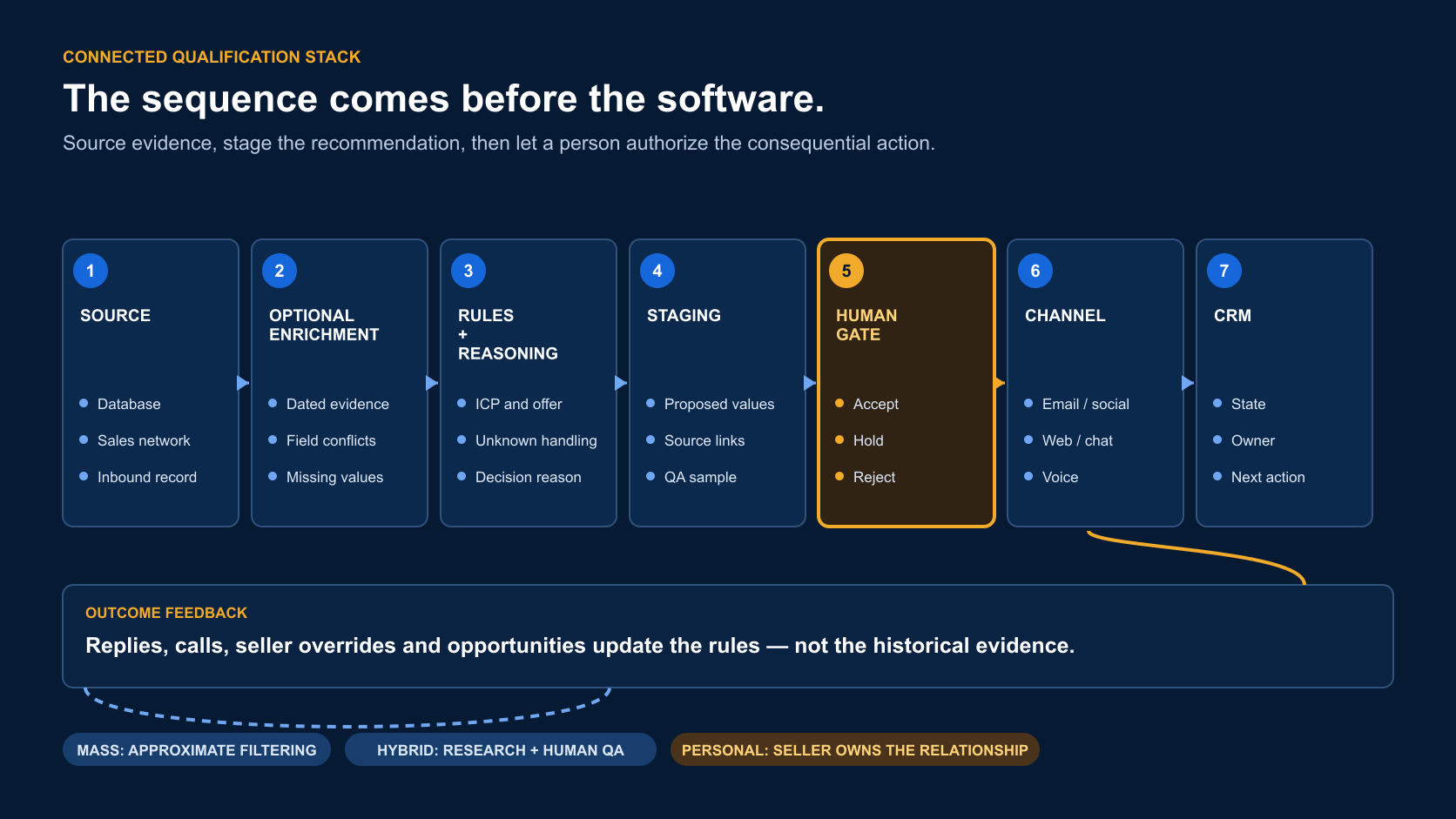
The staging table matters. It lets a reviewer see the source, current role, company, ICP evidence, unknowns, proposed route and draft message before production data changes.
Connected lead qualification stack from source data through enrichment, rules, staging, human approval, channels and CRM.
The value comes from the connected architecture, not from a single qualification tool.
Use this architecture when your real rule is too contextual for a simple form or point model. Skip it when five visible rules can make the same decision.
Lusha, LinkedIn Sales Navigator and LinkedHelper can support this path without becoming the qualification system. Lusha can add contact data. Sales Navigator can help confirm a current role and visible activity. LinkedHelper can support lower-cost LinkedIn execution, subject to the team's platform-policy and account-risk review. Their output still enters the same evidence, approval and CRM contract. Our lead intelligence tools guide compares those supporting roles in more depth.

07 / Stack by motion

Best qualification stack by sales motion

A tool earns its place when it removes a measured constraint. The same product may be essential in one motion and wasteful in another. Build the smallest complete path from evidence to accountable action.

Founder-led sales with limited volume

Start with a CRM, one reliable prospecting source and direct seller contact. HubSpot plus Apollo or Sales Navigator may be enough. Keep the initial qualification rule in visible CRM fields or a staging sheet. Add Clay only after repeated missing evidence creates a real cost.
The founder needs conversations more than infrastructure. A complex routing platform cannot compensate for an offer that has not earned replies. Review every early record and message because those observations define the eventual automation policy.

High-volume outbound with a proven offer

Use Apollo or another database to create the candidate pool. Apply a few decisive exclusions. Let Lemlist or a comparable sequencer deliver a direct offer, then stop on every meaningful reply. HubSpot should receive the relationship state, seller owner and approved next action.
This architecture accepts imperfect pre-contact coverage. It makes the market response part of qualification. Spend review time on data conflicts, early batches, replies and high-value exceptions rather than generating a long research paragraph for every recipient.

Research-led or account-based outbound

Begin with Apollo or Sales Navigator. Use Clay where another source can resolve a decision-critical field. Let Codex or Claude Code compare evidence in a staging table. Require human approval before contact. The CRM then owns all later states.
This motion fits smaller lists where account value justifies research. It also fits markets where social trust and precise relevance matter more than sending volume. Online activity may help choose timing, but it should not become a substitute for buyer evidence.

Inbound website qualification

Use HubSpot when its forms, chat and CRM rules cover the full path. Add Qualified or Warmly when real-time website context materially changes response. Add Chili Piper or Default when ownership, territory or scheduling is the measured bottleneck.
The final test is operational: did the right seller receive enough context to hold the conversation? A fast booking to the wrong owner is still a failed route.

Phone-led qualification

Connect the approved source and CRM state to a voice layer. Define who may be called, why, how often and under which regional rules. Preserve the transcript and outcome. Make human transfer available when the conversation becomes sensitive, complex or commercial.
The tool should never improvise the permission model. Voice is an execution surface inside the qualification contract, not a universal replacement for email, chat or sellers.

Budget for the complete decision, not the license

Qualification software creates value only when the surrounding data, integration, review and seller process remain dependable. A low subscription can become expensive when stale records require manual repair, routing failures interrupt calendars or generated research consumes tokens without changing a decision. A higher-priced system can also be wasteful when the team lacks enough traffic, clean history or operational discipline to use its advanced functions.
Calculate total operating cost across data access, enrichment credits, model usage, CRM integration, implementation, message delivery, monitoring and human quality control. Then divide that amount by seller-accepted records, held conversations and opportunities, using a separate denominator for each metric. This comparison exposes whether the stack improves commercial judgment or merely produces more activities.
In my experience, approximately $800 per month is a realistic lower boundary for a connected small-team stack, while research-heavy use can exceed $4,000. Those figures describe an operating range, not vendor pricing or a universal requirement. Clay consumption and model tokens usually create the greatest variability; database access, Claude Code and sequence delivery tend to be more predictable.

08 / Motion depth

Choose mass, hybrid or personal qualification before the stack

Mass motion: let a clear message do part of the filtering

A campaign with hundreds or thousands of contacts cannot support deep manual research for every record. Use approximate but controlled filtering. Remove clear mismatches. Verify a usable channel. Then send a short message that names the offer and lets the recipient decide.
The cost model accepts some extra records and missed details. Its success depends on the right ICP, a strong offer and a direct first message. Adding generated personal facts to every row may increase cost without improving trust.

Hybrid motion: spend more evidence on a smaller list

Some B2B markets do not buy through broad outreach. Use hundreds rather than thousands of contacts. Add current role, function, buying context, relevant company evidence and online activity. Clay plus a controlled reasoning layer can help. A person should review the first batches and all consequential actions.

Personal motion: protect the relationship

Tier 1 accounts may need social warm-up, thoughtful comments, non-sales contact and seller-led messages. Once a real conversation begins, do not downgrade the relationship into generic automation. The CRM should block duplicate sequences and preserve one owner.

09 / Field evidence

What one 1,627-record workflow taught us

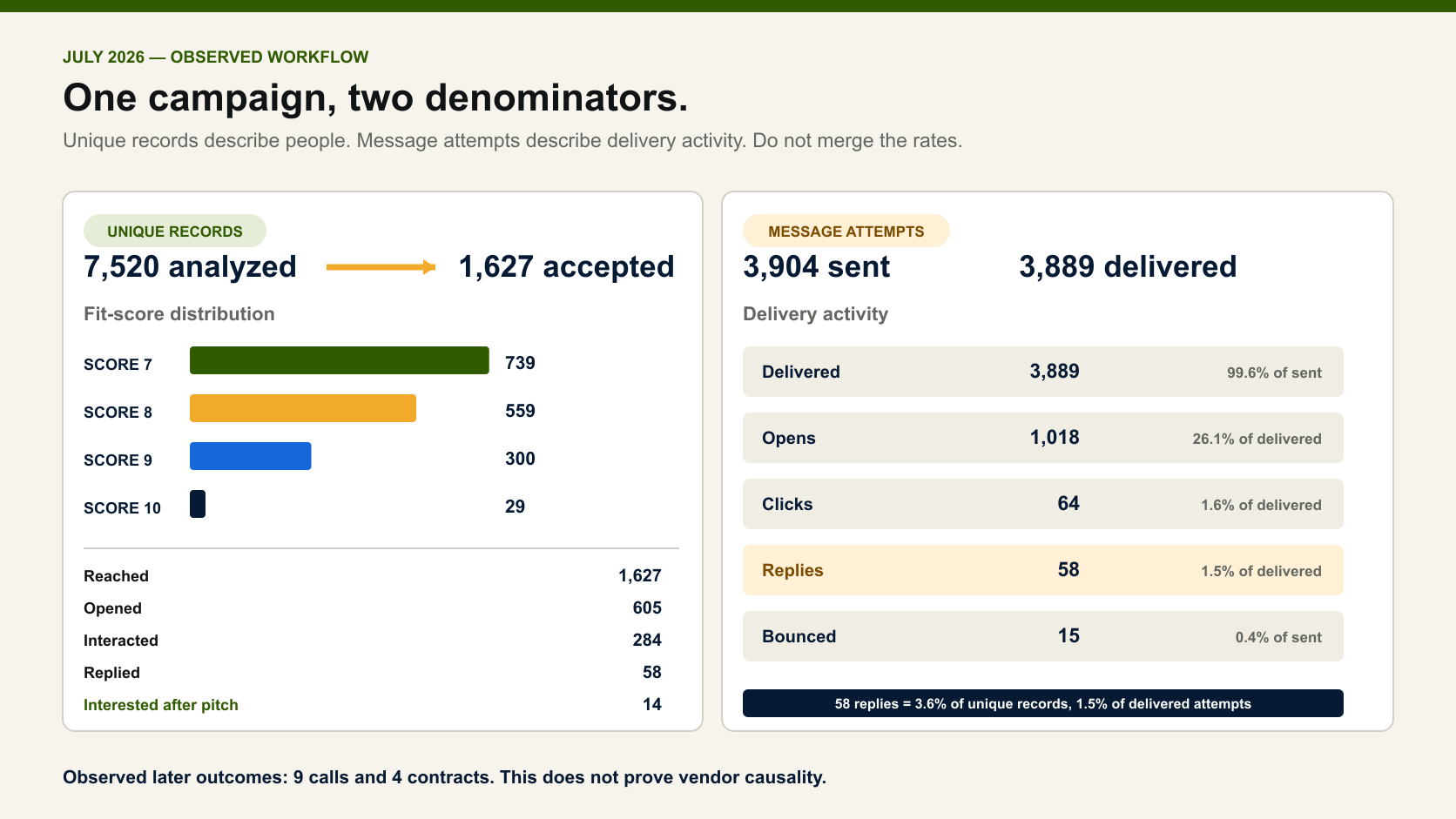
In July 2026, I worked with an anonymized reseller-partner campaign for marketing agencies. The workflow analyzed 7,520 records and admitted 1,627 at fit score 7 or higher.
Fit scoreAccepted recordsShare of accepted sample
773945.4%
855934.4%
930018.4%
10291.8%
Total1,627100.0%
The score was a pre-contact fit recommendation. It was not a prediction that the person would buy.

Unique-record funnel

EventUnique recordsRate from 1,627 reached
Reached1,627100.0%
Opened60537.2%
Interacted28417.5%
Replied583.6%
Interested140.9%
The 58 replies split into 14 interested after the pitch, 19 not interested and 25 neutral. The wider funnel later recorded nine calls and four contracts. This was an observational workflow, not a matched test of the vendors in this guide.

Message-attempt report

The same campaign also reported 3,904 sent attempts and 3,889 delivered attempts. There were 1,018 opens, 64 clicks and the same 58 replies. That makes the attempt-level reply rate 1.5%, not 3.6%.
Both rates are valid. They answer different questions. The unique-record rate describes people reached. The attempt rate describes delivered messages. Never move a count between those denominators.
Evidence map separating unique lead records from message attempts in an anonymized July 2026 B2B campaign.
Two denominators, one defensible campaign record: unique leads on the left and message attempts on the right.
The main lesson is not that score 10 wins. Most accepted records scored 7 or 8. The message and market performed the next qualification step.

10 / CRM contract

A minimum CRM data contract

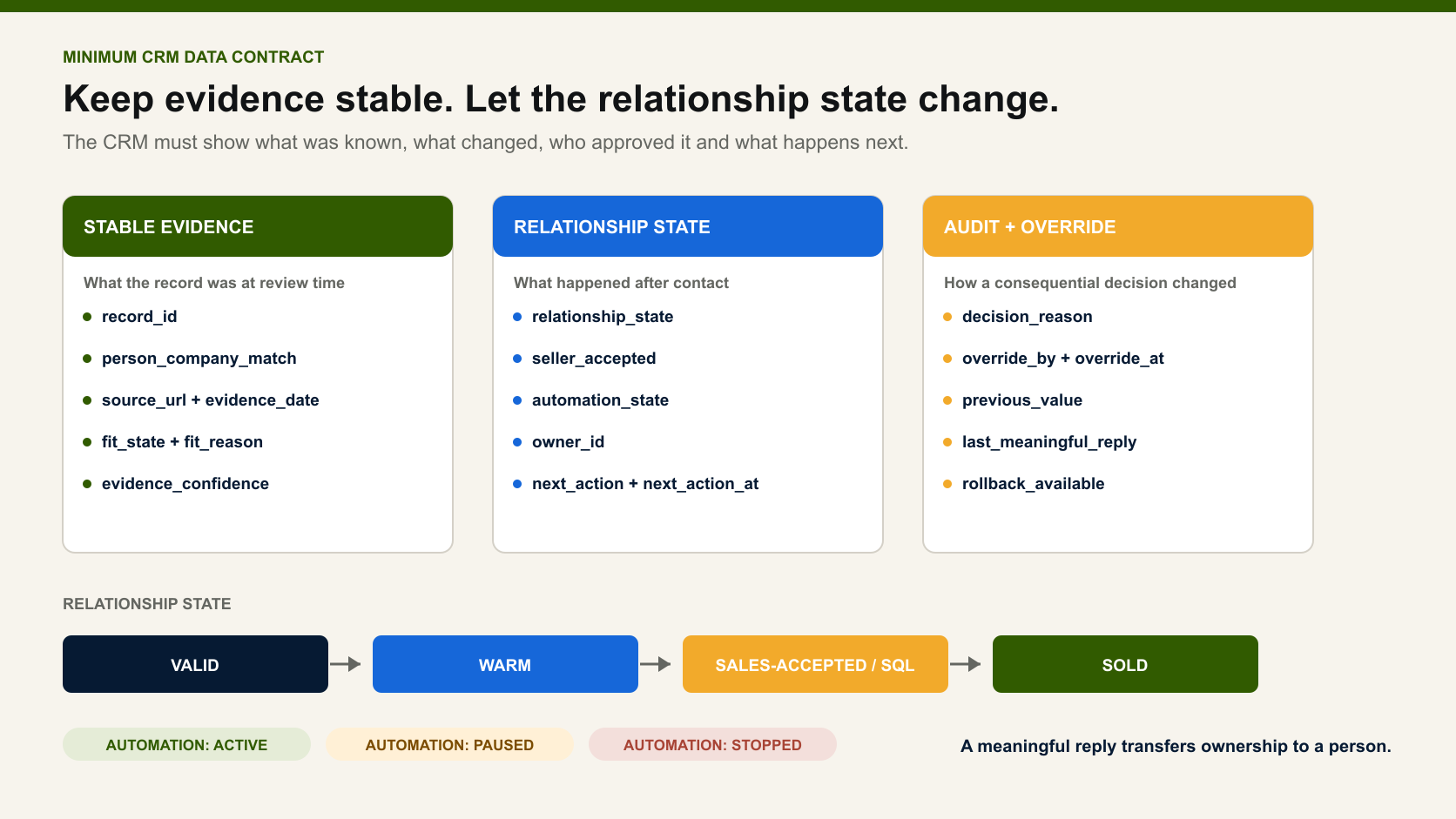
Do not let each tool write its own meaning into one qualified field. Use a small shared contract.
FieldPurposeExample value
record_idStable identity across toolsCRM contact ID
person_company_matchCurrent person–role–company linkverified / unresolved / conflict
fit_statePre-contact fitvalid / rejected / review
warm_stateActivity or prior relationshipcold / warm / human-owned
sales_acceptance_stateSeller-confirmed commercial statenot reviewed / accepted / declined
qualification_surfaceWhere evidence appearedform / web chat / email / voice
evidence_refsSources and timestampsURLs, form event, transcript ID
recommendation_reasonWhy the system suggested an actionconcise evidence-linked note
unknownsMissing facts that still matterauthority, use case, timing
human_reviewerAccountable decision ownerseller or RevOps user ID
override_reasonWhy advice was rejectedwrong role / duplicate / existing relationship
next_actionOne approved next stepresearch / reply / call / nurture / stop
next_action_atDue timetimestamp
automation_stateWhether tools may contactactive / paused / stopped
interaction_refFull thread or transcriptCRM activity ID
stage_historyChange and rollback trailold value, new value, actor, time
outcomeLater commercial resultcall / opportunity / lost / sold
Minimum CRM state contract separating stable evidence, relationship state, audit fields and human override.
Store stable evidence separately from changing relationship state and preserve every human override.
The original fit state may remain stable after a reply. The relationship and sales-acceptance states change. This preserves what the model knew before the market answered.

11 / Buyer pilot

Run a same-sample pilot before buying

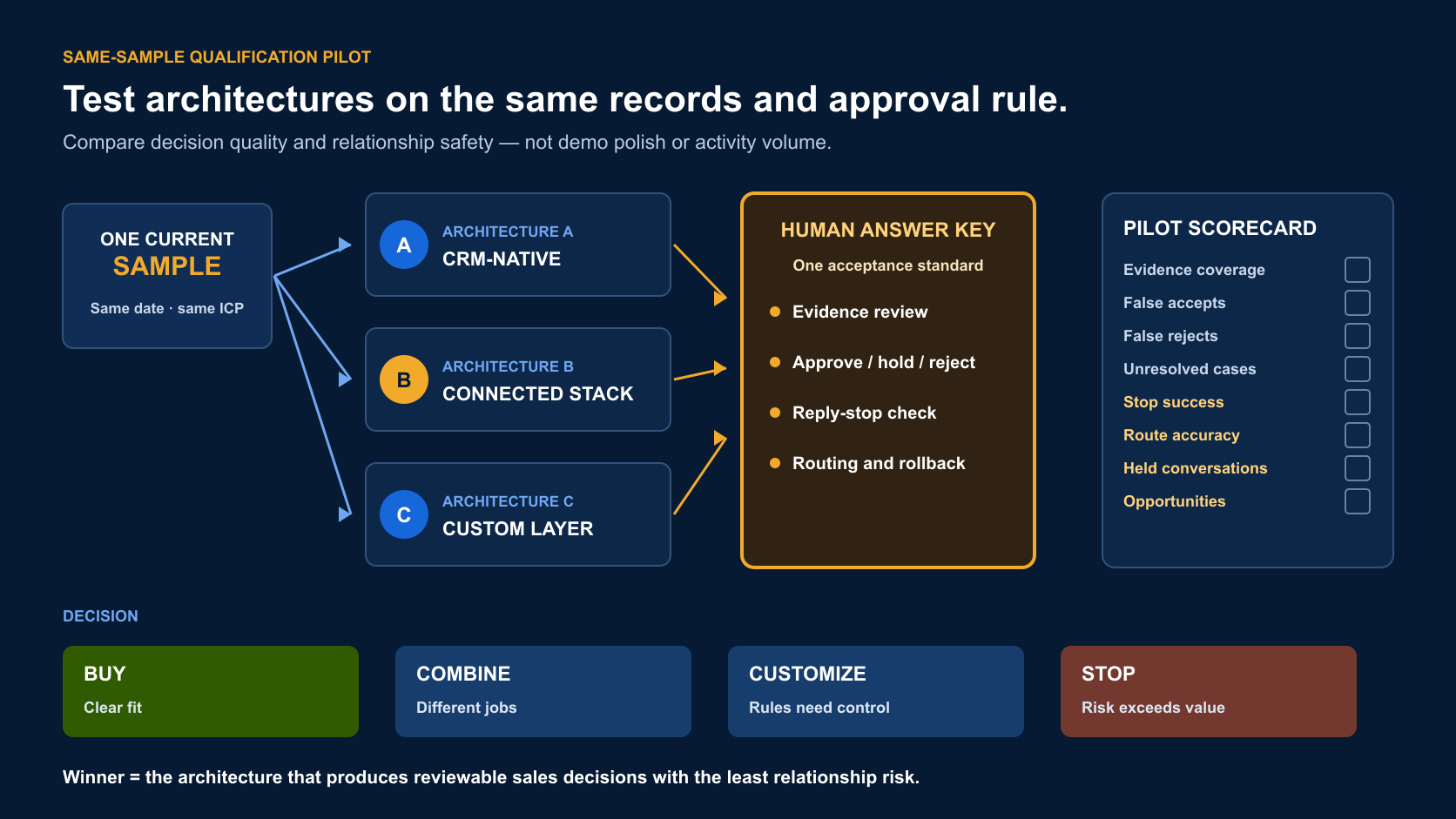
Do not compare a chat demo with a database trial and a routing screenshot. Give each viable architecture the same job.

1. Write one decision contract

Use this template:

We use [surface and evidence] to recommend [state or route] for [owner]. The tool may [low-risk action]. A person must approve [consequential action].

Example: We use current person–role–company evidence to recommend valid outbound records. The tool may add them to a review queue. A seller approves every first message.

2. Select one current sample

Use records from one motion, ICP and time period. Include clear fits, clear non-fits, incomplete records, conflicts and valuable exceptions. Historical data alone may hide current-market errors.

3. Use one answer key

Ask a seller and RevOps reviewer to label the intended decision before seeing vendor output. Record disagreements. An ambiguous case should stay unresolved.

4. Test the full handoff

Check evidence links, stop rules, ownership, CRM fields, rollback and notifications. A correct recommendation with a broken handoff is not a successful qualification result.

5. Use this pilot scorecard

MetricDefinitionWhy it matters
Evidence coverageRecords with all required decision evidenceShows whether the system can judge the sample
False acceptTool accepted; human rejectedCreates wasted seller time or trust risk
False rejectTool rejected; human acceptedHides possible pipeline
UnresolvedTool preserved uncertaintyBetter than confident invention when evidence is missing
Seller acceptanceRecommended actions approved by sellerMeasures operational usefulness
Override traceOverrides with a saved reasonMakes the rule improve over time
Stop successMeaningful replies that stopped automationProtects the relationship
Route accuracyAccepted records reaching the correct ownerTests operational handoff
Held conversationApproved meetings or calls that occurredStronger than booking alone
OpportunitySeller-created SQL or opportunityTests downstream relevance
Cost per accepted recordLicense, data, tokens, setup and review time divided by accepted recordsExposes total operating cost
Same-sample pilot comparing mass filtering, hybrid qualification and high-touch research against a human-reviewed answer key.
Compare qualification architectures on the same sample before buying or scaling one.
Human override is pass/fail. A tool that cannot be stopped or corrected should not control buyer-facing actions.

12 / Failure modes

Common qualification-tool mistakes

Buying the tool before the motion

Teams often start with a vendor shortlist. Start with how buyers expect to be approached, what creates trust and which channel feels normal. Then write the sequence. The required stack is often smaller than expected.

Using enrichment as proof of interest

Accurate company and role data can produce a valid lead. It cannot prove that the person wants a sales conversation. Keep fit and warmth apart.

Using a score instead of a conversation

A high fit score can tell a seller where to look. It cannot answer an objection, confirm timing or accept an offer. For that, the person must speak or reply.

Using chat as a routing policy

A chat tool can collect answers. It still needs a policy for who receives the record, what counts as accepted and what happens when evidence conflicts.

Defining the ICP as “C-level”

Title is not enough. Specify function, current responsibility, business model, buyer context, offer relevance and exclusions. The better the pre-launch definition, the less intelligence the tool must invent.

Personalizing a mass campaign past the point of value

Generated research for thousands of people can consume credits and tokens while adding weak details. Mass qualification needs a good list, direct offer and simple message. Deep personalization belongs in hybrid and personal motions.

Continuing automation after a real reply

A meaningful reply changes ownership. Stop the sequence. Let a person interpret the context and decide the next action.

13 / FAQ

Lead qualification tools FAQ

What is a lead qualification tool?

A lead qualification tool collects or interprets evidence to support a sales decision. It may work through a form, chat, email, voice, database, router or CRM. The output should state what was decided, why, what happens next and who can override it.

What is the difference between lead qualification and lead scoring software?

Lead scoring assigns priority or a likelihood to a record. Qualification determines whether the record meets a defined condition for a specific next step. A score may support qualification, but it is not the full decision. See our lead scoring software comparison.

Which lead qualification tool is best for B2B sales?

There is no universal winner. HubSpot suits CRM-native state, Qualified suits Salesforce-centered website conversations, Typeform suits structured questions, Chili Piper and Default suit routing, Apollo and Clay suit pre-contact evidence, Lemlist suits sequence control and a voice layer suits phone-led markets.

Can lead qualification be fully automated?

Low-risk evidence collection, branching, alerts and internal queues can be automated. First launches and costly actions need human review. Messages, calls, lifecycle changes, opportunities and established relationships should keep an accountable owner and override.

Which tools qualify inbound leads in real time?

HubSpot, Qualified and Warmly can support live website qualification or engagement in different ways. Typeform can collect structured answers. Chili Piper and Default can route accepted records. Test the whole path from source and answer to owner and CRM state.

Which tools support outbound lead qualification?

Apollo and Clay can prepare fit evidence before contact. Codex or Claude Code can apply local rules in a controlled staging flow. Lemlist can run the first sequence and stop after replies. The seller still decides whether a reply becomes SQL or an opportunity.

Should qualification live in the CRM?

The final relationship state, owner, next action and history should live in the CRM. Research, chat or voice may happen elsewhere. Their evidence should write back through named fields without erasing the original fit decision or seller override.

How much should a connected qualification stack cost?

In my experience, a working small or mid-market stack can start near $800 per month and rise above $4,000 when Clay usage, model tokens and volume grow. This is an operator range, not a vendor quote. Data, implementation and review time often cost more than the sender.

How should a team test automated lead qualification?

Use one current sample, one decision contract and one human answer key. Compare evidence coverage, false accepts, false rejects, unresolved cases, stop behavior, routes and held conversations. Keep every denominator explicit.

14 / Limitations

Methodology, evidence levels and disclosure

This guide compares qualification jobs and controls, not laboratory accuracy. HubSpot, Apollo, Clay, Claude Code or Codex, Lemlist, Warmly, Qualified and NextLevel AI were used in broader sales workflows. That does not mean each native qualification feature was tested on the same sample. Typeform, Chili Piper and Default profiles rely on current official product documents.
Anastasiia Krynytska supplied the anonymized July 2026 workflow. It documents a real process and its limits. It does not prove that a vendor caused the observed replies, calls or contracts.
Luck My Sales has no affiliate, paid-placement or commercial relationship with the vendors. NextLevel AI is disclosed as a first-party example. Recheck pricing, packaging, privacy, consent and regional calling or messaging requirements before launch.
For adjacent decisions, use our guides to B2B lead intelligence tools, data enrichment providers, automated lead nurturing and the full AI lead generation workflow.

15 / Sources

Primary product sources

ProductPrimary or first-party material reviewed
HubSpotBuild lead scores; qualify leads with Customer Agent; lead pipeline automation
QualifiedSalesforce integration; implementation
WarmlyWebsite visitor identification; Warmly platform
TypeformLead qualification; logic types
Chili PiperForm Concierge; inbound lead conversion
DefaultRevenue Operations Software
ClayFunctions; lead routing and inbound automation; enrichments
ApolloAutomate lead prioritization; Scores Overview
LemlistCampaign sequencing; reply and click stop controls
NextLevel AILead Qualification Engagement Agent; AI Sales Agent

Research note

Methodology

  1. 01Compare qualification jobs and controls rather than claim a laboratory accuracy ranking.
  2. 02Label HubSpot, Apollo, Clay, Claude Code or Codex, Lemlist, Warmly, Qualified and NextLevel AI as workflow-used; use official documentation for Typeform, Chili Piper and Default profiles.
  3. 03Attribute the anonymized July 2026 workflow to Anastasiia Krynytska and keep unique-record and message-attempt denominators separate.
  4. 04Do not infer vendor causality from replies, calls or contracts observed later in the workflow.
  5. 05Require traceable evidence, unknown handling, stop behavior, a CRM contract and human override in the evaluation method.
  6. 06Exclude private identities, unsupported superlatives and unverified vendor performance claims.
Read the full methodology

Source ledger

Sources & editorial notes

  1. 01
    Build lead scores

    HubSpot Knowledge Base · Official documentation for CRM-native fit and engagement scoring.

  2. 02
    Qualify leads with Customer Agent

    HubSpot Knowledge Base · Official documentation for question-led qualification, property updates and routing actions.

  3. 03
    Salesforce integration

    Qualified · Official documentation for Salesforce context, routing, lead creation and meeting booking.

  4. 04
    Website visitor identification

    Warmly · Official material for website identity, context and real-time engagement.

  5. 05
    Lead qualification for small and medium businesses

    Typeform Help Center · Official documentation for qualification questions, scoring, logic and scheduling paths.

  6. 06
    Form Concierge

    Chili Piper · Official material for form qualification, routing and scheduling.

  7. 07
    Revenue Operations Software

    Default · Official material for visual routing, workflow logs and CRM actions.

  8. 08
    Functions

    Clay University · Official documentation for enrichment, ICP logic, research, routing and workflow functions.

  9. 09
    Automate lead prioritization using workflows

    Apollo Knowledge Base · Official documentation for database filters, personas, branches and sequence activation.

  10. 10
    Understand campaign sequencing

    Lemlist Help Center · Official documentation for multichannel sequence branches and manual tasks.

  11. 11
    Lead Qualification Engagement Agent

    NextLevel AI · Disclosed first-party example for contextual conversation, CRM handoff and human transfer; not independent performance evidence.

  12. 12
    How AI Assists Lead Qualification

    Luck My Sales · Supporting human-gated qualification workflow and observed funnel context.

  13. 13
    Lead Scoring Software

    Luck My Sales · Separate comparison of numeric prioritization and scoring systems.

  14. 14
    Luck My Sales methodology

    Luck My Sales · Evidence states, first-hand-source treatment, freshness requirements and correction protocol.

Corrections or primary material: contact the corrections desk.

About the author

Anastasiia Krynytska

Anastasiia Krynytska is a LeadGen Team Lead at Softermii and the lead editor of Luck My Sales. She covers AI-assisted outbound, account research, qualification, messaging, CRM handoffs and revenue workflows from a practitioner’s perspective.View author profile LinkedIn

Continue reading

01 · News analysis

AI sales is moving from assistant to operating layer

The category is expanding from drafting support into research, pipeline decisions, recommended actions and controlled execution.

Read news
02 · Field analysis

In AI sales, the handoff may be the product

Models are becoming accessible; durable value sits in the controlled transition from signal to seller action.

Read analysis
03 · Research framework

Sales AI Workflow Signals 2026

A launch framework for mapping the products, controls and buying questions shaping AI-enabled revenue work.

Read reports

Luck My Sales briefing

Useful context, once a week.

News, explanations and original research from this desk. No noise.
The newsletter is still being built. We will contact you when the first edition is ready.