Weekly industry intelligence · No noiseSubscribe to the Luck My Sales newsletterFree briefing

Independent intelligence on AI in sales

Menu

Software comparison & buyer's guide · AI SDR tools

Best AI Sales Outreach Tools for B2B: Match the Tool to the Job

Compare AI sales outreach tools by workflow job, evidence, human control, reply handling, CRM fit and the B2B team each product suits.
Editorial disclosure

AI may assist research organization and drafting. A human editor reviews every published page, checks material claims against the cited sources and owns the final decision. No company paid for placement in this article.

AI use policy

Agent-ready brief

AI takeaways

Keep the key points here, or take a source-aware text brief into Claude, ChatGPT or another AI workspace.
  1. 01Research, personalization, sequencing, sales engagement and AI SDR products own different jobs.
  2. 02Define the bottleneck, permitted actions, success measure and rollback before buying.
  3. 03Any reply must stop the sequence and move the relationship to human validation.
  4. 04Right-size the stack for the actual sales motion.
  5. 05Compare candidates on identical records, prompts, denominators and failure notes.
Includes summary, takeaways, sources and a use note.
The best AI sales outreach tool is the one that fixes a defined bottleneck without hiding the evidence, buyer reply, or CRM decision. A contact database, research agent, email sender, sales-engagement platform, and autonomous AI SDR do different jobs. Putting them in one numerical ranking creates a confident answer to the wrong question.
Start with the job. Decide what the system may do. Name the person who takes over when a buyer responds. Then choose the smallest product or combination that can run that workflow.
Anastasiia Krynytska's approved rule is:
> Choose the tool by the bottleneck and workflow owner, not by the autonomy promised on the product page. Automation comes after the team has proved the ICP, offer, message, and channel.
This comparison recommends products by workflow job. It does not name one best overall tool. Luck My Sales has not run a controlled head-to-head test across every product in this guide.
Evidence and commercial disclosure: Apollo, Clay, LinkedIn Sales Navigator, Claude Code, and lemlist appear in previously documented broader workflows. Instantly was owner-recommended and its documentation was reviewed, but no current AI-personalization test is claimed. Smartlead, Outreach, Salesloft, Amplemarket, and 11x are reviewed from official documentation only. Existing records confirm no affiliate, client, employment, sponsorship, or paid relationship with Apollo, Clay, Anthropic/Claude, or lemlist. NextLevel AI appears later as a disclosed first-party Lemlist workflow. No relationship is documented for the remaining products; that is not a fresh declaration that none exists. No vendor determined the order.

Choose the workflow job before the product, then compare candidates with the same inputs and failure rules.

01 / Buying decision

The short answer: choose the outreach job before the product

Most teams do not need “more AI.” They need one missing operating capability. It may be current contact data, inspectable research, a better message-review process, safer email execution, one multichannel work queue, or reliable reply ownership.
Use this Outreach Tool Selection Contract before opening a pricing page:
Bottleneck → Required job → Approved inputs → Permitted action → Human gate → Reply owner → CRM rule → Success measure → Exit or rollback
For example, “personalization” is not a complete requirement. A useful version would be:
  • Bottleneck: sellers spend too long finding a valid reason to contact an account;
  • required job: collect current professional and company evidence;
  • approved inputs: CRM history, official company pages, and current professional signals;
  • permitted action: draft a short reason-to-contact note;
  • human gate: review named accounts before outreach;
  • reply owner: the assigned SDR;
  • CRM rule: add the cold record only after a positive or neutral reply is validated;
  • success measure: seller-approved records, meaningful replies, held calls, and customers;
  • exit rule: remove the specialist layer if it does not reduce review time or improve evidence quality.
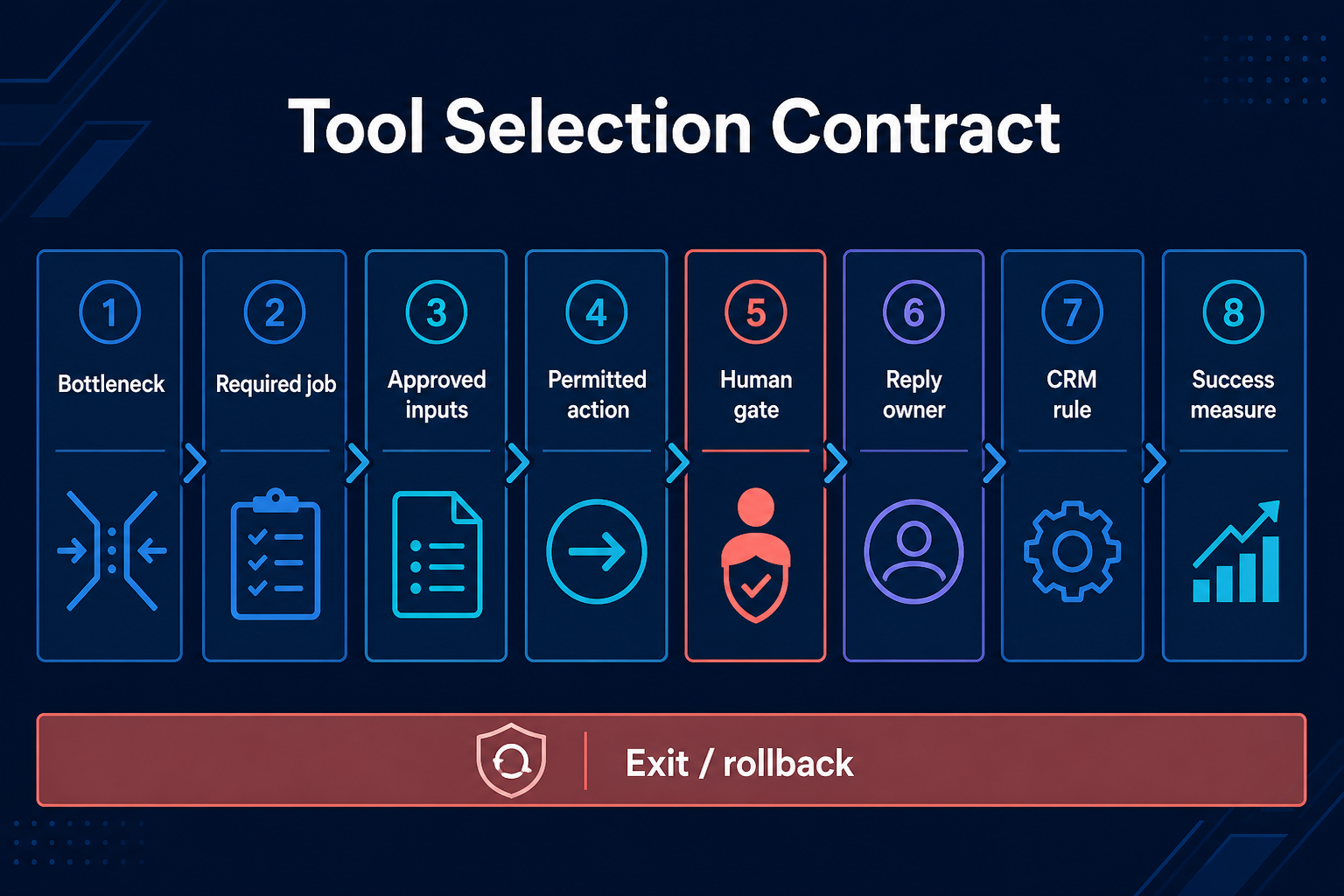
This contract makes product overlap easier to see. Apollo and Sales Navigator can both contribute contact context. Clay can coordinate several sources. Claude Code can apply custom research rules. lemlist, Instantly, and Smartlead can execute email. Outreach and Salesloft can govern broader seller activity. Amplemarket and 11x attempt to own more of the outbound loop. None of those descriptions proves that a product can repair a weak offer.
Tool selection contract from bottleneck and required job to success measure and rollback.
Select a tool against an owned workflow job, not a generic autonomy promise.

02 / How we evaluated

How we evaluated AI sales outreach tools

We included products that own a distinct part of B2B outreach and provide current official documentation for that job. We excluded generic writing apps with no operating role and vendors that could not be placed on the job map.
Every product receives one of three evidence labels:
  • Used in a broader workflow: the product appeared in documented sales work. This does not mean every current native AI feature was tested.
  • Owner-recommended plus documentation: the owner has recommended the product for a role, and official material was reviewed. It is not a controlled product test.
  • Documentation-reviewed: capabilities come from current official product or help pages. No hands-on result is claimed.
The evaluation asks the same questions for every category:
  1. What object does the product control: an account, contact, message, task, reply, or CRM record?
  2. Can a seller inspect the source and timestamp behind a recommendation?
  3. Does AI suggest an action, prepare it, or execute it?
  4. Can a person approve, reject, pause, and reverse the action?
  5. What happens when the buyer replies, opts out, or is already owned by another seller?
  6. What enters CRM, under which owner and lifecycle rule?
  7. Which result would justify the product after data, setup, and review time are counted?
We did not use vendor customer outcomes, database-size claims, or changing list prices to select a winner. Product documents were reviewed on 18 August 2026. Buyers should verify plan-specific features and prices during a live shortlist.

03 / Comparison

AI sales outreach tools at a glance

ProductPrimary jobEvidence levelWhat it may controlRequired human checkBest fit when
LinkedIn Sales NavigatorCurrent professional and account contextUsed in a broader workflowSearch, saved leads/accounts, alerts, relationship contextConfirm identity, current role, relevance, and platform-safe actionCurrent professional context matters more than raw list volume
ApolloContact data, enrichment, and sequence preparationUsed in a broader workflowSearch, enrichment, workflow enrollment, sequence tasksValidate identity, contactability, duplicates, and sender policyA small team needs an economical data-led foundation
ClayEnrichment and research orchestrationUsed in a broader workflowWaterfalls, conditional research, enrichment, field preparationInspect sources, conflicts, unknowns, credits, and write-backCustom evidence is valuable enough to justify an operations layer
Claude CodeCustom reasoning and workflow logicUsed in a broader workflowApply documented rules to research files and structured workflowsControl sources, permissions, outputs, and every external actionThe team needs custom logic rather than another fixed sales interface
lemlistEmail and multichannel campaign executionUsed in a real broader workflowSequence steps, tasks, sender accounts, stops, and reply queueApprove the motion, protect named accounts, and hand every reply to an SDRAn SMB wants one reviewed multichannel execution layer
InstantlyEmail-first sourcing and executionOwner-recommended plus documentationLead search, campaign sending, reply and sending controlsVerify data, risky emails, reply stops, suppression, and mailbox limitsCold email is the primary channel and the team wants a focused sender
SmartleadEmail sending infrastructure and campaign controlDocumentation-reviewedSender accounts, schedules, variants, stops, unsubscribe, reply categoriesCheck global suppression, reply state, bounce protection, and queued sendsA team needs detailed email operations and API-level controls
OutreachGoverned multichannel sales engagementDocumentation-reviewedSequences, tasks, triggers, rulesets, CRM sequence states, agentsGovern sequence creation, permissions, CRM mapping, and agent enrollmentA larger team needs admin control and auditable sequence state
SalesloftCadence execution and prioritized seller workflowDocumentation-reviewedCadences, calls, meetings, tasks, signals, CRM activity syncValidate signal meaning, next action, owner, and CRM behaviorSellers need one managed daily work queue across pipeline stages
AmplemarketSignal-led prospecting and assisted outreachDocumentation-reviewedFind, research, prepare sequences, and automate selected actionsInspect the signal, target, message, send mode, and handoffA team wants broader assistance but still defines the motion
11xBroad outbound AI SDR ownershipDocumentation-reviewedProspecting, research, follow-up, and meeting handoffAudit identity, messaging, sender risk, reply handling, and CRM historyA team has already proved the motion and can govern a broad agent
This is a job map, not a league table. A documentation-reviewed platform can be the right fit. It simply cannot receive a first-hand performance claim from this article.
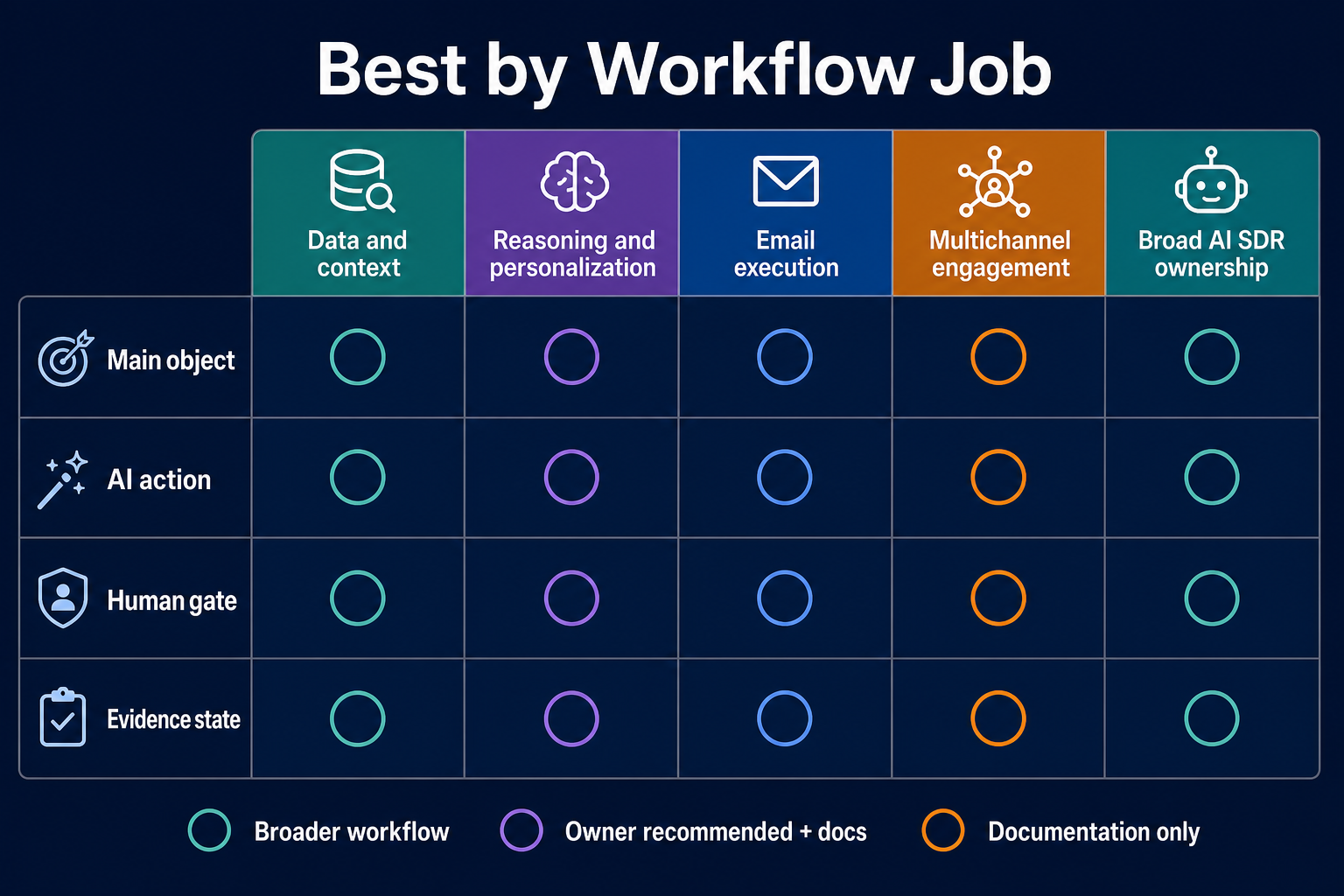
Vendor-neutral matrix of five AI outreach workflow-job categories.
Different categories own different objects, actions, evidence states and human gates.

04 / Research, data, and

Research, data, and personalization layers

The research layer should make a decision easier to inspect. It should not turn a weak signal into a confident reason to contact.

LinkedIn Sales Navigator: best for current professional context

LinkedIn Sales Navigator is useful when current roles, account changes, saved searches, alerts, and relationship paths matter. It appeared in Anastasiia's broader enrichment workflow. That is evidence of workflow use, not a test of every Sales Navigator feature.
The human check is identity and commercial meaning. A new role, recent post, or company change can guide research. It does not prove buying intent or grant permission to automate a LinkedIn action.
LinkedIn separately restricts third-party software that scrapes or automates activity. Review its prohibited software and extensions policy before connecting another tool. Relevance and platform permission are two different gates.
Best fit: named-account and relationship-led research where fresh professional context is more valuable than a large export.

Apollo: best for a practical data-led starting point

Apollo combines contact discovery, enrichment, workflows, and sequences. Its sequence documentation describes email, phone, social, and task steps. Contacts are enrolled manually or through a workflow, and out-of-office behavior can pause a contact.
Apollo appeared in documented broader workflows. Anastasiia's operating position is still to validate returned roles, email status, duplicates, and current relevance. A verified-looking field is not the same as a seller-approved record.
Apollo can be both the data source and part of execution. That convenience creates a governance question: should one system discover, score, enroll, and send without a visible approval event? Small teams should start with the fewest permissions needed. Add automation only after the list and message process works manually.
Best fit: a founder or small SDR team that needs one economical data foundation before adding a specialist enrichment layer.

Clay: best for custom enrichment and evidence orchestration

Clay is useful when a team needs conditional research across several providers. Its official guide to building a data waterfall shows how providers can run in a defined order. That can improve coverage and reduce unnecessary calls to expensive sources.
Clay appeared in broader enrichment and outreach workflows. The evidence does not support a claim that Clay automatically produces commercially relevant personalization. Operators still need to inspect source URLs, freshness, conflicting values, missing fields, credit cost, and the exact data written to the next system.
Do not add Clay because it is flexible. Add it when a pilot shows that a simpler data source leaves an important evidence gap. Otherwise the team may buy an orchestration layer before it has a stable process to orchestrate.
Best fit: a repeatable outbound motion with a defined enrichment logic, measurable data gap, and someone who owns the table or workflow.

Claude Code: best for custom reasoning, not autonomous sending

Claude Code is an agentic coding tool rather than a packaged sales platform. It belongs in this map because Anastasiia has used it as the reasoning layer in a broader workflow. It can process structured files, apply custom rules, and support repeatable research or message preparation.
That flexibility also means the team owns the system design. Anthropic's CLI reference includes allowed and disallowed tool controls. Sales operators should use the same principle: grant only the tools and files needed for the task. Keep external actions, named-account decisions, and buyer replies behind explicit boundaries.
Claude Code is not evidence that a campaign will work. The operator remains responsible for ICP, offer, inputs, and acceptance criteria.
Best fit: a technically capable team that needs custom research and transformation logic and can maintain permissions, prompts, source files, and QA.

05 / Email-first sequencing and

Email-first sequencing and sending tools

An email sender does not create strategy. It executes a sender, list, message, schedule, stop rule, and reply path. Those inputs determine whether the tool is useful.

lemlist: best documented fit for the owner's real SMB workflow

lemlist has the strongest first-hand evidence in this article. Screenshots S14–S16 and the supplied sequence show a real Lemlist multichannel workflow. The sequence used LinkedIn invitations, messages, email steps, wait conditions, and branching. The campaign promoted NextLevel AI, so it is a first-party operating example rather than an independent product test.
lemlist's official campaign sequencing documentation covers multichannel steps and manual tasks. Its reply-stop guidance documents stop controls. Anastasiia's policy is clearer than a default product setting: any reply stops automation, and an SDR validates what happens next.
The real sender setup used four subdomains, never the main domain, with four to five mailboxes per domain. Mailboxes warmed for at least 14 days. Sending began at five emails per day and rose to 15 after three weeks. The stated ceiling was 30 emails per healthy mailbox or domain setup, with health checked in Lemlist. ZeroBounce supported mass verification, Clay provided additional data, Lemlist handled duplicates, and two or three reserve subdomains or mailboxes stayed warming.
These are operating choices from one workflow, not universal deliverability guarantees. Email providers, domains, lists, copy, and rules differ.
Best fit: an SMB that wants reviewed email and LinkedIn execution with a visible reply inbox and a human SDR handoff.

Instantly: best considered as an email-first execution layer

Instantly was previously recommended by the owner as an email execution option. No hands-on comparison with lemlist or Smartlead is documented here. Its official campaign options describe reply stops, sending rules, risky-email behavior, and unsubscribe controls. Its search and enrichment features make the product broader, but this article treats its primary role as execution.
The important selection questions are operational.
  • Does a reply stop every relevant campaign or only the current sequence?
  • Can the team see which mailbox and message version produced the reply?
  • Are unsubscribes and blocks global where needed?
  • Can the SDR claim the conversation without another automation continuing elsewhere?
  • Can the team export its lead, sequence, and reply state if it changes tools?
Best fit: an email-led outbound team that wants a focused sending layer and will keep data validation, strategy, and reply ownership explicit.

Smartlead: best for teams that need granular email controls

Smartlead is documentation-reviewed only. Its current campaign setup guide describes sender-account assignment, schedules, variants, reply/click/open stop conditions, AI or manual reply categorization, bounce protection, domain-level limits, and webhooks.
Smartlead also distinguishes campaign pause from global suppression. Its unsubscribe documentation states that global unsubscribe prevents a record from being sent in future campaigns, while a campaign pause can be narrower. This distinction matters. “Paused here” is not the same as “do not contact again.”
The help center also warns that a message already queued may still send around the time a lead is paused. A buyer's reply or opt-out therefore needs a deterministic global rule and monitoring, not a vague assumption that every tool state is immediate and universal.
Best fit: an email-operations team that needs detailed sending, stop, blocklist, API, and webhook controls and has someone who can configure them.

06 / Multichannel sales-engagement platforms

Multichannel sales-engagement platforms

Outreach and Salesloft are different purchases from an email sender. They are designed to coordinate seller activity, administration, CRM state, and multiple channels across a larger team. Buying both normally creates duplicate queues and governance unless a specific migration or business-unit boundary explains it.

Outreach: best for governed sequences and auditable state

Outreach is documentation-reviewed only. Its Sales Engagement overview covers sequences, templates, triggers, rulesets, schedules, email, voice, SMS, meetings, and tasks. The Sequence overview lists automatic email, manual email, phone, generic, and LinkedIn task steps.
The governance value is the state around execution. Outreach documents sequence throttles, safety rules, out-of-office handling, CRM mappings, and sequence-state exports. June 2026 release notes added more sequence-state fields and enrollment-source visibility. May 2026 notes also describe agent actions and AI-content reporting. Those are vendor capabilities, not evidence that agent-created outreach produces better pipeline.
Before buying, define who may create master sequences, who may change CRM fields, which agent actions are allowed, and how a buyer reply removes every related contact from automated motion.
Best fit: a scaled SDR or revenue team that values permissions, standard sequence design, CRM integration, manager visibility, and exports more than a lightweight sender.

Salesloft: best for a managed seller work queue

Salesloft is documentation-reviewed only. Salesloft Cadence combines email, calls, meetings, templates, A/B testing, activity capture, and CRM sync. Rhythm uses signals and AI to prioritize seller actions across focus zones.
This makes Salesloft most relevant when the bottleneck is seller coordination, not merely sending volume. The human question is whether the signal and recommended action are understandable. A priority score should not silently become permission to contact. A CRM sync should not silently turn all cold records into pipeline.
Ignore customer outcome percentages on vendor pages when making the first shortlist. Evaluate whether your team can inspect the input, reject the action, control the cadence, and reconcile the CRM result.
Best fit: a managed revenue team that wants cadence execution, calling, meeting, prioritization, and CRM activity in one daily workflow.

07 / Workflow

AI SDR and broader workflow-ownership options

Some tools attempt to find prospects, research accounts, draft messages, enroll contacts, send follow-ups, and hand meetings to a seller. That category belongs in the shortlist only after the team has proved the human process.

Amplemarket: an assisted or automated prospecting option

Amplemarket Duo is documentation-reviewed. The vendor positions it around signal monitoring, research, sequence preparation, rep review, and automation modes. The useful evaluation is not whether the product calls itself an agent. It is which inputs it uses, which actions run without review, and who owns an exception.
Best fit: a team with a working outbound motion that wants one product to coordinate more research and execution but still needs clear approval modes.

11x: a broad outbound-agent option

11x Alice is documentation-reviewed. The company describes prospecting, research, multichannel engagement, and handoff. Luck My Sales did not independently test those capabilities or vendor outcome claims.
A broad agent has a larger failure surface. The pilot must cover stale identity, false reason-to-contact, duplicate ownership, reply classification, objection handling, unsubscribe, sender risk, and CRM correction. If the operator cannot show the state and stop the action, advertised autonomy is a liability rather than a benefit.
Best fit: a team with a proven ICP, offer, message, channel, sender setup, reply owner, and enough operational capacity to audit an agent.
The dedicated AI SDR tools comparison examines broader workflow ownership in more detail.

08 / Apply hard gates

Apply hard gates before scoring features

A product that fails a hard gate should not win because it has more templates, integrations, or AI features.
Hard gatePass conditionWhy it matters
Defined motionICP, offer, message logic, channel, and owner already existSoftware cannot discover a repeatable GTM motion on behalf of the buyer
Inspectable evidenceSeller can see source, timestamp, and unresolved conflictsRandom facts and stale identity create false personalization
Permitted actionEvery automated action is named and limited“Autonomous” is too vague for governance
Named-account controlStrategic accounts require human reviewBrand and ownership risk are higher
Any-reply stopEvery buyer reply stops the active automated sequenceA live conversation must not compete with follow-ups
SuppressionOpt-out and do-not-contact state is deterministic and broad enoughCampaign pause is not global suppression
Reply ownerA named SDR validates sentiment and next actionClassification is a sales decision, not only a label
CRM intake ruleCold records stay outside CRM until positive or neutral human validationRecord volume is not pipeline
Sender controlsDomains, mailboxes, authentication, verification, ramp, and health are explicitThe tool interface does not remove sender risk
Export and rollbackLead, message, reply, owner, and state data can be exported and automation can be stoppedThe team needs an exit path
After a product passes, score useful capabilities such as setup effort, channel coverage, reporting, CRM fit, admin controls, total cost, and review time. Do not reverse that order.

09 / Authority

The real reply and CRM contract

Anastasiia's live policy is simple: any reply stops the sequence. The SDR then validates the response and chooses one of four paths:
  • contact later or nurture;
  • remove the record;
  • reactivate at a defined later point;
  • ask the technical team for details before continuing.
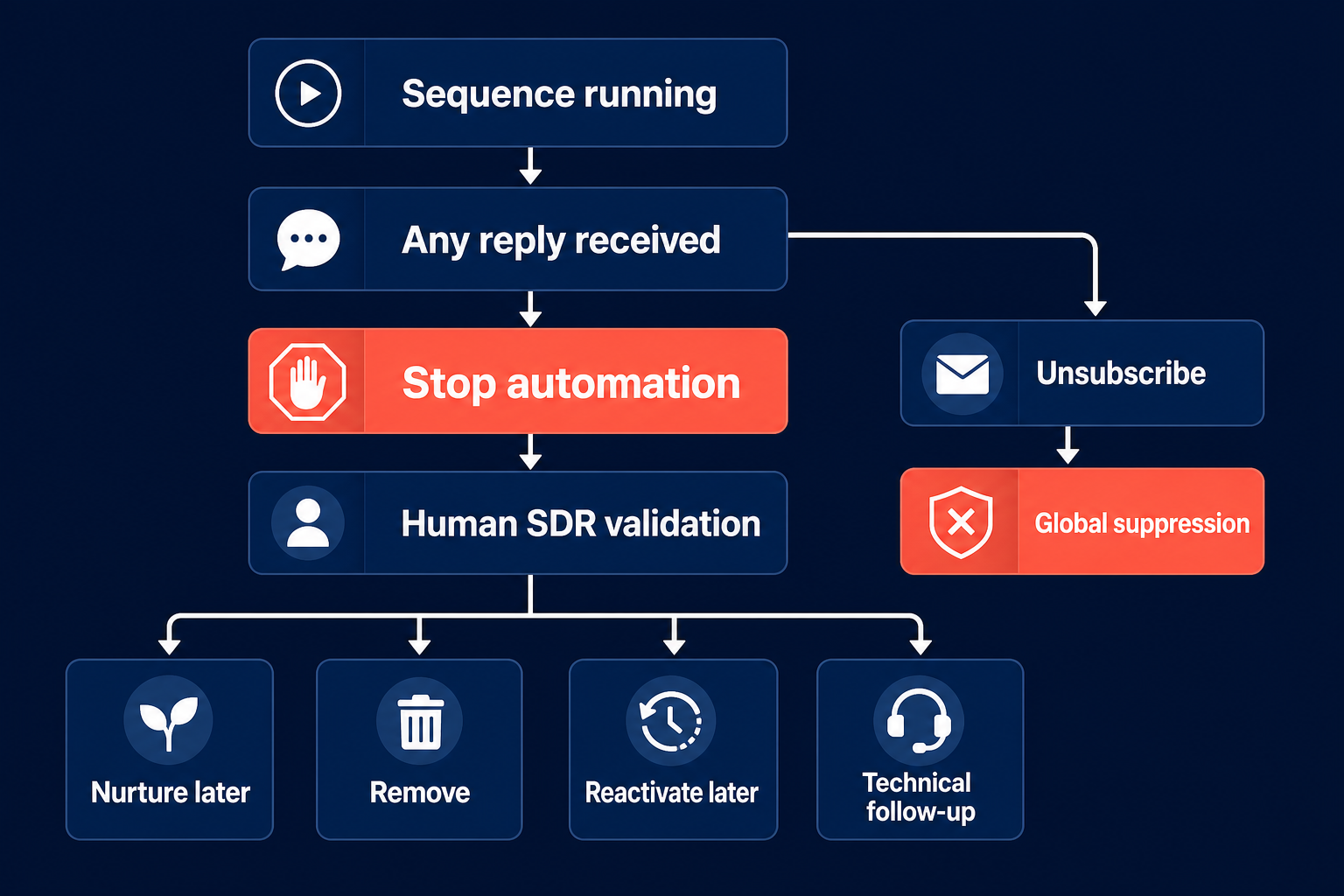
This policy resolves an apparent automation contradiction. Research, drafting, enrollment, sending, classification, booking, qualification, and CRM updates can all be automated after a human process is understood and configured. But the live buyer-conversation boundary can still require manual ownership.
CRM follows the same logic. Pre-reply work remains in lemlist or Instantly plus a spreadsheet. Only a positive or neutral reply that passes human validation becomes a CRM lead. A thousand imported cold contacts are not valuable pipeline merely because they occupy rows.
This is an author operating position, not a universal CRM law. A mature enterprise may maintain a prospect object outside its opportunity pipeline. The underlying principle remains: record state must reflect the relationship, not the size of the purchased list.
Any-reply stop workflow with human SDR validation and suppression branch.
Any reply stops the sequence; the SDR validates the correct next state.

10 / Stack design

Three right-sized stack designs

The following designs are architecture examples. They are not paid bundles and do not predict outcomes.

1. Founder-led service business

Use one primary data/context source, one reasoning workspace, one sender, a spreadsheet before reply, and CRM after validation.
A practical architecture could be:
Sales Navigator or Apollo → Claude Code or manual research → lemlist → SDR/founder reply → CRM
Clay is optional. Add it only if a pilot proves that Apollo or manual sources leave a material enrichment gap. The founder or sales head still owns the offer, ICP, and first sequence logic.

2. Small SaaS team with a repeatable email motion

Use a data source, optional enrichment, one email sender, one reply inbox, and one CRM intake rule.
For example:
Apollo → optional Clay → Instantly or Smartlead → SDR validation → CRM
Do not run Instantly and Smartlead for the same mailbox or audience without a deliberate infrastructure boundary. Do not send from the main domain. Keep suppression synchronized across every active campaign.

3. Governed revenue team

Use approved data and signal sources, one engagement platform, explicit permissions, an audit path, and CRM as the system of record.
For example:
Sales Navigator + approved enrichment → Outreach or Salesloft → seller/SDR → CRM
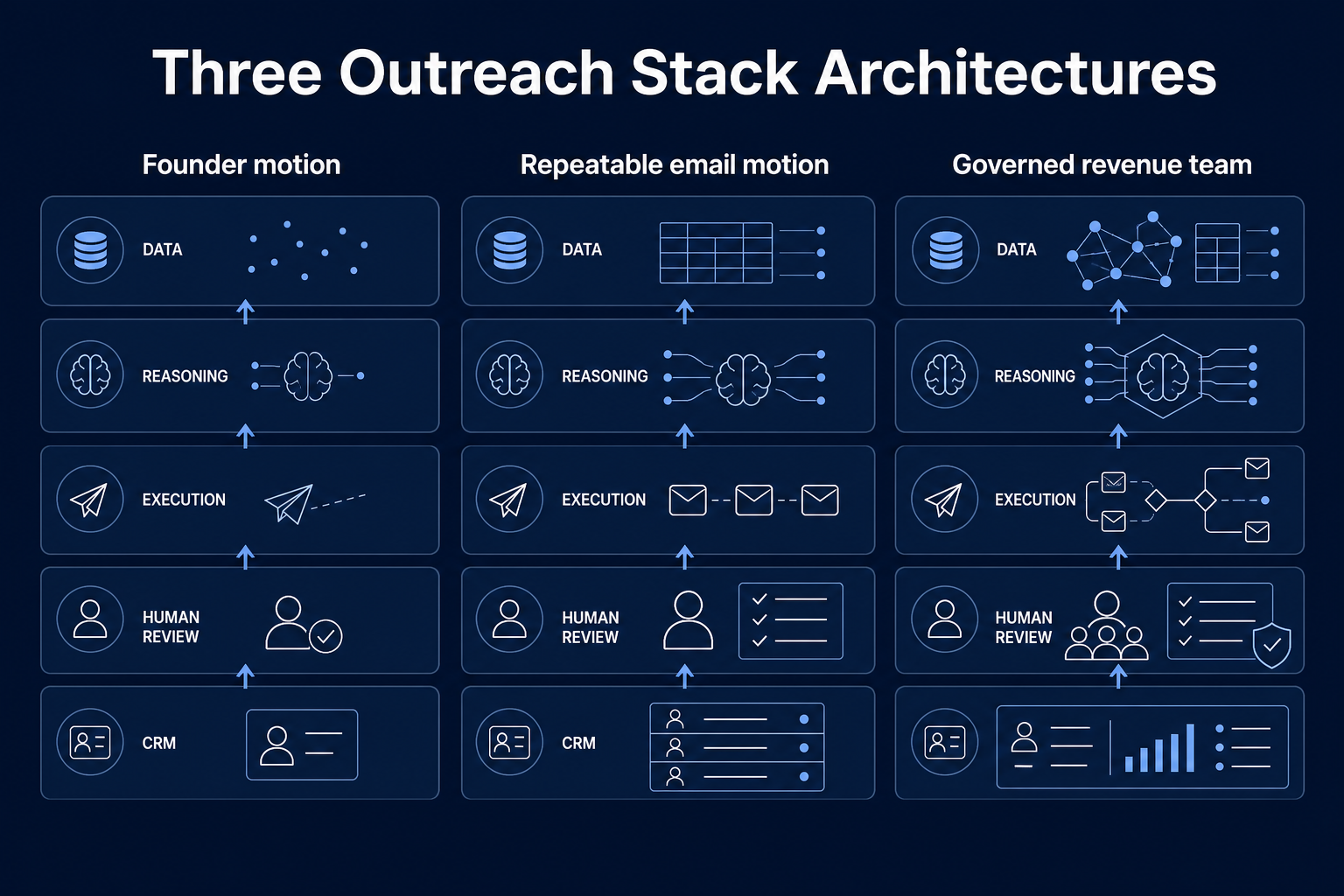
The choice between Outreach and Salesloft should follow admin model, current CRM, existing workflows, migration cost, reporting, and seller adoption. It should not follow a generic feature-count score.
Anastasiia's planning heuristic gives 40% of stack attention to contact and data work, 40% to reasoning or agentic work, and 20% to sending. This is a design heuristic, not measured industry allocation. Its value is the reminder that delivery is the last layer, not the whole campaign.
Three outreach stack architectures for founder, repeatable email and governed revenue motions.
Tool architecture should grow with the motion and governance burden.

11 / Stack design

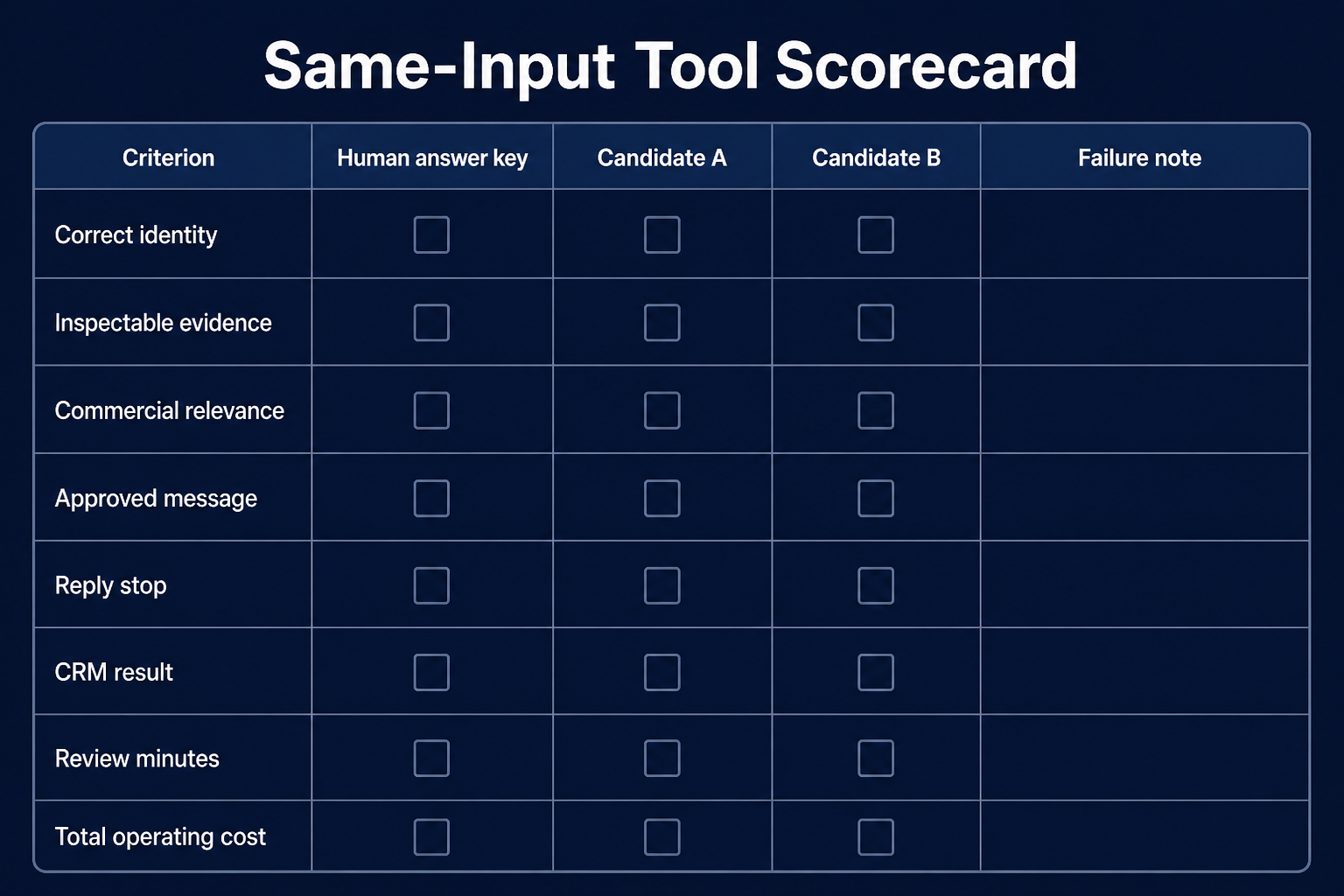
Run a same-input pilot before expanding the stack

No same-sample product test was performed for this article. Use the following as a proposed buying protocol, not as reported research.
  1. Define one job. Test data quality, research, personalization, sending, or reply operations. Do not test the entire revenue system at once.
  2. Freeze the inputs. Give each viable candidate the same current accounts, CRM history, offer, source permissions, and message constraints.
  3. Build a human answer key. Mark correct identity, current role, acceptable source, commercial relevance, prohibited contact, existing ownership, and expected next state.
  4. Include edge cases. Add stale roles, ambiguous identities, subsidiaries, current customers, previous opt-outs, named accounts, and conflicting CRM fields.
  5. Set allowed actions. Begin in draft or approve-to-send mode. Do not use autonomous send to discover what the product does.
  6. Record every correction. Log wrong identity, unsupported claim, weak relevance, tone change, suppression failure, reply leakage, and CRM mismatch.
  7. Measure the right denominators. Keep records reviewed, records approved, messages delivered, meaningful replies, held meetings, accepted opportunities, review minutes, and total cost separate.
  8. Define an exit rule. Stop if the tool cannot expose evidence, respect suppression, hand off replies, preserve CRM state, or reduce a material bottleneck.
Pilot measureDenominatorWhat it answers
Seller-approved recordsRecords reviewedDoes the output meet the team's fit and evidence rule?
Correction rateRecords reviewedHow much human repair is required?
Review timeApproved recordsDoes automation reduce or move the work?
Meaningful repliesDelivered messagesDoes the motion create real conversations?
Held meetingsSeller-accepted conversationsDoes interest survive scheduling and attendance?
Accepted opportunitiesHeld, qualified meetingsDoes the workflow produce CRM value?
Total operating costSeller-approved records or accepted opportunitiesIs the stack economically useful after hidden work?
Calls and acquired customers remain Anastasiia's preferred downstream outcomes. Connection acceptance can be an earlier motion-health signal. Open rate is not enough to choose a stack.
Blank same-input scorecard comparing two outreach tool candidates with a human answer key.
Compare candidates using identical inputs, denominators and failure notes.

12 / Total cost

Calculate total operating cost, not the subscription

The visible plan price is only one line. Build a worksheet that includes:
Cost componentQuestions to record
Product seats and base planWhich team, permissions, channels, and limits are included?
Data and enrichmentWhich credits, providers, waterfalls, refreshes, and overages are needed?
Domains and mailboxesHow many active and reserve assets exist, and who owns them?
Verification and healthWhat is paid for validation, monitoring, and remediation?
ImplementationWho builds fields, workflows, permissions, prompts, and integrations?
Human reviewHow many minutes go to evidence, messages, replies, and corrections?
CRM cleanupWhat creates duplicates, incorrect owners, stages, or attribution?
Training and administrationWho maintains templates, rules, suppression, and reports?
Migration and exitCan data, history, and state be exported without rebuilding the motion?
The smallest outbound setup can cost money before the first message because it needs domains, mailboxes, warm-up, lead data, verification, enrichment, and execution. Do not turn that observation into a universal market total. Calculate it from the proposed architecture and current official prices.

13 / Decision rules

Final decision rules

Choose Sales Navigator when current professional context and relationships are the bottleneck.
Choose Apollo when a small team needs a practical data and sequence foundation.
Choose Clay when a defined enrichment gap justifies orchestration and someone owns the workflow.
Use Claude Code when custom logic is more valuable than another fixed interface and the team can govern tools and sources.
Choose lemlist, Instantly, or Smartlead when email execution is the missing layer. Compare global suppression, reply stops, sender controls, inbox state, export, and operational ownership before secondary features.
Consider Outreach or Salesloft when a larger team needs governed multichannel execution, CRM state, administration, and a shared seller workflow.
Consider Amplemarket or 11x only after the human motion works and the team can audit the larger authority surface.
The safest buying sequence is:

Prove the process manually. Identify one bottleneck. Select one owner. Pilot compatible tools on the same inputs. Keep every buyer reply human-owned. Add the minimum product that creates a measurable improvement.

14 / FAQ

Frequently asked questions

What is the best AI sales outreach tool for a small B2B team?

There is no universal best product. A small team should start with one data/context source, one execution path, and one system of record. Apollo or Sales Navigator can support research, while lemlist, Instantly, or Smartlead can support execution. Add Clay or a broader agent only after a pilot proves a material gap.

What is the difference between an AI outreach tool and an AI SDR?

An AI outreach tool usually owns one job, such as research, drafting, sending, or sequence management. An AI SDR attempts to own several jobs across prospecting, messaging, follow-up, qualification, booking, and CRM. The broader the ownership, the more important permissions, reply stops, audit logs, and human handoff become.

Do I need one all-in-one platform or several specialist tools?

Choose the minimum architecture that solves the bottleneck. An all-in-one platform can reduce integrations but may duplicate a CRM or hide assumptions. Specialist tools can provide better control but add cost and handoffs. Test the architecture on the same records and count review and maintenance time.

Which tools support email and LinkedIn outreach?

lemlist, Apollo, Outreach, and Salesloft document multichannel steps or LinkedIn tasks. A product feature does not override LinkedIn policy. Review LinkedIn's current restrictions, keep strategic accounts human-reviewed, and avoid treating automation capacity as permission.

Can an outreach tool answer buyer replies automatically?

Some products can classify or draft replies, and broader agents may claim more autonomy. Anastasiia's operating policy is that any reply stops the sequence and an SDR validates the next action. This prevents an automated follow-up from colliding with a live buyer conversation, referral, objection, opt-out, or technical question.

Should cold contacts enter CRM before they reply?

Not in the workflow documented here. Pre-reply records stay in the execution tool or a spreadsheet. Positive or neutral replies enter CRM only after human validation. Other companies may use a separate prospect object, but cold rows should not be confused with qualified pipeline.

How should I compare AI personalization quality?

Review the evidence before the wording. Check identity, source, timestamp, commercial relevance, and unresolved conflicts. Then assess whether the message is concise, accurate, and appropriate. A random fact from a social profile is not useful personalization when it has no connection to the buyer's role or business problem.

How much does an AI sales outreach stack cost?

Add product plans, data and enrichment credits, domains and mailboxes, verification, implementation, integrations, human review, CRM cleanup, administration, and exit cost. Prices change quickly, so this article does not publish a synthetic market total. Calculate cost per seller-approved record or accepted opportunity for your pilot.

Is cold outreach legal?

Rules depend on market, channel, data, and message. In the United States, the FTC's CAN-SPAM guide explains requirements for commercial email, including B2B messages. Other jurisdictions can impose stricter rules. This guide is operational guidance, not legal advice.

15 / Method

Methodology and update policy

Luck My Sales compared products by primary job, evidence state, source visibility, permitted action, human control, reply ownership, CRM behavior, sender safeguards, implementation burden, and measurable outcome. Official product documentation was reviewed on 18 August 2026.
The article must be reviewed when a product materially changes its sequence controls, agent permissions, CRM integration, pricing model, suppression behavior, or public commercial relationship. Corrections should preserve the old claim, new evidence, date, and reason for change in the editorial packet.
Related guides:
Phase 06 draft status: complete

Research note

Methodology

  1. 01Products are compared by workflow job, evidence, human control, CRM behavior and implementation burden.
  2. 02Official product documentation was reviewed on August 18, 2026; no common-sample performance test was run.
  3. 03Commercial relationship gaps are disclosed and no vendor payment determines placement.
Read the full methodology

Source ledger

Sources & editorial notes

  1. 01
    LinkedIn Sales Navigator

    LinkedIn · Official product, platform, policy or regulatory source cited in this guide.

  2. 02
    prohibited software and extensions policy

    LinkedIn Help · Official product, platform, policy or regulatory source cited in this guide.

  3. 03
    sequence documentation

    Apollo Knowledge Base · Official product, platform, policy or regulatory source cited in this guide.

  4. 04
    building a data waterfall

    Clay University · Official product, platform, policy or regulatory source cited in this guide.

  5. 05
    Claude Code

    Anthropic · Official product, platform, policy or regulatory source cited in this guide.

  6. 06
    CLI reference

    Anthropic · Official product, platform, policy or regulatory source cited in this guide.

  7. 07
    campaign sequencing documentation

    lemlist Help Center · Official product, platform, policy or regulatory source cited in this guide.

  8. 08
    reply-stop guidance

    lemlist Help Center · Official product, platform, policy or regulatory source cited in this guide.

  9. 09
    campaign options

    Instantly Help Center · Official product, platform, policy or regulatory source cited in this guide.

  10. 10
    campaign setup guide

    Smartlead Help Center · Official product, platform, policy or regulatory source cited in this guide.

  11. 11
    unsubscribe documentation

    Smartlead Help Center · Official product, platform, policy or regulatory source cited in this guide.

  12. 12
    Sales Engagement overview

    Outreach Support · Official product, platform, policy or regulatory source cited in this guide.

  13. 13
    Sequence overview

    Outreach Support · Official product, platform, policy or regulatory source cited in this guide.

  14. 14
    Salesloft Cadence

    Salesloft · Official product, platform, policy or regulatory source cited in this guide.

  15. 15
    Rhythm

    Salesloft · Official product, platform, policy or regulatory source cited in this guide.

  16. 16
    Amplemarket Duo

    Amplemarket · Official product, platform, policy or regulatory source cited in this guide.

  17. 17
    11x Alice

    11x · Official product, platform, policy or regulatory source cited in this guide.

  18. 18
    FTC's CAN-SPAM guide

    US Federal Trade Commission · Official product, platform, policy or regulatory source cited in this guide.

Corrections or primary material: contact the corrections desk.

About the author

Anastasiia Krynytska

Anastasiia Krynytska is a LeadGen Team Lead at Softermii and the lead editor of Luck My Sales. She covers AI-assisted outbound, account research, qualification, messaging, CRM handoffs and revenue workflows from a practitioner’s perspective.View author profile LinkedIn

Continue reading

01 · News analysis

AI sales is moving from assistant to operating layer

The category is expanding from drafting support into research, pipeline decisions, recommended actions and controlled execution.

Read news
02 · Field analysis

In AI sales, the handoff may be the product

Models are becoming accessible; durable value sits in the controlled transition from signal to seller action.

Read analysis
03 · Research framework

Sales AI Workflow Signals 2026

A launch framework for mapping the products, controls and buying questions shaping AI-enabled revenue work.

Read reports

Luck My Sales briefing

Useful context, once a week.

News, explanations and original research from this desk. No noise.
The newsletter is still being built. We will contact you when the first edition is ready.