Weekly industry intelligence · No noiseSubscribe to the Luck My Sales newsletterFree briefing

Independent operator-led media on AI in B2B sales

Menu

Operator guide and implementation framework · Implementation guides

I Ran Two AI Sales Enablement Workflows for 12 Reps—Here’s What I’d Automate First

I ran AI sales enablement workflows for 12 AEs and SDRs. Here is the call-to-CRM setup, human approval gate, rollout plan and ROI model I would use.
Editorial disclosure

AI may assist research organization and drafting. A human editor reviews every published page, checks material claims against the cited sources and owns the final decision. No company paid for placement in this article.

AI use policy

Agent-ready brief

AI takeaways

Keep the key points here, or take a source-aware text brief into Claude, ChatGPT or another AI workspace.
  1. 01The first workflow to automate is usually call summarization plus proposed CRM actions, not autonomous messaging.
  2. 02Use the sequence AI suggests, human approves, CRM records.
  3. 03Increase approval strength with consequence: append, create, propose, then prohibit or separately approve.
  4. 04Treat adoption, efficiency, quality and process outcomes as separate measurement layers.
  5. 05The 12-rep observations are directional operating evidence, not controlled product benchmarks.
Includes summary, takeaways, sources and a use note.
AI sales enablement should remove a repeatable bottleneck while leaving the commercial decision with a person. It should not add another dashboard, another generic summary or another place where sellers must remember to work.
I learned that by operating two related workflows for a group of 12 AEs and SDRs: automated pre-call briefing, and post-call summarization with structured CRM write-back. The second workflow produced the clearest value because it started with a real conversation, extracted actions from that evidence, asked a seller to approve the result and then updated the system of record.
My first version went too far. It generated and sent follow-up emails automatically. One output invented product features and another sounded unlike the seller. I changed the workflow to draft-only. The seller could correct the summary, approve the next steps and decide whether any message should leave the company.
That incident produced the rule I still use:
> AI suggests, human approves, CRM records.
If you only remember one thing from this guide, remember that sequence. It is faster than manual administration, but it remains observable and reversible.

Start AI sales enablement with one evidence-grounded bottleneck, keep external communication and consequential CRM changes human-approved, and measure the workflow before revenue attribution.

01 / Quick answer: what AI sales enablement should

Quick answer: what AI sales enablement should do

AI sales enablement uses AI to help sellers find, interpret and apply the knowledge, conversation evidence and process guidance needed to move a deal forward. The useful unit is not an AI feature. It is a complete workflow with an input, a bounded action, a human checkpoint, a write-back and an outcome metric.
The first workflow I would automate for most B2B sales teams is call summarization plus action extraction into the CRM. It has five advantages:
  • the call gives the model a concrete evidence source;
  • the output is easy for the seller to inspect;
  • an incorrect summary can be corrected before it affects a buyer;
  • approved actions can be written into the system of record;
  • time saved and correction rate can be measured without pretending that AI caused revenue.
I would not start with autonomous external communication, unsupervised opportunity-stage changes or a broad “sales copilot” launch. Those actions have greater consequence, weaker reversibility or unclear ownership.
The best starting architecture is simple:
conversation evidence → structured draft → seller review → controlled CRM write-back → outcome feedback
The tools can change. The control logic should not.

02 / What AI sales enablement is—and what it

What AI sales enablement is—and what it is not

Traditional sales enablement gives sellers the content, training, coaching and process support they need to sell consistently. AI in sales enablement can make parts of that system easier to search, personalize, summarize or measure. It can also automate a controlled step when the evidence and authority are clear.
That definition creates three useful boundaries.

It is not a content generator by default

Generating another battlecard or follow-up draft does not solve enablement if the source material is stale, nobody owns it or sellers cannot find it during a live deal. AI may produce more content while making the knowledge problem worse.

It is not the same as sales automation

A deterministic rule can assign a task after a meeting. AI is useful when the input is unstructured and judgment is required: identifying an objection in a transcript, distinguishing a commitment from a suggestion or turning a conversation into proposed fields and actions.
Use a rule when a rule is enough. Use AI when interpretation is necessary. Keep a person in the loop when an error could mislead a buyer, alter a commercial record or create an irreversible action.

It is not autonomous selling

An enablement system can prepare a recommendation without owning the decision. The seller remains accountable for the buyer relationship. The manager remains accountable for coaching. RevOps remains accountable for field definitions and write permissions. Enablement remains accountable for the knowledge and program.
The distinction matters because the most common failure is hidden authority. A workflow begins as “help me summarize this call” and quietly becomes “send the message, change the stage and create a forecast assumption.” Each step may look small. Together they transfer commercial control to a system that was never approved to hold it.

03 / Diagnose the bottleneck before choosing AI

Diagnose the bottleneck before choosing AI

I would not buy or build anything until I could name the bottleneck in one sentence and identify the evidence that proves it exists.
Here is the diagnostic I use.
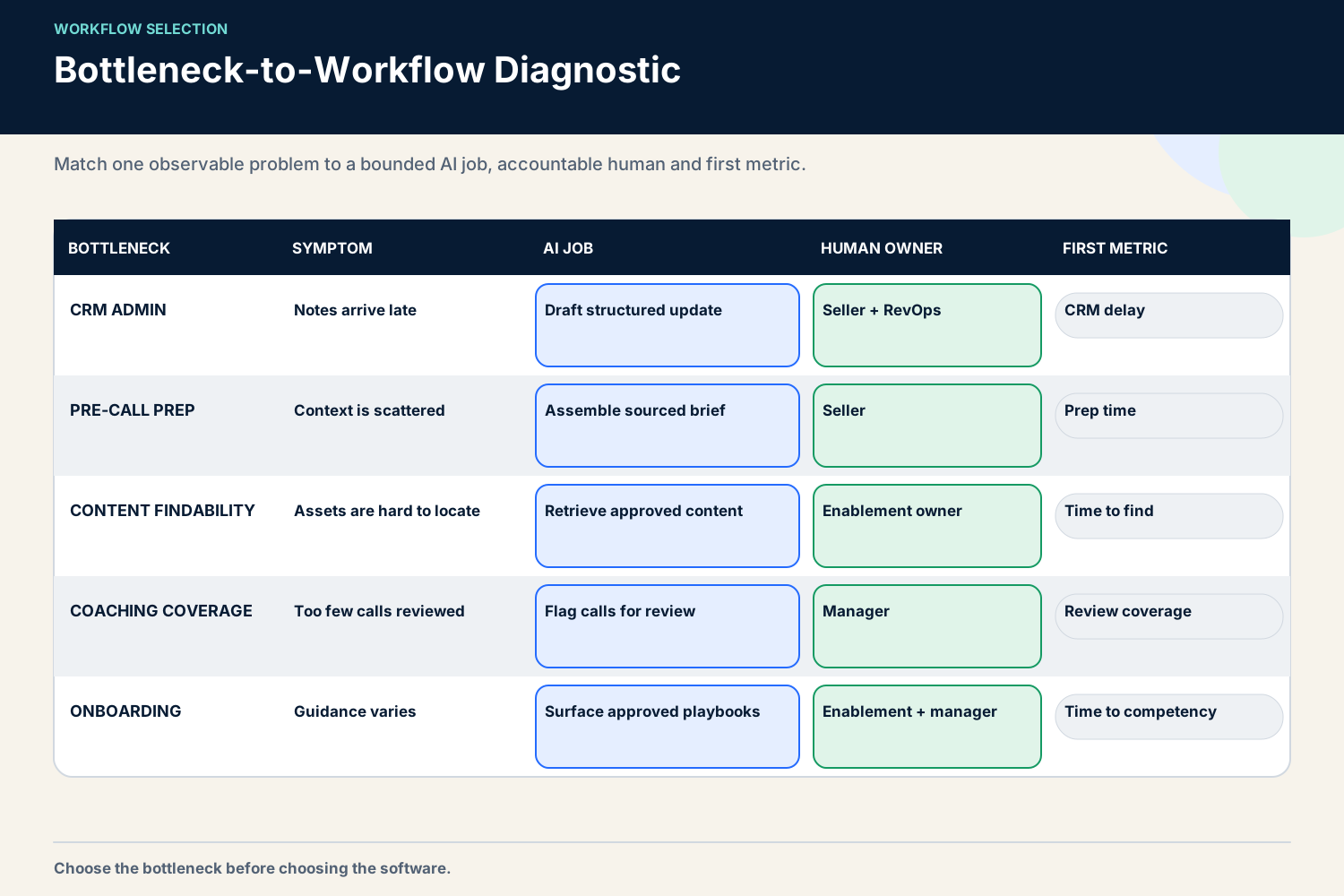
BottleneckObservable symptomUseful AI jobHuman authorityFirst metric
CRM administrationNotes and next steps arrive late or remain incompleteSummarize calls and propose structured updatesSeller approves facts and actionsMinutes per rep per day; correction rate
Pre-call preparationReps search several systems before meetingsAssemble a bounded brief from approved sourcesSeller decides what mattersPrep time; source coverage
Content retrievalReps ask the same questions or use old filesRetrieve verified content in contextContent owner verifies sourceSuccessful retrieval; stale-content reports

People and execution bottlenecks

BottleneckObservable symptomUseful AI jobHuman authorityFirst metric
Coaching coverageManagers cannot review enough callsSurface moments and patterns for reviewManager chooses coaching actionReviewed moments; coaching completion
OnboardingNew reps cannot apply training in live workRecommend role- and stage-specific practiceManager certifies readinessTime to agreed competency
Deal executionNext steps and stakeholders are inconsistentExtract commitments and missing evidenceDeal owner accepts the planAccepted actions; overdue commitments
This matrix prevents a common procurement mistake. “We need AI sales enablement” is not a requirement. “Our reps spend too much time converting calls into consistent CRM actions, and managers cannot trust the record” is a requirement.
The difference also determines whether you need a full sales enablement software platform, a CRM-native feature or a small workflow assembled from systems you already use.
Before moving forward, answer six questions:
  1. What repetitive job consumes time or creates an accuracy problem?
  2. Where does the source evidence live?
  3. Who currently makes the decision?
  4. Which output is a draft, which is a fact and which is an action?
  5. What can the system write, and what is read-only?
  6. What baseline will show improvement or harm?
If those answers are vague, AI will make the ambiguity faster.
A matrix matching CRM administration, preparation, content, coaching and onboarding bottlenecks to bounded AI workflows.
Choose one observable bottleneck, then define the AI job, human authority and first metric.

04 / The first workflow I would automate

The first workflow I would automate

The post-call workflow I ran used HubSpot as the CRM, conversation evidence from Gong or Fathom, and Python/n8n for the workflow layer. That exact stack is not a universal recommendation. The reusable part is the sequence.
Official product documentation confirms that this is technically feasible without treating a model output as an unquestionable truth. Gong’s Calls API can return call details including action items, topics, trackers and interaction information. Gong’s current CRM integration documentation describes exporting activities to CRM objects, editing imported CRM fields and testing association settings before production. HubSpot’s notes API supports creating notes and associating them with CRM records. These are capability facts, not evidence that any vendor guarantees summary accuracy or business impact.

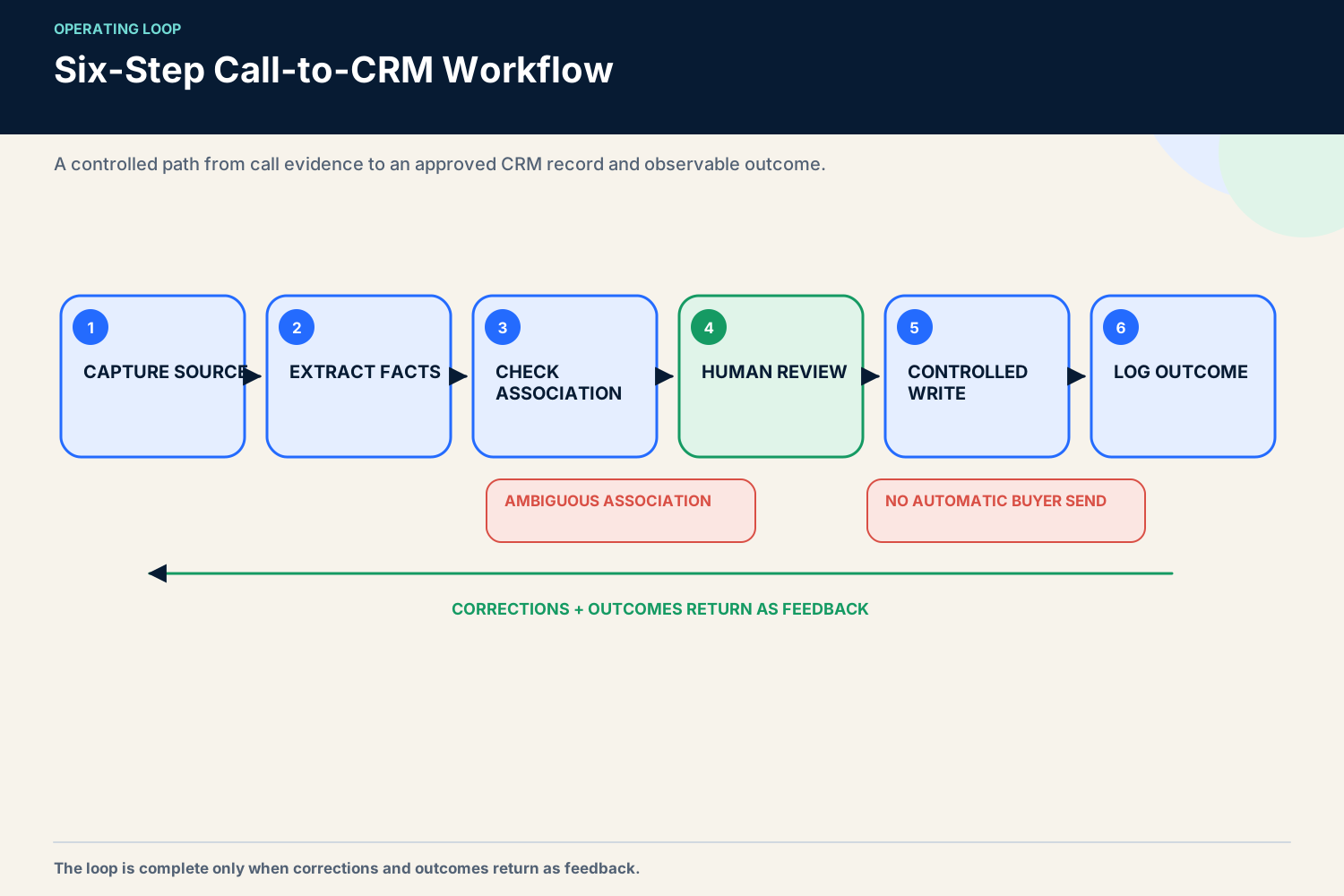
Step 1: capture the conversation and preserve the source

The workflow begins after a recorded meeting is available. The original call or transcript remains the evidence source. The summary is a derived artifact.
That separation matters. If a seller disputes a next step, the team should be able to return to the relevant passage. A generated paragraph with no source location turns review into guesswork.
At minimum, preserve:
  • call identifier and time;
  • participants;
  • CRM account, contact and opportunity association;
  • transcript or authorized recording location;
  • model and workflow version;
  • output time.
Do not expose every call to every user or workflow. The integration should only reach the records and fields it needs. Gong recommends a dedicated integration user for its HubSpot connection because permissions assigned to that user determine the records and fields available to Gong. That is a useful general control: machine access should have its own identity and the narrowest practical scope.

Step 2: extract facts, commitments and proposed actions separately

The workflow should not ask for “a good summary.” It should request a schema.
A practical output might include:
  • buyer-stated priorities, each linked to evidence;
  • questions that remain unanswered;
  • commitments made by the buyer;
  • commitments made by the seller;
  • proposed next steps with owner and due date;
  • risks or contradictions;
  • fields that might need an update;
  • a confidence or review flag.
Facts and recommendations should never share one unlabeled field. “The buyer said security review begins next week” is evidence. “Advance the opportunity stage” is a recommendation. “Stage changed from discovery to evaluation” is an applied action. Keeping these layers separate makes the workflow auditable.

Step 3: validate identity and association

The cleanest summary is useless if it lands on the wrong deal. CRM association deserves its own check.
The workflow compares meeting participants, domains, open opportunities, owners and known account relationships. If several open deals could match, it should stop for review. Gong’s CRM documentation explicitly notes that association settings can be configured and tested before production. Use that type of test with your own data before allowing automatic write-back.
I would measure association accuracy independently from summary quality. Combining them hides the actual failure. A perfect extraction attached to the wrong record is still a serious error.

Step 4: present a short approval surface

The seller should not reread a long AI essay. The approval view should show the minimum decision surface:
  • what the system heard;
  • where the evidence came from;
  • what will be added or changed;
  • which buyer-facing draft, if any, was prepared;
  • approve, edit or reject controls.
The reviewer should see differences, not just final text. For a CRM field, show old value, proposed value and source. For a task, show owner and due date. For a follow-up, keep the send action outside the automatic path.

Step 5: write approved data through a controlled path

After approval, the workflow can create a note, action items and allowed field updates. It should not receive blanket permission to overwrite the record.
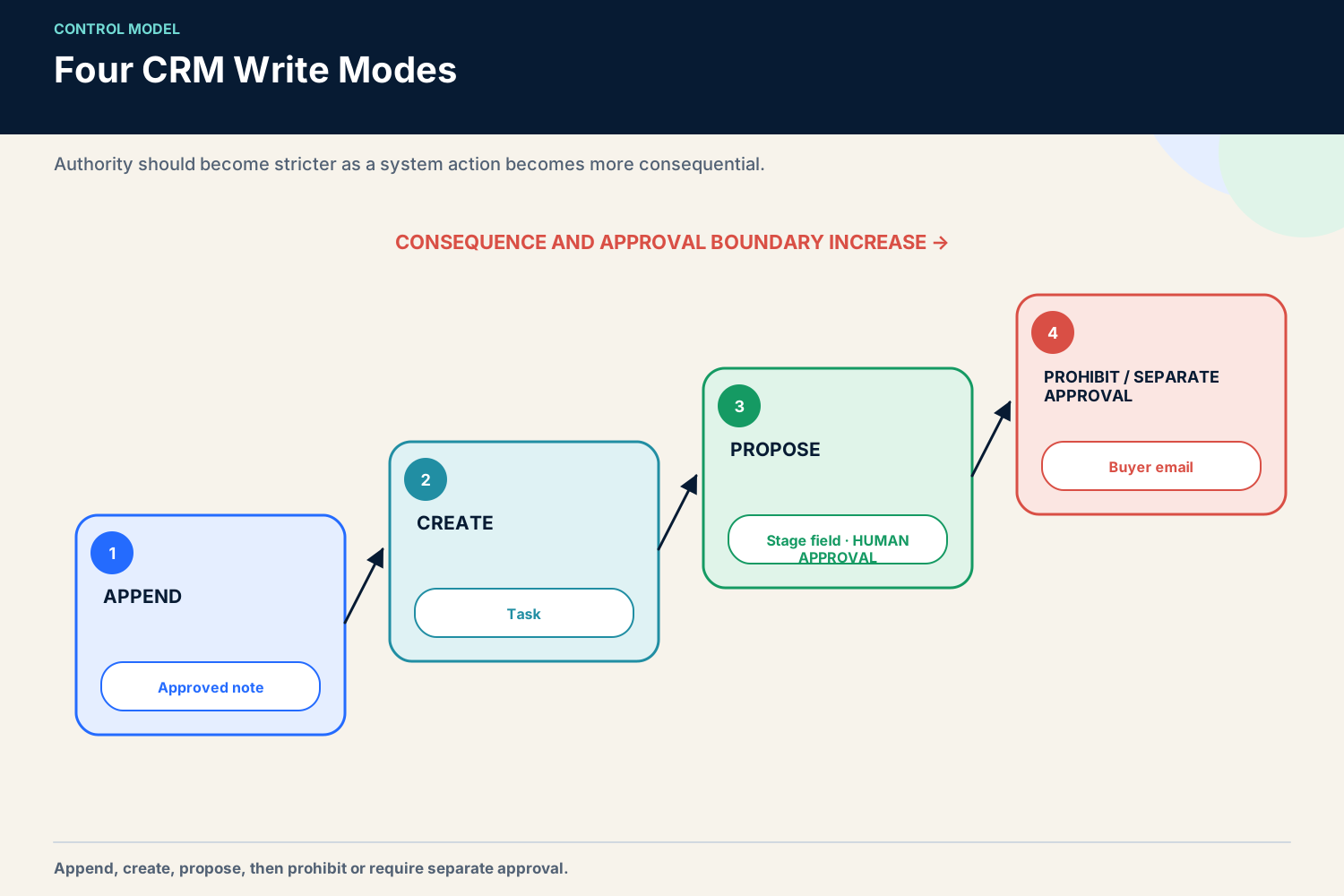
I divide writes into four modes:
ModeExampleRecommended control
AppendAdd an approved call noteAutomated after review; preserve source and author
CreateCreate a follow-up taskAutomated after owner and due-date approval
ProposeRecommend stage or close-date changeSeller explicitly accepts the change
ProhibitSend buyer message or overwrite protected commercial termsKeep outside the workflow or require a separate high-authority approval
The exact permissions depend on the organization. The principle is consistent: authority should follow consequence.

Step 6: log corrections and outcomes

The workflow is not complete when data reaches the CRM. Record whether the seller approved, edited or rejected each output. Then observe whether the action was completed.
Correction data is more valuable than a vague satisfaction score. It shows where the system fails:
  • invented facts;
  • missed commitments;
  • wrong owner;
  • wrong association;
  • unhelpful wording;
  • incorrect field suggestion;
  • duplicate action.
Review those patterns by workflow version. A lower correction rate can justify broader automation of low-risk writes. A recurring high-consequence error should narrow the scope or stop the workflow.

Define an acceptance contract before the pilot
A seller should not have to decide from scratch whether every output is “good enough.” I write an acceptance contract for each object the workflow creates.
For a call summary, the contract might require that every named product, date, amount and buyer commitment be traceable to the conversation. The summary must distinguish what the buyer said from what the seller proposed. It must not fill a missing value with a plausible guess. If the transcript is unavailable or the account association is ambiguous, the workflow returns a review state instead of a completed summary.
For an action item, the contract requires an owner, an action and either a due date or an explicit “date not agreed” label. “Follow up soon” is not a valid task. A proposed due date generated by the model must be labeled as proposed, not buyer-agreed.
For a CRM update, the contract identifies whether the operation is append, create or overwrite. It names the allowed field, required evidence and reviewer. A rejected proposal must not reappear automatically on the next run without new evidence.
For a buyer-facing draft, the contract is stricter. Product statements must come from an approved source. The language should identify uncertainty rather than invent certainty. No draft is sent without the seller reading and approving it. An approval interface that encourages a blind click does not satisfy this requirement.
I would test the contract with deliberately difficult examples before using live calls. Include a transcript with two opportunities at the same account, a buyer who mentions a date without making a commitment, a seller who states an outdated feature, a call with poor transcription, an internal participant discussing confidential pricing and a conversation in which the next step is intentionally left open. The aim is not to prove the model can answer everything. The aim is to prove the workflow knows when to stop.
Acceptance criteria also make vendor or model changes easier to evaluate. Run the same failure set against the new version. Compare unsupported facts, association errors, missed commitments and reviewer effort. A more fluent summary is not an improvement if it requires more correction or hides uncertainty.
Six steps from captured sales call to structured extraction, association check, seller approval, CRM write-back and outcome feedback.
The workflow is complete only when corrections and outcomes return as feedback.

05 / What happened in the 12-rep operating case

What happened in the 12-rep operating case

The operating context was a mixed group of 12 AEs and SDRs. The workflows supported pre-call briefing and post-call CRM administration. This was not a controlled experiment and it was not a vendor comparison.
The owner-provided evidence includes a before/after time log. CRM administration was observed at roughly 60 minutes per AE per day before the workflow and about 12 minutes after it. The packet does not preserve a defensible observation window, so I treat the result as a directional owner observation, not a benchmark. I also do not convert it into a revenue claim.
The more important finding was qualitative: the useful boundary became visible only after the failure. Automatic follow-up sending produced a hallucinated feature claim and an inauthentic tone. Drafting was helpful; autonomous sending was not. The workflow was changed so the seller reviewed all external communication.
This is why I prefer a small operated workflow to a broad promise. A team learns where evidence is strong, where review is fast and where authority must stay human.

06 / AI sales enablement use cases, prioritized

AI sales enablement use cases, prioritized

Not every use case deserves the same level of autonomy. I rank them by evidence quality, reversibility and external exposure.

Start here: low-exposure, reversible assistance

These jobs are usually good pilot candidates:
  • call summary drafts linked to the source;
  • action-item extraction;
  • pre-call briefs assembled from approved CRM and knowledge sources;
  • internal search across verified playbooks;
  • suggested coaching moments for manager review;
  • proposed CRM notes and tasks;
  • stale-content alerts for content owners.
The common pattern is that a human can inspect the output quickly, and a mistake can be corrected before it affects the buyer.

Add after the basics: medium-dependency workflows

These jobs can be valuable, but they depend on cleaner data and clearer authority:
  • next-best-action recommendations;
  • opportunity-risk summaries;
  • role-specific onboarding paths;
  • content suggestions based on deal context;
  • proposed stage, amount or close-date updates;
  • automated quality sampling across calls.
Pilot them only after you can trace the source, reviewer and applied action. For example, a stage recommendation should never be indistinguishable from a seller-confirmed stage.

Treat as high-risk: externally exposed or consequential action

These jobs require a stronger case and a stricter approval path:
  • automatic buyer-facing messages;
  • autonomous discount or commercial-term decisions;
  • silent opportunity-stage or forecast changes;
  • automatic coaching conclusions used for performance management;
  • broad record overwrite;
  • actions based on sensitive or weakly governed data.
The failed auto-send follow-up belongs in this category. It was easy to demonstrate and hard to trust. The right response was not a longer prompt. It was a smaller permission boundary.
For a deeper look at how conversation evidence can support review, see the AI conversation intelligence guide and the practical comparison of AI tools for sales call analysis.

07 / The minimum viable AI enablement stack

The minimum viable AI enablement stack

A useful stack has four layers. You may already own most of them.

1. System of record

The CRM holds identities, owners, opportunity state, actions and outcomes. It should remain the canonical record even when AI prepares the update.

2. Evidence layer

Conversation recordings, transcripts, approved knowledge, product documentation and buyer activity provide source material. Evidence needs ownership and access controls. More data is not automatically better data.

3. Workflow layer

Native automation, n8n, Python or another orchestrator moves data through a defined sequence. The workflow layer handles triggers, schemas, validation, approvals, retries and logs. It should fail visibly.

4. Measurement and governance

This layer records review decisions, correction reasons, processing failures and business outcomes. It also defines permissions, retention, escalation and rollback.
In the operated setup, HubSpot, Gong/Fathom and Python/n8n filled these roles. A different team may use one platform for several layers. The architecture still matters because it shows where evidence ends, inference begins and authority changes hands.
If you already have a CRM and meeting assistant, do not assume a separate platform is necessary. First check whether a narrow workflow can solve the measured bottleneck. The best AI meeting assistants for sales comparison can help with the evidence-capture layer, while the separate software guide addresses larger enablement platforms.

08 / Data, privacy and quality guardrails

Data, privacy and quality guardrails

AI enablement governance should be designed into the workflow, not added after launch. The NIST AI Risk Management Framework is voluntary, but its lifecycle approach is useful: govern the system, map the context, measure the risks and manage them over time. NIST also publishes a generative-AI profile with suggested actions for risks specific to generative systems.
For this use case, I would translate that guidance into ten practical controls.

1. Name the owner

Every workflow needs a business owner and a technical owner. The business owner defines acceptable output and authority. The technical owner manages access, reliability and change control.

2. Minimize access

Give the workflow access only to required calls, records and fields. Use a dedicated integration identity where possible. Review permissions on a schedule and when ownership changes.

3. Preserve provenance

Store the call, passage, document or CRM value behind a material statement. A summary should never erase the source.

4. Separate facts from inference

Label buyer statements, extracted entities, model interpretations, recommendations and applied actions. Do not let them collapse into one CRM field.

5. Use structured output

A schema makes missing fields, validation and review easier. Free-form prose hides ambiguity.

6. Require human approval for external communication

This is the non-negotiable lesson from my failed workflow. A seller reviews every buyer-facing message. The system may draft; it does not impersonate the seller without approval.

7. Bound CRM writes

Append notes and create reviewed tasks before granting permission to overwrite fields. Protect commercial, forecast and stage fields until the workflow earns a narrower, documented authority.

8. Log versions and decisions

Record model, prompt or rule version, source time, reviewer and applied action. Without that history, a team cannot investigate drift.

9. Define stop conditions

Stop or narrow the workflow if association errors, fabricated claims, sensitive-data exposure or high-consequence field errors appear. A rising edit rate is a signal, not an inconvenience.

10. Test rollback

Before production, prove that a bad write can be identified and reversed. “We can fix it manually” is not a rollback plan if the system can change hundreds of records.
The same principle appears in OpenAI’s description of running coding agents safely: bounded environments, approvals for higher-risk actions, constrained network access and agent-aware logs. Coding-agent controls do not prove a sales workflow is safe, but they illustrate a useful operating pattern for custom enablement scripts: constrain, approve and audit.
Luck My Sales also maintains an AI policy explaining the publication’s own human review and evidence approach.
Four CRM write modes: append, create, propose and prohibit, each with a stronger approval boundary.
Authority should increase with consequence: append, create, propose, then prohibit or separately approve.

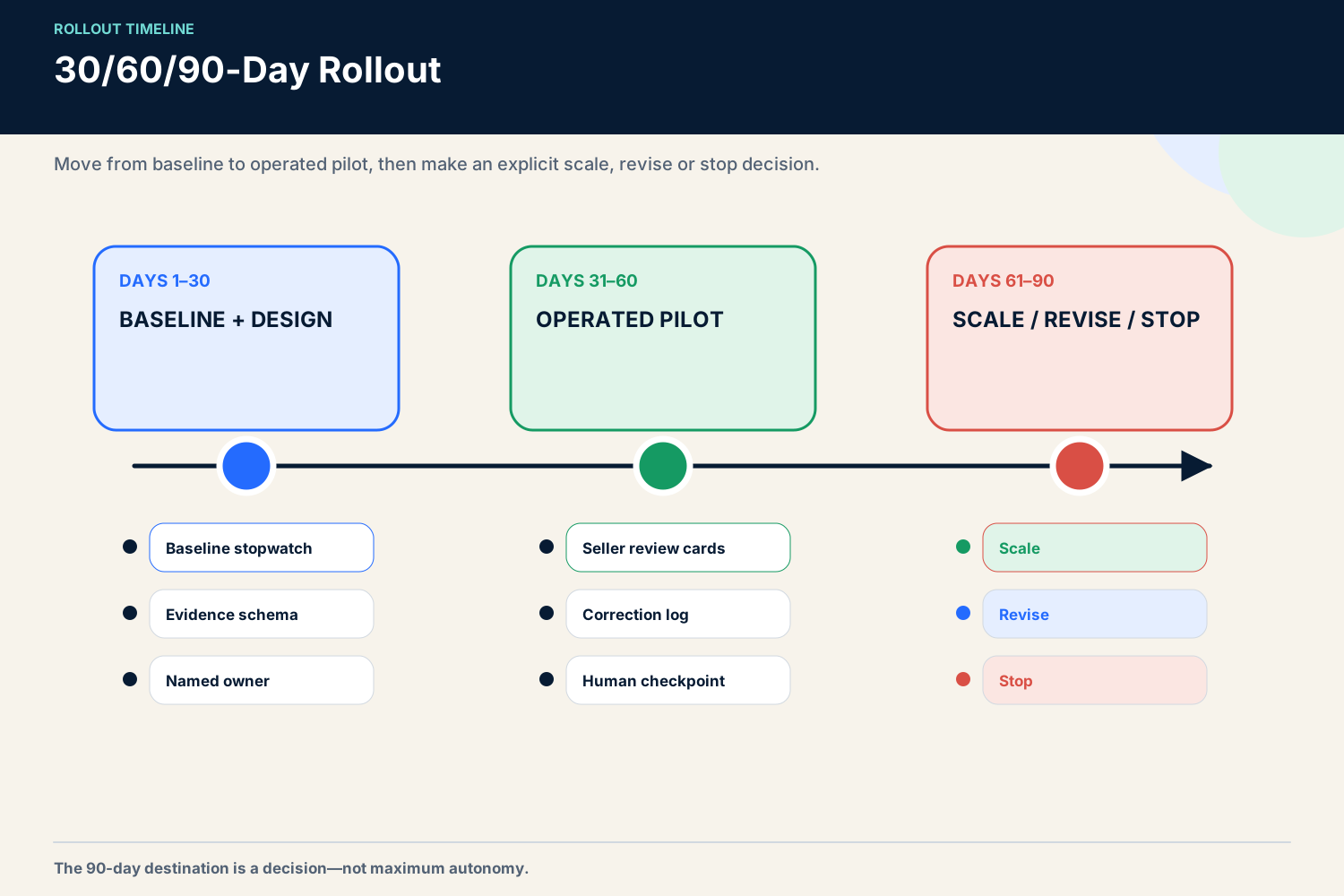
09 / A 30/60/90-day rollout

A 30/60/90-day rollout

The following is a planning framework, not a promised timeline. Slow down if the data, consent or ownership model is unclear.

Days 1–30: baseline and design

Choose one workflow and a small pilot group. Record the manual baseline before automation.
For call-to-CRM work, capture:
  • time spent after each call;
  • percentage of calls with usable notes;
  • delay before notes and actions reach the CRM;
  • association errors;
  • missing owners or due dates;
  • seller corrections.
Define the output schema, approved evidence sources, write modes and stop conditions. Keep all writes in draft or review mode. Build a small failure-test set containing ambiguous associations, missing transcripts, contradictory dates, product-feature questions and sensitive content.

Days 31–60: operated pilot

Run the workflow with close review. Every output should be approved, edited or rejected. Meet weekly to classify errors rather than arguing about isolated examples.
Useful pilot questions include:
  • Can a seller verify the output in under a minute?
  • Which fields create the most edits?
  • Does the system quote or locate the evidence?
  • Are actions assigned to the right owner?
  • Do missing inputs cause a safe stop?
  • Are buyer-facing drafts clearly separated from CRM updates?
Do not expand because users say the summary “looks good.” Expand because the quality and operating data support the next permission.

Days 61–90: scale, revise or stop

Compare the pilot with the baseline. Decide separately for each output type.
You might automate approved note append, keep task creation under review and prohibit external send. That is a successful result. Maturity is not measured by maximum autonomy.
At this point, define ongoing ownership, a review sample, incident handling and a refresh trigger. Expand to another pod only if the workflow remains observable at the larger volume.
A 30, 60 and 90 day AI sales enablement rollout from baseline to operated pilot and scale, revise or stop decision.
The 90-day destination is a decision—scale, revise or stop—not maximum autonomy.

10 / Who owns the operating system after launch

Who owns the operating system after launch

AI sales enablement sits across functions, so ownership cannot be implied. I use a simple operating model.
Enablement owns the seller job, output standard and adoption plan. RevOps owns CRM definitions, field authority and reporting. IT or the technical workflow owner controls integrations, service identities, logs and incident response. Sales managers own coaching decisions. Sellers own buyer-facing communication and the accuracy of accepted commercial actions. Legal, privacy or security teams set the applicable policy; the workflow should not pretend to replace their judgment.
One person may hold several of these roles in a small company. The responsibilities still need names. Otherwise a content error becomes an integration problem, an integration problem becomes an enablement complaint and nobody can stop the workflow.
I would schedule three operating reviews:
  • a weekly pilot review for corrections, incidents and adoption;
  • a monthly workflow review for source, schema and permission changes;
  • a quarterly value review to decide whether to expand, narrow, replace or retire the workflow.
The quarterly review should include a retirement option. A workflow can lose value because the CRM adds a better native feature, the data source changes, seller behavior evolves or review cost becomes too high. Keeping an internal automation because it already exists is the custom-tool version of shelfware.
Create a small change log. Record the reason for each prompt, rule, model, source or permission change. When quality shifts, that history is far more useful than asking whether “the AI got worse.” It also prevents a well-intentioned edit from silently changing the commercial process.

11 / How to measure AI sales enablement ROI

How to measure AI sales enablement ROI

ROI should begin with the operational bottleneck. It should not begin with a vendor’s broad revenue claim.
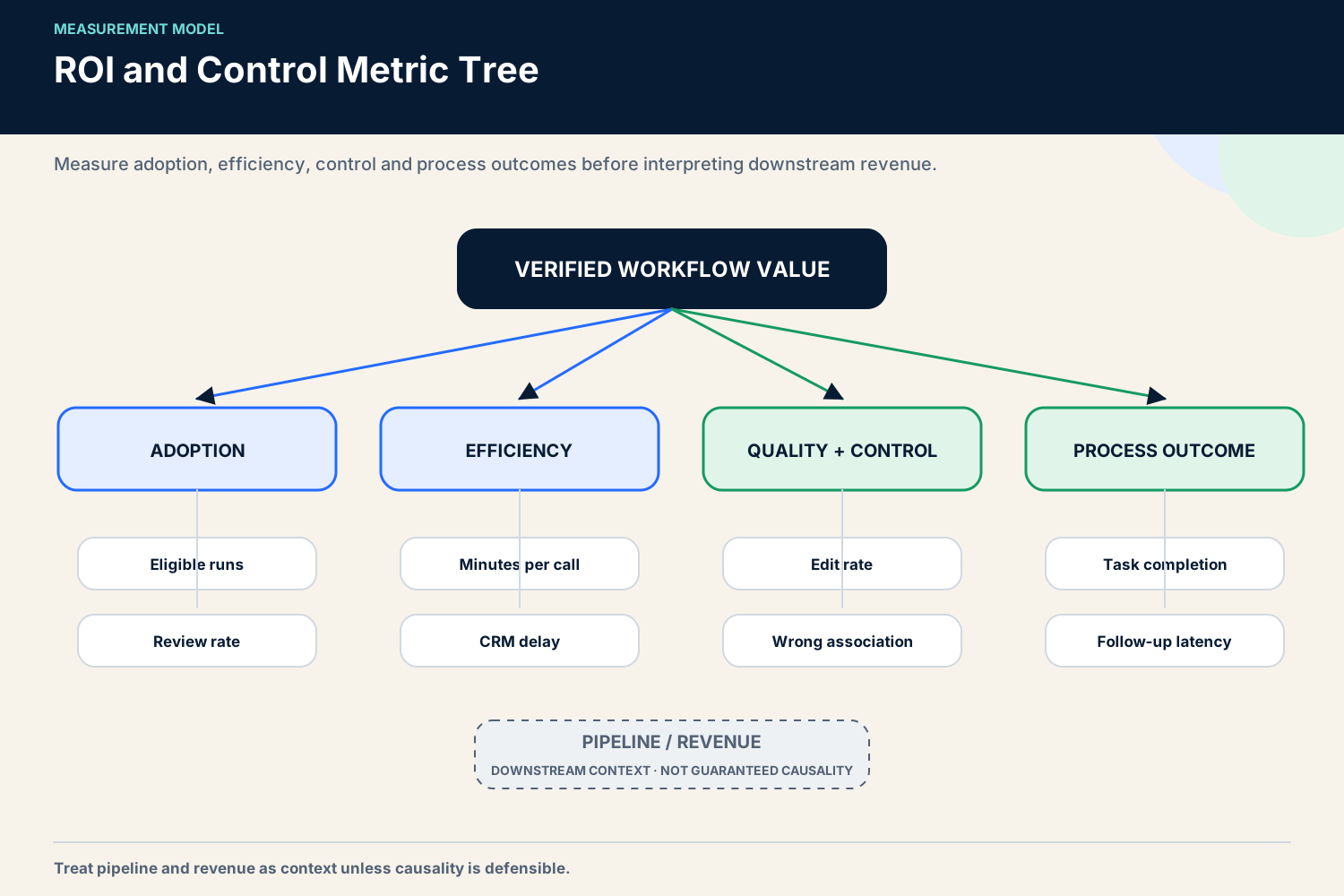
I use four metric layers.

Adoption

Measure eligible workflows, completed workflows, reviewer participation and where sellers abandon the process. Login rate is a weak proxy. The important question is whether the workflow appears inside real sales work.

Efficiency

Measure time per call, delay to CRM update, duplicate entry and manual steps removed. Report the sample, period and method. The 60-to-12-minute result in my 12-rep context is an owner-observed before/after time-log result with no preserved defensible observation window. It is useful as a directional case, not as a forecast for another company.

Quality and control

Measure approval rate, edits, rejection reasons, unsupported statements, wrong associations, failed writes and rollback events. A workflow that saves time while corrupting opportunity data has negative value.

Business process outcomes

Measure task completion, follow-up latency, note completeness, coaching coverage or another outcome close to the workflow. Treat pipeline and revenue as downstream context unless the design can support a credible causal claim.
A simple value model is:
net operating value = verified time value + avoided rework - software - implementation - maintenance - review - incident cost
Do not count all generated minutes as realized savings. Some time becomes more seller capacity; some is absorbed by review; some never changes headcount or spend. State the assumption.
For a more detailed look at CRM-side workflow design, see AI CRM automation.
A metric tree separating adoption, efficiency, quality controls and process outcomes from revenue attribution.
Measure the workflow first; treat pipeline and revenue as downstream context unless causality is defensible.

12 / Common failure modes

Common failure modes

Automating a vague process

If teams disagree about what a good note, stage or action means, AI will reproduce the disagreement. Standardize the decision first.

Measuring output instead of impact

“The system generated 1,000 summaries” says nothing about whether sellers used them, corrected them or acted on them.

Hiding the source

A polished answer without evidence is slow to verify and easy to overtrust. Preserve provenance.

Allowing premature external action

My failed auto-send workflow is the clearest example. Hallucinated product information and false tone were unacceptable buyer-facing errors. Draft-only plus seller approval solved the authority problem.

Overwriting canonical fields

Silent changes to stage, amount, owner or close date can damage reporting and accountability. Use proposals and explicit approval.

Buying a platform before defining the job

A platform cannot decide which bottleneck matters, who owns the content or which field is authoritative. Teams often pay for breadth while sellers continue using desktop files and chat messages.

Underestimating maintenance

Prompts, schemas, APIs, permissions, source documents and product facts change. A custom workflow is not free after launch. Someone must monitor and update it.

Treating one team’s result as a benchmark

The 12-rep case is evidence of one operated context. It does not predict another team’s time saving, adoption or revenue.

13 / When to buy software—and when to improve

When to buy software—and when to improve the process first

The Great SaaS Unbundling thesis, as I use it, is practical rather than ideological: narrow AI-assisted workflows can now cover jobs that once required a broad platform, but the ability to build something does not remove the operating cost.
I would assemble a lightweight workflow when:
  • one bottleneck is clearly defined;
  • the CRM and evidence source already exist;
  • the output schema is narrow;
  • a technical owner can maintain integrations and logs;
  • permissions and review are manageable;
  • the team can tolerate a controlled pilot.
I would consider a dedicated platform when:
  • many teams need governed content, learning and coaching together;
  • role, region and permission complexity is high;
  • CRM and productivity delivery must be supported at scale;
  • enablement has an owner and admin capacity;
  • reporting across programs is a real requirement;
  • procurement, security and change management justify the breadth.
The ability of coding agents to help with internal automation is improving. OpenAI describes agent workflows, reusable skills and supervision in the Codex app. Anthropic’s 2026 Agentic Coding Trends report emphasizes expansion beyond engineering, human oversight and security architecture. Those sources support the claim that custom workflow building is becoming more accessible. They do not prove that internal tools have zero cost, that every company should replace SaaS or that a custom workflow will be more reliable.
Before building, price the full operating model: design, integration, testing, security review, monitoring, model usage, incident handling and the time of the human reviewer. Before buying, price implementation, administration, migration, integrations, adoption and contract constraints. Compare complete systems, not subscription line items.

14 / FAQ

FAQ

What is AI sales enablement?

AI sales enablement applies AI to the content, knowledge, conversation, coaching and workflow systems that help sellers perform. A useful implementation has a defined evidence source, bounded AI action, human authority, controlled system write-back and measurable outcome.

How does AI sales enablement work?

It gathers approved evidence, interprets or retrieves what is relevant, produces a structured recommendation or draft, asks the appropriate person to review consequential output and records the approved action. The result then feeds measurement and correction.

Which sales enablement workflow should I automate first?

For many B2B teams, start with call summarization and action extraction into the CRM. It uses strong first-party evidence, is easy to inspect and can remain draft-only until quality is proven. Choose another workflow if your measured bottleneck is clearly different.

How do I measure the ROI of AI sales enablement?

Measure adoption, time, output quality, corrections and a process outcome close to the workflow. Include software, implementation, maintenance, human review and incident cost. Do not attribute revenue to AI without a design that supports causality.

What data does AI sales enablement require?

It requires enough governed evidence for the selected job: CRM identity and ownership, conversation or content sources, permissions, timestamps and outcome data. More data is not automatically better. Accuracy, authority and provenance matter more than volume.

Does AI replace sales enablement teams or managers?

No conclusion like that follows from this workflow. AI can prepare summaries, retrieve knowledge and surface coaching moments. Humans still define the program, verify content, make commercial decisions, coach people and remain accountable for buyer-facing actions.

15 / My final recommendation

My final recommendation

Start with one grounded, reversible workflow. For most teams I would choose call summary and action extraction, keep buyer communication human-approved and let the CRM record only what the seller has accepted.
Do not pursue autonomy as the goal. Pursue a better operating loop:
evidence → suggestion → approval → record → outcome → correction
That is the version of AI sales enablement I trust because it makes the work faster without hiding who decided what.

Research note

Methodology

  1. 01The guide is informed by two owner-operated workflows used with 12 AEs and SDRs: pre-call briefing and call-to-CRM processing.
  2. 02The 60-to-12-minute administration observation lacks a preserved formal observation window and is presented as directional, not causal evidence.
  3. 03Official product and governance sources were reviewed on 26 August 2026; packaging, APIs and model behavior require rechecking before rollout.
Read the full methodology

Source ledger

Sources & editorial notes

  1. 01
    Calls

    Gong API Documentation · official product documentation; reviewed 2026-08-26. Plan and permission boundaries may apply; Vendor documentation is not accuracy evidence

  2. 02
    CRM integrations

    Gong Help · official product documentation; reviewed 2026-08-26. Feature availability depends on plan and configuration; Gong connects to one CRM at a time

  3. 03
    AI Risk Management Framework

    NIST · authoritative public-sector framework; reviewed 2026-08-26. General framework, not a sales-workflow certification; AI RMF 1.0 is under revision

  4. 04
    Running Codex safely at OpenAI

    OpenAI · official product safety and operations article; reviewed 2026-08-26. Supports internal-build governance framing only; Does not prove sales workflow performance or lower TCO

  5. 05
    Introducing the Codex app

    OpenAI · official product article; reviewed 2026-08-26. Product capabilities evolve; No zero-cost or SaaS-replacement inference

  6. 06
    2026 Agentic Coding Trends Report

    Anthropic · official vendor report; reviewed 2026-08-26. Vendor-authored trend report; Does not prove custom tooling is free, universally preferable or a replacement for SaaS

Corrections or primary material: contact the corrections desk.

About the author

Anastasiia Krynytska

Anastasiia Krynytska is a LeadGen Team Lead at Softermii and the lead editor of Luck My Sales. She covers AI-assisted outbound, account research, qualification, messaging, CRM handoffs and revenue workflows from a practitioner’s perspective.View author profile LinkedIn

Continue reading

01 · News analysis

AI sales is moving from assistant to operating layer

The category is expanding from drafting support into research, pipeline decisions, recommended actions and controlled execution.

Read news
02 · Field analysis

In AI sales, the handoff may be the product

Models are becoming accessible; durable value sits in the controlled transition from signal to seller action.

Read analysis
03 · Research framework

Sales AI Workflow Signals 2026

A launch framework for mapping the products, controls and buying questions shaping AI-enabled revenue work.

Read reports

Luck My Sales briefing

Useful context, once a week.

News, explanations and original research from this desk. No noise.
The newsletter is still being built. We will contact you when the first edition is ready.