
Weekly industry intelligence · No noiseSubscribe to the Luck My Sales newsletterFree briefing

Independent intelligence on AI in sales

Menu

Tool comparison & stack guide · Lead enrichment

11 B2B Lead Intelligence Tools—and the Stack That Makes Them Useful

Compare 11 B2B lead-intelligence tools by operational role, then connect data, agentic research, outreach, CRM and human approval into one measurable stack.
Editorial disclosure

AI may assist research organization and drafting. A human editor reviews every published page, checks material claims against the cited sources and owns the final decision. No company paid for placement in this article.

AI use policy

Agent-ready brief

AI takeaways

Keep the key points here, or take a source-aware text brief into Claude, ChatGPT or another AI workspace.
  1. 01Choose tools by the missing operational role, not by database size or a universal ranking.
  2. 02For a lean team, begin with one agentic work layer, one appropriate data source, one delivery route and a CRM.
  3. 03Treat Clay as an optional enrichment layer when budget and a controlled pilot prove that another provider closes a material gap.
  4. 04Use public engagement as a research cue, not consent, qualification or proof of purchase intent.
  5. 05Measure seller-accepted records, field correctness, freshness, traceability and cost before buying more volume.
Includes summary, takeaways, sources and a use note.
A useful B2B lead intelligence stack needs more than a large contact database. It needs an agentic layer that applies your rules. It also needs dependable data sources, research or enrichment, a delivery channel, a CRM, and a seller who approves important decisions.
My recommendation for a small or midsize team in 2026 is to design the connection between these roles first. Then choose the products. Codex or Claude Code can act as the operating brain. Apollo or LinkedIn Sales Navigator can provide the starting data. Clay is an optional enrichment layer when the budget allows and a pilot proves that one source leaves a material gap. Crunchbase and Falcon can add different kinds of company evidence. Lemlist, Instantly, or LinkedHelper can run an approved outreach path. A voice AI product such as NextLevel AI can add permitted phone follow-up or reactivate a dormant database. The CRM remains the system of record. A person remains accountable for qualification, replies, stage changes, meetings, and closure.
These products are not interchangeable. Codex is not a contact database. Apollo is not a CRM decision owner. Lemlist is not proof that a record fits your ICP. A like on a competitor's post is not proof that somebody wants to buy.
For a constrained budget, my starting allocation is 40% for data, including account and contact sources, validation and enrichment; 40% for the LLM or agentic layer, including research, filtering, workflow logic, drafting and quality assurance; and 20% for delivery through email, LinkedIn or another approved execution channel. This is my operating recommendation, not an industry benchmark. Change it when your own acceptance rate, coverage, compliance costs, or delivery constraints show that another allocation works better.
Method and disclosure: Clay, Apollo, Claude Code, and Lemlist appeared in the owner-supplied workflow behind this guide. NextLevel AI appeared in the supplied operating context and is an author recommendation for the voice layer. Other products are owner-recommended, documentation-reviewed, or both. We did not run a controlled accuracy test across all 11 products and do not name a universal winner. Luck My Sales has no commercial, affiliate, or client relationship with Clay, Apollo, Anthropic/Claude, or Lemlist. Product documentation was reviewed on August 12, 2026.

When evidence is insufficient, lower confidence—not standards. AI recommends; a seller qualifies.

01 / Buying decision

The short answer: choose lead intelligence tools by their role

Start by identifying what is actually broken.
If your problem is...Add or improve this roleShortlist from this guideWhat a person must still decide
Research and filtering consume seller timeAgentic work layerCodex or Claude CodeRules, exceptions, approved output, and whether the evidence is sufficient
You cannot find enough suitable companies or contactsDiscovery sourceApollo or LinkedIn Sales NavigatorICP fit, current role, and whether the person should be contacted
Records are incomplete, one provider has poor coverage, and the budget supports another layerOptional enrichment and orchestrationClayWhether the measured gap justifies the cost, plus provider order, acceptance rules, and spend limits
You need private-company context or change eventsCompany intelligenceCrunchbaseWhether the event matters to this offer now
A seller needs a deeper reason to contact an accountAccount researchFalconWhich findings are factual, relevant, and safe to use
Good records never enter a consistent sequenceDeliveryLemlist, Instantly, or LinkedHelperChannel, copy, cadence, policy, and first-send approval
Warm leads or an old database need a phone pathVoice and reactivationNextLevel AI or another reviewed voice platformConsent, call purpose, script, escalation, status, and next action
The team cannot explain what happened after outreachSystem of recordYour CRMStage, status, owner, outcome, and learning rule
This is why a ranked list of “best lead intelligence software” can mislead. Products may appear in the same comparison even though they solve different problems. Ask a better buying question:

Which missing evidence or execution role prevents our sellers from creating qualified conversations?
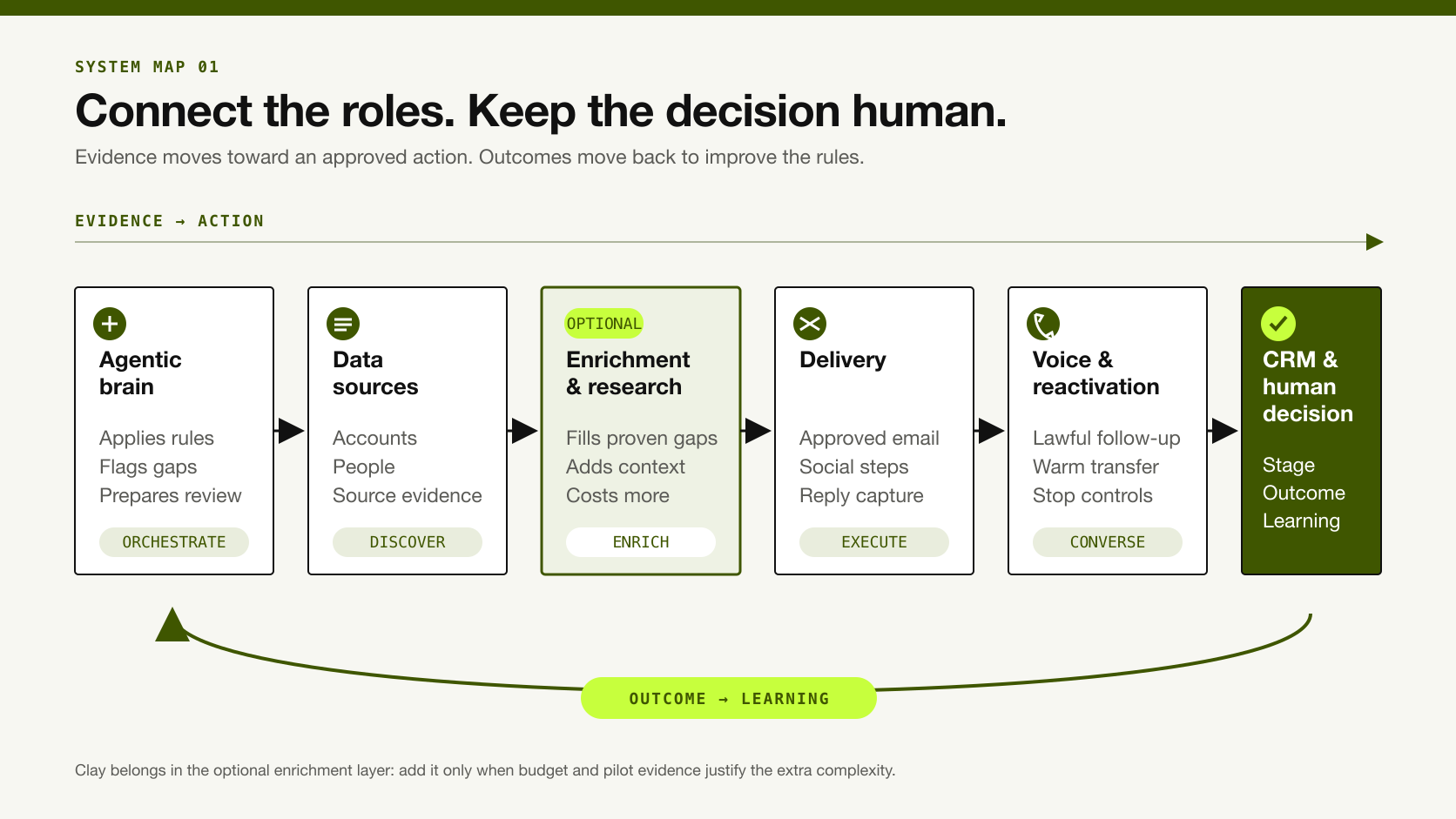
Six-layer B2B lead-intelligence stack from agentic orchestration and data to outreach, CRM and human decisions.
Each layer has a different job; outcomes should travel back to improve the rules.

02 / Category map

What a B2B lead intelligence tool should do

A lead intelligence tool should turn source-backed account or contact evidence into a more informed, inspectable sales action. It may help a team discover companies, identify current decision-makers, refresh records, reveal relationship or market context, research a business, or prioritize a next step.
A database becomes intelligence only when a team can answer four questions:
  1. Where did this claim come from?
  2. How current and well verified is it?
  3. Why does it matter to our approved ICP or buying situation?
  4. What action did a seller approve because of it?

Keep the jobs separate even when one vendor combines them

LayerPrimary jobUseful outputIt should not silently control
Data sourceReturn companies, people, and observable attributesA sourced candidate recordQualification or outreach permission
EnrichmentFill or refresh a known recordNew field, source, and verification stateAcceptance of conflicting data
ResearchExplain a company, role, trigger, or business problemEvidence-linked account briefA fabricated reason to contact
Agentic orchestrationApply rules, call tools, transform records, and prepare recommendationsReview queue with rationaleUnreviewed sending or irreversible CRM changes
DeliveryExecute email, social, or call stepsDated touch and response eventICP fit or opportunity creation
CRMPreserve identity, decisions, activity, and outcomesAuditable record and next actionTruth inferred only from a vendor score
The complete workflow is:

Discover → Verify → Enrich → Interpret → Approve → Write to CRM → Measure

The arrows matter more than the logos. A reliable source can still be mapped to the wrong contact. A good record can still receive weak copy. A reply can be misclassified. A meeting can be booked but never held. Each handoff needs a visible owner and result. The wider AI lead-generation workflow shows how these handoffs connect to outreach and CRM learning.

Measure seller-accepted intelligence

A seller-accepted record is a company or contact that passes the team's documented checks and is approved for a defined next action by an accountable person. This is more useful than counting every row a database returns. Our AI lead-qualification guide defines the seller decision in more detail.
Calculate the operating unit this way:

Cost per seller-accepted record = pilot tool and usage cost ÷ unique records approved for the defined action

Labor can be tracked separately or included if the team uses a consistent fully loaded cost. State which version you use. Do not compare one vendor's credit price with another vendor's subscription while ignoring the time needed to correct bad records.

03 / Evaluation

How we evaluated these 11 solutions

This is a role-based stack review, not a controlled product ranking. We included tools that appeared in the supplied workflow, products Anastasiia recommends for a specific role, and adjacent products needed to explain how evidence reaches execution.
Every product has one of three evidence labels:
  • Workflow-used: present in the documented operating workflow supplied for this article.
  • Owner-recommended: recommended by Anastasiia for a defined role; this does not imply a comparative test.
  • Documentation-reviewed: capabilities checked against official product documentation; no hands-on claim is made.
Official pages establish what a product is designed to do. They do not establish accuracy for your ICP, geography, or sales motion. Vendor database counts, conversion claims, testimonials, and superlatives are not used as editorial proof.

04 / 11 tools

11 B2B lead intelligence tools compared by role and benefit
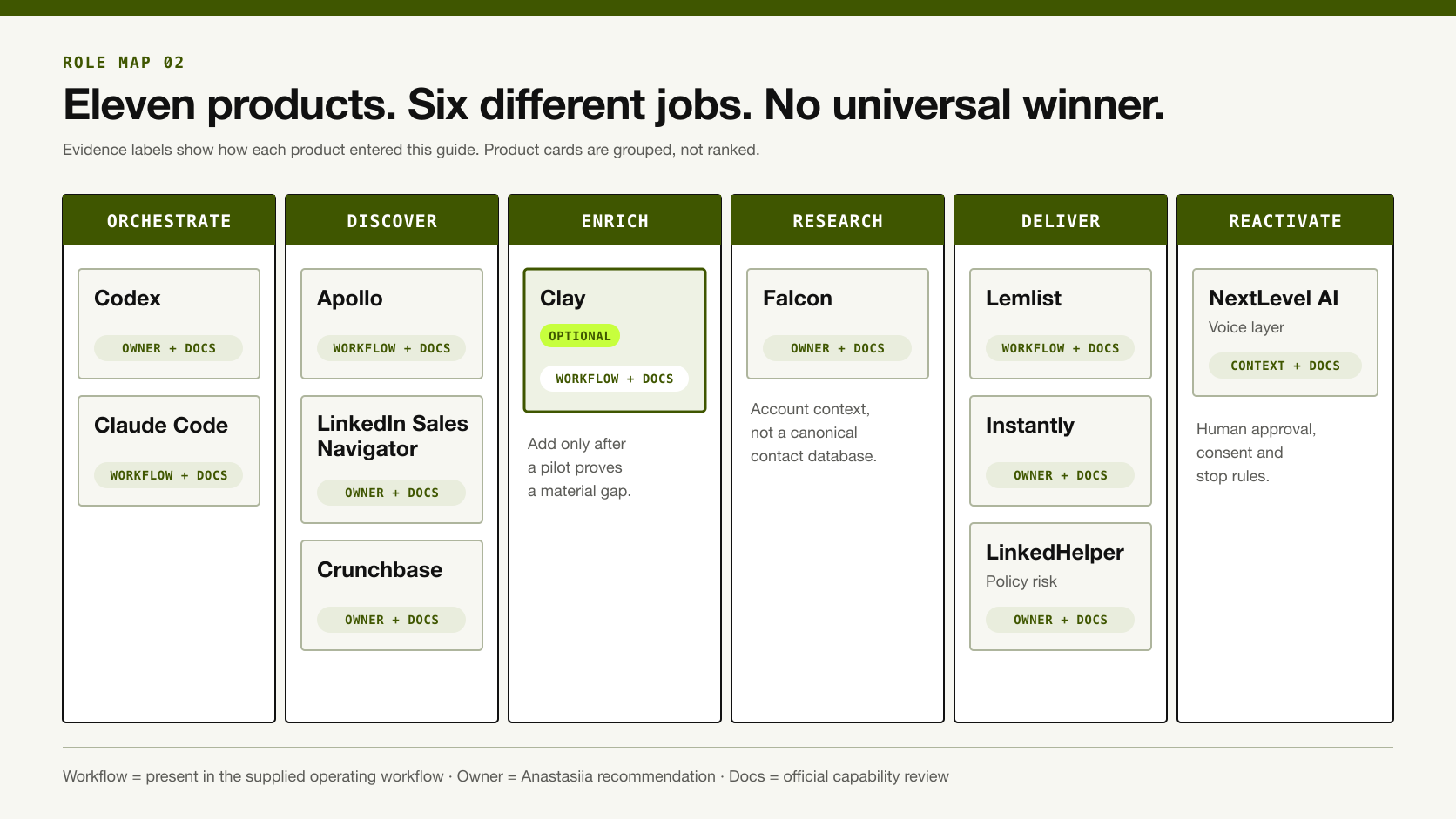
Eleven B2B lead-intelligence products grouped by their role in a connected sales stack.
The products are grouped by job, not ranked as interchangeable competitors.
SolutionRole in the stackPractical benefitBest fitEvidence levelMain human gate or limitation
CodexAgentic work layerBuilds and operates repeatable research, filtering, QA, and integration workflowsSmall or midsize team able to define rules and tool accessOwner-recommended; documentation-reviewedKeep permissions, sources, and consequential actions controlled
Claude CodeAgentic work layerProcesses structured inputs, applies workflow rules, and prepares customized outputsTeam already using programmable files, scripts, and connected toolsWorkflow-used; documentation-reviewedA human approves first records, copy, replies, and CRM actions
ApolloContact discovery and enrichmentCreates an economical starting list and fills company/contact fieldsLean outbound team needing one practical data sourceWorkflow-used; documentation-reviewedReturned data still needs current-role, company, and contactability checks
LinkedIn Sales NavigatorProfessional identity and relationship contextFinds current people and observes role, account, and content changesLinkedIn-led B2B prospecting and relationship sellingOwner-recommended; documentation-reviewedDoes not independently verify email, phone, or commercial fit
ClayOptional enrichment and orchestrationCombines providers, conditional logic, research, and controlled outputsBudgeted team that has proved a complex ICP or single-source coverage gapWorkflow-used; documentation-reviewedNot required for a lean stack; more providers create more cost and conflicting claims unless rules are explicit
CrunchbasePrivate-company intelligenceAdds company, funding, market, and change contextTeams targeting startups, private companies, investors, or growth eventsOwner-recommended; documentation-reviewedA company event is context, not automatic buying intent
FalconAccount researchProduces value-proposition-specific account research from public informationSellers who need a defensible reason to contact a smaller account setOwner-recommended; documentation-reviewedIt is not a substitute for a canonical contact database or human fact check
LemlistMultichannel deliveryRoutes email, LinkedIn, phone, WhatsApp, and manual steps in one sequenceTeam that wants conditional multichannel outreach and a shared inboxWorkflow-used; documentation-reviewedDelivery behavior is not qualification; first sends and replies need review
InstantlyEmail deliveryRuns email-first outreach and follow-up at scaleTeam whose chosen channel is primarily cold emailOwner-recommended; documentation-reviewedVerify deliverability, suppression, copy, and legal requirements independently
LinkedHelperBudget LinkedIn executionAutomates LinkedIn tasks at lower operational costTeam willing to accept and govern substantial platform-account riskOwner-recommended; documentation-reviewedLinkedIn says third-party automation of activity violates its rules
NextLevel AIVoice and reactivationAdds tailored phone and omnichannel follow-up to approved recordsWarm-lead response, call-back flows, or permitted dormant-base reactivationOwner workflow context; owner-recommended; documentation-reviewedFree tailored prototype is supported; free production setup and outcomes are not established

1. Codex — the operating brain for a connected stack

Use Codex when workflow work is the constraint, not the absence of another database. It can research source material, structure records, apply documented checks, and draft review-ready outputs. It can also help build repeatable processes around existing tools.
OpenAI describes Codex as an agent that can work across code and connected tools. It can handle multi-step tasks and apply reusable skills or team instructions. This makes it useful above the product layer. The same workspace can read a qualification rule, inspect input files, call permitted tools, produce a rejection reason, and prepare a CRM update for approval.
The benefit is not “AI writes better emails.” The benefit is that a small team can encode how it wants research, validation, and handoffs performed. A good Codex workflow can expose missing data instead of filling the gap with plausible prose.
Add it when: repeated filtering, research, formatting, QA, or integration work consumes substantial human time.
Human gate: define tool permissions, approved sources, stop conditions, review samples, and every external write or send. Codex can prepare a decision. It does not own the sales standard.

2. Claude Code — programmable filtering and flow assistance

Use Claude Code when your team wants an agentic command-line layer around files, scripts, and connected tools. Anthropic documents programmatic output modes. It also documents MCP connections for scripted or integrated workflows.
In the supplied workflow, Claude Code helped filter records and adapt custom copy. It also supported routine handoffs into outreach. The human-review rule was strict. The team inspected the first leads, enrichment outputs, messages, sends, replies, and filtering decisions before wider use.
That gate is essential. An LLM can apply a bad rule consistently. It can also turn weak evidence into confident language. The production value comes from combining the model with deterministic checks and a seller who can reject the output.
Add it when: qualification and copy logic already live in files, scripts, or a structured workflow and the team can review outputs.
Human gate: approve rules and representative samples. Keep reply handling, stage changes, meeting setup, nurture, and closure with accountable sellers.

3. Apollo — a practical starting database that still needs updating

Use Apollo when a lean team needs contact discovery and enrichment without a complex provider stack. Apollo's product materials describe prospect filters, saved searches, CRM or CSV enrichment, deduplication, API access, and scoring functions.
In our documented workflow, Apollo was one of the starting points for discovering or enriching prospects. The lesson was not that its data could be trusted without review. We still needed to confirm the current person-company match, professional profile, domain, geography, role, and whether the account's real client work fit the offer.
Apollo's API documentation makes the same boundary visible in another way: organization enrichment may match by domain, LinkedIn URL, company name, or website, and providing more than one input can improve the match. Matching is a process, not a magical lookup.
Add it when: you need an economical source for initial account/contact discovery and can measure correction work.
Human gate: validate stale roles, wrong companies, contactability, duplicates, generic inboxes, and missing evidence before outreach.

4. LinkedIn Sales Navigator — current professional and social context

Use Sales Navigator when current role, relationship, and activity matter more than another static email list. LinkedIn documents more than 50 search filters, saved searches, alerts, relationship paths, and selected CRM features. Availability depends on the plan.
This layer is useful for checking whether a person still presents the expected role, following job changes, identifying relationship paths, and observing content engagement. It can also support a social-signal workflow: research people who engage with a relevant competitor or category conversation, then inspect whether their company, role, and current situation justify outreach.
Call this social signal, not confirmed intent. A person may like a post to learn, support a colleague, disagree, or save an idea. Engagement starts research. It does not prove a buying project.
Add it when: LinkedIn is a primary discovery or relationship channel and current professional identity matters.
Human gate: confirm the active role and reason to contact. Obtain email or phone verification elsewhere when needed.

5. Clay — optional enrichment when the budget and evidence justify it

Clay is optional, not part of the minimum stack. Use it only after a simpler source fails to provide enough accepted records, your ICP needs custom evidence, and the budget can support another layer. Clay documents sources, conditional runs, scheduled refreshes, and waterfalls. A waterfall tries data providers in a selected order. The workflow can show which provider returned a result and when an enrichment should run.
That flexibility is Clay's practical advantage. A team can begin with a known account, request only missing fields, stop when an accepted result appears, and route uncertain rows to review. It can also add research or classification columns that a standard database does not provide.
The same flexibility creates risk. A long waterfall can spend credits on low-value fields. Several providers may return the same stale value. AI-generated columns can turn inference into apparent fact. A source change may not retroactively update existing results unless the workflow is rerun.
Add it when: a controlled pilot shows that one source leaves material ICP coverage or research gaps, and the extra accepted records justify the credits and operating work.
Human gate: set run conditions, provider order, validation strategy, accepted-value rules, refresh behavior, and spending caps. Review the first rows record by record.

6. Crunchbase — private-company context and change signals

Use Crunchbase when company events and private-market context affect account selection. Crunchbase describes company profiles, products, funding, growth, acquisitions, leadership, and other private-company signals. Its data can feed account research and enrichment workflows.
This is useful when “software company with 20–100 employees” is too broad. A funding event, a recent acquisition, a new product category, or a change in company direction can help a seller decide whether to investigate now.
Do not turn every event into intent. Funding can create budget, but it can also create hiring, integration, or execution pressure unrelated to your offer. Some Crunchbase product descriptions are LLM-generated and do not have complete coverage, according to its support documentation.
Add it when: private-company change events are materially connected to the sales hypothesis.
Human gate: inspect the source, date, coverage, and why the event matters to this specific offer.

7. Falcon — account research shaped by your value proposition

Use Falcon when sellers need a current account brief rather than another bulk contact list. Falcon positions itself as an AI research product for sales teams. The vendor says it learns the user's value proposition. It then researches leaders, competitors, financial context, and other public account information.
The practical role is research after discovery. Give it a selected account and a defined offer, then ask for evidence that supports or weakens the reason to contact. This can turn broad firmographic fit into a more specific commercial hypothesis.
Falcon should not be described as a canonical firmographic database based on its current public positioning. Nor should its output be written straight into outreach copy. Web research can be incomplete, stale, or attached to the wrong entity.
Add it when: the team wants deeper account context for a smaller, higher-value list.
Human gate: open the cited sources, separate fact from inference, and approve the final reason to contact.

8. Lemlist — multichannel delivery and response operations

Use Lemlist when the intelligence is ready but the team needs a controlled multichannel sequence. Lemlist documents conditional email, LinkedIn, phone, WhatsApp, and manual steps. It also offers a unified inbox for replies.
In the supplied workflow, selected records and customized messages moved into Lemlist or another sending tool. The useful distinction is that Lemlist executed the route; it did not establish the ICP or decide that the message was safe. Replies entered the human process, and consequential CRM changes remained with the team.
The sequence screenshots supplied for this series show why orchestration matters. One path can send email when a verified address exists, while another requests a LinkedIn connection. Later steps can depend on acceptance or response. The flow still needs limits, review, and exit conditions.
Add it when: the team needs email and social steps, conditional routing, and centralized reply handling.
Human gate: approve the initial sequence, identity, copy, timing, reply classification, and stop/suppression behavior.

9. Instantly — email-first delivery

Use Instantly when the chosen motion is mainly email and the team needs execution, not another intelligence layer. Instantly presents automated email outreach, follow-up, and reply management.
The benefit is focus. A team that already has accepted records, verified addresses, approved copy, and a CRM process may not need a heavier multichannel system. It needs reliable execution, clear campaign reporting, and clean response handling.
Do not infer lead quality from sends, opens, or automated personalization. Delivery metrics diagnose execution. Qualified conversations and seller-accepted opportunities remain the stronger outcomes.
Add it when: email is the selected channel and upstream intelligence is already controlled.
Human gate: sending-domain health, suppression, applicable commercial-email rules, copy, reply handling, and CRM status.

10. LinkedHelper — lower-cost LinkedIn execution with material policy risk

LinkedHelper may look attractive when budget is tight and LinkedIn is the selected channel, but the account-risk warning belongs in the buying decision. The product advertises automation for connection requests, messages, profile actions, and other LinkedIn tasks.
LinkedIn says it does not permit third-party software that scrapes, modifies, or automates activity on its service. Its examples include automated access, adding or downloading contacts, sending messages, and fake engagement. Product claims about “safe” automation do not override the platform's rules.
This means LinkedHelper is not merely a cheaper version of another sending product. It introduces a different policy and account-continuity risk. A team should review the current LinkedIn User Agreement, its own tolerance for account restriction, and compliant alternatives before use.
Add it when: only after informed policy review—not simply because the subscription costs less.
Human gate: the decision to use it at all, plus account ownership, limits, message quality, and immediate stop controls.

11. NextLevel AI — tailored voice follow-up and database reactivation

Use a voice layer when an approved contact or existing relationship justifies a phone conversation, not as a shortcut around weak targeting. A tailored voice agent can support prompt follow-up to warm leads, handle approved call-back logic, or help reactivate a dormant database under the appropriate consent and legal basis.
NextLevel AI's public site describes custom voice AI agents for phone, website, mobile, and messaging channels. It also offers a tailored prototype free of charge. In the supplied workflow, voice AI appeared later in the CRM process. It helped continue follow-up with custom questions.
That evidence supports a role in the stack. It does not support a universal claim that NextLevel is the best platform, a guaranteed conversion rate, or free production implementation. The free offer applies to the tailored prototype described on the site.
Add it when: there is an approved call purpose, usable phone data, an escalation path, and a CRM state that tells the agent what may happen next.
Human gate: consent and jurisdictional rules, script and offer, identity, escalation, status changes, meeting setup, objections, and closure.

05 / Stack recipes

Five practical stack recipes
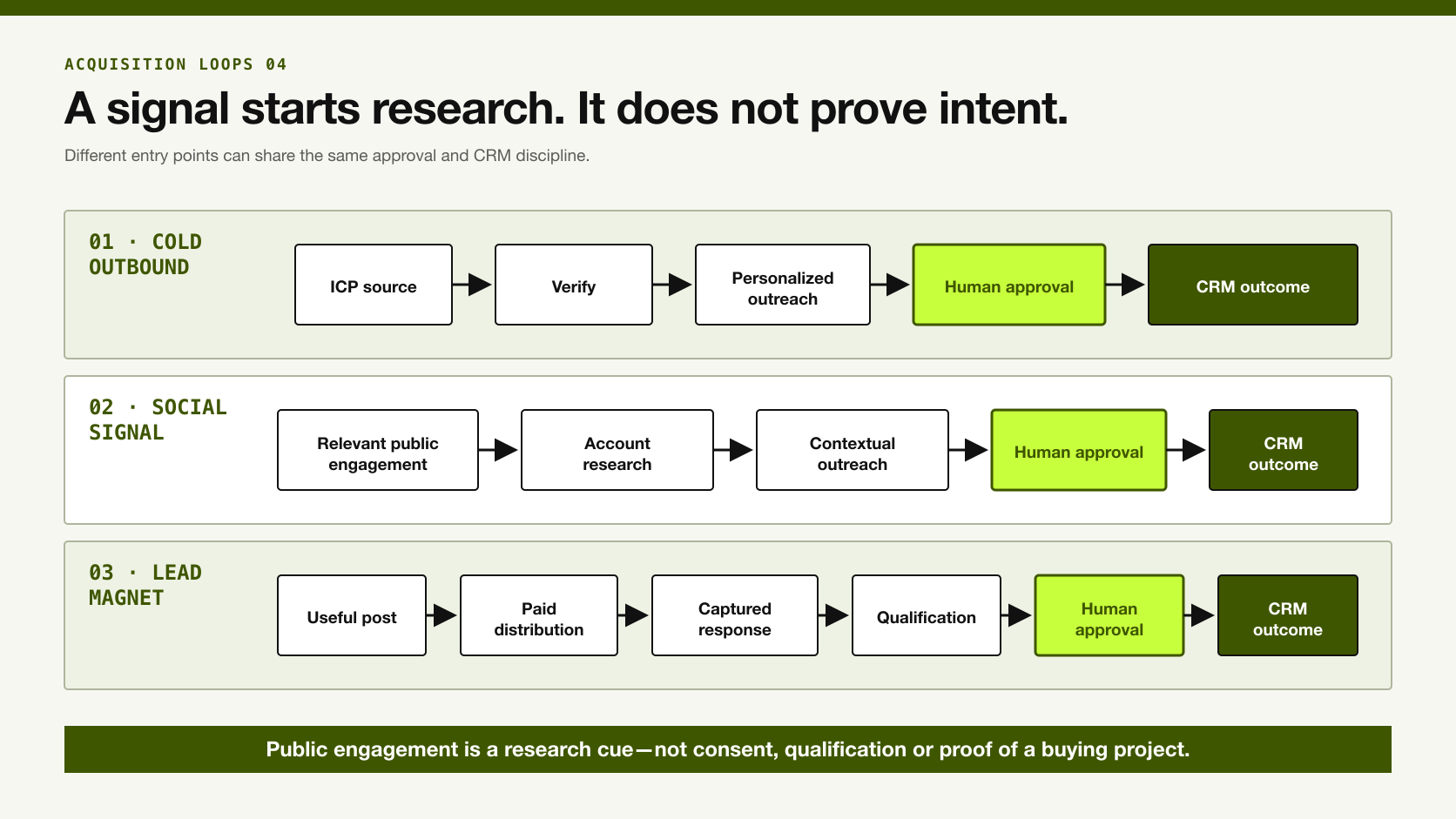
The right stack depends on the acquisition motion. Start with the smallest connection that can produce a seller-accepted record and a measurable outcome.
Cold outbound, social-signal and lead-magnet acquisition loops with human review and CRM outcomes.
A signal starts research; it does not prove buying intent.

1. Minimal outbound stack for a constrained budget

Codex or Claude Code → Apollo or Sales Navigator → Instantly or Lemlist → CRM
Use the agentic layer to apply the ICP, normalize records, flag missing evidence, and draft a review-ready reason to contact. Use one primary source first. Add delivery only after a person accepts the record and copy.
This stack is appropriate when the team can trade some manual review for lower software complexity. Do not add Clay until you can identify the missing field or coverage problem that justifies it.

2. Research-heavy outbound stack

Codex or Claude Code → Apollo/Sales Navigator → optional Clay layer → Falcon or direct source research → Lemlist → CRM
Use this path for a complex offer or narrow ICP with enough budget for deeper research. Clay can coordinate selected enrichments if the initial source leaves a measured gap. Falcon or direct research supplies account context. The agentic layer applies the rules and prepares a source-linked brief.
The stop condition matters. Research should end when the seller has enough reliable evidence to approve or reject the action. More enrichment is not automatically more intelligence.

3. Social-signal stack

Relevant public engagement → Sales Navigator → account/contact verification → agentic research → seller review → contextual outreach
One current method is to examine people engaging with relevant posts from competitors, category experts, or adjacent providers. The engagement gives the researcher a reason to inspect the account. It should not be described as buying intent.
The first message should use only a defensible connection to the person's role or the public discussion. Do not pretend to know a private problem because somebody liked a post.

4. Lead-magnet-to-outreach loop

Useful post or resource → paid distribution → captured engagement or opt-in → qualification → approved outreach → CRM outcome
Create a genuinely useful lead magnet or strong expert post. Distribute it to the relevant audience. Build the follow-up pool from people who take a defined action, then qualify the company and person before outreach.
This loop can create warmer context than a cold list. It still needs consent-aware capture, an explicit definition of the qualifying action, and suppression rules. A view or impression alone should not create a sales-ready lead.

5. Dormant-database reactivation stack

CRM cohort → identity/contact refresh → seller-approved segment → email or voice sequence → human escalation → updated CRM outcome
Start with records your company is permitted to use. Refresh identities and contact details. Exclude opt-outs, unresolved identities, active disputes, and accounts whose context no longer fits. Let the agentic layer prepare a segment and approved questions. Use email or voice only after human review.
The voice agent should know when to stop, when to transfer, what it may promise, and which CRM status it may recommend. A human should approve opportunity creation, meetings, negotiation, nurture, and closure.

06 / Budget

How I would allocate a small lead-intelligence budget
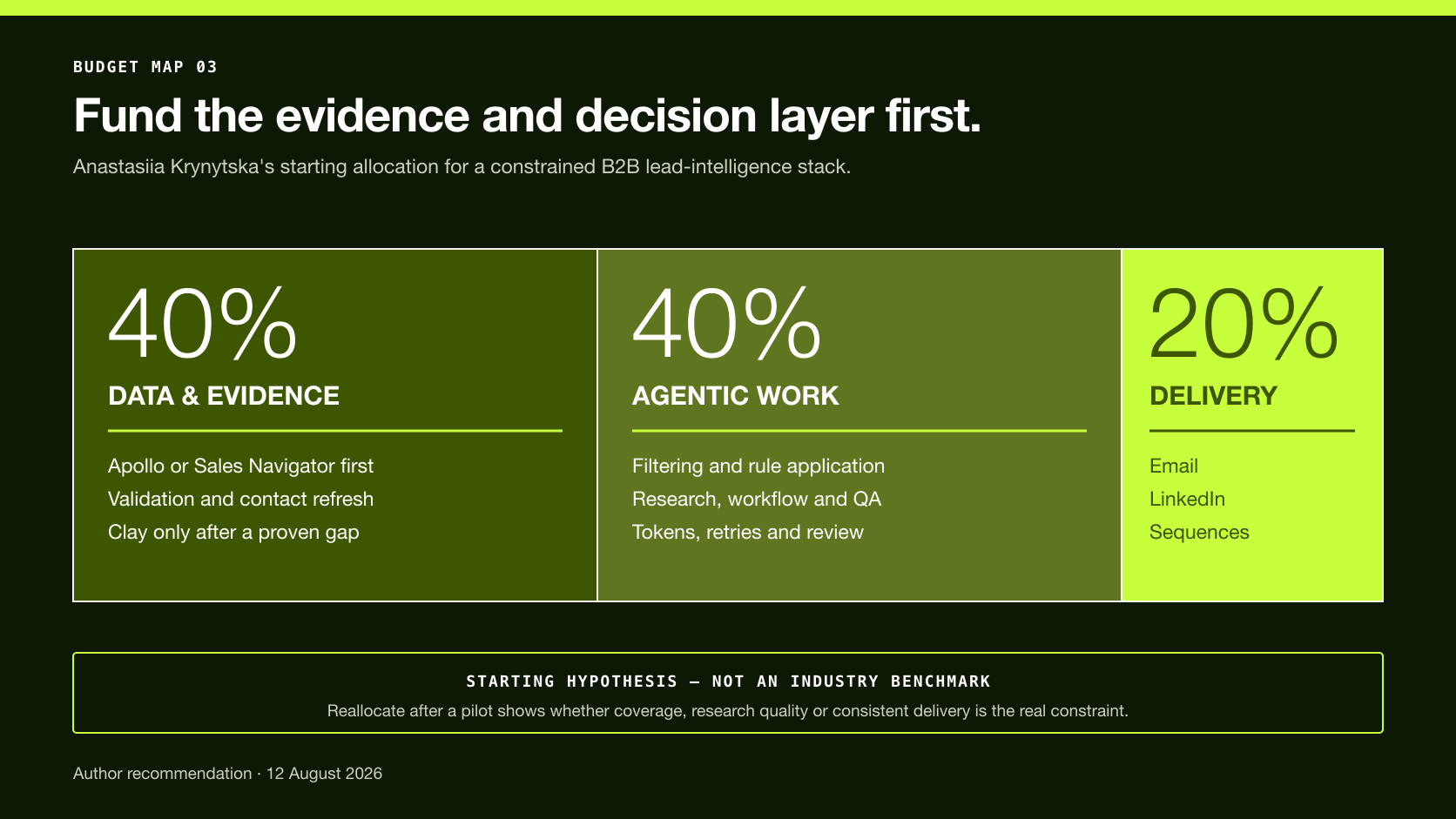
My starting point is 40% data, 40% agentic work, and 20% delivery.
Suggested small-team lead-intelligence budget split of 40 percent data, 40 percent agentic work and 20 percent delivery.
Protect the quality of the data and decision layer before buying more sending volume.

40%: data and evidence

This covers the account/contact source, validation, enrichment, and any specialist company intelligence. The goal is not maximum rows. The goal is enough correct, current, source-traceable records for the selected motion.

40%: Codex, Claude Code, or another controlled agentic layer

This covers the tokens, tool access, workflow development, evaluation, and review needed to filter and interpret the data. The agentic layer often needs more budget than teams expect because useful work includes retries, source inspection, exceptions, and quality control—not only one generated message.

20%: delivery

This covers the system that sends or schedules approved touches. Delivery is necessary, but buying more inboxes or automation before fixing acceptance quality scales the wrong records.
Review the allocation after one pilot. If contact coverage is weak, move money toward data. If sellers spend too much time correcting research, improve the agentic rules or source set. If accepted records do not receive consistent touches, strengthen delivery. If replies cannot be resolved and recorded, fix the CRM process before expanding volume.

07 / Field case

What a 7,520-record workflow taught us about buying tools

In July 2026, the anonymized workflow behind this series analyzed 7,520 records. It rejected 5,899 and approved 1,627 for campaign entry, an acceptance rate of 21.6% under that campaign's rules.
This does not mean any named data vendor was 21.6% accurate. The rejection logic included more than data correctness. Reviewers considered current identity, valid domains, verified LinkedIn profiles for the relevant route, competitors, geography, client portfolio, and whether the actual workflow fit the offer.
The useful finding is operational: source-pool size and seller-accepted intelligence are different measurements. A large database can supply candidates. It cannot decide your commercial standard.
The team also reviewed an initial 23-record batch before scale. Each lead, enrichment result, message, sequence step, reply, and filter needed human inspection. This small gate exposed errors that an attractive aggregate score could hide:
  • a real company connected to an outdated or commercially irrelevant role;
  • a broad agency category that hid a client portfolio with the wrong sales motion;
  • missing professional profiles or uncertain domains;
  • confident copy built from a weak inference;
  • a claimed website condition that had not been verified;
  • a suitable account routed to the wrong product or channel.
The case supports sample-first review and explicit rejection reasons. It does not prove conversion lift from one platform or establish a universal pilot size.

08 / Pilot

Run a 100-record lead-intelligence pilot before buying more volume
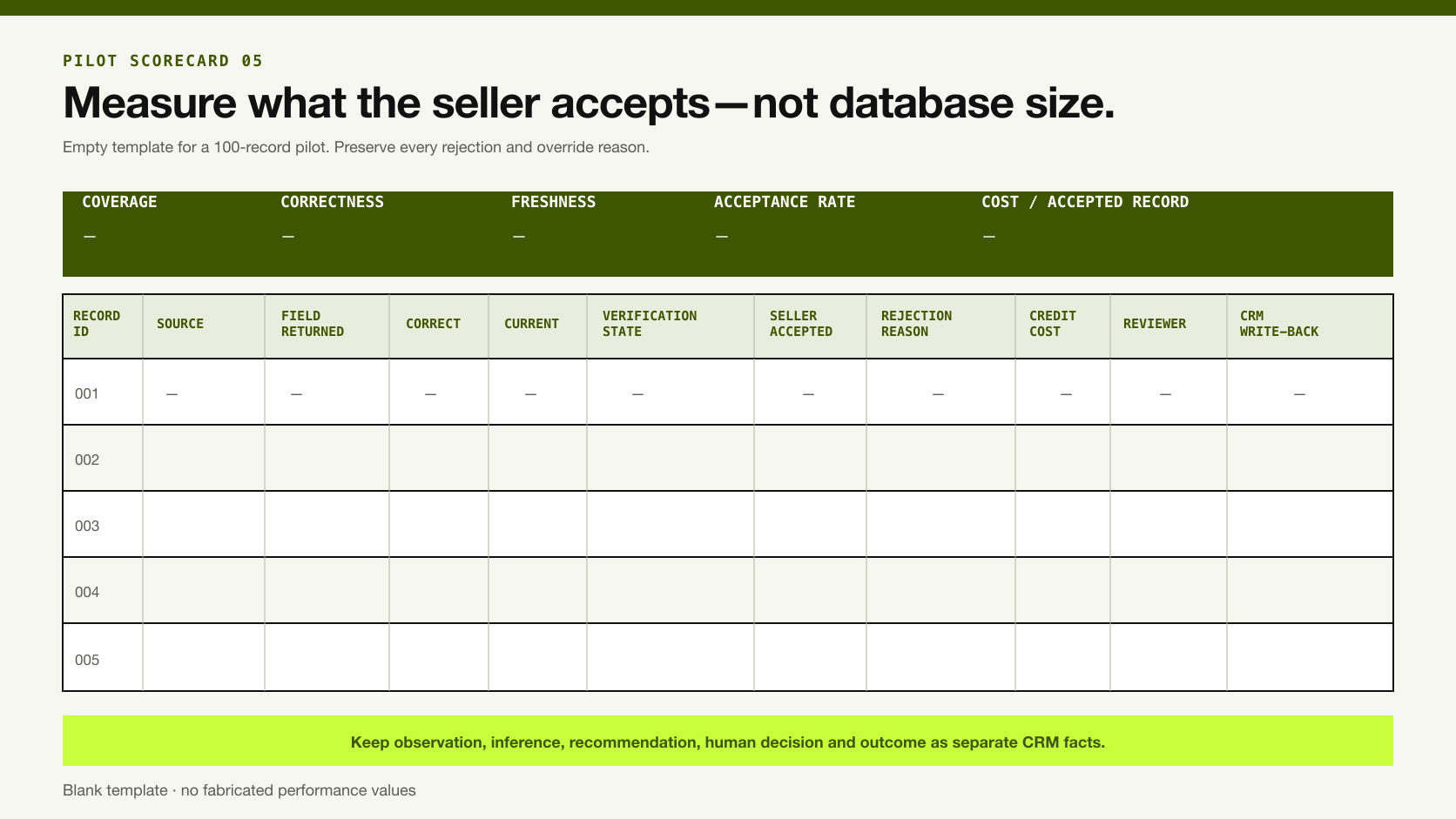
A 100-record pilot is a practical editorial starting point, not a statistical guarantee. Use enough records to represent the actual ICP and expose repeated errors. A narrow enterprise motion may need fewer carefully selected accounts. A varied geographic or role-based motion may need more.
Field-level scorecard for evaluating lead-intelligence tools on 100 real records.
Measure the fields a seller accepts, not the database size a vendor advertises.

Step 1: define the action

Write one sentence:

For this record, the stack will recommend [research, reject, email, LinkedIn, call, or nurture]. A seller will approve or reject that recommendation.

Without the action, accurate lead remains vague.

Step 2: build a ground-truth sample

Stratify the sample by region, company size, segment, role, and known difficult cases. Include known-good and known-bad records. Preserve the source used to establish ground truth and the date checked.

Step 3: evaluate fields separately

FieldReturned?Correct?Current?Verification stateSource traceable?Seller accepted?
Company identity/domain
Current employer
Current role
Professional profile
Work email
Phone
Geography
Client/workflow fit
Research trigger
Do not collapse missing, incorrect, stale, and unverifiable into one bad data label. Each problem suggests a different fix.

Step 4: record rejection reasons

Use a controlled list such as:
  • invalid domain;
  • unresolved company match;
  • stale role;
  • wrong seniority or function;
  • missing required profile;
  • duplicate;
  • competitor or excluded category;
  • geography or policy block;
  • weak client/workflow fit;
  • contact data unavailable or unverified;
  • evidence insufficient;
  • seller rejected for another documented reason.

Step 5: test the handoffs

Inspect what happens between products. Does a source URL survive enrichment? Does the CRM distinguish an observed value from an AI inference? Can a seller reject a recommendation without deleting its history? Does the sending tool honor the approved status and suppression field?

Step 6: calculate operating metrics

At minimum, report:
  • coverage: records or fields returned ÷ records or fields requested;
  • correctness: correct returned values ÷ values checked;
  • freshness: current returned values ÷ values checked for recency;
  • traceability: accepted values with a source and checked date ÷ accepted values;
  • seller acceptance: unique records approved for the defined action ÷ records reviewed;
  • cost per seller-accepted record: relevant pilot cost ÷ unique approved records;
  • review time: reviewer minutes ÷ records reviewed.
Keep field metrics separate from record metrics. A record with a valid email but an outdated decision-maker should not be counted as fully accepted.

Step 7: decide whether to buy, combine, or stop

Buy the tool if it materially improves the required role at an acceptable total cost. Combine providers when the second source improves accepted coverage enough to justify added credits and complexity. Stop when added enrichment does not improve seller acceptance or when policy, governance, or review cost exceeds the value.

09 / Failure modes

Failure modes to prevent before scale

Stale contact data becomes confident personalization

The most polished message still fails when the person no longer owns the role. Require current-role evidence before drafting the reason to contact.

Firmographic fit hides workflow mismatch

Industry and headcount are not enough. Inspect customers, services, operating model, and the problem the offer actually solves.

Social engagement is promoted to purchase intent

A public interaction is a research signal. Preserve the event and date, then look for corroborating evidence.

Enrichment overwrites a better CRM value

Write the provider, observed value, checked date, verification state, and confidence beside the proposed update. Preserve the previous value until the change is approved.

Sending volume becomes the success metric

Track qualified conversations, seller-accepted opportunities, held meetings, and later commercial outcomes. Sends and opens diagnose activity, not sales value.

Automation outruns platform rules or consent

Review the rules for every channel and market. LinkedIn prohibits third-party tools that automate activity on its service. US commercial email is subject to CAN-SPAM, including B2B email. Under an FCC declaratory ruling, AI-generated voice calls to US consumers may require prior express consent, identification, disclosure, and opt-out methods unless an exemption applies. Other markets have different requirements. Get legal advice for the intended markets and use case.

10 / FAQ

B2B lead intelligence tools FAQ

What is the best B2B lead intelligence tool?

There is no defensible universal winner. Choose the product that fixes the missing role in your workflow and produces more correct, current, source-traceable records that sellers accept for a defined action.

What is the difference between lead intelligence and sales intelligence?

The terms overlap. Lead intelligence usually emphasizes evidence about a specific prospect or account before an action. Sales intelligence can cover the wider market, account, relationship, intent, and pipeline context. Product categories use both labels inconsistently, so evaluate the actual evidence job.

Is a lead database a lead intelligence solution?

A database is one input. It becomes part of a lead intelligence solution when the team can verify the record, interpret its relevance, approve an action, and preserve the decision and outcome in the CRM.

Should a small team choose Apollo, Sales Navigator, or Clay?

Start with Apollo when you need economical contact discovery and enrichment. Start with Sales Navigator when current professional identity, relationships, and LinkedIn context matter most. Clay is optional. Add it only when the budget permits and a controlled test shows that multi-provider enrichment or custom research closes a material gap.

Can Codex or Claude Code replace Apollo or Clay?

No. An agentic coding tool can orchestrate research and apply rules, but it still needs authorized sources and connected tools. It should not invent missing contact data. Conversely, a database does not replace the logic and review layer.

Does social intent mean somebody is ready to buy?

No. A like, comment, follow, or post interaction is an observable social signal. It may justify account research, but purchase intent requires stronger, contextual evidence.

When should a lead-intelligence stack include voice AI?

Add voice when an approved cohort, lawful basis, contact path, script, and escalation rule exist. Strong use cases can include rapid warm-lead response, requested call-backs, and permitted reactivation of older CRM records. Do not use voice to compensate for weak targeting or unresolved consent.

What should a lead-intelligence tool write to the CRM?

At minimum, write the source, observed value, checked date, verification state, confidence, fit rationale, recommendation, rule version, reviewer decision, rejection or override reason, next action, and later outcome. Keep observation, inference, recommendation, human decision, and outcome as separate facts.

11 / Final rule

Build the connection, then earn the right to scale

The strongest lead intelligence stack is not the one with the most logos. It is the smallest connection that can produce evidence a seller understands, an action a seller approves, and an outcome the team can learn from.
Begin with one agentic work layer, one appropriate data source, one delivery route, and a CRM. Add enrichment, private-company intelligence, deeper account research, social signals, or voice only when a field-level pilot identifies the missing role.
Then measure seller acceptance and qualified outcomes. More records, more tokens, and more sends are costs. They become useful only when the workflow makes better sales decisions visible.

12 / Sources

Stats & sources

Research note

Methodology

  1. 01Treat this as a role-based stack review rather than a controlled product ranking.
  2. 02Use official documentation for current product capabilities, platform rules and US outreach requirements.
  3. 03Attribute the 7,520-record case, 23-record review gate and 40/40/20 budget recommendation to Anastasiia Krynytska’s anonymized 2026 operating experience.
  4. 04Keep workflow-used, owner-recommended and documentation-reviewed evidence labels distinct.
  5. 05Exclude vendor database-size, accuracy, conversion and superlative claims unless independently established.
  6. 06Evaluate products on coverage, correctness, freshness, traceability, seller acceptance, review time and cost per seller-accepted record.
Read the full methodology

Source ledger

Sources & editorial notes

  1. 01
    Codex for every role, tool, and workflow

    OpenAI · Official product positioning for multi-step work, connected tools and reusable workflow instructions.

  2. 02
    Claude Code CLI reference

    Anthropic · Official documentation for programmatic output and agentic command-line workflows.

  3. 03
    Prospect and Enrich

    Apollo · Official discovery, filtering and enrichment capabilities; vendor scale and outcome claims were excluded.

  4. 04
    LinkedIn Sales Navigator

    LinkedIn · Official search, alerts, relationship and plan-dependent CRM capabilities.

  5. 05
    Waterfalls

    Clay · Official documentation for configurable provider sequences and enrichment orchestration.

  6. 06
    Crunchbase data

    Crunchbase · Official private-company data positioning; company events are treated as context rather than buying intent.

  7. 07
    Falcon

    Falcon · Official account-research positioning; performance claims were not treated as independent evidence.

  8. 08
    Multichannel prospecting

    Lemlist · Official delivery-channel and conditional-flow capabilities.

  9. 09
    Instantly outreach

    Instantly · Official email-outreach and follow-up capabilities; vendor performance claims were excluded.

  10. 10
    Prohibited software and extensions

    LinkedIn Help · Official restrictions relevant to third-party LinkedIn automation.

  11. 11
    NextLevel AI

    NextLevel AI · Official custom voice-agent, channel and free tailored-prototype statements; no universal winner or conversion claim is made.

  12. 12
    CAN-SPAM Act: A Compliance Guide for Business

    US Federal Trade Commission · US regulator guidance for commercial email, including B2B email.

  13. 13
    Declaratory Ruling on AI-generated voices

    US Federal Communications Commission · Official US ruling on AI-generated voices under artificial or prerecorded voice restrictions.

  14. 14
    AI Lead Generation: Field-Tested B2B Workflow

    Luck My Sales · Supporting human-gated workflow and CRM outcome architecture.

  15. 15
    Luck My Sales methodology

    Luck My Sales · Evidence states, first-hand-source treatment, freshness requirements and correction protocol.

Corrections or primary material: contact the corrections desk.

About the author

Anastasiia Krynytska

Anastasiia Krynytska is a LeadGen Team Lead at Softermii and the lead editor of Luck My Sales. She covers AI-assisted outbound, account research, qualification, messaging, CRM handoffs and revenue workflows from a practitioner’s perspective.View author profile LinkedIn

Continue reading

01 · News analysis

AI sales is moving from assistant to operating layer

The category is expanding from drafting support into research, pipeline decisions, recommended actions and controlled execution.

Read news
02 · Field analysis

In AI sales, the handoff may be the product

Models are becoming accessible; durable value sits in the controlled transition from signal to seller action.

Read analysis
03 · Research framework

Sales AI Workflow Signals 2026

A launch framework for mapping the products, controls and buying questions shaping AI-enabled revenue work.

Read reports

Luck My Sales briefing

Useful context, once a week.

News, explanations and original research from this desk. No noise.
The newsletter is still being built. We will contact you when the first edition is ready.