
Weekly industry intelligence · No noiseSubscribe to the Luck My Sales newsletterFree briefing

Independent operator-led media on AI in B2B sales

Menu

AI meeting assistant comparison · Meeting assistants

Best AI Meeting Assistants for Sales: Compare Notes, CRM Write-Back and Follow-Up Control

Compare AI meeting assistants for sales by capture mode, transcript evidence, CRM write-back, follow-up control, integrations, consent and total operating cost.
Editorial disclosure

AI may assist research organization and drafting. A human editor reviews every published page, checks material claims against the cited sources and owns the final decision. No company paid for placement in this article.

AI use policy

Agent-ready brief

AI takeaways

Keep the key points here, or take a source-aware text brief into Claude, ChatGPT or another AI workspace.
  1. 01Choose the capture mode before evaluating summary quality.
  2. 02Inspect commercial names, numbers, speakers, intent and evidence—not a single transcript percentage.
  3. 03Treat follow-up, pricing, promises and sensitive CRM fields as proposals that require human authority.
  4. 04Run the same meetings and field-level CRM contract through every finalist.
  5. 05Pause automation when consent, identity, evidence, ownership or correction thresholds fail.
Includes summary, takeaways, sources and a use note.
The best AI meeting assistant for a sales team is not the app that writes the most polished summary. It is the one that preserves the commercial evidence, creates a usable record, proposes the right next action and cannot quietly damage your CRM.
That distinction matters because most meeting assistants are easy to demo. Join a call, receive a transcript, skim a neat recap and feel that the administrative work has disappeared. The harder questions appear later. Did the assistant identify the decision-maker correctly? Did it distinguish a real objection from a polite delay? Did it attach the next step to an owner and date? Did it overwrite a trusted field? Did it draft a promise that the seller never made?
I have used Fathom and Fireflies in real sales work and Gong in a more enterprise-oriented conversation-intelligence context. My practical preference for Fathom's user experience is a preference, not a controlled declaration that it wins every workflow. Fireflies can be the better fit when its integration and CRM controls match the team's process. Gong belongs in a different buying conversation when managers need wider pipeline inspection and already have the process and budget to operate it.
This guide compares meeting assistants by the job they own after a sales conversation: capture, evidence, summary, action, CRM write-back and human review.

A sales meeting assistant should be judged by the quality of the revenue record and controlled follow-through it creates, not by the polish of its summary.

01 / Quick shortlist: best by sales workflow

Quick shortlist: best by sales workflow

Team or workflowStart withWhyMain verification
Founder or individual sellerFathom or a similarly lightweight assistantFast capture, accessible summaries, low operating burdenDoes it preserve the offer, objection and next step?
Small sales team that needs configurable CRM follow-throughFirefliesReviewable CRM Autofill and workflow-oriented integrationsWhich fields write automatically, and what can be reviewed first?
Sales team that values the cleanest day-to-day review experienceFathomIn my use, the interface made reviewing calls and actions easierValidate your language, meeting platform and CRM path
Managed enterprise pipelineGongConversation evidence connected to broader revenue workflowsCost, adoption, governance and manager operating capacity
ZoomInfo-centered enterprise stackChorusAdjacent conversation-intelligence optionConfirm current product scope and stack dependency directly
In-person or restricted-bot meetingsA product with supported mobile or bot-free captureA calendar bot may be unacceptable or impossibleConsent, recording quality and speaker attribution
This is not a universal ranking. A lightweight note taker and an enterprise revenue platform should not be scored as if they were interchangeable products.

02 / What makes an AI meeting assistant usef…

What makes an AI meeting assistant useful for sales?
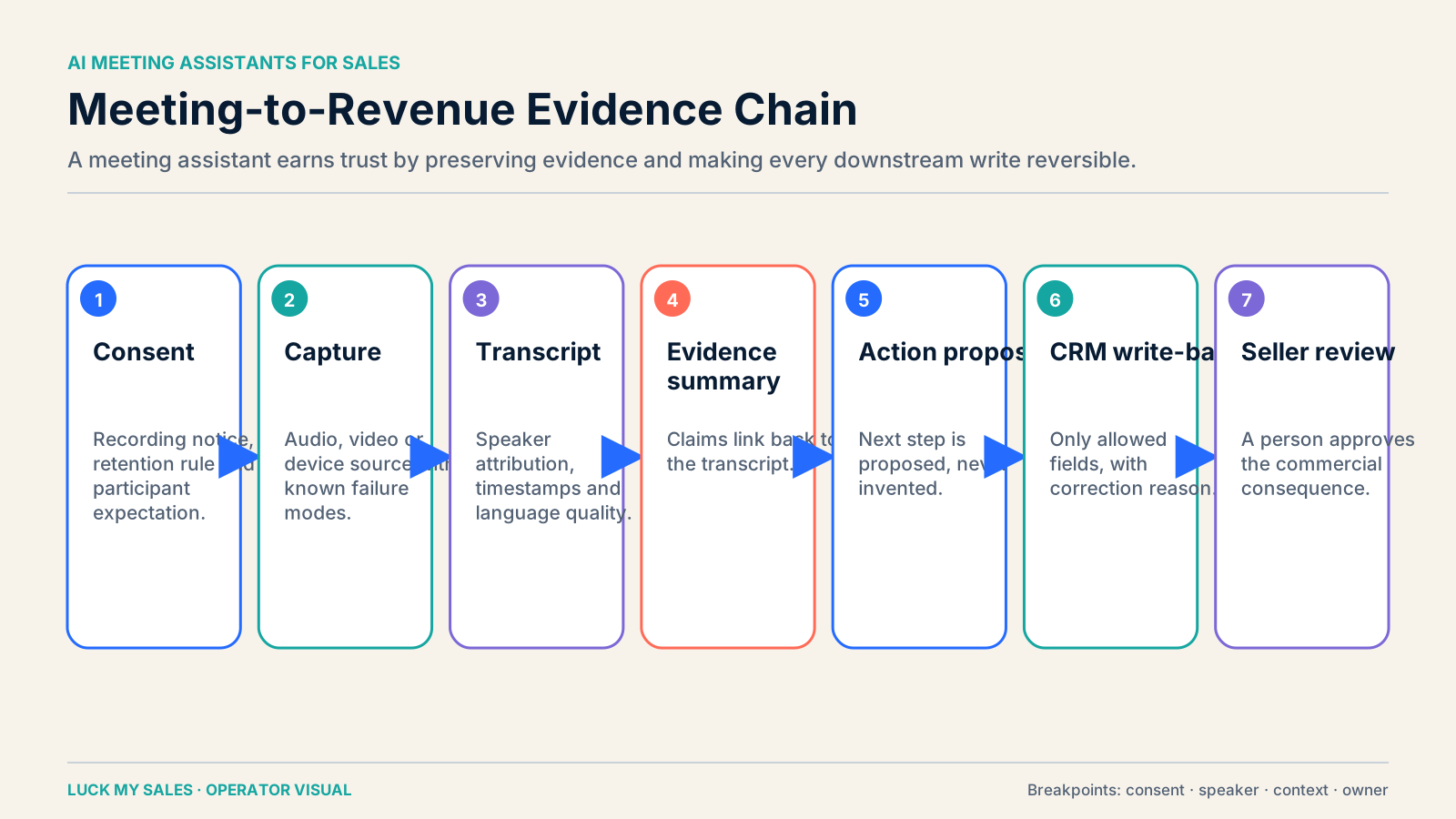
Meeting assistant evidence chain from consent and capture to seller-reviewed CRM action.
A useful meeting assistant preserves evidence through every step from consent to the seller-approved action.
A transcription is a raw record. A sales assistant must turn that record into accountable work without pretending that interpretation is fact.
The useful chain is:
recording and consent → transcript → evidence-linked summary → proposed action → rule check → CRM write-back → human owner
Every arrow can fail. The recording may omit a participant. The transcript may confuse a brand name. The summary may collapse “send security documentation before we discuss a pilot” into “customer wants a pilot.” The action layer may create a generic task without an owner. The CRM integration may overwrite a stage the seller intentionally set.
The revenue-record test is simple: if a manager opens the record next week, can they see what the buyer actually said, what the system inferred, what the seller approved and what must happen next? If not, the meeting assistant removed typing but did not create reliable sales data.

03 / Meeting assistant, AI note taker or con…

Meeting assistant, AI note taker or conversation intelligence?

These categories overlap, but they solve different ownership problems.
CategoryPrimary jobTypical buyerCommon failure
AI note takerRecord, transcribe and summarize meetingsIndividual seller or small teamAttractive recap with weak commercial context
AI meeting assistantCapture plus tasks, follow-up and CRM workflowSales team and RevOpsToo much write-back authority too early
Conversation intelligenceAnalyze calls across pipeline, coaching and management workflowsSales leadership and enablementExpensive system with low manager and seller adoption
Fathom and Fireflies can cover more than basic note taking. Gong covers meeting capture but is normally evaluated as part of a broader conversation and revenue workflow. Chorus sits in that broader enterprise category as well.
This boundary matters for SEO lists that place every product under “best AI meeting assistant.” The list may be technically broad and commercially useless. First decide whether you need personal meeting memory, post-call execution, or management intelligence.

04 / Choose the capture mode before the model
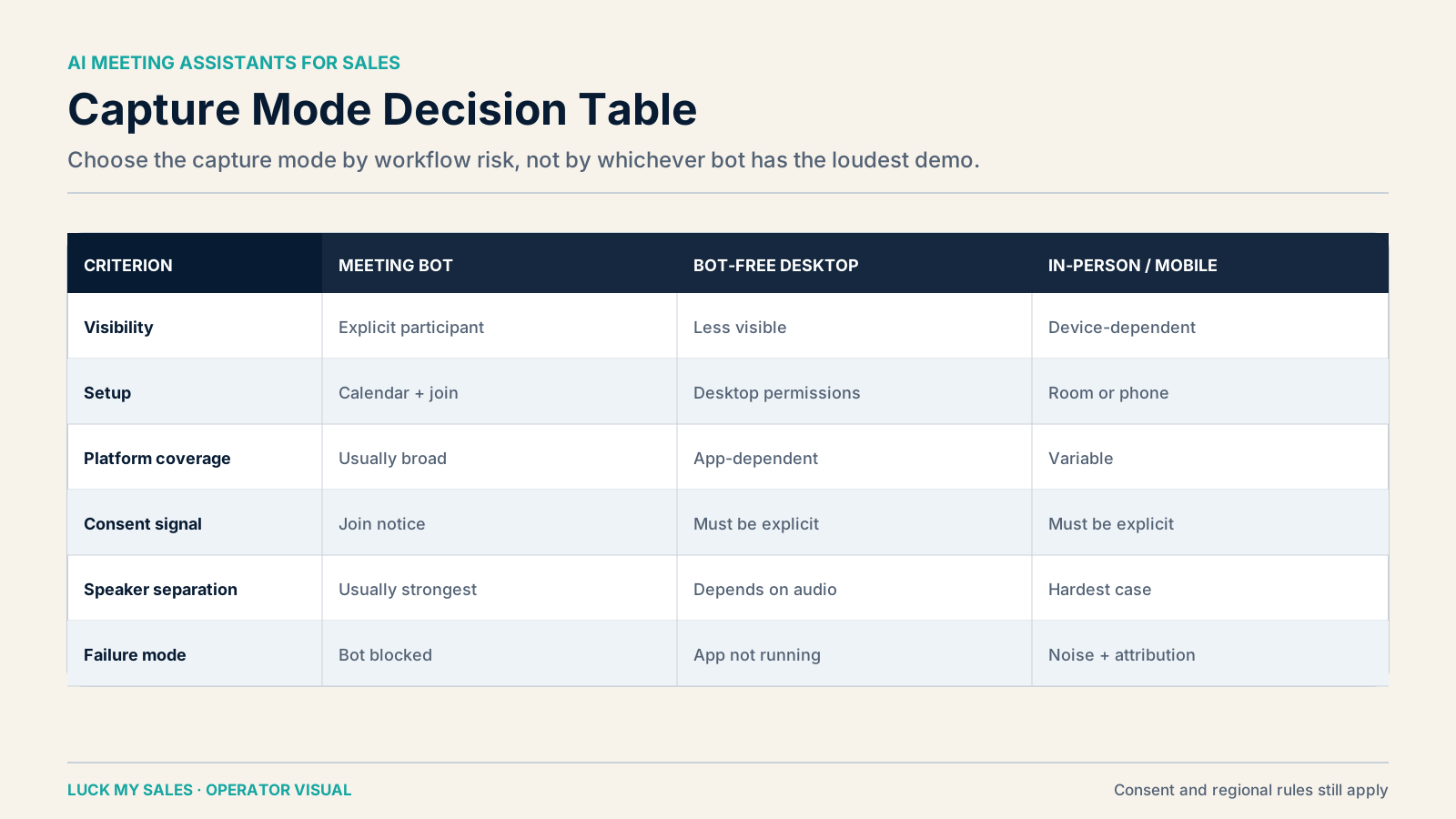
Choose the capture mode before the model

Comparison of bot, bot-free and in-person AI meeting capture modes.
Capture mode changes consent, reliability, IT and meeting-experience requirements before model quality is considered.
Capture is an operating constraint, not a cosmetic preference.

Calendar bot

A bot joins the meeting as a participant. This is easy to understand and often easy to administer. It also makes recording visible. The drawbacks are familiar: some buyers dislike bots, external organizations may block them, and an absent or late bot can lose the whole record.

Bot-free desktop or browser capture

The assistant records through a local app, browser extension or supported meeting integration without adding a visible participant. This can reduce meeting clutter and work in calls where bots are blocked. It also changes the consent and IT questions. The team still needs a valid recording process; invisible capture is not permission.

Mobile and in-person capture

Field sellers, events and on-site meetings need a mobile workflow. Test the real room, device, noise and speaker layout. A product that performs well on a clean Zoom call may fail when three people share a conference-room microphone.

Platform-native recording

Zoom, Google Meet, Microsoft Teams or the calling platform records the meeting, and the assistant processes the result. This can fit organizations that already govern recording centrally. Check how quickly the file arrives, whether speaker identity is preserved and how the result maps to CRM.
Do not buy a tool because its summary looked good in a vendor demo. Run it through the capture constraints your sellers actually face.

05 / Transcript quality is necessary, but no…

Transcript quality is necessary, but not enough

Teams often ask for a single transcript-accuracy percentage. That number is rarely sufficient. Accuracy changes with language, accent, audio quality, product vocabulary, names, overlapping speech and channel.
For sales, inspect at least five error classes:
  • commercial entities: company, product, competitor and person names;
  • numbers: prices, quantities, dates, percentages and contract terms;
  • speaker attribution: who made the promise or raised the objection;
  • negation and qualification: “not approved,” “might,” “after security review”;
  • action language: owner, deadline and dependency.
A transcript can be mostly correct and still be dangerous. Mishearing one product name is inconvenient. Assigning a buyer's concern to the seller, or turning a conditional next step into a commitment, can corrupt the deal record.
In a pilot, sample calls from your real regions and motions. The author has seen regional language quality and integrations matter more than marginal differences in a generic English demo. For English calls, many products are competent. The decision becomes harder in multilingual teams, mixed accents and technical industries.
Fathom currently documents unlimited recordings and transcriptions in 38 languages on its free plan, with premium features for richer summaries and action-oriented workflows. That is a product capability, not proof of accuracy on your calls. Fathom plan and feature documentation

06 / The commercial-context test

The commercial-context test

The central evaluation is not “Did it summarize the meeting?” It is “Did it preserve the evidence that changes the sales decision?”
Take one real discovery call and create a reference sheet:
  • problem in the buyer's words;
  • current process and consequence;
  • buying role and other stakeholders;
  • timing and trigger;
  • constraints, risks and objections;
  • commercial promise made by the seller;
  • explicit next step, owner and date;
  • unresolved questions.
Now compare the assistant's summary with that reference. Penalize unsupported certainty. “Interested in a pilot” is not equivalent to “will consider a pilot after legal review.” “Budget available” is not equivalent to “budget may open next quarter.”
An evidence-linked summary contract should separate three layers:
  1. Observed: a short quote, timestamp or transcript reference.
  2. Inferred: the system's classification, such as intent or objection.
  3. Approved: the seller's accepted next step or CRM change.
If the interface collapses these layers, require the workflow to keep the transcript link and make consequential fields reviewable.

07 / Actions and follow-up: proposal is not …

Actions and follow-up: proposal is not permission

The meeting assistant should propose administrative actions aggressively and execute commercial actions conservatively.
Our decision-rights model is:
ActionSafe default
Save transcript and summaryAutomatic, with source link and retention rule
Extract possible next stepAutomatic proposal
Create taskAutomatic only after owner/date validation; otherwise review
Draft follow-upAutomatic draft
Send follow-upSeller approval
Fill an empty contact fieldAutomatic after validation
Overwrite trusted contact dataNever silently
Change opportunity stageSeller approval
Change forecastSeller approval
Change account ownerDeterministic territory/segment rule and accountable human
Create price or commercial promiseHuman-provided approved terms only
This is where many “AI productivity” stories become risky. Writing a draft in seconds is useful. Sending it before the seller checks the promise, recipient and next step is a different decision.
The same rule applies to meetings. An assistant may detect “Tuesday afternoon,” but a booking or task should pass through timezone, calendar availability, account ownership and policy validation.

08 / CRM write-back needs a field-level cont…

CRM write-back needs a field-level contract
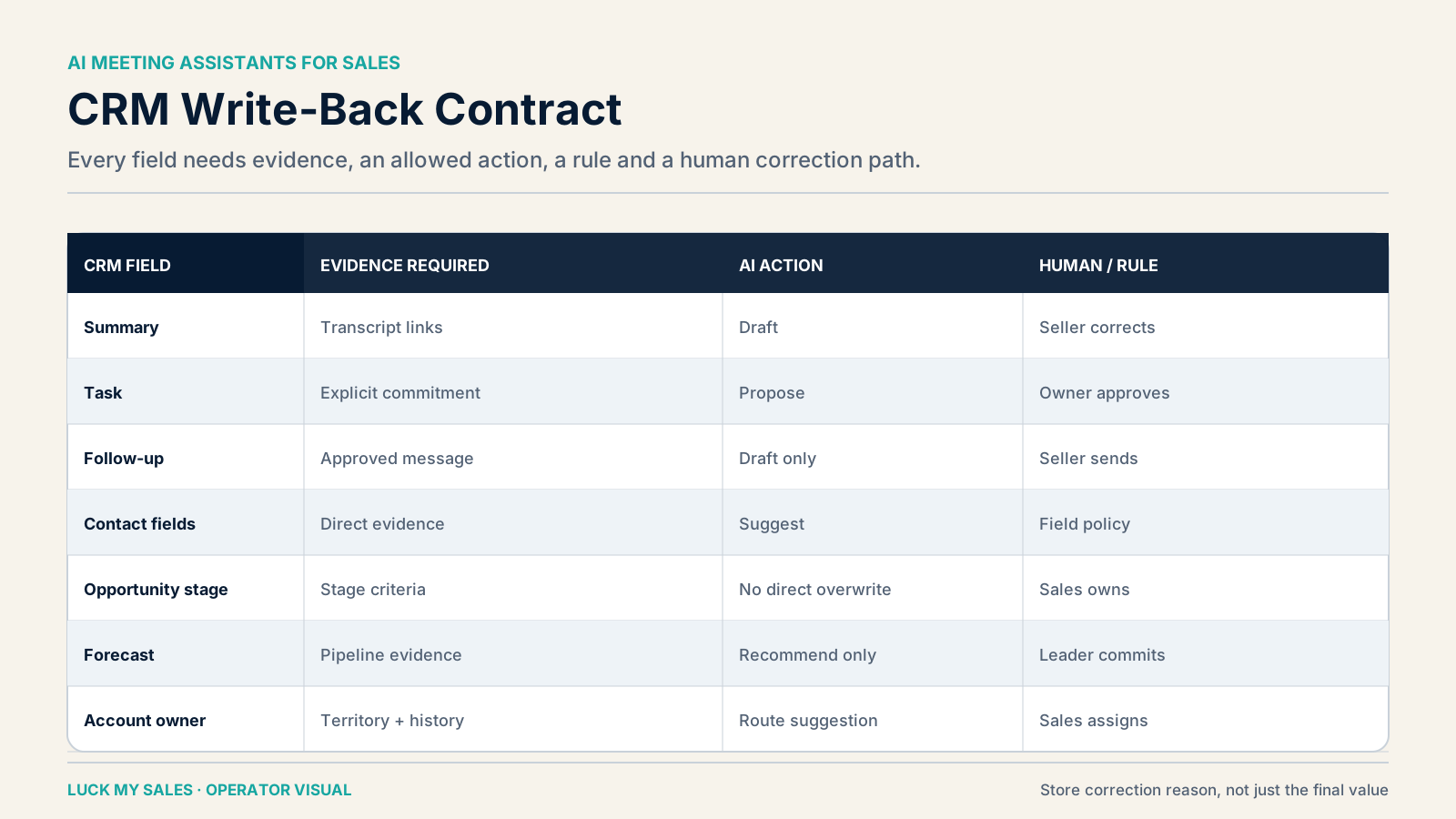
Field-level contract controlling what an AI meeting assistant may write to CRM.
Each CRM field needs an explicit write mode, evidence requirement and human owner.
“Integrates with HubSpot” or “syncs to Salesforce” tells you very little. A safe integration needs a field-level contract.
For each field, document:
  • source evidence;
  • transformation or classification;
  • confidence requirement;
  • create, fill-empty or overwrite permission;
  • human approver;
  • rollback path;
  • correction reason.
A practical contract looks like this:
CRM object or fieldDefault actionWhy
Meeting activityCreate automaticallyIt is an auditable event
Transcript/recording linkAttach automaticallyPreserves source evidence
SummaryWrite automatically with AI labelUseful, reversible, traceable
Next-step taskCreate after owner/date checkPrevents orphan tasks
Contact phone/titleFill only if empty and evidence is strongAvoids silent overwrites
Lifecycle stagePropose; seller or defined owner approvesChanges process treatment
Opportunity stagePropose; seller approvesConsequential pipeline decision
Forecast categoryNever auto-finalizeManagement commitment
Account ownerApply deterministic rule; sales accountablePrevents ownership drift
Follow-up emailSave as draftCommercial communication requires context
Fireflies documents a HubSpot integration and an Autofill CRM workflow that can sync meeting intelligence into CRM with configurable review. Teams should verify the exact current behavior for their plan and fields rather than treating “Autofill” as permission to write everywhere. Fireflies HubSpot integration, Fireflies CRM Deal Intelligence
The best meeting assistant does not create the most CRM data. It creates the smallest trustworthy record that helps the next person act.

09 / Consent, retention and access are workf…

Consent, retention and access are workflow requirements

Recording consent is not a badge a vendor can transfer to you. The organization remains responsible for its jurisdiction, meeting policy, notice, lawful basis, retention and access design.
Ask procurement and security questions at the workflow level:
  • Who is informed before recording starts?
  • Can the assistant be removed or recording stopped immediately?
  • Which meetings must never be captured?
  • Where are audio, video, transcript and derived summaries stored?
  • How long is each artifact retained?
  • Can a participant request deletion?
  • Which employees can search transcripts?
  • Does model training use customer content, and under which setting?
  • What happens when a seller leaves?
  • Are CRM copies deleted when the source is deleted?
The correct answer varies. The important part is that the team owns it. Buying a “GDPR-compliant AI meeting assistant” does not create a compliant sales process on its own.

10 / Product cards: evidence state before ve…

Product cards: evidence state before verdict

Fathom — best starting point for a seller who values review UX

Evidence state: used by the author; current product documentation reviewed.
I prefer Fathom's day-to-day experience for reviewing a call and finding the useful pieces quickly. That does not mean it wins every CRM-heavy or enterprise deployment. Its current documentation distinguishes a free tier with unlimited recordings/transcriptions from paid capabilities such as more advanced summaries and action-oriented features. It also documents CRM sync for supported systems under plan and team conditions. Verify the current limit for your account. Fathom free and premium features
Choose it when the main bottleneck is seller capture, personal review and a low-friction path from meeting to follow-up. Test the exact CRM field behavior before expanding.

Fireflies — strong when post-call workflow and CRM controls matter

Evidence state: used by the author; current official guides reviewed.
Fireflies is a credible candidate for teams that want meeting capture connected to integrations and CRM workflows. Its Business tier documentation lists unlimited transcription, summaries and storage, plus integrations and API access, while AI credits are treated separately. Pricing and inclusions are time-sensitive: the official page accessed in August 2026 lists $19 per user monthly on annual billing or $29 monthly. Fireflies Business pricing and features
Choose it when configurable post-call automation matters more than a personal interface preference. Run the field-level contract before enabling Autofill broadly.

Gong — conversation intelligence for a managed revenue system

Evidence state: used in enterprise-oriented work; current implementation material reviewed; no public list price used.
Gong is not my default recommendation for a small founder-led team that only needs notes and follow-up. It becomes relevant when a sales organization already has a meaningful pipeline, managers who will review evidence, CRM discipline and a broader need for conversation and revenue intelligence.
The author uses a practical heuristic: consider this class only when active pipeline is roughly $20,000 or more and the organization can operate the system. That is not a formal ROI threshold or vendor claim. Ask for a quote and model the cost of implementation, management and adoption, not just licenses. Gong's own professional-services material makes clear that implementation is a defined project, which is another signal that this is not merely a meeting bot. Gong implementation service description

Chorus — adjacent enterprise option

Evidence state: category research, not a current same-input product test.
Chorus belongs in the enterprise conversation-intelligence shortlist, especially for organizations evaluating it inside the ZoomInfo environment. It should not receive a detailed verdict here because we do not have a current, comparable production test. Confirm current packaging, dependencies, retention and CRM behavior directly.

Generic transcription — the control group

A basic transcript can be enough for a founder who reviews every important call and writes the next step manually. Use it as the control group. If a paid assistant does not reduce review work or improve action quality, the extra automation is not earning its place.

11 / Implementation: design the post-call wo…

Implementation: design the post-call workflow before rollout

Adding a bot to every calendar is not an implementation plan. Start with one meeting type and map what happens after the call today.
For a discovery meeting, the map may be:
  1. seller confirms recording permission;
  2. assistant captures and transcribes;
  3. assistant creates a source-linked summary;
  4. system extracts problem, stakeholders, timing, objections and proposed next step;
  5. deterministic rules identify the CRM account and owner;
  6. seller reviews consequential fields and follow-up;
  7. approved task and note write to CRM;
  8. unresolved or low-confidence items enter an exception queue.
Give every step an owner. Sales Operations can own integration and field rules. Enablement can own the summary rubric. The seller owns the commercial record. Security or legal owns recording policy. A manager owns correction trends and adoption.
Then configure meeting types separately. A customer-support call should not use the same scorecard as a discovery call. A renewal, demo, negotiation and partner conversation preserve different facts. One universal summary template usually produces generic records because it has no clear commercial job.
Roll out in three levels:

Level 1: capture only

Record, transcribe, summarize and link the source. No automatic CRM changes beyond the meeting activity. This reveals language, speaker and context errors with low operational risk.

Level 2: proposed work

Extract fields, draft follow-up and suggest tasks. Sellers approve before write or send. Track which proposals they accept, correct or ignore.

Level 3: controlled automation

Allow low-risk, reversible writes after rules have proved stable. Keep stage, forecast, ownership exceptions, pricing and promises under accountable human control.
The progression should follow evidence, not the vendor's maturity label. A feature called “autopilot” does not eliminate your decision rights.

12 / Measure whether the assistant improves …

Measure whether the assistant improves the sales record

Minutes recorded and summaries generated are activity metrics. They do not show that the system helps sales.
Use a compact operating scorecard:
  • capture success: eligible meetings recorded correctly;
  • evidence completeness: required commercial fields supported by the call;
  • consequential correction rate: stage, intent, next step, owner or commercial fact corrected by a person;
  • task acceptance: proposed tasks accepted with owner and date;
  • follow-up acceptance: drafts sent after seller review versus rewritten or rejected;
  • CRM latency: time from meeting end to an approved usable record;
  • review time: seller and manager minutes per meeting;
  • next-step completion: accepted tasks completed by due date;
  • progression quality: meetings that move with valid evidence, not merely stage changes;
  • adoption: sellers and managers who use the record in real work.
Do not reward the system for creating more notes. A shorter, evidence-linked record can be more valuable than a detailed narrative nobody trusts.
Set different thresholds by risk. A wrong filler sentence in a summary may be tolerable. A wrong price, owner, forecast or next step should count as a severe correction. When severe errors repeat, pause the affected action rather than lowering the score threshold until the dashboard looks healthy.
The author supplied an anonymized coaching case with precise performance figures. Because its measurement period was not supplied for this edition, those figures are not used as comparative proof here. That is the evidence discipline readers should expect: a real number can still be unsuitable for a published conclusion when its denominator or period is incomplete.

13 / Best AI meeting assistant for remote an…

Best AI meeting assistant for remote and distributed teams

Remote teams need more than broad meeting-platform compatibility. Test cross-time-zone ownership, multilingual calls, access permissions and asynchronous review.
A distributed seller should be able to leave an evidence-linked record that a manager in another region can understand without replaying the entire call. At the same time, the summary must not erase uncertainty or regional context. Give reviewers access to the relevant excerpt, not unrestricted access to every recording in the company.
For remote teams, prioritize:
  • reliable capture across external Google Meet, Zoom and Teams calls;
  • language quality on the regions you actually sell into;
  • clear participant, workspace and customer access boundaries;
  • tasks with explicit owner, date and timezone;
  • notification rules that do not create duplicate work;
  • CRM sync that survives different teams and pipelines;
  • retention rules for employees, contractors and departed users.
A tool can be excellent for one seller and weak for a distributed operating model. Pilot both the meeting and the handoff between people.

14 / A reproducible same-meeting pilot

A reproducible same-meeting pilot
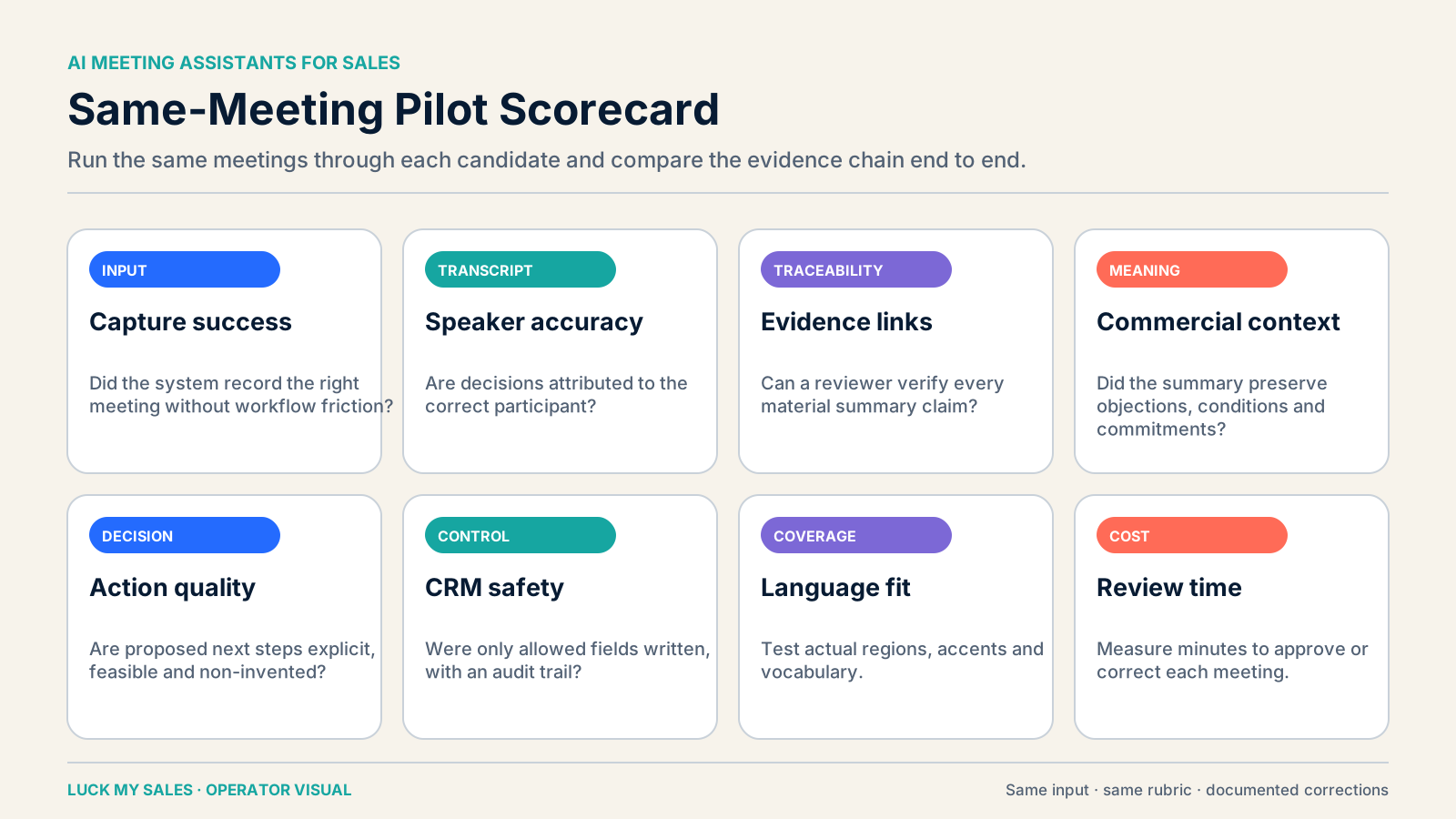
Scorecard for comparing AI meeting assistants on the same calls and outcomes.
Use the same meetings, rubric and CRM sandbox so the comparison measures workflow quality instead of demo conditions.
Do not compare products on different calls. Use the same five to ten recorded meetings, with proper permission, and a human reference sheet.
Include:
  • one clean English discovery call;
  • one call with your regional accent or language;
  • one call with overlapping speakers;
  • one commercial call with price, timing and competitors;
  • one weak-fit call that should not become an opportunity;
  • one call where the next step is conditional.
Score each product out of 100:
DimensionWeight
Commercial facts and numbers20
Speaker attribution10
Objection and intent with evidence15
Next step, owner and dependency15
CRM write-back control15
Language and regional performance10
Review speed and usability10
Total operating cost5
Add vetoes. A product fails the pilot if it invents a commercial promise, silently overwrites a consequential field, cannot satisfy the consent design, or repeatedly loses the next-step condition.
Do not publish an accuracy claim from one call. Use the pilot to choose a workflow, then monitor corrections in production.

15 / When to pause automation

When to pause automation
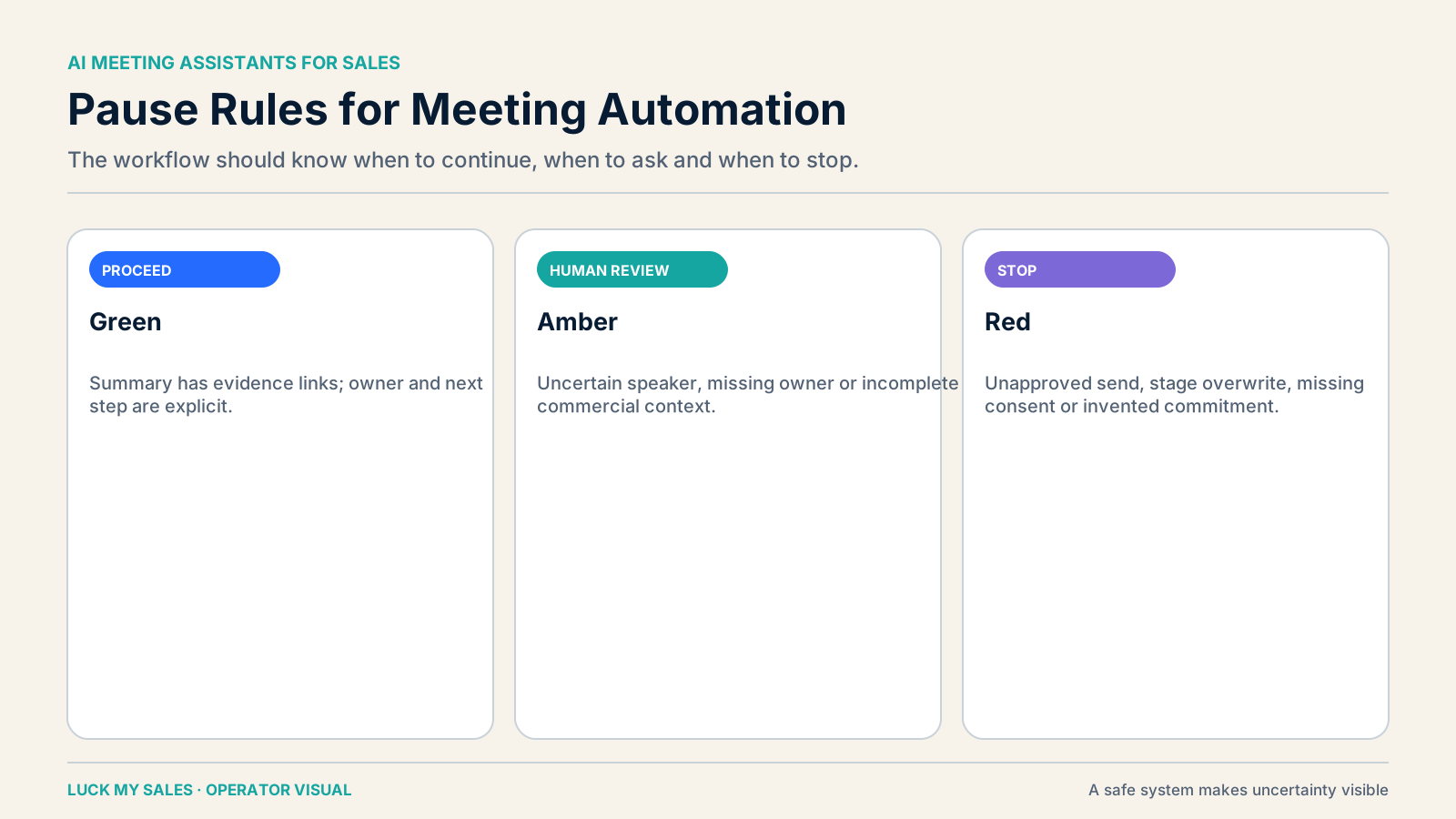
Conditions that pause AI meeting automation and return decisions to a person.
Consent, identity, evidence, ownership and correction failures should stop automated actions and return control to a person.
Pause expansion when:
  • the same transcript or classification error repeats;
  • seller corrections rise after a new language, team or meeting type;
  • tasks are created without clear owners;
  • buyers receive follow-ups a seller did not approve;
  • CRM fields conflict with seller evidence;
  • recordings appear where consent should have blocked capture;
  • review time is not falling;
  • managers and sellers stop using the record.
The cause is often not “bad AI” in the abstract. It is incomplete input, weak rubrics, missing CRM permissions or a workflow designed around a demo instead of the revenue record.

16 / Twelve questions before you buy

Twelve questions before you buy

17 / A two-week operator test for the whole …

A two-week operator test for the whole sales team

A shortlist becomes useful only after the team runs its own calls. Use two weeks to test capture, review, action and CRM behavior. Do not start with every seller or every meeting type. Pick one repeatable motion, one manager and a small group of willing sellers.

Day 0: freeze the reference process

Document how the team handles the meeting today. Record who writes notes, creates tasks, sends follow-up and updates CRM. Measure the time required for each step. Note where work is skipped or duplicated.
Choose five required facts for that meeting type. A discovery call might require the problem, business consequence, stakeholders, timing and next step. A demo might require the evaluated use case, technical concern, decision process, promised material and follow-up owner.
Write the human answer for each reference call. This becomes the baseline. The baseline should link every important fact to the recording or transcript. It should also show which facts remain uncertain.
Do not let the vendor design this rubric alone. The vendor understands its product. Your sales team understands the decision that the record must support.

Days 1–2: test capture before intelligence

Run internal and external meetings through each candidate. Include calls where a bot may join and calls where it may not. Test the calendar conditions your sellers use every week.
Check these basic events:
  • the right meeting was captured;
  • excluded meetings stayed excluded;
  • every participant received the required notice;
  • speakers were separated correctly;
  • recording and transcript links opened for the right users;
  • deleted or restricted records followed policy.
Capture failure should stop the evaluation. A perfect summary of half a meeting is not a reliable record. A tool that records the wrong meeting creates a larger risk.

Days 3–4: compare facts with the reference

Review the same calls against the human baseline. Mark each required fact as correct, incomplete, unsupported or missing. Give numbers and commercial promises a separate severity level.
Do not reward a long summary. Reward accurate evidence and useful uncertainty. “Budget not confirmed” is better than a confident budget statement with no source.
Track brand names and young products separately. Models often normalize an unfamiliar name into a familiar word. Add approved vocabulary or knowledge rules, then repeat the call test.
Test regional language with real speakers. A generic English accuracy claim cannot validate a MENA, Nordic or multilingual pipeline. One wrong currency or date can matter more than several harmless transcript errors.

Days 5–6: test the action layer

Give the assistant clear next-step rules. It may draft a follow-up, propose a task and suggest CRM fields. It may not invent a price, delivery promise or contractual commitment.
Create edge cases on purpose:
  • the buyer suggests two possible dates;
  • the owner mentioned on the call is unavailable;
  • the meeting belongs to an existing opportunity;
  • the buyer asks for a discount;
  • legal review must happen before a pilot;
  • no explicit next step was agreed.
The correct output may be “human review required.” That is a successful control, not a weak AI result. The system should show why it paused.
Compare the proposed action with the transcript. Then compare it with the seller's final choice. Record the correction reason, not only the final value.

Days 7–8: connect CRM in a safe mode

Start with a sandbox or restricted pipeline. Allow meeting activity, source links and labelled summaries. Keep stage, forecast, owner exceptions and commercial fields in proposal mode.
Use one field-level matrix for all candidates. The matrix should name the source, permission, approver and rollback path. This prevents a product from winning because it wrote more fields.
Test duplicates and ownership. A meeting assistant should find the current contact and account before creating another record. It should respect an open opportunity and an existing account owner.
Now inspect the record as another seller or manager. Can that person understand the buyer's position without replaying everything? Can they open the exact evidence when a conclusion looks doubtful?

Days 9–10: measure human review

Ask each seller to review their own records. Measure time from meeting end to an accepted record. Count accepted, corrected and rejected recommendations.
Separate correction types:
  • cosmetic wording;
  • missing context;
  • wrong commercial fact;
  • wrong next step;
  • wrong CRM object or field;
  • wrong owner or pipeline treatment.
One cosmetic edit should not carry the same weight as a false promise. Create a severe-error rate for the decisions that can damage a deal.
Managers should review a sample, not repeat all seller work. If the manager must replay every call, the assistant has not reduced the inspection burden.

Days 11–12: test exceptions and recovery

Disable a calendar connection. Remove CRM permission. Use an ambiguous account name. Submit a call in an unsupported language. Then watch the failure path.
A controlled product should preserve the evidence, avoid duplicate actions and explain the blocked step. It should route the case to a named queue. Recovery should not require silent manual repair.
Test export and deletion too. The team needs a credible exit path if the product changes, the contract ends or policy requires removal.

Days 13–14: decide by operating fit

Score the full route, not the summary screen. Review capture success, evidence completeness, severe corrections, review time, CRM trust and total cost.
Ask sellers one direct question: would they trust this record before the next buyer interaction? Ask managers whether the record changes coaching or pipeline review. Ask RevOps whether the data improves or pollutes reporting.
Choose the smallest product that passes the workflow. A founder may need reliable notes and drafts. A managed sales organization may need call search, coaching and pipeline evidence. Buying the larger category early adds cost and administration without creating maturity.
Write the expansion rule before launch. For example: expand after two weeks with no unapproved sends, no silent consequential overwrite, at least 90% capture success and a falling review time. Use thresholds that match your risk and meeting volume.

18 / The manager's weekly review loop

The manager's weekly review loop

Automation still needs a human operating rhythm. Keep the loop short enough to survive a busy quarter.
Once a week, review severe corrections and repeated failure patterns. Inspect a few accepted records to detect false confidence. Check whether tasks were completed and whether follow-up matched the approved next step.
Do not use the assistant's score for employment or compensation decisions. Use it to find calls worth reviewing and skills worth coaching. The manager must consider deal context and the seller's explanation.
Change one rule at a time. A new summary prompt, field permission and scorecard should not ship together. Otherwise the team cannot identify which change improved the record.
The meeting assistant earns wider authority only through stable evidence. Trust is built at the field level, not granted by a product label.
  1. Which meeting platforms and capture modes work in our environment?
  2. Which languages and accents have we tested ourselves?
  3. Can every consequential summary claim link to evidence?
  4. Does the tool distinguish observation from inference?
  5. Which CRM fields can it create, fill or overwrite?
  6. Can follow-up remain a seller-approved draft?
  7. How are task owner and date validated?
  8. What is the consent and recording notice process?
  9. What are retention, deletion and access controls?
  10. What is included in the plan, and what consumes AI credits?
  11. How much seller and manager review remains?
  12. Which metric or error triggers a pause?

19 / FAQ

FAQ

What is the best AI meeting assistant for sales?

For an individual seller, Fathom is a strong starting point and the author's UX preference. For a team that needs configurable CRM follow-through, Fireflies deserves a controlled pilot. Gong belongs in a broader enterprise conversation-intelligence decision. Your winner should be selected on the same meetings and workflow.

What is the best AI meeting assistant for Google Meet?

Choose a product that reliably supports your Google Meet capture mode, consent process and CRM path. Test calendar bot behavior, bot-free options, external meetings and language quality. Product support changes, so verify current documentation during the pilot.

Can an AI meeting assistant send follow-up emails automatically?

Many systems can automate or integrate follow-up. Our safe default is automatic drafting with seller approval before send. The system should not invent pricing, promises or commitments.

Should meeting summaries write to CRM automatically?

Yes, when they are labelled as AI-generated and include a transcript or recording link. Stage, forecast, ownership and trusted contact data need tighter rules or human approval.

Is an AI meeting assistant the same as conversation intelligence?

No. A meeting assistant primarily captures and structures a meeting. Conversation intelligence analyzes calls across a wider sales-management workflow, often including coaching, pipeline inspection and deal signals. See our AI conversation intelligence guide.

How should a sales team evaluate transcript accuracy?

Use your own language, accents, names, numbers and commercial calls. Score high-impact errors separately. A single aggregate percentage can hide the errors that change a deal.

What should never be delegated to a meeting assistant?

Do not let it independently finalize forecast, opportunity stage, pricing, commercial promises, account ownership exceptions, compensation or employment decisions. It can prepare evidence and proposals; an accountable person makes the decision.

20 / Final recommendation

Final recommendation

Start with the revenue record, not the AI recap.
The best AI meeting assistant captures the conversation you are allowed to record, preserves commercial evidence, drafts useful work and stays inside a field-level permission contract. It makes the seller faster without pretending that a summary is a decision.
Run the same meetings through your shortlist. Keep follow-up, stage, forecast and promises under human control. Expand only when corrections fall, review time improves and the CRM becomes more trustworthy.

Research note

Methodology

  1. 01Fathom and Fireflies were used in real sales work; Gong was used in a broader enterprise conversation-intelligence context.
  2. 02Other shortlist entries are bounded to current official documentation, and no formal same-meeting benchmark across every product is claimed.
  3. 03The comparison is organized by workflow job, capture constraint, evidence quality, CRM authority and total operating burden—not by paid placement.
Read the full methodology

Source ledger

Sources & editorial notes

  1. 01
    Fathom overview

    Fathom · Official product or documentation source used for bounded capability or pricing claims; current packaging, prices and features may change.

  2. 02
    Fireflies Business tier

    Fireflies.ai · Official product or documentation source used for bounded capability or pricing claims; current packaging, prices and features may change.

  3. 03
    Fireflies HubSpot integration

    Fireflies.ai · Official product or documentation source used for bounded capability or pricing claims; current packaging, prices and features may change.

  4. 04
    Fireflies for sales

    Fireflies.ai · Official product or documentation source used for bounded capability or pricing claims; current packaging, prices and features may change.

  5. 05
    Fireflies CRM Deal Intelligence

    Fireflies.ai · Official product or documentation source used for bounded capability or pricing claims; current packaging, prices and features may change.

  6. 06
    Gong implementation guide

    Gong · Official product or documentation source used for bounded capability or pricing claims; current packaging, prices and features may change.

Corrections or primary material: contact the corrections desk.

About the author

Anastasiia Krynytska

Anastasiia Krynytska is a LeadGen Team Lead at Softermii and the lead editor of Luck My Sales. She covers AI-assisted outbound, account research, qualification, messaging, CRM handoffs and revenue workflows from a practitioner’s perspective.View author profile LinkedIn

Continue reading

01 · News analysis

AI sales is moving from assistant to operating layer

The category is expanding from drafting support into research, pipeline decisions, recommended actions and controlled execution.

Read news
02 · Field analysis

In AI sales, the handoff may be the product

Models are becoming accessible; durable value sits in the controlled transition from signal to seller action.

Read analysis
03 · Research framework

Sales AI Workflow Signals 2026

A launch framework for mapping the products, controls and buying questions shaping AI-enabled revenue work.

Read reports

Luck My Sales briefing

Useful context, once a week.

News, explanations and original research from this desk. No noise.
The newsletter is still being built. We will contact you when the first edition is ready.