Weekly industry intelligence · No noiseSubscribe to the Luck My Sales newsletterFree briefing

Independent operator-led media on AI in B2B sales

Menu

Commercial comparison and workflow guide · Sales AI comparisons

My AI Proposal Software Setup Cut a First Draft From 2 Hours to 15 Minutes—Here’s What I Still Keep Human

I evaluated AI proposal software and built a source-controlled workflow for faster first drafts without giving AI control of price, scope or legal terms.
Editorial disclosure

AI may assist research organization and drafting. A human editor reviews every published page, checks material claims against the cited sources and owns the final decision. No company paid for placement in this article.

AI use policy

Agent-ready brief

AI takeaways

Keep the key points here, or take a source-aware text brief into Claude, ChatGPT or another AI workspace.
  1. 01Proposal software, formal RFP response, CPQ, digital sales rooms and e-signature are adjacent but different jobs.
  2. 02The source pack and approval model matter more than prose fluency.
  3. 03Keep legal terms, final discount and statement-of-work scope human-owned.
  4. 04Measure review-ready output, edit burden and critical errors on one frozen source pack.
  5. 05The two-hour to 15-minute observation is one scoped workflow result, not a vendor benchmark.
Includes summary, takeaways, sources and a use note.
In one commercial proposal workflow, my AI proposal software setup reduced first-draft time from about two hours to 15 minutes. The seller still changed roughly 15–20% of the draft. More important, a person retained control of legal language, the final discount and the statement-of-work scope.
Those numbers are one scoped observation, not a product benchmark. I did not preserve a formal sample, time-study protocol or controlled comparison that would justify saying a particular vendor caused the result. I am sharing the workflow because its boundaries are repeatable: use a controlled source pack, let AI assemble and tailor a first draft, force unsupported commitments into review, and keep the record of truth outside the generated prose.
I evaluated or used PandaDoc AI, Qwilr and the historical RFP360 product in proposal or SOW work. RFP360 is not a current standalone recommendation: RFPIO acquired it in 2021, and RFPIO became Responsive in 2023. For current buying decisions, Responsive belongs in the formal RFP-response category, not beside ordinary sales-proposal tools.
My short list by job:
PandaDoc for a sales team that wants document creation, structured pricing, approval, delivery and e-signature in one platform.
Qwilr for interactive, design-led web proposals that can use CRM and conversation inputs while applying configured sales rules.
GetAccept when the proposal is part of a broader digital sales room with buyer collaboration and e-signature.
Proposify when templates, locked content, approvals and CRM-fed variables matter more than a broad AI narrative.
Better Proposals for a smaller team that wants templated documents, pricing, tracking and signatures with simpler public packaging.
Responsive or Loopio only when the job is a formal RFP, RFI, DDQ or security questionnaire with a reusable answer library and SME workflow.
No product is a universal winner. The correct purchase depends on where the current process breaks: source collection, drafting, pricing control, internal approval, presentation, buyer collaboration, signature or formal questionnaire management.
Evidence boundary: PandaDoc, Qwilr and historical RFP360 observations are first-hand but not a common-input, long-term product test. Current product facts come from official vendor pages checked on 26 August 2026. Vendor performance claims and customer outcomes are excluded. Public prices, plan limits and AI features can change and must be reconfirmed for the exact account before purchase.

Use AI to assemble a proposal from a controlled source pack while keeping price, discount, legal language, scope and send authority with named people.

01 / Quick answer: match AI proposal software to

Quick answer: match AI proposal software to the proposal job

Job that needs helpStarting shortlistHuman authority that stays
Assemble a branded quote or proposal from CRM dataPandaDoc, Qwilr, ProposifyApproved source fields, price, discount and send decision
Create an interactive buyer experienceQwilr or GetAcceptCommercial narrative, offer, commitments and next step
Standardize templates and stop rogue editsPandaDoc, Proposify, Better ProposalsTemplate ownership, locked blocks and approval policy
Combine proposal, engagement and e-signaturePandaDoc, GetAccept, Proposify, Better ProposalsContract review, signer authority and exception handling
Answer a formal multi-question RFP or DDQResponsive or LoopioSME, Security and Legal signoff
Build a highly specific internal drafting layerBounded coding agent plus an existing document systemData access, tests, approval and final delivery
If the process is unreliable because CRM fields are wrong, call notes are incomplete or the price matrix has no owner, adding a generative writer will not fix it. It will make the inconsistency easier to present.

02 / How I evaluated the tools

How I evaluated the tools

I used the proposal workflow as the unit of comparison. The question was not “which editor writes the most impressive paragraph?” It was “which system can turn approved deal evidence into a reviewable commercial document without inventing authority?”
The source pack for my preferred workflow contains:
  • the CRM opportunity record and named account fields;
  • discovery notes from approved Gong or Fathom transcripts;
  • the customer’s stated objectives and constraints;
  • an approved solution and service catalog;
  • a controlled price matrix;
  • current proof points with permitted wording;
  • brand and tone guidance;
  • approved legal blocks;
  • an SOW scope template;
  • a list of prohibited or escalation-only claims.
I compared products across nine dimensions:
  1. input grounding and source traceability;
  2. CRM variables and data mapping;
  3. reusable approved content;
  4. pricing-table or CPQ behavior;
  5. document design and mobile experience;
  6. internal approval and permission controls;
  7. engagement analytics and buyer collaboration;
  8. e-signature, export and audit trail;
  9. setup, integration, review and retained-human cost.
I also recorded access. Operational or guided evaluation applies only to PandaDoc AI, Qwilr and historical RFP360 experience described by the owner. Documentation review applies to current GetAccept, Proposify, Better Proposals, Responsive and Loopio descriptions. A guided demo can support an evaluation statement. It cannot support “tested” performance across products.
The 2-hour-to-15-minute result is attached to one workflow, not to PandaDoc, Qwilr or RFP360. The 15–20% edit estimate is also scoped. It does not measure whether all unchanged text was correct, and it should not be generalized as an accuracy rate.

03 / Proposal software versus RFP, CPQ and digital

Proposal software versus RFP, CPQ and digital sales rooms

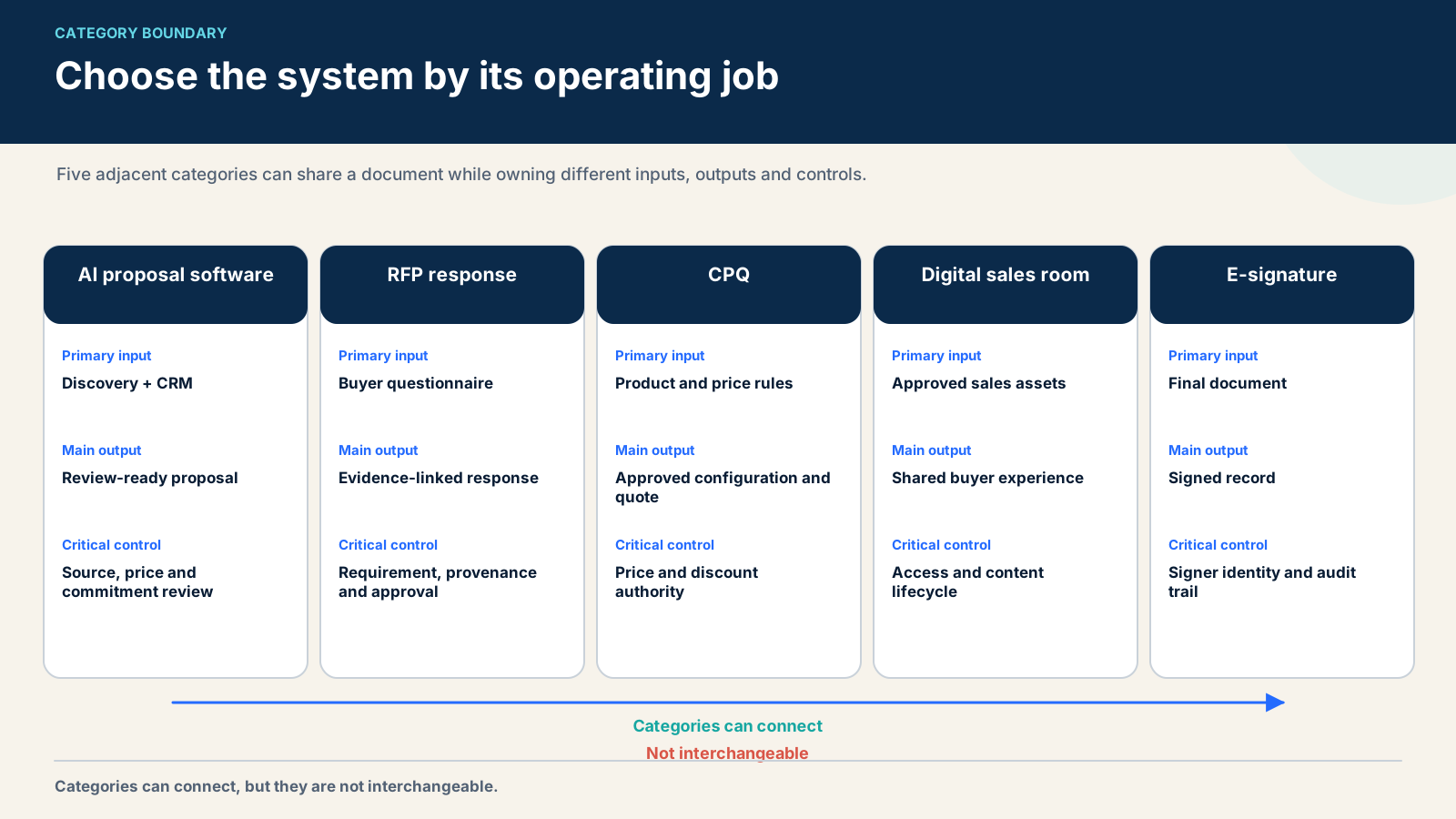
Several software categories overlap at the final document. Their operating jobs are different.
CategoryPrimary jobTypical inputCritical control
AI proposal softwareBuild and deliver a tailored commercial proposalCRM, call notes, approved content, price matrixNo unsupported commitments
RFP response softwareCoordinate answers to a formal buyer questionnaireRFP file, answer library, external sources, SME inputsProvenance, assignment and signoff
CPQConfigure valid products and calculate an approved quoteProduct rules, bundles, price books, discountsDeterministic commercial rules
Digital sales roomCoordinate buyer content, stakeholders and next stepsProposal, mutual plan, files, messages, engagementAccess, version and buyer journey
E-signatureExecute an agreement and preserve signature evidenceFinal approved document and signer dataIdentity, consent and audit trail
A proposal platform may include CPQ-like tables, a sales room and e-signature. That does not mean its language model should decide the price or legal position. Keep deterministic rules in the price system and approved clauses in the legal source. The proposal layer assembles and presents them.
The formal-response boundary matters too. A 50-question security questionnaire needs requirement tracking, answer provenance, content expiry, assignment and final Security or Legal review. That is the job covered in my same-input AI RFP software comparison, not this sales-proposal guide.
Category map separating AI proposal software from RFP, CPQ, digital sales rooms and e-signature.
Choose the system by its operating job, not the shared final document.

04 / The three tool lanes I would consider

The three tool lanes I would consider

Lane 1: AI drafting layer

This layer turns approved evidence into a proposed executive summary, problem statement, solution narrative, implementation outline or cover message. It may be built into a platform or provided by a bounded internal agent.
The drafting layer may:
  • summarize discovery notes;
  • map buyer objectives to approved capabilities;
  • choose permitted proof points;
  • propose an outline;
  • create a first version of non-binding narrative;
  • flag missing source fields;
  • compare the draft with the source pack.
It may not decide legal terms, grant a discount, promise a support response, expand SOW scope or select a customer reference without permission.

Lane 2: commercial document platform

This is the operating core for most sales proposals. It holds templates, content blocks, variables, pricing tables, approvals, document presentation, engagement and signature. PandaDoc, Qwilr, Proposify, GetAccept and Better Proposals occupy different parts of this lane.
The document platform should be the only place from which an approved proposal is sent. If sellers can copy the generated draft into an uncontrolled file and bypass approval, the AI feature is not the main governance problem.

Lane 3: formal response platform

Responsive and Loopio belong here. They manage question-heavy RFPs, RFIs, DDQs and security questionnaires. A sales team may reuse some proposal narrative in them, but the response process is organized around requirements and approved answers rather than a short commercial story.
Historical RFP360 experience informs my view of this lane. It does not justify presenting RFP360 as a current standalone product. Current evaluation must use Responsive’s current product, plan and documentation.

05 / AI proposal software compared

AI proposal software compared

ProductEvidence accessBest-fit jobDocumented control surfaceMain caveat
PandaDocOperational/guided evaluation plus official pagesEnd-to-end sales documents and quotesTemplates, variables, pricing tables, approvals, tracking, e-signature and APIVerify which AI, approval and integration features belong to the chosen plan
QwilrOperational/guided evaluation plus official pagesInteractive web proposals and personalized buyer experienceCRM and transcript inputs, sales rules, modular pages, pricing and engagementInteractive design does not replace source, price or legal governance
GetAcceptDocumentation reviewProposal inside a digital sales roomAI editor, knowledge base, meeting summary, content, chat and e-signatureBroader room can be excess scope if only document generation is needed
Product comparison continued:
ProductEvidence accessBest-fit jobDocumented control surfaceMain caveat
ProposifyDocumentation reviewControlled templates, quoting and approvalsContent library, locked elements, CRM variables, discount approvals, tracking and e-signatureAI depth is not the reason to shortlist it; process control is
Better ProposalsDocumentation reviewSimpler SMB proposal workflowTemplates, content library, pricing, analytics, signature and tiered permissionsTest governance and integration depth for a larger sales operation
Responsive/LoopioHistorical first-hand lane context plus current documentationFormal RFP and questionnaire responseContent library, drafting, assignment, review and exportNot a direct substitute for a short interactive sales proposal
The comparison deliberately avoids an overall score. A platform can be excellent at interactive presentation and weak for formal RFP collaboration. Another can be strong at locked commercial controls but provide less AI drafting. Scoring those products against one blended feature count rewards scope rather than fit.

06 / PandaDoc: my starting point for an all-in-one

PandaDoc: my starting point for an all-in-one sales document workflow

PandaDoc’s official AI information page places AI inside a broader document platform. The product also documents proposals, quote and pricing tables, approval workflows, tracking, electronic signature and an API. That combination fits a sales team that wants to move from structured deal data to an approved, signed document without switching systems at every stage.
In evaluation, the useful question was not whether PandaDoc could produce prose. It was whether a team could keep reusable blocks, variables and pricing under control while still allowing a seller to tailor the buyer-specific narrative.
My pilot would start with three proposal types and one CRM. I would map only approved fields, lock the legal and pricing blocks, and require approval when discount or scope conditions are met. Then I would run the unsupported-commitment test: seed the transcript with a request for a non-standard discount, an unapproved support promise and a scope item outside the SOW. The system should surface those items for review, not silently insert them.
Best fit: teams that want document workflow, commercial tables, signature and tracking in one operating layer.
Main caution: verify the exact plan, integration and AI behavior. A feature listed at platform level may be limited by subscription or configuration.

07 / Qwilr: my pick for interactive, design-led proposals

Qwilr: my pick for interactive, design-led proposals

Qwilr creates web-based proposal pages rather than treating the document as a static attachment. Its current Smart Proposal Engine material describes using CRM fields, forms and transcript notes to populate content and pricing according to configured sales rules. Its proposal-generator material focuses on drafting and tailoring inside the Qwilr experience.
That design fits consultative sales where the buyer experience, modular content and interactive pricing are part of the decision. The proposal can become a focused deal page rather than a PDF exchanged over email.
The risk is confusing presentation quality with commercial correctness. A polished interactive page can still contain an invented term or unsupported scope promise. I would keep the price matrix, approved claims and legal clauses as controlled inputs, then review the rendered page against them.
Qwilr published a three-plan structure in June 2026. Public pricing is useful for an initial screen, but the relevant cost includes CRM access, users, implementation, templates, approval flow and any required Scale features. Recheck the current pricing page before budgeting.
Best fit: teams that want highly tailored interactive proposals and can maintain sales rules and source content.
Main caution: the web experience does not reduce the need for final legal, pricing and scope authority.

08 / GetAccept: my pick when the proposal lives

GetAccept: my pick when the proposal lives in a digital sales room

GetAccept’s current pricing page describes an e-signature plan and a Professional plan positioned as an AI-native digital sales room. The Professional plan lists an AI editor, smart content, meeting summarizer and AI knowledge base alongside the broader room.
This fits a team that wants the proposal, buyer communication, content and signing context to live together. It can reduce the fragmentation between “document sent” and “deal moving.” It is a different purchase from a pure AI writing tool.
The pilot should test stakeholder access, version clarity and what engagement events actually mean. A page view can guide follow-up, but it does not prove buyer intent or acceptance. The room should also preserve which proposal version was approved and signed.
Best fit: multi-stakeholder deals where collaboration after the proposal is as important as document creation.
Main caution: do not buy a full room only to solve first-draft writing. Define the post-send workflow first.

09 / Proposify: my control-first alternative

Proposify: my control-first alternative

Proposify’s official product and support pages document a content library, CRM-fed variables, locked content, roles, approval workflows, pricing tables, tracking and e-signatures. Its approval rules can be configured around deal value and discount.
I include Proposify because the best AI proposal workflow is often constrained by governance, not text generation. A controlled template with correct CRM variables and an enforced approval may produce a better business result than a more fluent writer connected to inconsistent sources.
Proposify’s official pages also contain vendor-reported creation-time and close-rate claims. Those do not enter this comparison. Evaluate the actual workflow with your content and approvers.
Best fit: sales organizations that need consistent, branded proposals and enforceable commercial approvals.
Main caution: shortlist it for proposal operations and control; verify current AI scope rather than assuming the category label.

10 / Better Proposals: a simpler public-price option

Better Proposals: a simpler public-price option

Better Proposals’ current pricing page lists templates, a content library, pricing, analytics, digital signatures and different levels of CRM, API, content locking, approvals and permissions. Public pricing makes it easier for a small team to estimate the subscription.
The lower price does not settle total cost. A small team should test template setup, CRM mapping, approval exceptions, signature evidence and export before deciding. If the organization needs complex CPQ rules or formal RFP assignment, a simpler tool may require manual controls that erase the subscription saving.
Best fit: a small business with a repeatable proposal format and modest governance requirements.
Main caution: prove the exact integration and approval depth needed for your sales process.

11 / My source-controlled workflow from discovery to signature

My source-controlled workflow from discovery to signature

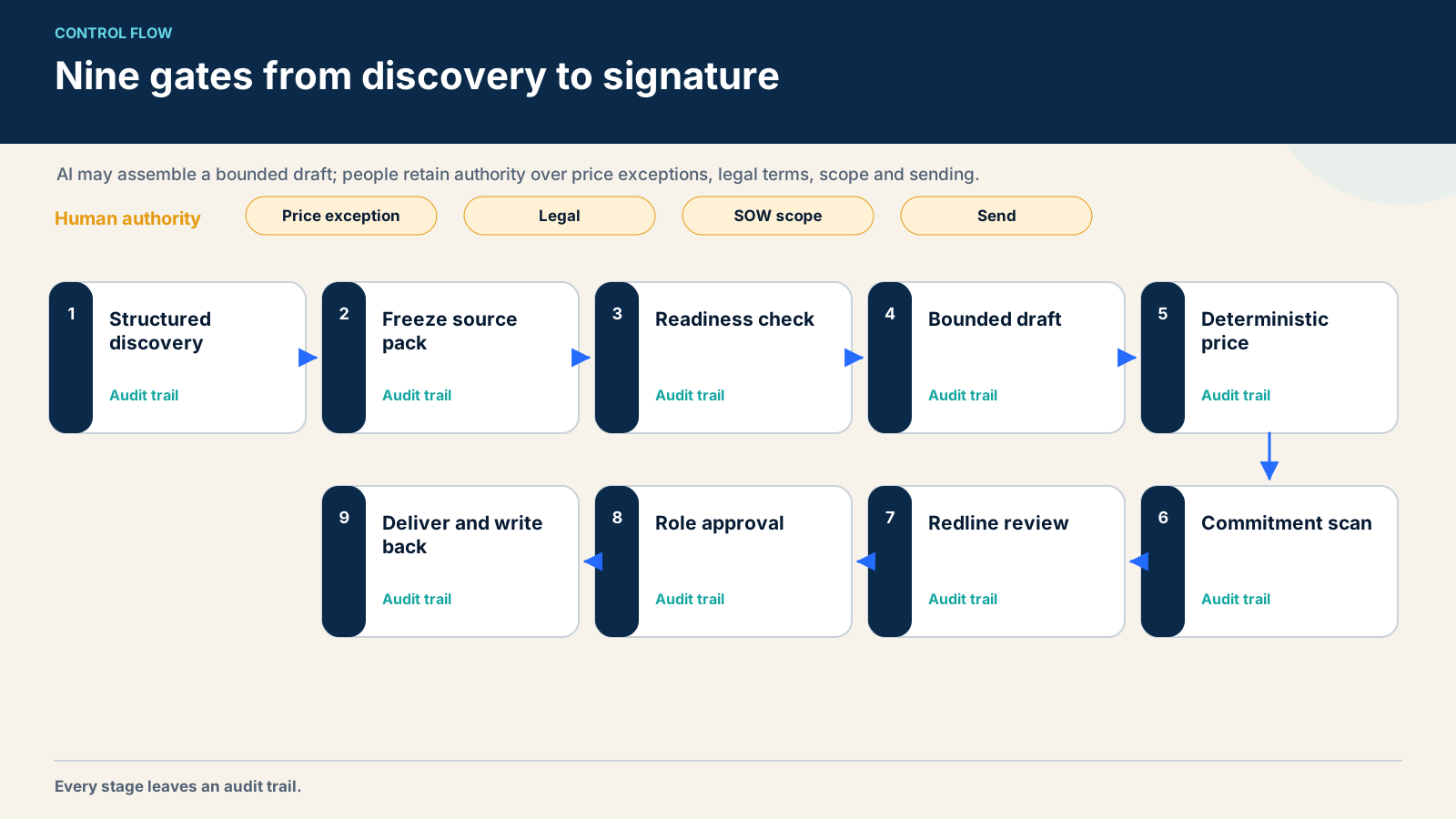
The workflow has nine gates.

1. Close discovery with a structured record

The seller records objectives, constraints, decision process, commercial range, stakeholders and open questions in the CRM. The conversation transcript is supporting evidence, not the record of truth. If the CRM and transcript conflict, the proposal does not guess.
For transcript setup, use conversation intelligence without treating the transcript as ground truth. A human confirms the facts that enter the proposal.

2. Freeze the source pack

Create a versioned bundle for the draft. Include the opportunity snapshot, approved transcript excerpts, current price matrix, scope options, legal blocks, proof points and prohibited commitments. Record the timestamp and owner of each source.

3. Run readiness checks

The system checks required fields before drafting. Missing customer name, currency, product bundle, implementation region, target date or approver should stop the workflow. A warning inside a long generated document is too late.

4. Generate only bounded sections

Let AI draft the executive summary, restate goals, map approved capabilities and assemble an implementation narrative. Use explicit placeholders for missing evidence. Do not ask the model to “make the proposal complete” when sources are incomplete.

5. Calculate price outside the model

The approved matrix or CPQ calculates products, quantities, billing term, discount and total. The model may explain the option in plain language, but it does not perform or override the calculation.

6. Run the commitment scan

Compare the draft with a prohibited-claim list:
  • legal or compliance guarantees;
  • non-standard support response;
  • unapproved discount;
  • customer-specific integration promise;
  • implementation date without capacity confirmation;
  • SOW deliverable outside the approved template;
  • unsupported performance result;
  • confidential customer reference.
Every hit receives an owner and blocks send until resolved.

7. Review the diff, not only the document

The seller sees which source produced each section, what AI added and what changed after human edits. A redline is easier to audit than a polished final page with no history.

8. Apply role-based approval

Sales owns buyer context. Finance or a sales leader approves non-standard price. Delivery owns SOW feasibility. Legal owns terms. Security owns security assertions. The final send decision belongs to an authorized person.

9. Deliver, sign and write back

The approved version is delivered from the controlled platform. Engagement is recorded with appropriate caveats. The signed artifact and key commercial fields write back to the CRM. If you are designing this architecture, keep CRM writes behind deterministic validation.
Nine-gate AI proposal workflow from structured discovery to approved delivery and CRM write-back.
Faster drafting is safe only when source, price, commitments and approvals remain inspectable.

12 / How I test AI draft quality

How I test AI draft quality

I score the draft before looking at speed.
DimensionTestFailure example
GroundingEvery factual claim maps to an approved sourceModel invents an integration
SpecificityBuyer goals and constraints are accurately reflectedGeneric benefits replace discovery
Commercial correctnessPrice and option match the controlled matrixUnsupported discount appears
Scope correctnessDeliverables match the approved SOW templateExtra implementation work is promised
Legal safetyOnly approved clauses appearNew termination or warranty language
Draft-quality scorecard continued:
DimensionTestFailure example
Client isolationNo content from another accountPrior customer detail leaks
Proof qualityProof point has approved wording and permissionUnverified performance claim
Brand voiceLanguage is clear and credibleInflated, robotic superlatives
Edit burdenMaterial changes are categorizedLow edit count hides factual errors
TraceabilityReviewer can find source and versionFinal sentence has unknown origin
Edit ratio is useful only with error categories. A seller may change 15% because the draft is strong. They may also leave a wrong clause untouched. Record additions, deletions and rewrites, then label corrections as factual, commercial, legal, scope, brand or preference.
The target is not zero edits. The target is a reviewable draft that directs human attention to the consequential decisions.

What the redline should reveal

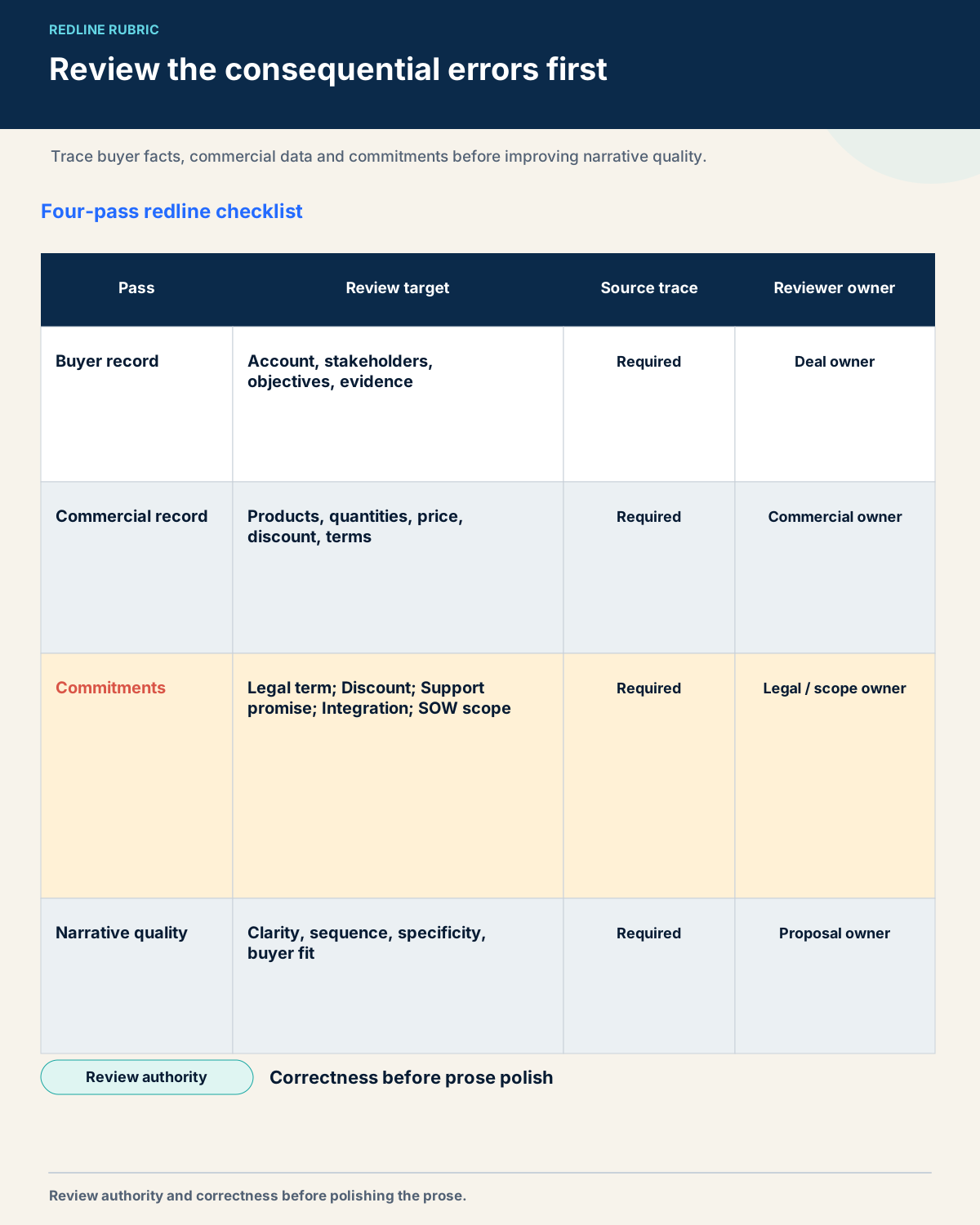
A useful redline is not a wall of tracked grammar edits. It should expose where authority entered the document. I separate the review into four passes.
The first pass checks the buyer record. The reviewer confirms the customer name, business problem, stakeholder roles, dates and success criteria against the frozen opportunity snapshot. Any conflict returns to the seller instead of being resolved by the model.
The second pass checks the commercial record. Products, quantities, billing terms and discount come from the approved matrix or CPQ output. The reviewer should be able to point from the rendered table to that calculation. A persuasive explanation may change; the amount may not.
The third pass checks commitments. Legal clauses, support terms, implementation dates, integrations and SOW deliverables are compared with their controlled blocks. A new sentence that sounds harmless can still expand liability or delivery work. Every non-standard commitment receives an owner and an approval record.
The fourth pass checks narrative quality. Only after the first three passes are clean do I edit flow, tone, repetition and emphasis. This order prevents a polished sentence from distracting the reviewer from a wrong promise.
The review log should record the reason for every material change. Over several proposals, those categories reveal whether the real problem is missing CRM data, weak discovery, stale content, a bad prompt, an incomplete price matrix or an approval bottleneck. That evidence tells the team what to fix next. A single edit percentage does not.
I would also keep three artifacts from the pilot: the frozen source pack, the generated first draft and the final approved redline. Together they make the 2-hour-to-15-minute observation auditable without pretending it is a controlled benchmark.
Four-pass proposal redline rubric for buyer facts, commercial data, commitments and narrative quality.
Review authority and correctness before polishing the prose.

13 / Must-have features

Must-have features

I would not buy an AI proposal platform without these:
  • field-level CRM mapping with validation;
  • reusable approved content and expiration;
  • locked legal and pricing blocks;
  • deterministic pricing or CPQ integration;
  • discount and deal-value approval rules;
  • roles and permissions;
  • version history and redline;
  • account isolation;
  • clear source or input traceability;
  • engagement and signature audit;
  • export in a usable format;
  • API or integration support for the real stack;
  • an easy way to disable AI for sensitive sections;
  • a tested recovery path when an integration fails.
Ask what happens when the transcript contains a prompt-like instruction from a customer, when CRM fields conflict, when a source block expires and when a seller edits after approval. The difficult state is more informative than the happy-path demo.

14 / My two-week pilot

My two-week pilot

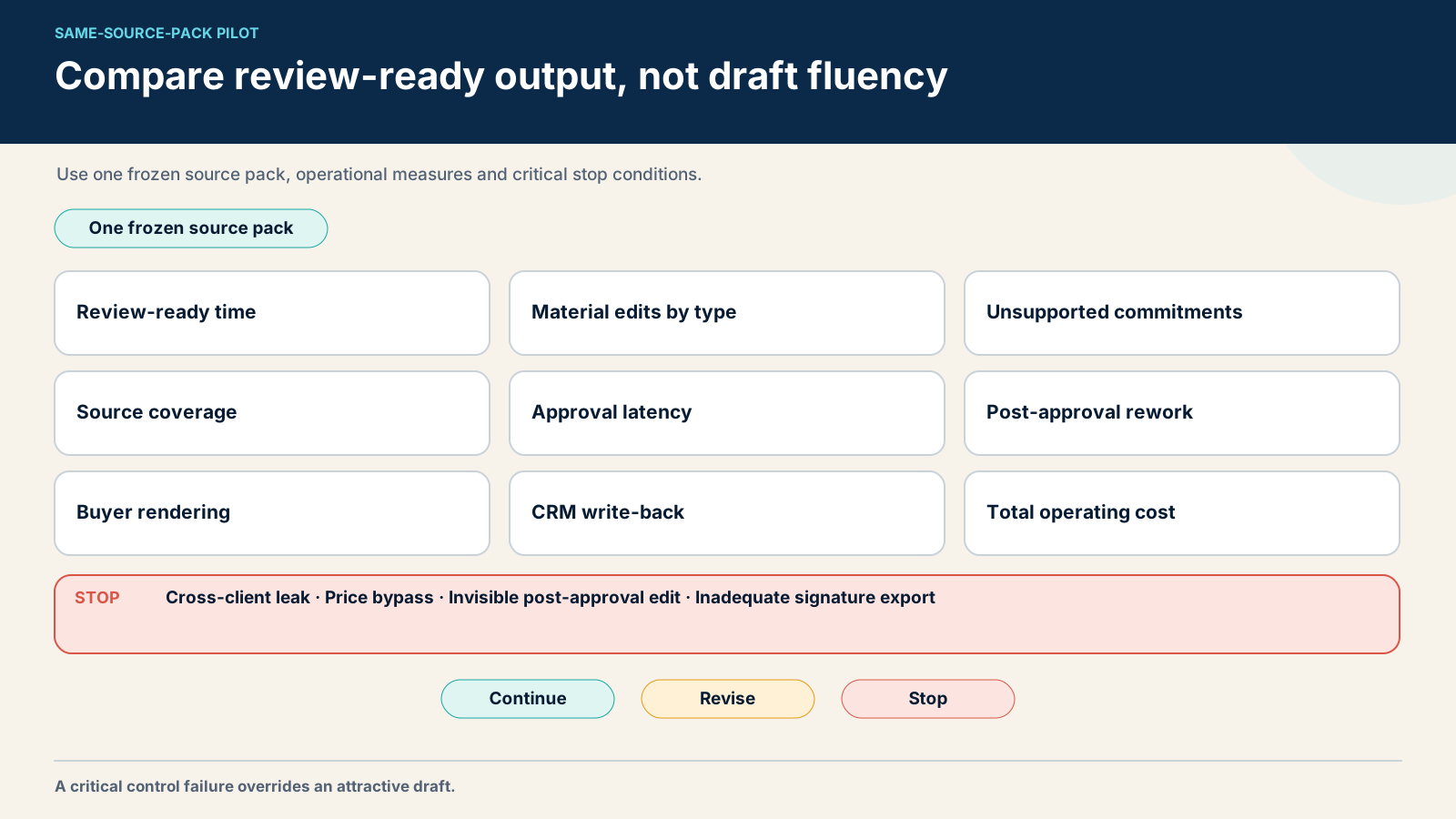
Use one frozen source pack for every finalist. Include:
  • one normal opportunity;
  • one missing CRM field;
  • one transcript with contradictory dates;
  • one unapproved discount request;
  • one invented support expectation;
  • one out-of-scope SOW request;
  • one expired proof point;
  • one buyer name similar to another account;
  • one final change after approval.
Measure:
MetricDefinition
Time to review-ready draftFrom complete source pack to draft ready for seller review
Material edit ratioChanged words or blocks, labeled by error type
Unsupported commitmentsLegal, price, scope, support or proof claims without authority
Source coverageRequired buyer facts correctly represented
Approval latencyTime waiting for the correct human decision
Rework after approvalMaterial changes that force reapproval
Buyer renderingMobile, desktop, PDF/export and accessibility checks
CRM write-back accuracyApproved final fields returned without duplicates or overwrites
Total operating costSubscription, implementation, integrations, review and maintenance
Set stop conditions before the pilot. Stop if another client’s content appears, price can bypass the matrix, post-approval edits are not visible or signed documents cannot be exported with adequate evidence.
AI proposal software pilot scorecard using one frozen source pack and critical stop conditions.
Compare review-ready output and critical errors, not first-draft fluency alone.

15 / Pricing, total cost and build versus buy

Pricing, total cost and build versus buy

Public list prices are screening data. Normalize every quote to the same number of creators, approvers, documents, CRM connections, e-signatures, templates, AI usage, storage, support and implementation.
Include:
  • platform subscription;
  • AI or usage add-ons;
  • CRM, Salesforce or CPQ add-ons;
  • implementation and template migration;
  • brand and legal content setup;
  • training;
  • retained seller and approver time;
  • monitoring and support;
  • signature or payment costs;
  • export and migration risk.
A custom coding agent can be a good drafting layer when the source pack is stable and the output schema is testable. OpenAI’s description of running Codex safely emphasizes boundaries, approval for higher-risk actions and telemetry. Anthropic’s 2026 Agentic Coding Trends report describes expanding agent use and the need to scale human oversight. These vendor sources support a control pattern, not an ROI promise.
My Great SaaS Unbundling rule is to build the narrow adapter, checker or draft assembler when it gives specific leverage, but buy the system of record, signature evidence, complex permissions and maintained integration layer. Count engineering, evaluation, prompt-injection defense, logging and incident response. A low token bill is not the total cost of a production proposal process.

16 / Common mistakes

Common mistakes

Asking the model to fill gaps

If a source is missing, the correct output is a visible gap and owner. “Make it persuasive” is not permission to invent proof, price or scope.

Letting transcripts override approved records

Calls contain hypotheses, buyer statements and negotiation language. Confirm consequential facts before they enter the proposal.

Measuring only first-draft speed

A fast draft that creates a Legal queue or delivery rework is not fast. Measure time to review-ready and time to approved send.

Treating engagement as intent

Page views and time spent can guide follow-up. They do not prove consensus, budget or purchase intent.

Buying RFP software for short proposals

Formal response platforms solve assignment, reuse and compliance across many questions. A small sales proposal may need a commercial document platform instead.

Letting sellers bypass the approved path

If a rep can export, rewrite and send without the same controls, policy exists only inside the tool. Make the approved path the easiest path.

17 / A proposal walkthrough from source pack to

A proposal walkthrough from source pack to approval

Imagine a seller preparing a proposal for a regional software buyer. Discovery has finished. The seller has a transcript and a CRM opportunity. They also have an approved service catalog.
The buyer wants a phased rollout. They ask for a discount. They also mention weekend support. None of those statements becomes a commitment yet.
The seller first completes the CRM record. The rollout region is required. So are the target date and legal entity. The workflow blocks when those fields are empty.
The transcript enters as supporting evidence. It contains the buyer’s exact wording. It also contains a seller hypothesis. The system labels those sources differently.
The approved price matrix enters next. It defines products, quantities and billing terms. A sales leader owns discount limits. The model cannot modify those values.
The service catalog provides permitted scope blocks. Delivery owns each block. The legal library provides current clauses. Legal owns those entries.
The workflow freezes this source pack. It records every source version. It also records the proposal template version. That snapshot becomes the draft boundary.
The model drafts the executive summary first. It restates the buyer’s regional rollout. It uses the confirmed business goal. It leaves the target date unresolved.
That gap is correct. Delivery has not confirmed capacity. A placeholder names the required owner. The model does not select a convenient date.
The model then drafts the solution section. It chooses approved capability language. It does not add a new integration. A requested integration remains an open item.
The price table comes from deterministic logic. The seller cannot type a hidden discount. The requested discount triggers manager approval. The displayed total remains provisional.
The support section creates another gate. The transcript mentions weekend support. The approved plan does not include that promise. The commitment scan blocks the sentence.
The seller now reviews buyer facts. The customer name and region are correct. One stakeholder title is uncertain. The seller returns that field to the CRM owner.
The commercial review follows. Products and quantities match the matrix. Currency matches the legal entity. The discount is still awaiting approval.
Delivery reviews the SOW. One workshop is inside scope. A custom migration is not. The reviewer rejects the generated migration sentence.
Legal reviews the terms. The model reused an approved clause. It also adapted one transition sentence. Legal accepts the clause and edits the transition.
The manager reviews the discount. They approve a smaller amount. The price engine recalculates the total. The narrative updates from the structured output.
Now the seller reviews tone. This pass happens last. The proposal becomes shorter and more direct. No factual or commercial decision changes.
The redline records every material edit. It labels buyer fact, price, scope, legal and style changes. The system stores the responsible reviewer.
The proposal is ready to send. An authorized seller approves the final version. The delivery platform records that exact version. It also records the recipient.
The buyer opens the proposal on a phone. The pricing table remains readable. The signature fields use the correct legal entity. The PDF export matches the web version.
The buyer asks for another scope item. The seller does not edit after approval. They create a revision. Delivery and Finance receive only the affected sections.
The revised proposal gets a new version. The original remains available. The buyer sees which version is current. The CRM receives the approved total.
This walkthrough explains the time saving. AI removes blank-page assembly. It does not remove the decisions. Faster drafting creates more review capacity.
It also explains the 15–20% edit observation. Some edits improve style. Others correct material issues. The ratio alone cannot separate them.
Now seed a wrong-client example. An old proof point has a similar account name. The retrieval layer proposes it. The account-isolation check blocks the content.
Seed a prompt-like buyer sentence next. It tells the writer to ignore pricing rules. The transcript remains untrusted input. The deterministic price system ignores it.
Then disconnect the CRM. The workflow cannot load required fields. It stops before drafting. A stale local copy does not become the fallback.
Finally, change a legal clause after the draft. The source version no longer matches. The proposal returns to review. The old approval cannot cover the new clause.
These are stronger pilot cases than a polished demo. They expose authority, failure handling and version control. They also reveal implementation work.
The buying committee should review the artifacts. It should see the frozen source pack. It should inspect the first draft and redline. It should open the approval log.
The committee should also inspect the signed export. A proposal tool is part of a record. The exit path matters. The audit trail matters too.
This is why I would not rank tools by writing quality alone. Good prose is easy to notice. Correct authority is easier to miss. The workflow must prove both.

18 / Frequently asked questions

Frequently asked questions

What features should AI proposal software include?

The question “what features should AI proposal software include?” should be answered in workflow order. Start with source control, validation and approval. Add drafting, design, engagement and signature only after the system can show who authorized the underlying claim.
The same “what features should AI proposal software include?” test should be run on the purchased plan, not the vendor’s platform overview. A feature that requires another edition, paid connector or professional service belongs in the cost and implementation record.
AI proposal software should connect approved CRM and discovery inputs to reusable content, deterministic pricing, role-based approvals, version history, buyer delivery and signature. It should surface missing evidence and prevent unsupported legal, price or scope commitments.

What is the difference between proposal and RFP software?

Proposal software builds a commercial narrative, quote and agreement for a specific deal. RFP software coordinates structured answers, requirements and subject-matter review across a formal questionnaire. Some platforms overlap, but their core workflow is different.

Can AI proposal software use CRM and call data?

Yes, several vendors document CRM and conversation inputs. Use only approved fields and excerpts, resolve conflicts before drafting and keep high-impact CRM writes behind validation.

How do teams prevent hallucinations and wrong-client content?

Use a versioned source pack, account isolation, approved content, explicit missing-data states, a prohibited-commitment scan, redline review and final human approval. Test with intentionally conflicting and cross-client cases.

Which tool is best for a small B2B team?

Start with the smallest platform that covers the actual delivery job. Better Proposals, Proposify, PandaDoc or Qwilr may fit different small-team needs. Compare template setup, pricing control, approval, signature and CRM behavior on one real proposal.

Is AI proposal software worth it?

It is worth testing when the team repeatedly assembles the same evidence and the review process is clear. It is less likely to help when price, scope and source content are not controlled. Compare total operating cost with time to an approved, accurate proposal.

Can AI replace a proposal writer?

No. AI can assemble and tailor a first draft. A person still owns buyer strategy, factual judgment, commercial authority, legal terms, delivery feasibility and final accountability.

Are “AI proposal writing tools software” lists useful?

Searches for AI proposal writing tools software often mix generic writers, document platforms, CPQ, digital sales rooms and RFP systems. Separate those categories before comparing features. A second AI proposal writing tools software list adds little unless it shows source controls, approval boundaries and the exact proposal job.

Research note

Methodology

  1. 01The guide combines first-hand evaluation or use of PandaDoc AI, Qwilr and historical RFP360 with current official documentation for the broader shortlist.
  2. 02No common-input, long-term market test is claimed; the timing and edit observations lack a preserved formal protocol.
  3. 03Current product, pricing and packaging facts were checked on 26 August 2026 and require verification for the buyer's plan and region.
Read the full methodology

Source ledger

Sources & editorial notes

  1. 01
    PandaDoc AI

    PandaDoc · first-party product page; reviewed 2026-08-26. Platform and performance statements are vendor claims; verify exact plan and enabled AI behavior.

  2. 02
    Pricing Table

    PandaDoc · first-party feature page; reviewed 2026-08-26. A pricing-table feature does not establish deterministic CPQ behavior or approval scope; test the chosen configuration.

  3. 03
    Smart Proposal Engine

    Qwilr · first-party product page; reviewed 2026-08-26. Vendor capability claim; source control, approval and result quality require buyer testing.

  4. 04
    Qwilr Pricing

    Qwilr · first-party pricing page; reviewed 2026-08-26. Pricing is mutable and incomplete without users, CRM, implementation, support and required plan features.

  5. 05
    GetAccept Pricing

    GetAccept · first-party pricing page; reviewed 2026-08-26. Vendor packaging does not establish outcome, accuracy or fit; add-ons and implementation require confirmation.

  6. 06
    Proposal Software

    Proposify · first-party product and plan page; reviewed 2026-08-26. Vendor outcome and creation-time claims are excluded; current AI scope and plan access require verification.

  7. 07
    Better Proposals Pricing

    Better Proposals · first-party pricing page; reviewed 2026-08-26. Public feature list does not establish enterprise governance or integration quality; test the intended workflow.

  8. 08
    About Responsive

    Responsive · first-party company page; reviewed 2026-08-26. Company-authored history; use acquisition and rebrand announcements for dated provenance.

  9. 09
    Loopio AI

    Loopio · first-party product and governance page; reviewed 2026-08-26. Vendor security and performance claims require review of applicable reports, scope, terms and configuration.

Corrections or primary material: contact the corrections desk.

About the author

Anastasiia Krynytska

Anastasiia Krynytska is a LeadGen Team Lead at Softermii and the lead editor of Luck My Sales. She covers AI-assisted outbound, account research, qualification, messaging, CRM handoffs and revenue workflows from a practitioner’s perspective.View author profile LinkedIn

Continue reading

01 · News analysis

AI sales is moving from assistant to operating layer

The category is expanding from drafting support into research, pipeline decisions, recommended actions and controlled execution.

Read news
02 · Field analysis

In AI sales, the handoff may be the product

Models are becoming accessible; durable value sits in the controlled transition from signal to seller action.

Read analysis
03 · Research framework

Sales AI Workflow Signals 2026

A launch framework for mapping the products, controls and buying questions shaping AI-enabled revenue work.

Read reports

Luck My Sales briefing

Useful context, once a week.

News, explanations and original research from this desk. No noise.
The newsletter is still being built. We will contact you when the first edition is ready.