Weekly industry intelligence · No noiseSubscribe to the Luck My Sales newsletterFree briefing

Independent operator-led media on AI in B2B sales

Menu

Controlled automation guide · AI CRM

AI CRM Automation: What to Automate, Review and Never Overwrite Blindly

Build AI CRM automation with evidence, field authority, human review, audit history and rollback—from inbound routing to outcome feedback.
Editorial disclosure

AI may assist research organization and drafting. A human editor reviews every published page, checks material claims against the cited sources and owns the final decision. No company paid for placement in this article.

AI use policy

Agent-ready brief

AI takeaways

Keep the key points here, or take a source-aware text brief into Claude, ChatGPT or another AI workspace.
  1. 01A closed source-to-outcome loop is the prerequisite for useful CRM automation.
  2. 02The AI may prepare and classify evidence, but field-level authority must be explicit.
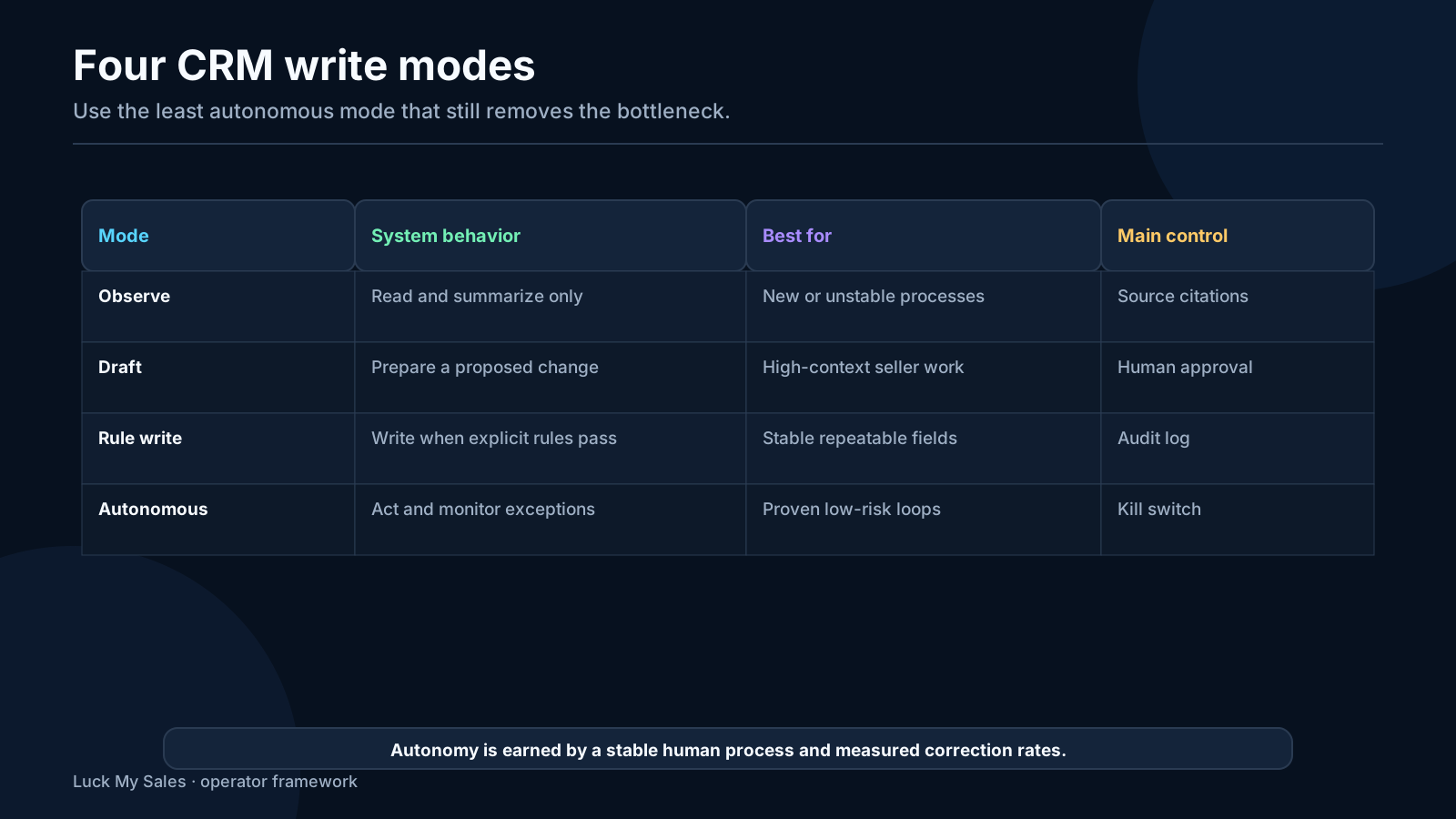
  3. 03Draft, append, propose and execute are four different write modes with different risk.
  4. 04Test duplicates, missing evidence, stale owners and contradictory replies before trusting success paths.
  5. 05Measure corrections, approvals, follow-up latency and outcomes—not records touched.
Includes summary, takeaways, sources and a use note.
AI CRM automation should automate a process the sales team already understands. It should not make an unclear process move faster.
The most useful pattern is a closed loop: a lead arrives, evidence is assembled, AI recommends a score and segment, a human reviews the decision in a batch, the accepted lead enters an action plan, and the result returns to the system as feedback. The AI does the repetitive preparation. The seller keeps authority over the commercial decision.
In my work, this can remove a very large part of routine CRM administration. My operating estimate is that a mature, well-designed workflow can simplify up to 90% of the repetitive preparation, sorting and data-handling work in scope. That is not a benchmark for every company and it does not mean 90% of sales work disappears. Discovery, pricing, negotiation, judgment and accountable decisions remain human work.
The safe rule is simple:
manual proof → controlled automation → monitored outcome → reversible correction
If the team cannot explain the manual version of the workflow, it is not ready to automate it.

Automate a stable human process with explicit field authority, failure tests, audit history and rollback—not an unclear process that happens to be in a CRM.

01 / What AI CRM automation is

What AI CRM automation is

AI CRM automation uses models or agents to interpret unstructured evidence, recommend or execute record actions and adapt work based on the context in the CRM and connected systems.
It is different from three adjacent categories.

Rules

A rule follows deterministic logic: if a form country equals Germany, assign the lead to the DACH queue. Rules are best when the evidence is structured and the decision is stable.

Copilots

A copilot prepares a summary, draft, recommendation or query result for a user. It does not need authority to change the canonical record.

Agents

An agent can plan or execute several steps: gather context, classify, create a task, update a field or trigger another workflow. More autonomy creates more need for permissions, logging and stop conditions.
Good CRM architecture uses all three. A model may interpret a free-text request. A deterministic rule may enforce existing account ownership. A human may approve a strategic route. An agent may create the approved task and append the evidence.
The mistake is using AI for decisions that a clear rule can handle, or giving an agent write access because the demo needs it rather than because the process does.

02 / The closedloop prerequisite

The closed-loop prerequisite

AI CRM automation becomes useful only when the business can trace a lead from origin to outcome.
The minimum loop is:
source or trigger → CRM identity → evidence → segment and owner → seller action → buyer response → opportunity outcome → feedback
In practice, this means:
  • a website form, chat, call, trial, event, email or referral produces a recorded trigger;
  • the trigger resolves to a company and person without silently creating duplicates;
  • the CRM or staging layer knows the source and observation time;
  • a segment and next action are defined;
  • SDR and sales activity is captured;
  • positive, neutral and negative outcomes have distinct states;
  • a customer, disqualification or loss reason closes the loop.
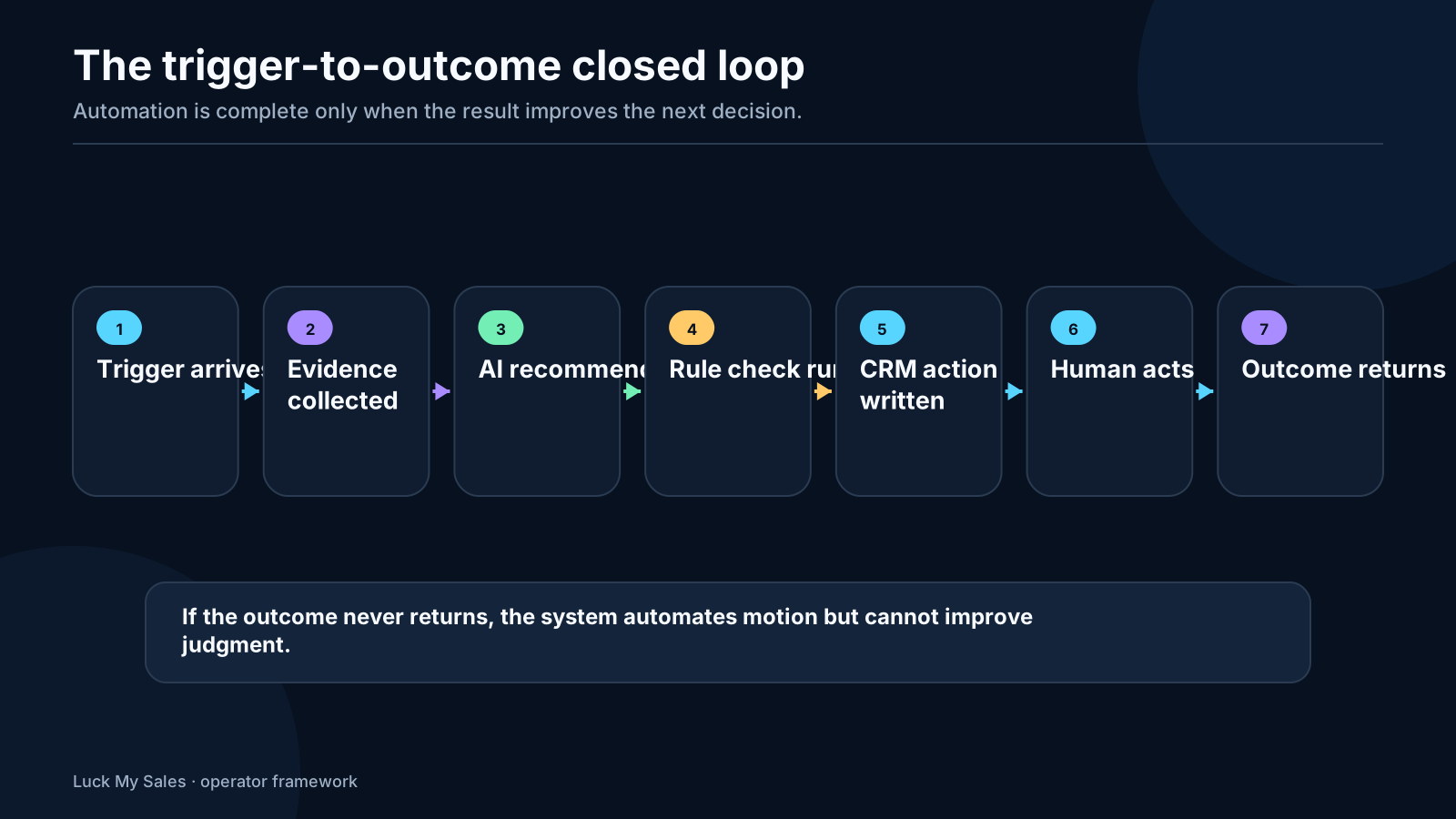
If the website form creates a record but calls live elsewhere, emails do not sync, stages have no common meaning and lost deals lack reasons, AI has no reliable history to learn from. It can still create a polished summary. The summary will describe an incomplete reality.
This loop is closely related to the ownership contract in AI lead routing and the evidence separation in AI lead scoring with Gmail and CRM.
Closed-loop AI CRM workflow from lead arrival through evidence, score, human review, action and outcome feedback.
Automation becomes useful when every action can return an outcome to the same loop.

03 / A firsthand inboundrouting workflow

A first-hand inbound-routing workflow

The main workflow I use to explain AI CRM automation begins with an inbound lead. The same pattern can be adapted to outbound replies, trials or event leads.

1. Trigger: the lead enters the working database

The trigger can be a website form, chat, product trial, event, partner referral, email or phone interaction. The first action is identity resolution, not scoring.
The system checks:
  • whether the company or person already exists;
  • whether an opportunity is open;
  • whether a named account or partner owner already applies;
  • which consent, source and region rules apply;
  • whether the input contains enough evidence to proceed.
If identity is uncertain, the record should remain in a review state. Creating a second company because the domain was formatted differently will corrupt every later metric.

2. Evidence assembly

AI assembles the evidence available at that moment:
  • form answers and free text;
  • website chat or call transcript;
  • CRM history;
  • first-party website activity;
  • enrichment evidence;
  • current account and opportunity ownership;
  • territory, product, language and capacity state.
Not every source has equal authority. A buyer's current form answer should usually carry more weight than an old enrichment value. A seller-confirmed owner should outrank a model's round-robin suggestion. A transcript quote is evidence; a model's interpretation of it is an inference.

3. AI recommends a score and segment

The model returns structured output, not only prose:
  • proposed segment;
  • fit score and confidence;
  • evidence used;
  • missing evidence;
  • disqualifying or conflicting facts;
  • recommended next action;
  • proposed owner after precedence rules;
  • escalation reason.
The score is a recommendation. It is not a hidden command to change lifecycle or opportunity stage.

4. Deterministic rule check

Before any routing action, rules apply in a fixed order. A common precedence is:
existing account/opportunity owner → named account → partner ownership → territory/product → language/skill → availability/capacity → round robin
AI can interpret evidence within the chain. It should not reorder the chain without an explicit governance change.

5. Human batch review

The team reviews recommendations in a batch. This is more efficient than redoing every research step but still catches systematic errors.
The reviewer sees:
  • the source input;
  • relevant evidence;
  • recommendation and confidence;
  • owner and rule result;
  • differences from the current record;
  • proposed action.
The first batches receive close review. Once the workflow is stable, low-risk records can move with sampling while conflicts, named accounts and consequential changes stay manual.

6. Accepted leads enter an action plan

An accepted record can create a task, notify the owner, generate a draft or enter a permitted sequence. The action should be specific: call within the SLA, send a reviewed reply, request technical evidence, or place the lead into a named nurture state.
The workflow should never end with “lead routed.” It should identify what the owner must do and when.

7. AI evaluates the result and returns feedback

After the action, the system observes what happened:
  • response time;
  • seller acceptance or reassignment;
  • contact outcome;
  • meeting held;
  • opportunity created;
  • stage movement;
  • disqualification or loss reason;
  • correction to the original score or segment.
AI can summarize patterns and propose changes. The process owner decides whether to change the rules. One surprising lead is not enough to rewrite the workflow.

04 / The evidence contract

The evidence contract

Every AI decision should separate five layers.
LayerExample
Observed factBuyer selected “50–200 employees” in the form
External evidenceCompany site describes two target products
InferenceRequest likely belongs to the mid-market product segment
RecommendationRoute to product specialist A
Applied actionHuman approved and owner changed at 10:14
Store the source and time for observed facts. Store model, prompt or rule version for the inference. Store the reviewer for consequential actions. Later, store the outcome.
Without this separation, the CRM displays one final value and nobody knows whether it came from the buyer, enrichment, AI or a seller. Corrections become arguments instead of data.

05 / Who may change which CRM

Who may change which CRM fields

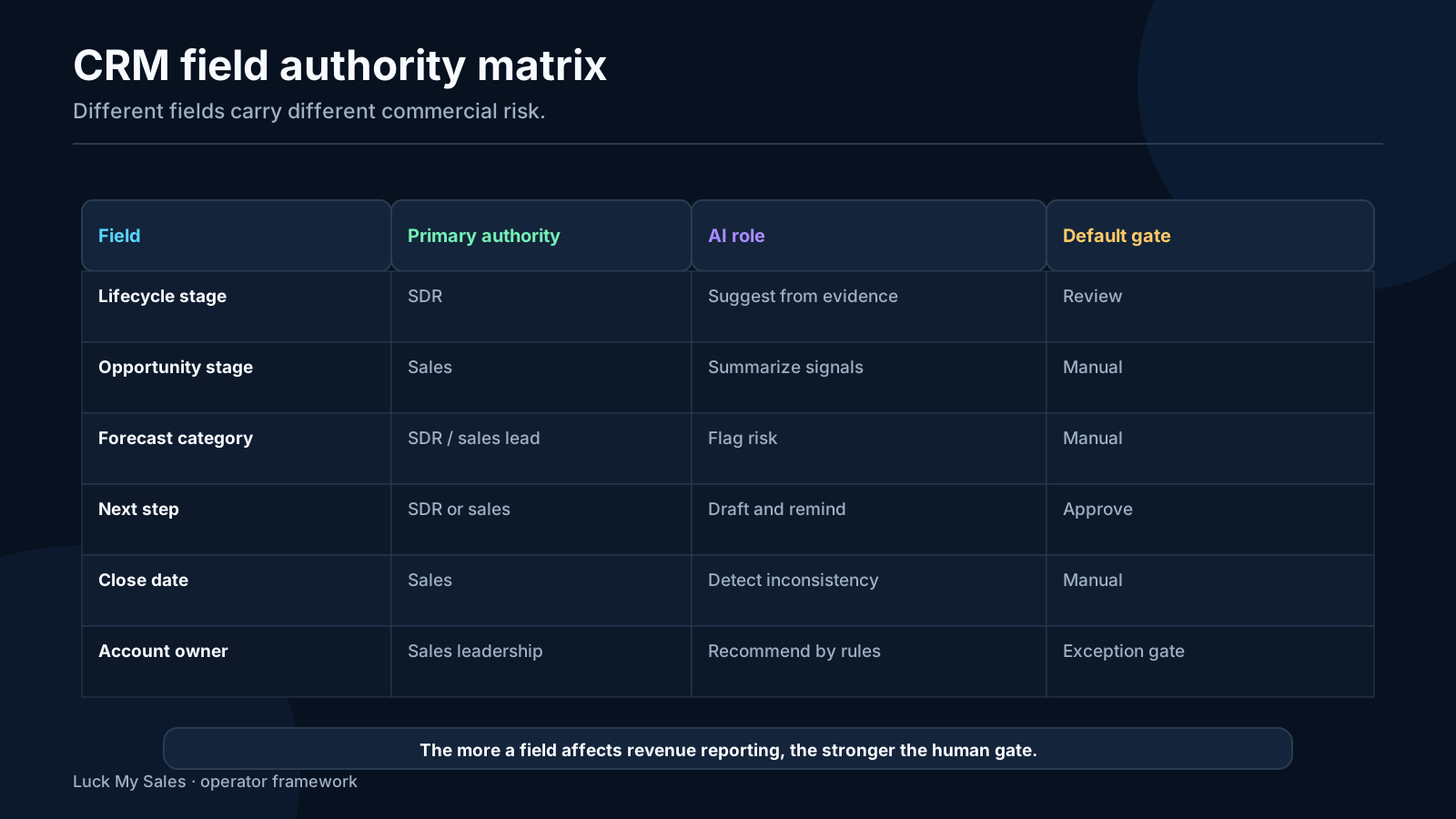
Field authority depends on the organization's process. In the workflow we described, authority is:
Field or actionPrimary authorityAI role
Lifecycle stageSDRRecommend; apply only within approved transitions
Opportunity stageSales/AESummarize evidence and propose; do not silently advance
Forecast categorySDR in this operating modelPrepare evidence; local governance choice, not universal practice
Next stepSDR or salesDraft, extract from conversation and create after review
Close dateSales/AEFlag inconsistency; seller confirms change
PricingSales/authorized commercial ownerNever set or alter without human authority
Account ownershipNamed sales/RevOps authorityRecommend according to precedence; never bypass existing ownership
Suppression/unsubscribeCompliance and communication ruleStop relevant communication immediately and log the event
Many organizations give forecast authority to managers or AEs rather than SDRs. The table documents one operating choice, not a universal recommendation. The important requirement is a named authority for every consequential field.
CRM field authority matrix for SDR, sales and AI recommendations.
Field ownership must be defined before an agent receives write permission.

06 / AI synchronization across channels

AI synchronization across channels

Automation fails when each channel has a different version of the lead.
Imagine a person who:
  • submits a website form;
  • speaks to a voice agent;
  • replies to an outbound email;
  • connects on LinkedIn;
  • already belongs to an open account.
If those events create four records, the team may send duplicate messages and route the person away from the existing owner. If the events merge without provenance, a low-confidence enrichment value may overwrite first-party data.
AI synchronization requires:
  • one canonical identity or explicit unresolved state;
  • event timestamps;
  • source authority rules;
  • cross-channel reply and suppression state;
  • current owner precedence;
  • record-level audit history;
  • idempotent actions so retrying an integration does not duplicate work.
This is not primarily a model problem. It is a data and systems problem. AI can help resolve ambiguous identity, but the architecture must make uncertainty safe.

07 / Build the control plane before

Build the control plane before adding more agents

An AI CRM workflow needs one control plane that decides which system owns each state. Otherwise every connected tool behaves as if its local view were complete.
The control plane does not need to be a separate product. It can begin as documented ownership rules plus a small workflow service. It must still define a canonical record key, event order, field authority, protected states, suppression behavior, retry policy and audit log.
Start with identity. A website form may create a person from an email address. Enrichment may discover a company domain. A meeting scheduler may use another address. LinkedIn may show a recent role at a different company. The workflow must decide whether these events belong to one person, two people or an unresolved identity. AI can propose a match, but it should not merge uncertain records silently.
Then define event precedence. A current human decision usually outranks an older automated inference. An unsubscribe or explicit negative reply outranks a scheduled follow-up. A sales-owned opportunity should not be reassigned by a round-robin workflow. A verified correction should survive the next bulk enrichment run.
Finally, define what happens when systems disagree. Good automation does not hide conflict. It creates a review item with both values, sources, timestamps and the proposed resolution.

A practical precedence order

For a small sales team, a starting hierarchy can be:
  1. legal, consent and suppression states;
  2. explicit human correction or approved commercial decision;
  3. existing account and opportunity ownership;
  4. current customer or active-opportunity evidence;
  5. verified source evidence with an observed date;
  6. AI inference or recommendation;
  7. stale imported values.
This hierarchy is not universal. The important part is that the team writes its own order and enforces it across routing, enrichment, outreach and CRM write-back.

Prevent loops and duplicate actions

Connected AI systems can create automation loops. A CRM update triggers enrichment; enrichment changes a score; the score changes lifecycle; lifecycle triggers a sequence; the sequence writes activity; activity retriggers the score. Each action may be valid alone while the combined loop is destructive.
Use an event ID, source system, workflow version and processing status. Make repeated processing idempotent: receiving the same event twice should not create two contacts, two tasks or two sends. Add a maximum retry count and a dead-letter queue for events the system cannot resolve safely.
Before production, simulate delayed and out-of-order events. Test a reply arriving before the CRM record exists, an owner change during a sequence, a form resubmission by an existing customer and a correction followed by an older enrichment result. These are ordinary operating conditions, not rare edge cases.

Separate recommendation, approval and applied action

Do not let one field carry three meanings. Store what AI recommended, what the human approved and what the CRM ultimately applied as separate events. This distinction matters when a write fails, a seller chooses a different stage or a later reviewer asks why the record changed.
For example, an AI may recommend MQL with score 82 because the company fits the ICP and requested pricing. The SDR may approve qualification but assign it to a partner motion. The applied action may therefore be a partner-owned lifecycle path rather than the default inbound queue. A single overwritten stage field would erase the useful history.

08 / Define an exception operating model

Define an exception operating model

Automation quality is determined partly by the normal path and largely by how the team handles exceptions. Someone must own unmatched records, conflicting owners, failed writes, missing evidence, ambiguous replies and integration downtime.
Set an exception SLA based on commercial impact. A positive inbound reply or high-value named account deserves faster human review than a missing optional enrichment field. Group exceptions by cause so the owner can fix a rule instead of reviewing the same failure forever.
Track the age of the exception queue, repeated causes, records affected and whether the issue blocked a customer response. A workflow with a 95% automatic pass rate can still be unacceptable if the remaining 5% contains the highest-value accounts or all unsubscribe events.
Do not route exceptions back into a generic AI agent with broader permissions. Escalation should reduce autonomy and increase evidence, not do the reverse.

09 / Test failure before trusting success

Test failure before trusting success
A demo proves the happy path. Production readiness requires failure tests.
Disable one integration and verify that the workflow pauses or marks evidence incomplete. Send the same event twice. Change a contact's employer. Create two open opportunities for one account. Submit a form from an existing customer. Add a positive reply while another channel has a follow-up queued. Attempt to overwrite pricing, account owner or close date without the named approval.
For each test, inspect what the seller sees, what the CRM stores and what the audit log explains. The system is ready only when it fails visibly, preserves protected state and offers a clear recovery path.
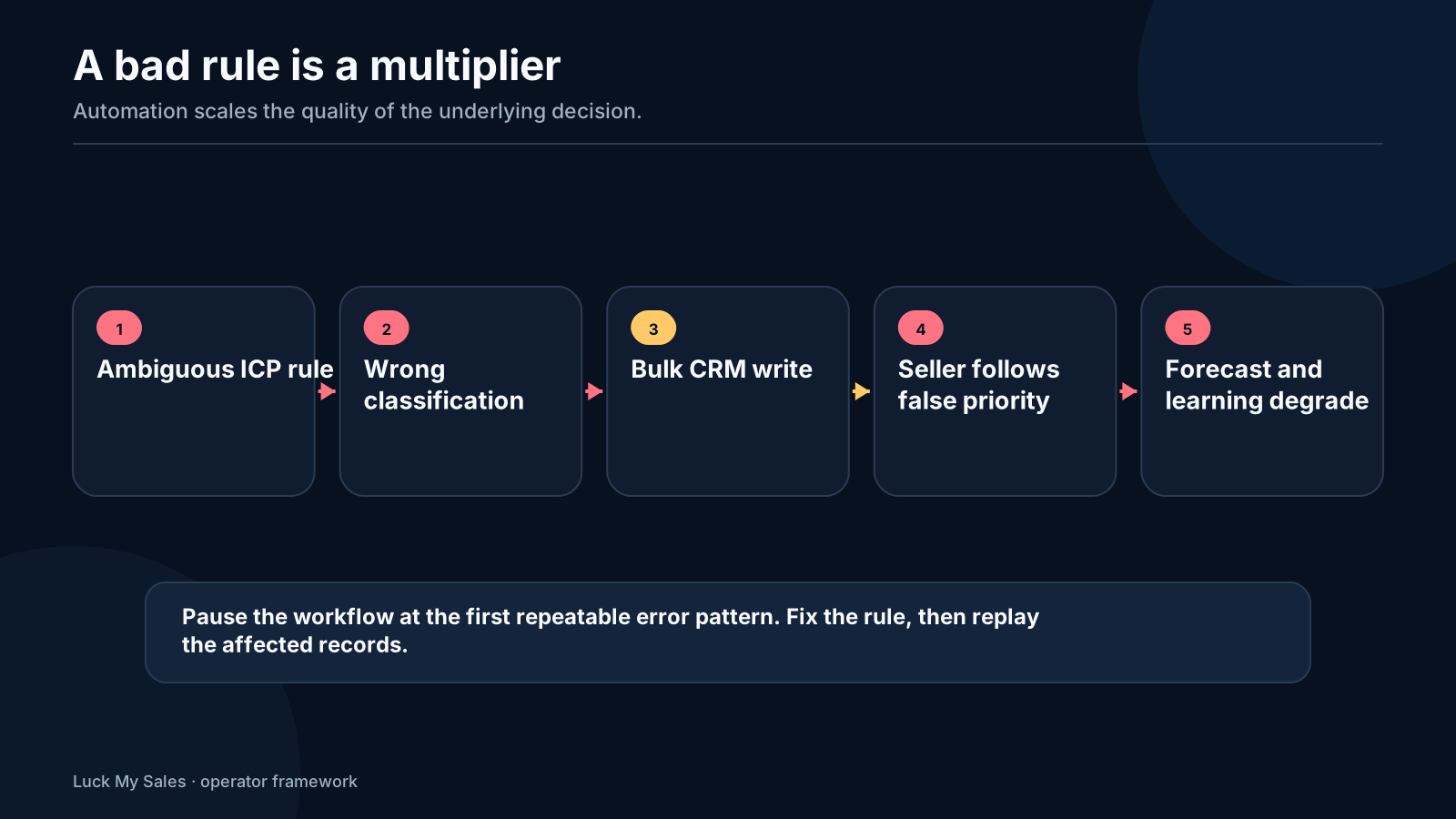
Diagram showing how one weak rule multiplies errors across an automated CRM workflow.
Automation multiplies the quality of the rule, including its mistakes.

10 / What a reviewable inbound decision

What a reviewable inbound decision card should contain

The seller should not need to open six tools to understand why an inbound lead was routed. A useful decision card compresses the evidence without hiding it.
For example:
Decision-card fieldExample
TriggerWebsite form submitted at 09:42
IdentityExisting contact at Acme; no open opportunity
Buyer request“Need multilingual support for three stores”
First-party contextViewed integration and pricing pages
Enrichment85 employees; e-commerce; UK and EU presence
ConflictsEmployee count differs across two sources
Proposed segmentMid-market e-commerce
Proposed ownerFrench-speaking product specialist with capacity
Precedence checkNo named account, partner or existing owner conflict
ConfidenceMedium-high; geography and product fit supported
Required human actionApprove route and call within 30 minutes
Each statement should open the underlying form, event, transcript or source. If a reviewer disagrees with the segment, the system should record segment correction, not merely replace the value.
This design also makes bulk review safer. The operator can filter for conflicts, low confidence, named accounts or recommendations that would change an owner. Routine records remain compact; exceptions receive attention.

What not to put in the card

Avoid a single paragraph that mixes fact, inference and action. Avoid personality labels generated from LinkedIn. Avoid sensitive personal information unrelated to the commercial request. Avoid copying full transcripts when the seller needs two relevant moments and a link to the source.
The card exists to support a decision, not to demonstrate how much text the model can produce.

11 / Designing the batchreview queue

Designing the batch-review queue

Bulk review is where AI CRM automation often becomes economically useful. It is also where weak interface design can create rubber-stamping.
The queue should group records by risk and required authority:
  1. Auto-ready, sampled: high-confidence recommendations that do not conflict with ownership or protected fields. A defined percentage is still reviewed.
  2. Evidence conflict: sources disagree, identity is ambiguous or the recommendation depends on a weak inference.
  3. Named or strategic: existing customer, partner, open opportunity or named account.
  4. Consequential change: proposed owner, opportunity state, forecast, close date or another protected field.
  5. No-action: insufficient evidence, duplicate, suppression or non-commercial request.
The reviewer needs fast actions: approve, correct, request evidence, hold, suppress or escalate. Every correction should require a reason from a controlled list plus optional notes. That creates training data for process improvement without turning free-text comments into the only audit trail.
Set a batch limit. Reviewing 25 carefully structured decisions is different from clicking “approve all” on 2,500 records. If the system cannot show why a batch is homogeneous, it should not offer one-click approval.

12 / Rules for replies and communication

Rules for replies and communication stops

CRM automation often connects to outreach, so reply handling deserves explicit control.
In our outbound workflows, any real reply stops the remaining sequence. The SDR then validates the response and chooses the next state: active conversation, nurture later, wrong person, technical question, not interested or suppression. The same principle should apply when CRM automation triggers communication.
  • Positive interest: stop automation and assign a human owner.
  • Objection: stop the sequence; let the owner respond with context.
  • Referral or wrong person: stop; validate the referred contact before new outreach.
  • “Not now”: stop current touches and record an approved future trigger.
  • Unsubscribe or explicit negative: suppress immediately.
  • Out-of-office: pause and apply a defined return-date rule; do not treat it as buying interest.
  • Ambiguous response: stop and route to review rather than letting a classifier send another pitch.
Reply classification can be automated as a recommendation. Answering replies autonomously should be a later permission because tone, pricing, product detail and brand risk are much higher after a buyer engages.

13 / A 30day implementation pilot

A 30-day implementation pilot

Week 1: map and baseline

Select one inbound source and one seller team. Map every current step from trigger to outcome. Measure current response time, manual touches, reassignment, duplicate rate, missed follow-ups and admin time. Define field authority and stop states.

Week 2: observe and recommend

Connect the evidence but keep the AI read-only. Generate identity matches, summaries, segments and routes. Compare recommendations with actual seller decisions. Fix missing sources and ambiguous rules.

Week 3: controlled execution

Permit low-risk actions: task creation, appended evidence, draft messages and notifications. Keep owner, opportunity stage, pricing and close date protected. Review every exception and a sample of accepted records.

Week 4: evaluate outcomes

Compare the pilot with the baseline. Did median response time improve? Did review time fall? Did correction or reassignment rise? Were follow-ups completed? Did sellers trust the cards? Were actions fully logged?
The go/no-go decision should use a scorecard:
AreaScale whenPause when
EvidenceRequired sources are present and traceableSummaries regularly omit or misstate key context
RecommendationSeller acceptance is stableCorrections cluster around one rule or segment
OwnershipReassignments are low and explainableExisting owners or named accounts are overwritten
OperationsReview time and SLA improveAutomation creates more exception work than it removes
Buyer experienceReplies stop automation and reach an ownerDuplicate or contradictory touches appear
ControlAudit and rollback work in testsA change cannot be explained or reversed
Do not scale based only on processed-record volume. A workflow that processes 10,000 records and creates 300 corrections is not automatically better than one that processes 1,000 and produces reliable action.

14 / Four safe write modes

Four safe write modes

Draft

The model proposes a message, summary, field value or task. A user applies it. Use this when the action is consequential or the workflow is new.

Append

The system adds evidence without replacing the canonical value. Examples include a transcript summary, qualification note or source citation. Append is safer when several sources may disagree.

Reversible update

The automation changes a field while preserving the old value, reason, actor and timestamp. Use it for tested, bounded transitions with a clear rollback.

Blocked overwrite

The system cannot change the protected field. Pricing, contract terms, named ownership and other material commercial decisions belong here unless the company has an explicit approved exception.
An “AI write access” toggle is too broad. Permission should exist at object, field, transition and action level.
Four CRM write modes: draft, append, propose and execute, ordered by authority and risk.
Use the least powerful write mode that can solve the workflow problem.

15 / Audit correction and rollback

Audit, correction and rollback

Every automation run should produce an event record containing:
  • trigger ID;
  • input evidence IDs;
  • model and rule version;
  • recommendation;
  • deterministic rule result;
  • proposed changes;
  • reviewer and decision;
  • applied CRM changes;
  • later corrections;
  • downstream outcome.
Rollback should restore the previous value and preserve the fact that a correction occurred. Deleting the wrong action from history removes the best evidence for improving the workflow.
Build three stop mechanisms.
  1. Record stop: block actions for one person, company or opportunity.
  2. Workflow stop: pause one automation when errors or metrics deteriorate.
  3. Global stop: disable the agent's write or communication permissions during a broader incident.
The stop should not depend on the same model that may be causing the error.

16 / What to measure

What to measure

Measure the human and system outcome, not only automation activity.
MetricWhy it matters
Records processedCapacity, not value; always show the denominator and workflow boundary
Recommendations reviewedShows the human control surface
Seller acceptance rateTests whether recommendations are useful
Correction rateReveals data, prompt or rule failures
Review time per accepted actionShows whether the workflow actually reduces routine work
Response SLATests routing and task execution
Missed follow-upsFinds broken handoffs
Reassignment rateDiagnoses weak ownership logic
Opportunities and held meetingsConnects routing to sales progress
Audit completenessConfirms the system can explain its actions
Do not publish “records processed improved 30%” unless the baseline, period and denominator are known. A percentage without a measurement definition is not evidence.

17 / Where the 90 estimate applies

Where the 90% estimate applies

I believe a mature AI-assisted CRM system can remove or simplify up to 90% of routine work within a defined administrative workflow. The scope can include:
  • assembling records from connected sources;
  • deduplicating obvious matches;
  • summarizing calls and email threads;
  • extracting next steps;
  • preparing scores and segments;
  • generating tasks and drafts;
  • checking required fields;
  • compiling a batch for human review;
  • reporting exceptions and outcomes.
It does not include 90% of sales. It does not remove responsibility for:
  • deciding ICP and offer;
  • understanding a nuanced buyer;
  • validating an unusual account;
  • live discovery and negotiation;
  • pricing and commercial terms;
  • relationship ownership;
  • rule changes;
  • quality control and incident response.
The estimate is a design target from operating experience, not a controlled time study. Teams should measure their own before-and-after review time, corrections and missed work.

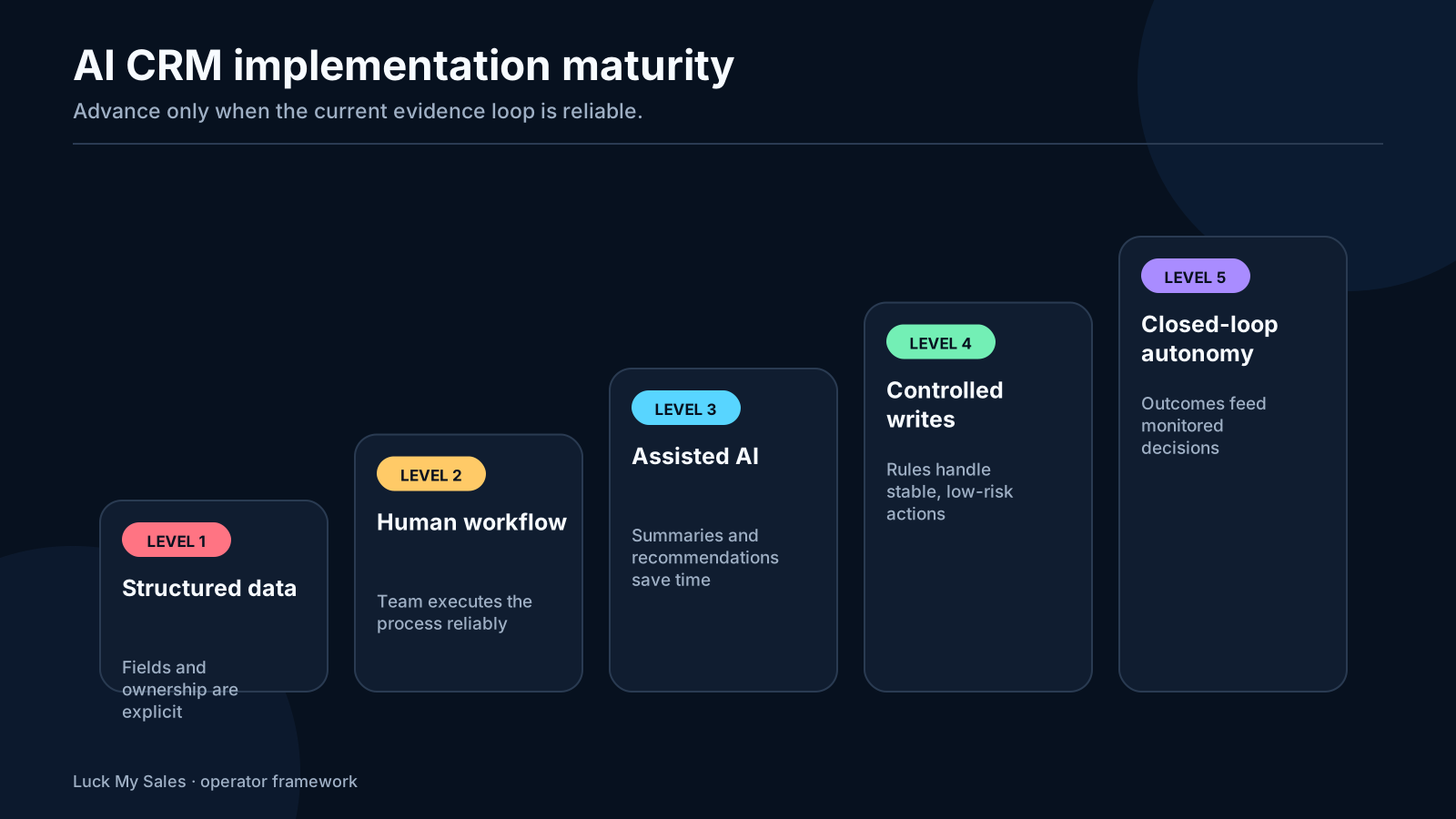
18 / Implementation stages

Implementation stages

Stage 1: observe

Connect sources and create summaries without writing canonical fields. Compare the output with seller decisions.

Stage 2: recommend

Add scores, segments, routes and next steps in a review queue. Track acceptance and correction.

Stage 3: execute low-risk actions

Allow task creation, appended evidence and approved draft generation. Use strict permissions and logs.

Stage 4: automate bounded transitions

Permit reversible updates for workflows with stable evidence, low correction and clear rollback.

Stage 5: optimize the closed loop

Use outcomes to improve rules, source priorities and exception handling. Keep consequential decisions with named humans.
Do not jump from no process to Stage 4 because an agent can technically update the CRM.
AI CRM automation maturity ladder from observation and drafts to bounded execution and outcome learning.
Increase autonomy only after evidence and correction loops are working.

19 / Change the workflow like production

Change the workflow like production software

Do not edit a live AI prompt, routing rule or field map without a version and rollback plan. A small wording change can alter classification across every new lead. A new enrichment source can change identity resolution. A CRM administrator can rename a stage and break a downstream action.
Use a simple release process. Document the proposed change and the reason. Test it on stored records that include normal cases and known failures. Compare old and new outputs. Ask the business owner to approve any change to qualification, ownership, customer communication or protected fields. Release to a limited segment first. Monitor corrections and exceptions before expanding.
Keep the previous workflow available. If the new version creates duplicate tasks, wrong routes or unsafe writes, pause it and return to the last known version. Do not repair production state by asking another agent to guess what happened. Use the event log and explicit correction actions.
The review sample should include difficult records, not only clean ones. Include an existing customer, a named account, a partner lead, a duplicate, a person with two companies, a neutral reply and an unsubscribe. Those cases reveal whether the control rules survive change.
Treat prompts as one component of the release. Field definitions, thresholds, tools, source access, model version and action permissions also affect output. Record them together so the team can explain why two workflow versions behaved differently.

20 / Common failure modes

Common failure modes

Automating undefined stages

If sellers disagree on what qualified means, AI cannot apply it consistently.

Letting a score become a fact

Scores are recommendations. Store evidence, confidence and rule version.

Silent cross-channel duplication

Use one identity, global reply state and idempotent actions.

Overwriting ownership

Existing opportunities, named accounts and partner routes should take precedence over AI suggestions.

Treating a summary as complete history

Show which sources were included and what was missing.

Scaling before batch review stabilizes

One early error can multiply across hundreds of records. Inspect the first batches closely.

No rollback

An audit log without a practical recovery action is documentation, not control.

21 / Frequently asked questions

Frequently asked questions

What CRM tasks can AI automate?

AI can assemble evidence, summarize interactions, classify records, recommend scores and routes, create tasks, draft follow-ups, check required fields and support reporting. Write access should expand only after the workflow proves stable.

Can AI update opportunity stages?

It can propose a stage or execute an approved transition, but opportunity-stage authority should stay with sales in most teams. At minimum, preserve evidence, history and rollback.

What should AI never overwrite blindly?

Pricing, commercial terms, account ownership, seller-confirmed facts, close decisions and any protected compliance state. Other fields may also require approval depending on risk.

How do I start AI CRM automation?

Map one closed-loop workflow, define field authority, connect sources, begin with recommendations and measure seller acceptance and correction. Do not begin with full agent autonomy.

Does AI CRM automation replace RevOps?

No. It reduces repetitive execution but increases the importance of process design, permissions, evidence contracts, monitoring and correction—core operations responsibilities.

22 / The practical rule

The practical rule

Automate preparation before judgment, recommendations before consequential writes and proven transitions before open-ended autonomy. Make every decision explainable and every write reversible.
The best AI CRM automation feels less like a magic employee and more like a disciplined operating system. It gives the seller a better evidence card, a smaller review queue and a clear next action. The human still owns the commercial consequence.

Research note

Methodology

  1. 01The core inbound-routing loop comes from Anastasiia's direct operating workflow and previously approved lead-routing evidence.
  2. 02The up-to-90% routine-work figure is an operator estimate for repetitive preparation and sorting, not a universal benchmark or reduction in sales judgment.
  3. 03The article separates recommendations, accepted actions and final CRM state so later corrections remain auditable.
Read the full methodology

Source ledger

Sources & editorial notes

  1. 01
    How AI Lead Scoring Works Across Gmail and CRM

    Luck My Sales · Existing first-party guide separating source evidence, recommendation, human decision and CRM action.

  2. 02
    AI Lead Routing: How to Assign Inbound Leads Without Hiding the Sales Decision

    Luck My Sales · Existing first-party guide defining the inbound routing contract reused in this workflow.

  3. 03
    10 B2B Data Enrichment Providers and Tools Compared by the Record You Need

    Luck My Sales · Existing first-party comparison defining evidence states before CRM activation.

Corrections or primary material: contact the corrections desk.

About the author

Anastasiia Krynytska

Anastasiia Krynytska is a LeadGen Team Lead at Softermii and the lead editor of Luck My Sales. She covers AI-assisted outbound, account research, qualification, messaging, CRM handoffs and revenue workflows from a practitioner’s perspective.View author profile LinkedIn

Continue reading

01 · News analysis

AI sales is moving from assistant to operating layer

The category is expanding from drafting support into research, pipeline decisions, recommended actions and controlled execution.

Read news
02 · Field analysis

In AI sales, the handoff may be the product

Models are becoming accessible; durable value sits in the controlled transition from signal to seller action.

Read analysis
03 · Research framework

Sales AI Workflow Signals 2026

A launch framework for mapping the products, controls and buying questions shaping AI-enabled revenue work.

Read reports

Luck My Sales briefing

Useful context, once a week.

News, explanations and original research from this desk. No noise.
The newsletter is still being built. We will contact you when the first edition is ready.