
CRM platform comparison · AI CRM
Best CRM Platforms With Advanced AI Features for Sales Teams
AI may assist research organization and drafting. A human editor reviews every published page, checks material claims against the cited sources and owns the final decision. No company paid for placement in this article.
AI use policyAgent-ready brief
AI takeaways
Keep the key points here, or take a source-aware text brief into Claude, ChatGPT or another AI workspace.- 01HubSpot and Pipedrive have direct operating evidence here; the remaining products are compared from official documentation.
- 02Compare record synchronization, permissions and workflow fit before comparing isolated AI features.
- 03A CRM-native baseline is often safer than adding a separate agent before the sales process is stable.
- 04Implementation, integrations, AI credits, administration and migration matter more than the seat price alone.
- 05Run the same 50 records and 10 conversations through a bounded trial before committing.
The best AI CRM is the smallest system that can keep evidence synchronized while preserving human authority over consequential commercial decisions.
01 / Best AI CRM platforms at
Best AI CRM platforms at a glance
| CRM | Best fit | Useful AI direction | Main buyer caution | Evidence in this guide |
|---|---|---|---|---|
| HubSpot | Founder-led and SMB teams needing one connected customer platform | Summaries, guided selling, prospecting and deal progression around CRM context | Credits, plan gates and suite cost can expand quickly | Direct use + official documentation |
| Pipedrive | Sales teams wanting a focused visual pipeline | Sales-assistant insights, summaries, probability and next-action support | Less suitable for highly complex governance and custom enterprise objects | Direct use + official documentation |
| Salesforce | Enterprise or complex RevOps governance | Scoring, forecasting, agents, activity capture and extensible automation | Licensing, implementation and admin complexity | Official documentation reviewed |
| Zoho CRM | Cost-conscious teams wanting broad suite coverage | Zia scoring, prediction, anomaly, recommendation, enrichment and communication assistance | Capability and usability vary by edition and configuration | Official documentation reviewed |
| Freshsales | SMB teams wanting sales CRM plus built-in AI assistance | Scoring, suggestions, drafting, duplicate resolution and Freddy features | Confirm exactly which Freddy capabilities and credits are included | Official documentation reviewed |
| Attio | Modern teams building a flexible relationship data model | Natural-language queries, AI attributes, workflows and permission-aware external AI access | Flexibility requires a clear schema and operator ownership | Official documentation reviewed |
| Close | High-velocity SMB sales with calls, email and SMS in one CRM | Chloe, summaries, enrichment, follow-up and workflow action | Agent availability, geography and credits are evolving | Official documentation reviewed |
| monday CRM | Teams that prefer visual work management and configurable process | Lead/sales agents, summaries, email drafting and meeting notes | Easy customization can create inconsistent data without governance | Official documentation reviewed |
02 / What advanced AI CRM should
What “advanced AI CRM” should mean in 2026
- Capture and synchronize evidence. Bring email, meetings, calls, forms, website events and enrichment into the right records without creating duplicates.
- Interpret the record. Summarize history, classify requests, identify missing evidence and explain deal or lead state.
- Recommend action. Suggest an owner, next step, task, segment, forecast risk or follow-up based on visible inputs.
- Execute bounded work. Draft, append, create tasks or run approved workflows within permission and review rules.
- Learn from outcomes. Connect the action to later reply, meeting, stage movement, win or loss so the team can evaluate the workflow.
source event → identity resolution → evidence state → AI interpretation → rule and permission check → human gate → CRM action → observed outcome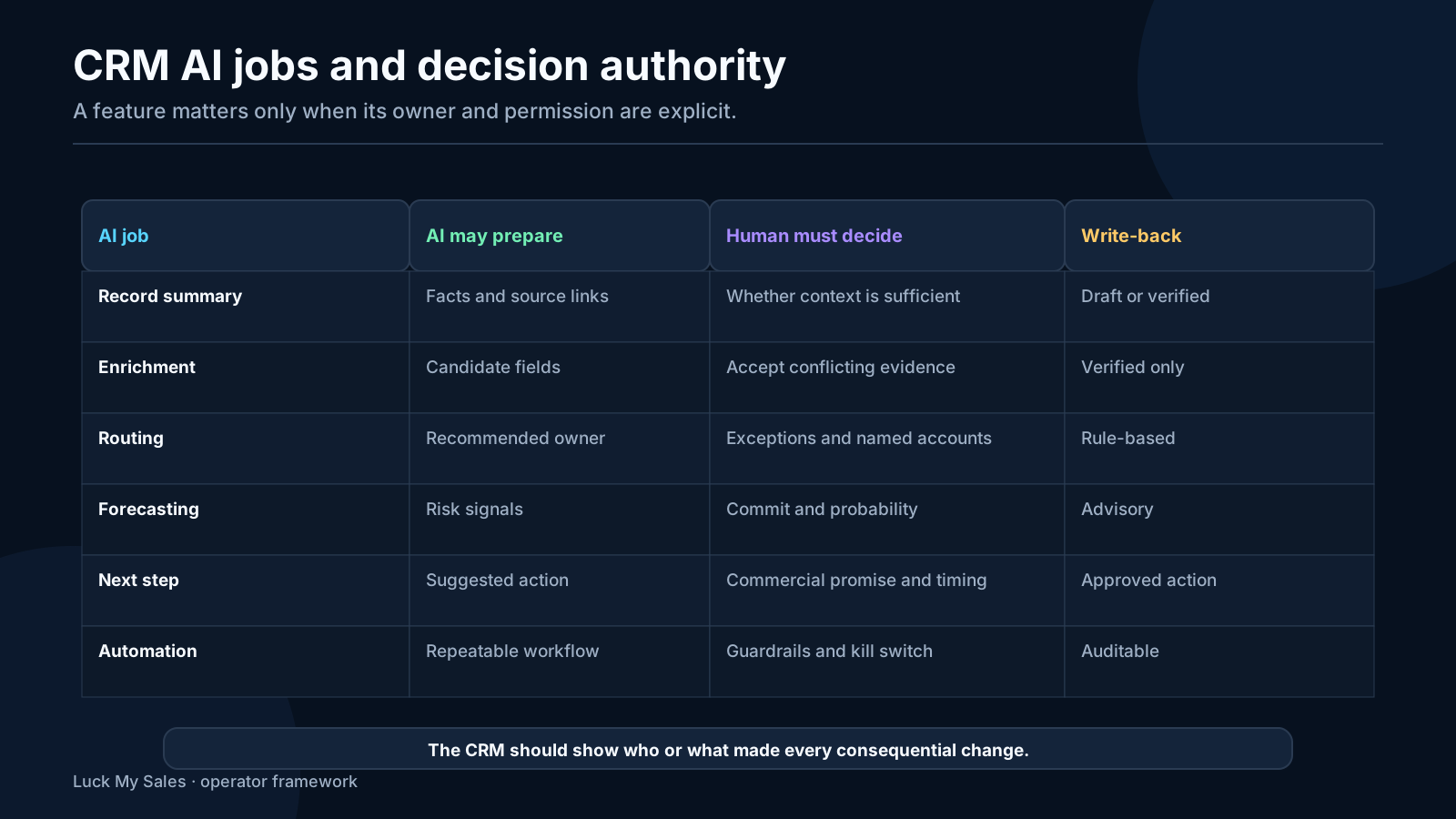
03 / How we evaluated the platforms
How we evaluated the platforms
- Can the CRM connect the sales channels and external AI systems the team actually uses?
- Does the AI expose the evidence behind a summary, score or recommendation?
- Can admins control which records and fields an agent may read or write?
- Can a seller review important changes before they become canonical?
- Are AI features native, added through an external agent, or both?
- Can the system preserve history, attribution and correction reasons?
- Does the total operating cost fit the team's process maturity?
04 / HubSpot best balanced fit for
HubSpot: best balanced fit for founder-led and growing teams
- one accessible CRM foundation for inbound and outbound context;
- forms, email, meetings and marketing handoff in the same ecosystem;
- understandable lifecycle and ownership concepts;
- a large integration market;
- enough automation to build a closed loop without starting with enterprise architecture.
05 / Pipedrive best for a focused
Pipedrive: best for a focused visual sales pipeline
06 / Salesforce best for complex governance
Salesforce: best for complex governance and extensibility
- someone must own the data model;
- permissions need design and testing;
- integrations need monitoring;
- agents must be restricted to approved objects and actions;
- sellers need an interface that does not turn every task into administration;
- forecasts and stages need common definitions.
07 / Zoho CRM best for suite
Zoho CRM: best for suite breadth and cost-sensitive customization
- Is the feature available in the edition and region we will buy?
- Can our current data support it?
- Will sellers understand the recommendation?
- Can we connect our voice, email and enrichment systems cleanly?
- Who owns customization after launch?
08 / Freshsales best for SMB teams
Freshsales: best for SMB teams wanting built-in assistance
09 / Attio best for a flexible
Attio: best for a flexible data model and external AI workflows
- canonical company, person and opportunity identities;
- which attributes come from first-party evidence versus enrichment;
- field ownership and write permissions;
- workflow states and human approvals;
- how external agents authenticate and log actions.
10 / Close best for highvelocity communication
Close: best for high-velocity communication inside the CRM
11 / monday CRM best for visual
monday CRM: best for visual, configurable sales work
12 / The five AI capabilities that
The five AI capabilities that matter most
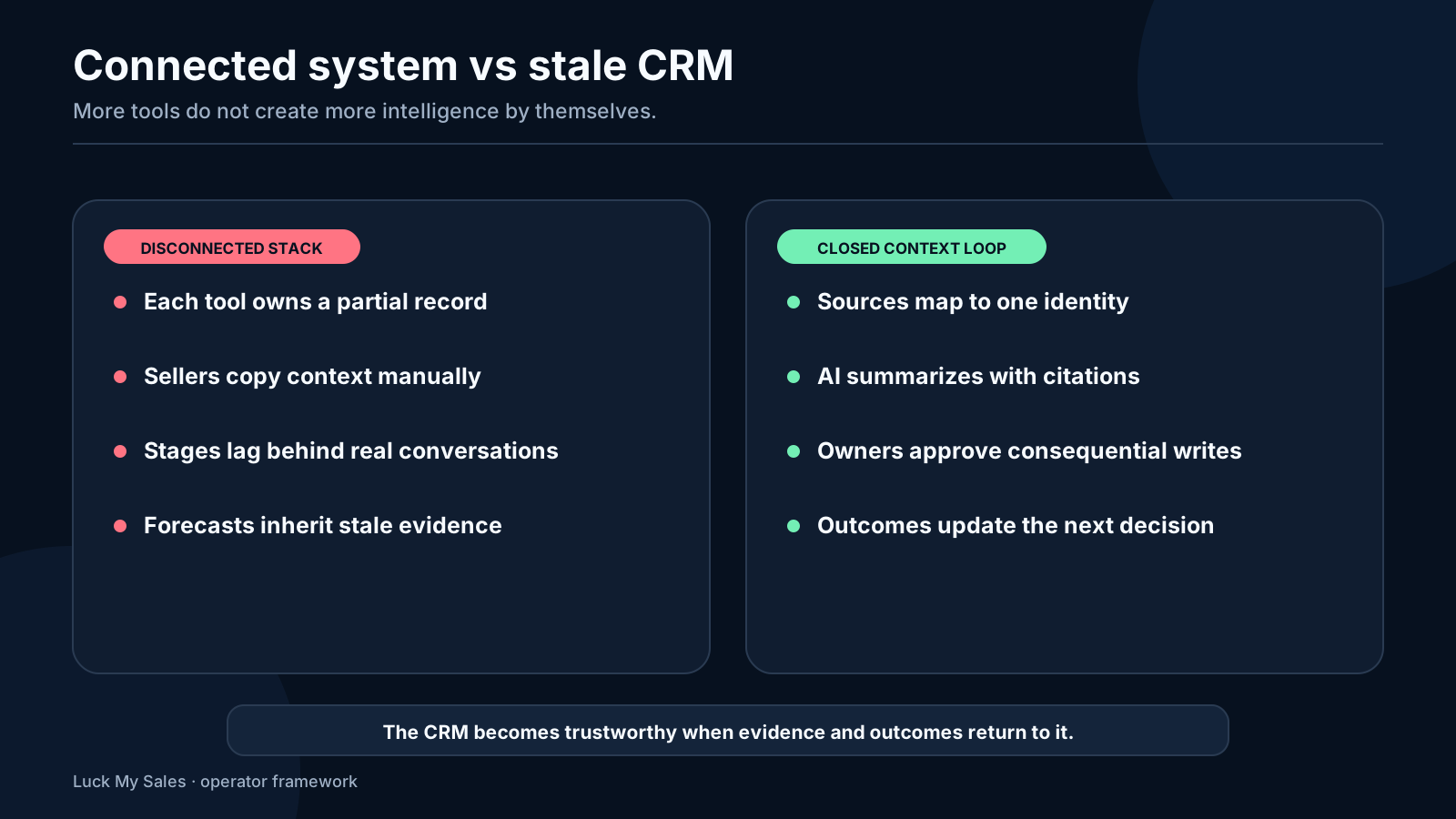
1. AI synchronization
2. Evidence quality
3. Permission-aware action
4. Conversation and agent integration
5. Outcome feedback
13 / Compare AI synchronization not isolated
Compare AI synchronization, not isolated features
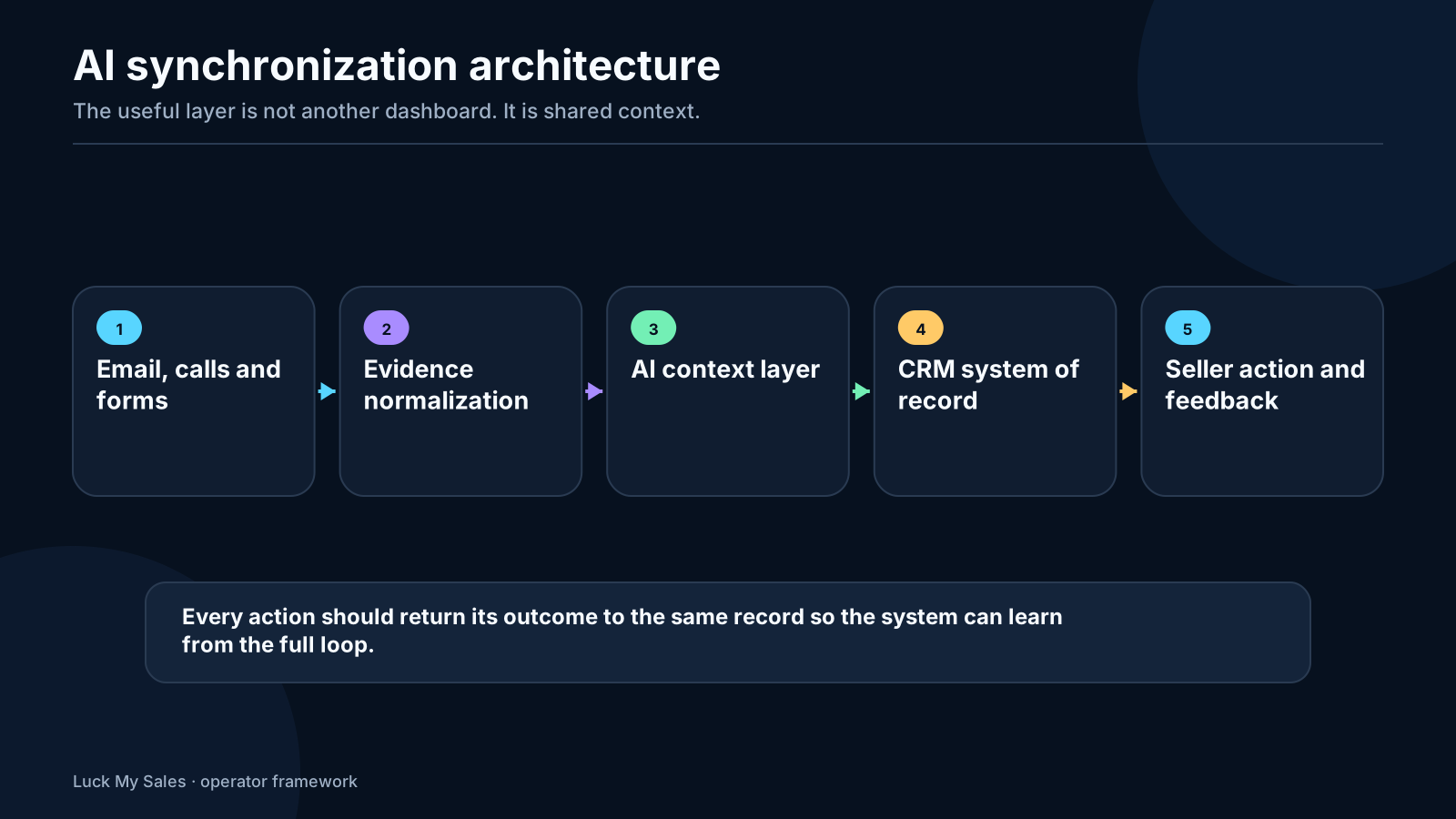
A synchronization test for the shortlist
- submit a form;
- add enrichment with a conflicting company value;
- attach an email and meeting;
- request an AI summary and next-step recommendation;
- change the owner;
- send a reply from another channel;
- correct one wrong field;
- rerun the enrichment or agent.
API access is not the same as safe agent access
Portability matters as AI changes quickly
14 / Best fit by sales operating
Best fit by sales operating model
Founder-led sales
SMB sales team
- can an inbound or outbound reply stop the right automation?
- can an SDR qualify without overwriting the AE's opportunity?
- can managers see missing next steps and stalled records?
- can email, calls and meetings synchronize without duplicate contacts?
- can the team change the workflow without an external consultant for every adjustment?
Structured RevOps and enterprise governance
15 / SaaS CRM versus a custom
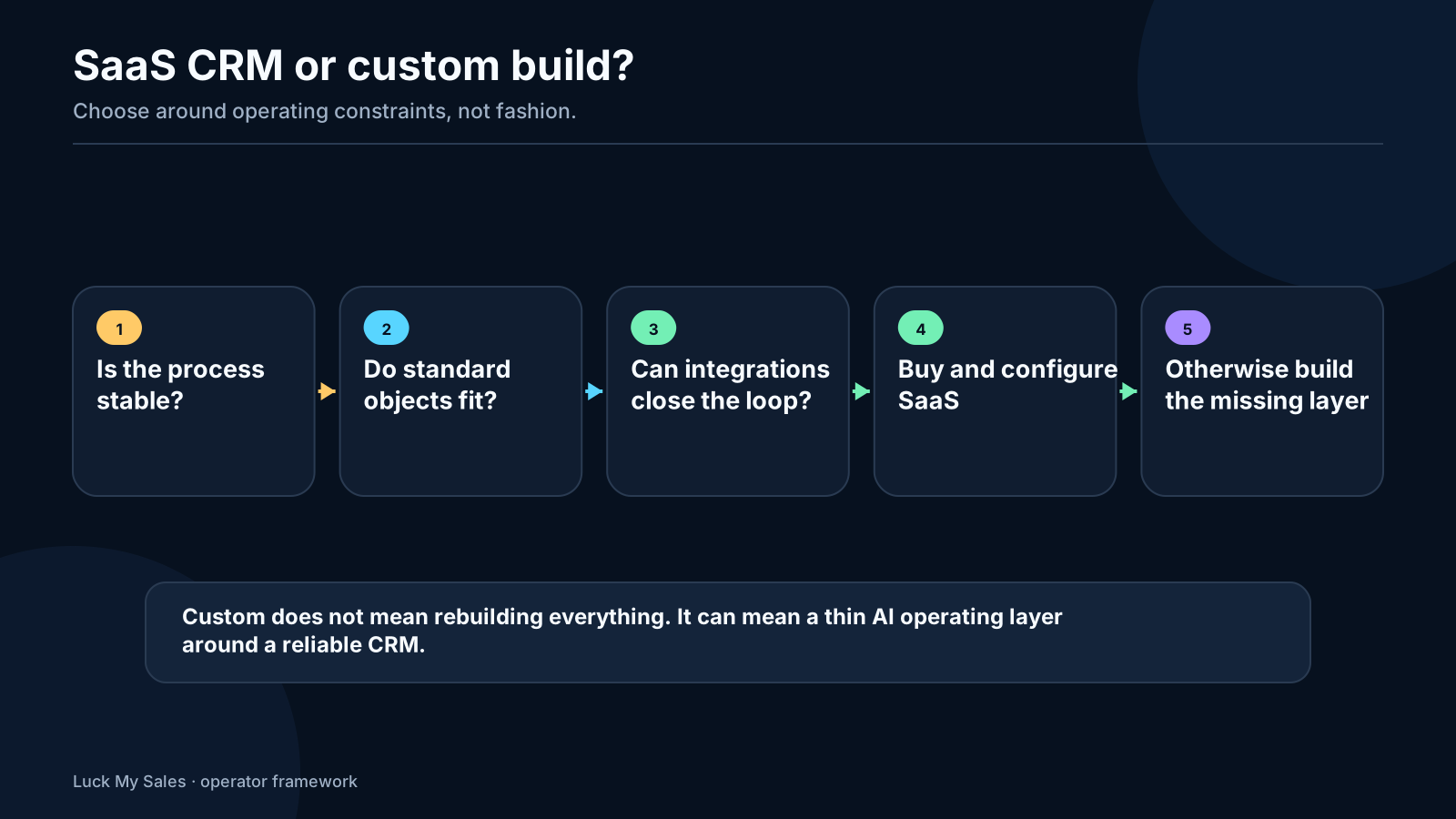
SaaS CRM versus a custom AI-built operating layer
1. Standard SaaS CRM
2. SaaS system of record plus custom AI layer
3. Custom operating application
16 / Total operating cost
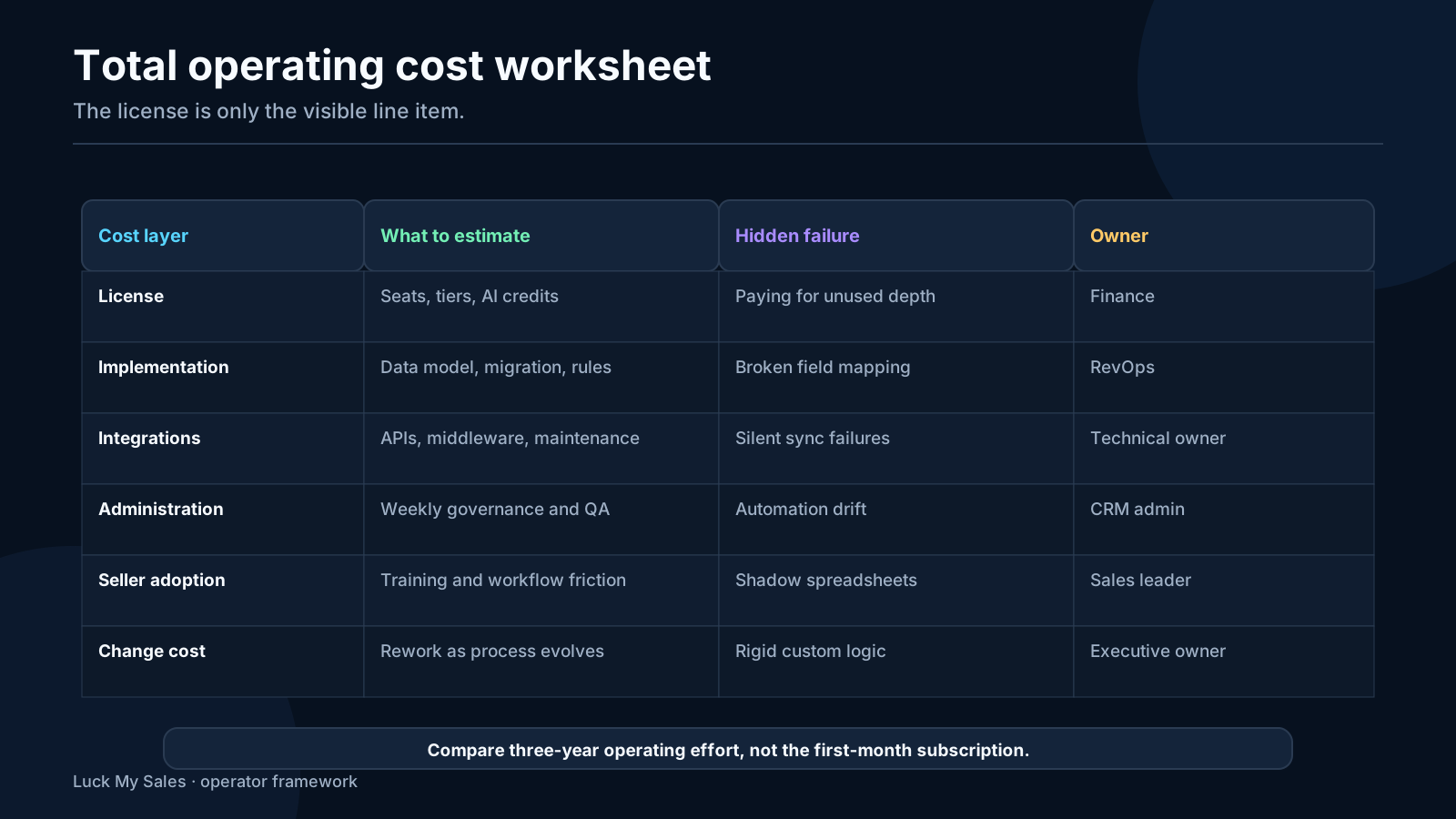
Total operating cost
| Cost | Questions to ask |
|---|---|
| Licenses | Which users need full seats, light seats or admin access? |
| AI credits | Which features consume credits, how are limits pooled and what happens when exhausted? |
| Implementation | Who designs stages, objects, permissions and imports? |
| Integrations | Are connectors native, paid, custom or dependent on middleware? |
| Administration | How many hours per month maintain workflows, fields, permissions and reports? |
| Migration | Can history, attachments, associations and audit data move cleanly? |
| Adoption | How much seller time is lost if the interface is too complex? |
| Custom layer | Who owns code, tests, monitoring, security and maintenance? |
Include migration and exit in the buying decision
17 / A 50record and 10conversation trial
A 50-record and 10-conversation trial
- Import 50 representative records: clean, incomplete, duplicated and ambiguous.
- Connect one real inbox and calendar with controlled permissions.
- Add 10 anonymized or approved conversations covering positive, negative and uncertain outcomes.
- Test identity resolution, summaries, enrichment and duplicate handling.
- Ask the AI the same factual and action questions in every product.
- Record citations, wrong answers, missing context and correction time.
- Test one inbound-routing or follow-up workflow.
- Verify field permissions, audit history and rollback.
- Ask two sellers to complete real daily tasks.
- Calculate operating cost using the plan, credits, integrations and admin work you would actually need.
18 / Buying checklist
Buying checklist
- We have defined company, contact, lead and opportunity objects.
- Stage and lifecycle meanings are written down.
- Every important source event can connect to a record.
- Protected fields have named human owners.
- AI outputs link to evidence.
- Draft, append, update and blocked-write modes are distinct.
- Voice, chat, email and meeting systems have identity and write-back rules.
- The trial uses our records and conversations.
- AI credits and integration costs are included in the model.
- We know who administers the system after launch.
- We can export our data and audit history.
- We can describe the path from first source to customer or loss.
19 / Frequently asked questions
Frequently asked questions
What is the best AI CRM for a small sales team?
Which CRM has the most advanced AI?
Should I build a custom AI CRM?
Are AI CRM recommendations accurate?
What should never be overwritten automatically?
20 / The practical choice
The practical choice
Research note
Methodology
- 01Anastasiia has direct day-to-day operating experience with HubSpot and Pipedrive.
- 02Salesforce, Zoho CRM, Freshsales, Attio, Close and monday CRM are evaluated from current official documentation, not a controlled common-input test.
- 03Luck My Sales received no affiliate payment, sponsorship, free access, consulting benefit or other consideration from the compared CRM products.
Source ledger
Sources & editorial notes
- 01Sales Hub page
HubSpot · Official, primary or category source used for the bounded claim cited in this guide; current feature scope may change.
- 02AI Sales Assistant documentation
Pipedrive · Official, primary or category source used for the bounded claim cited in this guide; current feature scope may change.
- 03Sales Cloud AI documentation
Salesforce Help · Official, primary or category source used for the bounded claim cited in this guide; current feature scope may change.
- 04AI feature page
Zoho · Official, primary or category source used for the bounded claim cited in this guide; current feature scope may change.
- 05Freddy AI page
Freshworks · Official, primary or category source used for the bounded claim cited in this guide; current feature scope may change.
- 06Ask Attio documentation
Attio · Official, primary or category source used for the bounded claim cited in this guide; current feature scope may change.
- 07Close
Close · Official, primary or category source used for the bounded claim cited in this guide; current feature scope may change.
- 08official AI documentation
Support · Official, primary or category source used for the bounded claim cited in this guide; current feature scope may change.